Why Is Multi-Track Editing Essential for Professional Audio?
Why multi-track editing is essential for professional audio: per-source control, comping, automation, stems, recall, and a pro session checklist.
Multi-track editing is essential for professional audio because it keeps every source on its own track, so you can level, EQ, compress, fix, comp, retime and automate one part without touching the rest. The same session then prints stems and alternate versions for mixing, mastering, sync and film, and it can be reopened for a revision months later.
We checked every source below on 19 November 2026. We make Soundverse, so its details come from our own feature pages.
What multi-track editing means
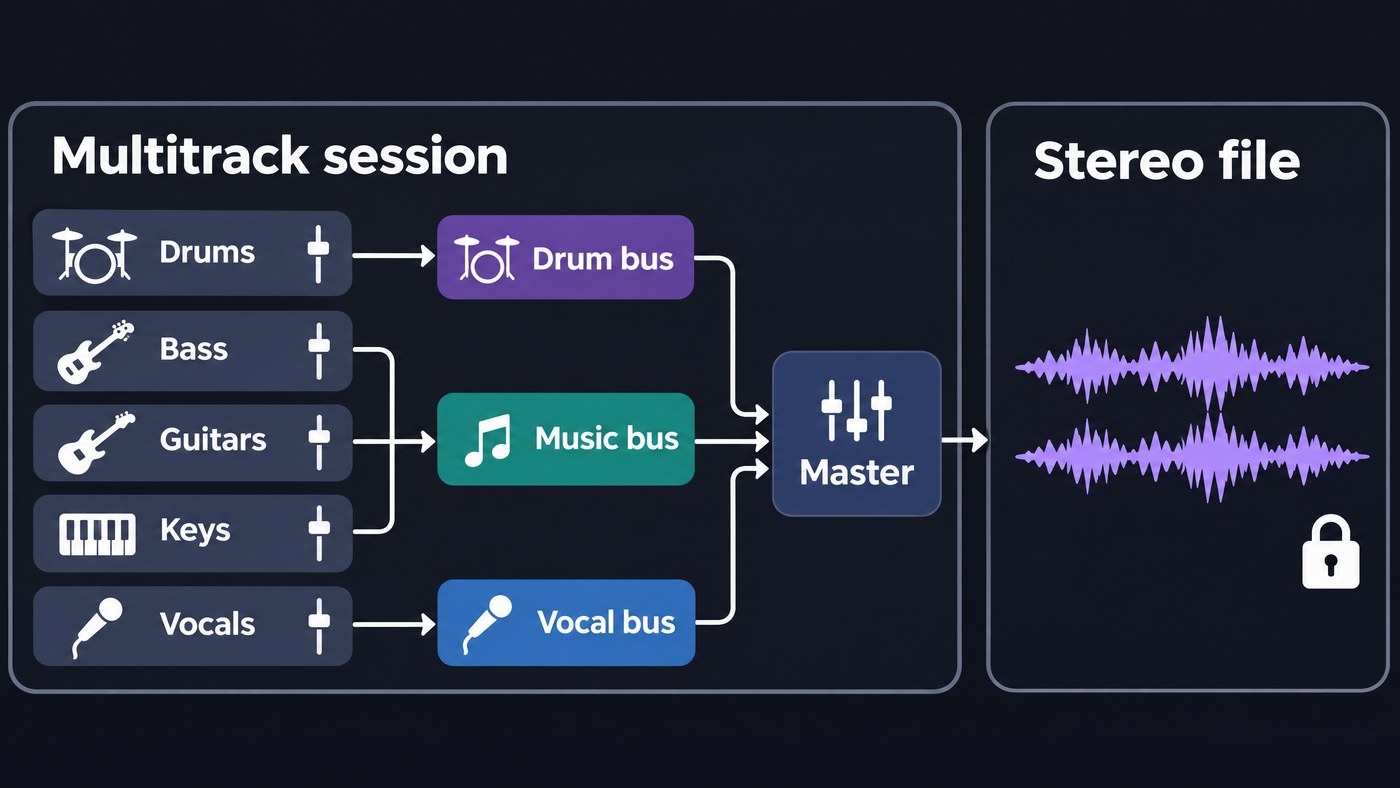
In a multitrack session, each source gets its own track on one shared timeline: kick, snare, overheads, bass DI, each guitar, the lead vocal, every harmony. All tracks run from the same start point, so they stay in time with each other however much you cut, move or process them.
Three layers do the work:
- Tracks hold the audio or MIDI for one source, each with its own fader, pan, plugins and automation.
- Clips (also called regions or events) are the pieces of audio on a track. Editing a clip is non-destructive, so the recording on disk stays untouched.
- Buses sum groups of tracks, such as all the drums, before everything meets on the master bus and becomes a stereo mix.
A stereo file sits at the far end of that chain. Every decision has already been summed into two channels, left and right.
From tape to the DAW: a short history
Before multitrack tape, adding a part meant risking everything already recorded. Mix magazine's TECnology Hall of Fame entry on Ampex Sel-Sync, published in 2006, notes that Les Paul was doing sound-on-sound recording as early as 1949 on a deck modified with an extra head, and names the catch: "One bad pass and the recording was ruined, and each additional pass added noise and distortion."
Paul took the idea of an 8-track machine to Ampex, which started the project in 1953. The breakthrough was Sel-Sync: monitoring the existing tracks in exact sync while new parts were overdubbed. According to Mix, the first 1-inch Sel-Sync 8-track reached Paul two years later and cost $10,000. From then on, parts could be recorded one at a time, fixed one at a time and balanced at the mix.
Digital editing reached the desktop at the end of the 1980s. Mix's entry on Pro Tools records that Digidesign unveiled Sound Tools, a 2-track Mac system, on 20 January 1989, and in 1991 launched Pro Tools, which combined multitrack recording and editing, DSP and on-screen mixing. Logic Pro, FL Studio, Pro Tools and today's browser studios all work on that same track-per-source model.
Why multi-track editing is essential for professional audio
- Independent processing. High-pass the vocal, compress only the bass, gate the toms. On a stereo file, a cut at 250 Hz hits the guitars, the vocal and the snare at once.
- Fixing one part. Re-record a flat line, replace a weak snare hit or punch in a single bar. The rest of the performance stays as it was.
- Comping. Record several passes onto take lanes and build one composite from the best phrases. The unused takes stay in the session in case the artist changes their mind.
- Timing edits. Tighten the drums as a group so the close mics and overheads stay phase-aligned, and leave the parts that should breathe alone.
- Automation. Ride the vocal up a decibel in the last chorus, open a filter on the synth only, mute the guitars for the breakdown. Our guide to balancing levels in a multi-track project covers fader rides step by step.
- Stems. Mix engineers, mastering engineers, remixers, music supervisors and film editors all ask for parts. The Audio Engineering Society's recommendation for delivering recorded music projects lists live concert stem playback, remixes, video games and film among the current uses of mix stems.
- Collaboration and recall. A session or a stem set can go to a mixer in another city, and you can reopen it for a revision months later. Here's how cloud collaboration differs from sharing local project files.
- Alternate versions. An instrumental, an a cappella, a clean edit with one word muted on the vocal track, or a TV mix, which the AES document defines as the master mix with backing vocals but no lead vocal. With separate tracks, each takes minutes.
What you lose when you only have a stereo file
From a stereo bounce you can still cut on bar lines, EQ the whole mix, use mid/side processing and master it. What's gone:
- The balance. Raising the vocal raises everything sharing its frequencies, and mid/side EQ moves the whole centre: vocal, kick, snare and bass together.
- Your processing choices. Reverb tails, bus compression and any limiting are printed into every part.
- The takes. Alternate performances and parts you muted aren't in the file.
- Quick versions. An instrumental or a clean edit needs the vocal on its own.
- Precise fixes. A late bass note can't move without moving the drums with it.
Can AI stem separation get the tracks back?
Partly. A separator rebuilds broad families of sound from the mix, not the original tracks. Ableton Live's built-in stem separation splits audio into four stems (Vocals, Drums, Bass and Others), and Soundverse's Stem Separator gives 2 stems, 6 stems (vocals, drums, bass, guitar, piano and other) or, on Creator and up, a maximum split with a MIDI file for each part.
The limits matter for professional work:
- Families, not tracks. You get one guitar stem, not the rhythm and lead guitars on their own, and no alternate takes.
- Bleed. Ableton's manual warns that sounds can land in stems you didn't expect, such as hi-hat highs in the Others stem or chorused synths in the Vocals stem.
- Printed processing. Reverb and master-bus compression stay inside each stem.
- Source quality sets the ceiling. A separator can only split what's already in the mix, so start from a WAV master rather than an MP3.
Use separation to rebalance a song whose session is lost, pull an a cappella of your own track for a remix, or turn a part into MIDI. Judge each stem inside the full mix rather than soloed. Our explainer on what makes stem separation effective shows how to test a separator on your own material.
A pro session organisation checklist
Set this up before the first take, and the session stays usable for the mixer, the mastering engineer and you six months from now.
- Name every track by source before recording: Kick In, Kick Out, Bass DI, Gtr L, LdVox, BV1. "Audio 14" means nothing at mix time.
- Name files for delivery. The AES recommendation puts an artist code, song title, mix or stem type, sample rate, bit depth and revision in one name, separated by underscores, as in
LH_BodyAndSoul_Master_96k_24b_R01.wav. It asks for no spaces or accents, and song titles under 15 characters where possible. - Colour by family. One colour each for drums, bass, guitars, keys, vocals and effect returns, the same in every session.
- Keep one track order. Drums at the top down to vocals at the bottom, or your studio's own order, every time.
- Route to buses. Drums, bass, music, backing vocals and lead vocal each on a bus, with reverbs and delays on send returns. Those buses become your stems.
- Mark the structure. Add markers for intro, verses, choruses, bridge and outro, so anyone can jump to the second chorus.
- Write down the session facts. Tempo, key, sample rate and bit depth go in the session notes.
- Consolidate from bar 1. The AES document is plain about it: "All tracks including partial tracks, such as guitar solos, background vocals, etc. should have the same start time to maintain proper time relationships between tracks." It also asks for no more than one file per track. Our guide to editing audio stems shows how to align and consolidate in any DAW.
- Print stems and versions together. Same start, same length, wet or dry as agreed, plus the instrumental, a cappella and TV mix.
- Back up the session and the stems in two places, one of them off-site.
This two-minute tour shows Soundverse AI Studio's tracks, built-in instruments and effects, and real-time collaboration in the browser.
Where Soundverse fits
Soundverse is an AI music platform that takes you from idea to audience, built for independent artists who release music. AI Studio is a multitrack studio in the browser, with audio, MIDI, video and image tracks on one timeline. Each audio track records its own input, and you can split, trim, fade and move clips, draw volume, pan and effect automation, and invite collaborators by email or link to edit the same timeline live, with comments pinned to a track at a bar. On Creator and up, it exports stems as one file per track in a ZIP, with or without each track's effects. The Free plan gives you 3 projects with up to 3 tracks each and MP3 export.
Two limits to know: recording has no count-in, punch-in or take comping, and AI Studio doesn't load third-party VST or AU plugins. When the session files are gone, Stem Separator splits a finished mix into 2 or 6 stems on every plan.
FAQ
What is the difference between multi-track and stereo editing? Multi-track editing works on a separate track for each source before the mix is summed. Stereo editing works on the finished two-channel mix, so every change affects every instrument at once. Mastering is the main job normally done on a stereo file.
Is multi-track editing the same as multitrack recording? They're two halves of one workflow. Multitrack recording captures sources onto separate tracks, and multi-track editing is everything you do to them afterwards. You can also multitrack-edit parts you never recorded, such as programmed MIDI, samples or separated stems.
Do mastering engineers need stems? Usually a stereo mix is the deliverable. Some engineers offer stem mastering from a few grouped stems (drums, bass, music, vocals), which lets them fix a balance problem without sending the mix back.
Can I turn a finished song back into a multitrack session? Partly. Stem separation gives you vocal, drum, bass and instrument stems you can rebalance and edit, and audio-to-MIDI can turn parts into notes. You won't get the original tracks, takes or dry signals back, so archive your sessions.
Sign up for Soundverse free and build your next song as a multitrack session in AI Studio. More production guides on the Soundverse blog.
