How Does Cloud-Based Audio Collaboration Differ From Local Project Files?
Cloud-based audio collaboration vs local project files: why shared .ptx, .logicx, .als and .flp files break, the workarounds, and how cloud projects work.
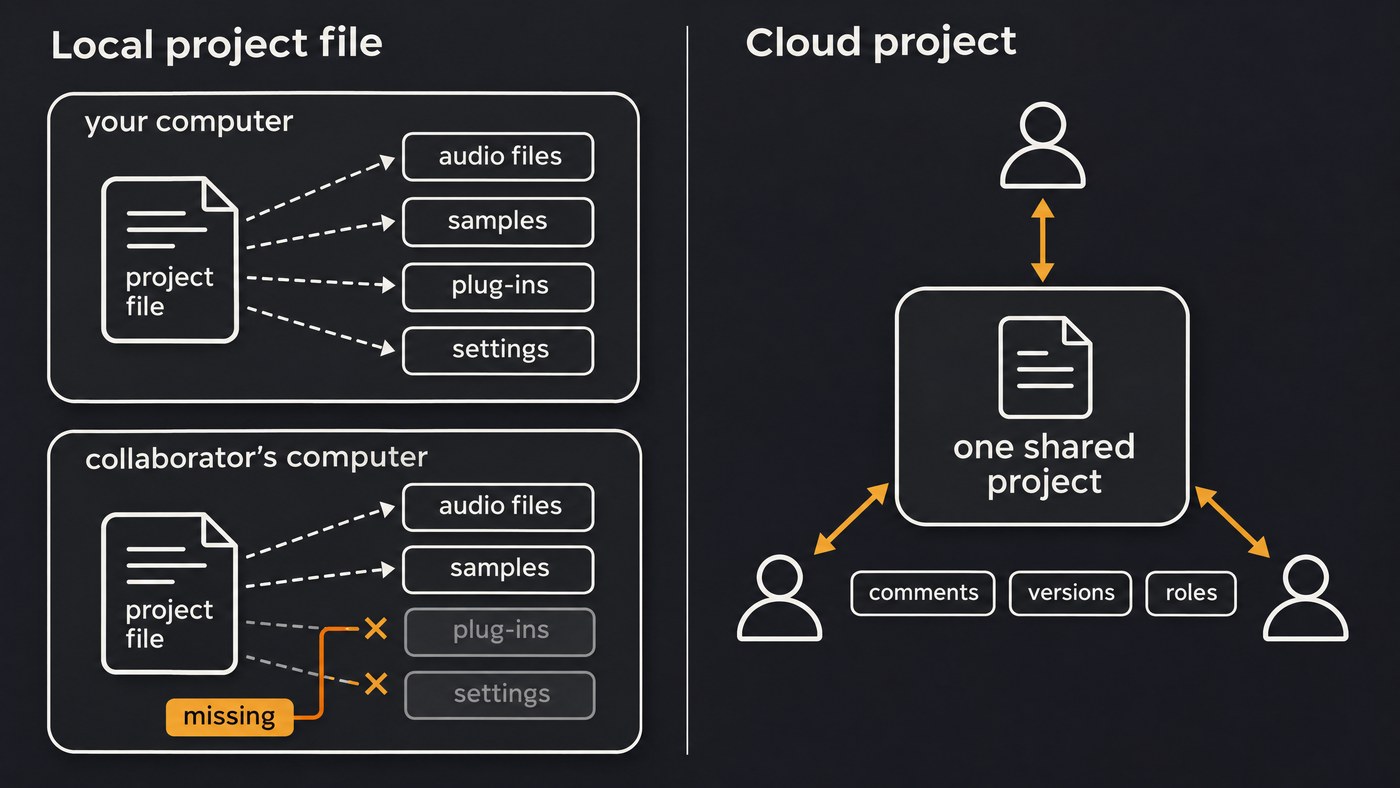
Cloud-based audio collaboration keeps one shared copy of a project on a server, so every collaborator opens the same tracks, edits and notes, and the service keeps everyone in sync. A local project file lives on one computer and points to audio, plugins and settings there, so sharing it means copying everything and hoping the other studio matches.
Below are the mechanics: what a project file holds in four major DAWs, why sharing one breaks, the usual workarounds, and how cloud projects handle the same jobs. We read every vendor page cited here on 19 November 2026. For latency, plugin formats and cost, see how cloud-based audio editors compare to desktop software.
What a local project file actually contains
A DAW project file is mostly a map: track layout, edits, automation, mixer and plugin settings, plus pointers to audio stored next to it or anywhere else on the computer.
- Pro Tools saves a session file, .ptx since Pro Tools 10 according to Avid's session compatibility article. Avid's guide to relinking missing files explains that a session links to its media and recommends keeping all of it in the session folder.
- Logic Pro saves either a package (.logicx) or a project folder, and Apple's user guide says you can copy audio files and other assets into the project or reference them from another location.
- Ableton Live saves a Live Set (.als) inside a project folder. Samples from Packs, the User Library or elsewhere on your computer count as external files and stay where they are unless you collect them.
- FL Studio saves project data in an .flp file, with samples left in place unless you export a Zipped loop package, which puts the .flp and its samples in one ZIP, per the FL Studio manual.
Plugins are never inside the file. The project stores their settings and expects each plugin to be installed and authorised on whichever computer opens it.
Why sharing a local project file breaks
- Missing audio. Anything referenced from outside the project folder stays behind. Ableton's Live 12 manual says clips that reference missing samples are marked "Offline" and Live plays silence in their place.
- Missing plugins. If your co-producer doesn't own a plugin, that insert can't load. Apple's page on working on a Logic Pro project on your iPad and your Mac, published 6 July 2026, suggests bouncing in place any track that uses third-party plug-ins before you share the project.
- Version gaps. Avid's compatibility article (updated 16 December 2025) warns that older Pro Tools versions ignore some newer features, even with the same file extension. Live won't overwrite a Set from an older major version without Save As.
- Sample-rate mismatches. Apple's Logic Pro guide says an audio file whose sample rate doesn't match the project's can play back at a different pitch, and offers a setting to convert files when you import them.
- Different DAWs. A Logic project won't open in Ableton Live, or an .flp in Pro Tools.
Workarounds producers use for local projects
- Collect everything into one folder. Live's Collect All and Save copies external files into the project, and its File Manager can pack a project into an .alp Pack for collaborators (collect first, since external files aren't packed automatically). Logic's Save a Copy As, Pro Tools' Save Copy In with Audio Files ticked and FL Studio's Zipped loop package do the same job. It only works if the other person has the same DAW, a compatible version and the same plugins.
- Print stems. Bounce every track from bar 1 at the session's sample rate, with and without effects. Stems open anywhere but lose MIDI, plugin settings and automation. See what audio stems are and exporting stems in Pro Tools.
- Use an interchange format. AAF moves audio clips, fades, volume and pan between tools, but it has no concept of musical time, which keeps it in post-production. DAWproject, an open format from Bitwig, stores notes, automation, plugin states and audio (embedded or referenced) in one ZIP-based file. Its README lists support in Bitwig Studio, PreSonus Studio One, Steinberg Cubase and Cubasis, VST Live and n-Track Studio, and Steinberg's edition comparison lists DAWproject support for Cubase Pro 16 and Artist 16. The README is candid about the status quo: "What most users end up doing is just exporting audio as stems."
- Share a synced folder. Dropbox, Google Drive, iCloud Drive and OneDrive move files but don't merge edits, so two people saving one project overwrite each other or get conflicting copies. Avid's relinking guide even recommends turning off iCloud and OneDrive backup for session media, because files that haven't fully downloaded cause Missing Files errors.
- Version by hand. FL Studio's Save new version (Ctrl+N) writes MyProj_2, MyProj_3 and so on, and its FL Cloud backup stores a ZIP each time you save, not continuously in the background. Splice Studio, which synced projects and revisions for several DAWs, was shut down in 2023, as MusicRadar reported on 10 March 2023. Splice's own announcement page blocked our requests.
How cloud-based audio collaboration works instead
In a cloud project, the project and its media live on the vendor's servers and each person's app syncs to that copy. Avid draws the line in its knowledge base, updated 28 September 2026: a Session keeps the file and its assets on a local drive, while "If you want to collaborate online, you will need to create a Project file, which is like a Session that’s stored online in your Avid cloud space and cached locally on your system."
One shared copy. In Soundverse Collaborative AI Studio, everyone edits one shared copy of the project, so tracks, clips and notes update for each person as they change.
Real time or in turns. Avid says Cloud Collaboration takes up to two other collaborators on a Project at the same time, working in near real time or offline and uploading updates later. BandLab's guide to collaboration (updated 21 October 2026) describes Live Session in its web Mix Editor for real-time work, with up to 50 collaborators on a project. In Soundverse, each person's named cursor and edits appear as they happen. Steinberg's VST Connect manual describes something else: an engineer in Cubase or Nuendo recording a remote performer live, with video, rather than a shared project.
Comments and chat. Soundverse pins comments to a track at the exact bar, with @mentions and threads you resolve or reopen, plus Session Chat for messages and files. Pro Tools Cloud Collaboration has a built-in chat window.
Version history and undo. Avid's FAQ says Revision History has no limit on saved versions, and Abandon Changes reverts a track to the cloud version. In Soundverse, undo and redo apply only to your own edits, never a collaborator's, and projects save as you work.
Roles and access. In Soundverse, the owner and Admins invite people as Editor, Viewer or Admin, or open the project to anyone with the link. The Viewer role and Can view links don't lock the timeline, so invite only people you'd trust to edit. On BandLab, whoever sends the first invite is the song's main owner.
Conflicts. With local files, the last save wins. Cloud tools sync changes as you go, so the practical rule is agreeing who works on which tracks. Avid's tip for judging a collaborator's change is to duplicate a track before sharing and keep the duplicate private.
Offline work. Local projects work anywhere; Avid lets you work offline and upload later. Soundverse's top bar shows Synced while you're connected and Local only when you're not.
Storage and ownership. Avid's FAQ lists 1 GB of free cloud storage for up to three Projects, and says a NAS or Dropbox backup won't sync with its servers; Save Copy In turns a Project back into a local Session. In Soundverse, a shared project's track limit follows the owner's plan, each person's exports follow their own plan, and you need the rights to everything anyone uploads or records.
Which to use for which job
Use cloud-based audio collaboration for co-writing across cities, remote vocal takes over your beat, and mix notes from a manager or A&R that should sit at the exact bar. Keep local project files for plugin-heavy mixes, hardware inserts, long sessions, formal deliverables and days offline. Many producers do both: write and collect takes in a shared project, export stems, then finish the mix in their own DAW.
Where Soundverse fits
Soundverse is an AI music platform that takes you from idea to audience, built for independent artists who release music. Collaborative AI Studio is the cloud side of this comparison: click Invite in an AI Studio project, and everyone works on one live timeline with named cursors, comments pinned at a bar, Session Chat and calls. Agent One can join too, editing under its own AI-marked avatar. Collaborators need a free account, not a paid plan.
The limits are real. AI Studio doesn't load third-party VST or AU plugins, calls don't include screen sharing, and an emailed invite expires after 7 days. On Creator and above you can export one file per track as WAV, FLAC or MP3 in a ZIP to finish in your DAW. Our guide to what an AI studio is and the post on real-time collaboration in AI Studio go further. Licensing is set by plan: the Free plan is for personal use, and the Creator plan comes with a royalty-free license.
This short video shows people invited into one AI Studio session building a track together, with every edit and generated stem appearing on everyone's screen.
FAQ
Can two people work on the same local project file from Dropbox? Not at the same time. Synced folders copy files but don't merge edits, so one person's save replaces the other's or leaves a conflicting copy. Take turns, or move the work to a cloud project.
Do collaborators need the same plugins? With local files, yes, or the affected tracks sound different. Avid suggests freezing or committing tracks before you share a cloud Project, and Apple suggests bouncing in place tracks with third-party plug-ins before moving a project to Logic Pro for iPad.
Can I move a cloud project back into my DAW? In Pro Tools, Save Copy In stores a cloud Project as a full local Session. From Soundverse AI Studio you take audio: stems on Creator and above, with each track's effects baked in or not.
Sign up for Soundverse free and invite your next co-writer into one AI Studio project.
More production guides on the Soundverse blog.
