What Is the Role of Metadata in Audio Distribution?
Metadata in audio distribution, end to end: how DDEX feeds carry it to stores, what it controls from royalties to credits, and what breaks when it's wrong.
The role of metadata in audio distribution is to tell every store, app and royalty system what a recording is, who made it, who gets paid, and where, when and how it can be played. Your distributor sends it with the audio, and it decides credits, search results, explicit filtering, Content ID claims and royalty matching.
This guide follows that data from your upload to the payout. We read every source below on 23 November 2026. If you need the field-by-field rules instead, see our checklist of what metadata is required for successful music distribution.
How metadata travels from your upload to the stores
Stores never see the form you fill in. The data takes four steps:
- You enter it once. Titles, artist names and roles, credits, ISRC, release date, countries, explicit flag and genre go into your distributor's upload form.
- Your distributor turns it into a DDEX message. DDEX is the music industry's data standards body, and its Electronic Release Notification (ERN) standard defines this step. In DDEX's words: "The ERN standard messages enable the communication of metadata about releases that are being made available for distribution, and how those releases can be made available." Its main message, the NewReleaseMessage, describes the release, every recording on it, and the terms for when, where and how stores may offer it.
- Each store ingests the feed and builds its release pages, search index and credits from it.
- Usage comes back. Stores report plays and sales against the same identifiers, and DDEX publishes a separate Digital Sales Reporting message suite for that return trip. Those reports become your distributor's statements and feed the bodies that pay songwriters.
Because stores show what arrives, every fix has to travel the same route. Spotify's help page on fixing problems with music metadata lists artist name, release title, artwork, live and release dates, track order, country availability, explicit tags, your role and credits as things only your label or distributor can change, and gives the reason: "We can’t change this manually on our end because we show music according to the metadata sent to us."
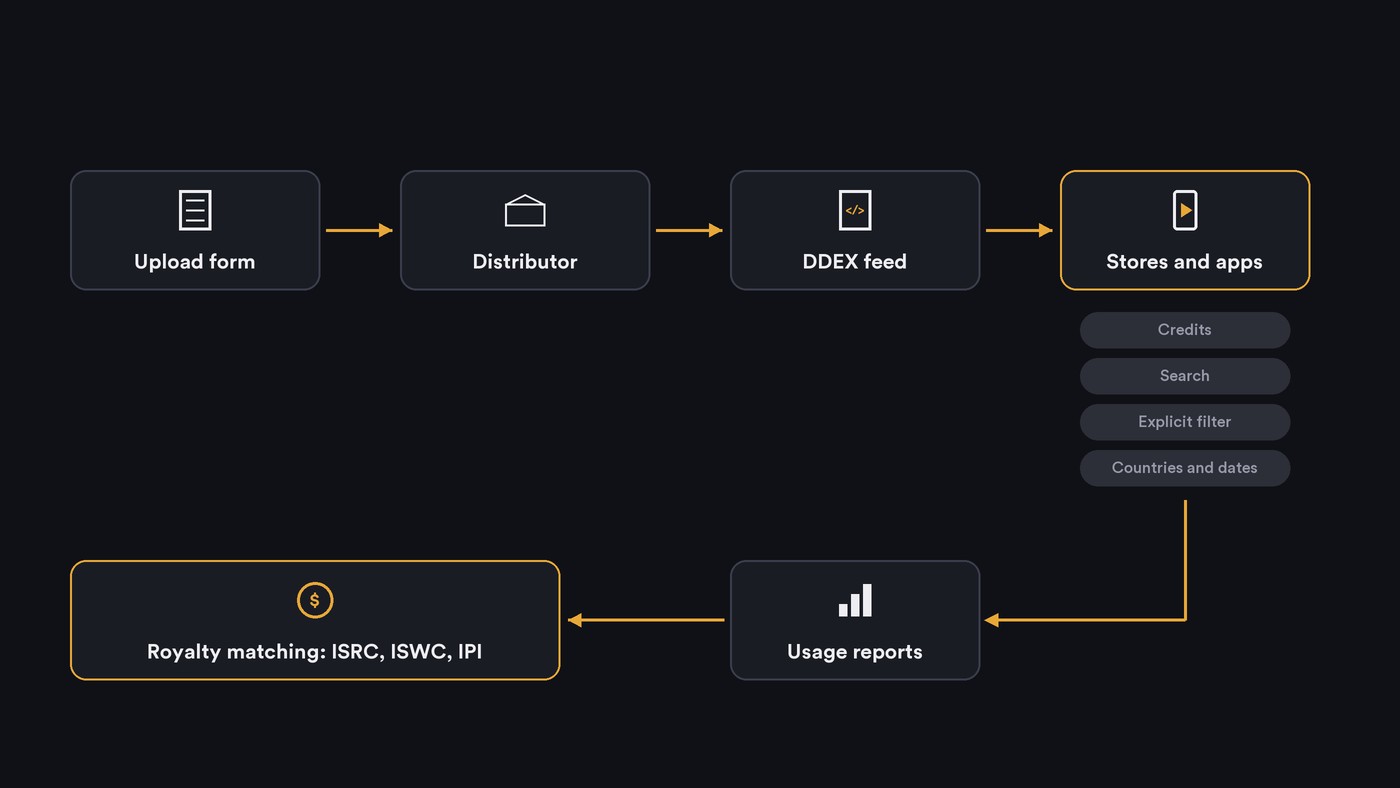
What metadata controls in audio distribution
Royalty routing: ISRC, ISWC and IPI
Three identifiers connect a play to the people owed for it.
- ISRC names the recording. Stores report streams against it, and your distributor pays the master side from those reports. Our guide on why ISRC codes matter for tracking streams covers the rules.
- ISWC names the composition, the song behind every recording of it. It's assigned when your publisher or performing rights organization registers the work.
- IPI names the people and companies. CISAC's page on the IPI system says it gives each natural person or legal entity with an interest in a work a globally unique identifier, across roles such as composer, arranger and publisher. SUISA administers it, and collecting societies use it for documentation, distribution and accounting.
The songwriter side depends on matching recordings to works. In the US, The MLC's DURP page explains the chain: DSPs report usage and royalties each month, The MLC tries to match the recordings in those reports to registered works, and the ones it can't match go into its unmatched recordings database. What The MLC knows about those recordings comes from usage reports carrying the metadata distributors delivered to the DSPs. A missing writer or a mistyped title at upload can stop the match.
Credits listeners see
Song credits in the Spotify and Apple Music apps come from the same delivery. Apple's Music Style Guide (version 2.5, October 2026) requires complete, accurate credits at delivery across performers, production and engineering, and composition and lyrics. It says to leave a credit out rather than send a placeholder such as TBD. On Spotify, credits are on the list of fixes only your distributor can send.
Search and recommendations
Apple says its style guide exists to improve the listener's experience and your discoverability, and two of its rules show how. It censors explicit words in titles automatically, and warns that titles you censor yourself with asterisks make your music harder for listeners to search for and find. It also says localized artist and title metadata make content more discoverable.
Recommendations read the same data. In its September 2025 announcement, Spotify said its music spam filter would identify uploaders and tracks using mass uploads, duplicates, SEO hacks and artificially short tracks, tag them and stop recommending them.
Countries and release dates
The ERN message carries the deal terms: which countries, from which date. If a country is missing from those terms, stores there have nothing to sell. A wrong date sends the release live on the wrong day, and on Spotify both are distributor-only fixes.
Explicit flags and parental filters
Spotify's explicit content settings page says it tags explicit content based on information it receives from rights holders. When a listener, or the manager of a Premium Family plan, switches explicit content off, anything with the tag is greyed out and skipped. Apple requires explicit tracks to carry its parental advisory tag, and a Clean flag only where an explicit version exists. So a missing flag lets explicit lyrics through a filter, and a wrong one hides a clean song from listeners who filter.
Content ID matching
YouTube's Content ID scans uploads against a database of audio and visual files submitted by copyright owners. For most independent releases your distributor holds that partner account, and the ownership details in your delivery decide whose claim a match creates. Our guide to how distribution platforms handle Content ID walks through reference files, claims and allowlisting.
What happens when metadata is wrong
- Royalties go unmatched. Plays that can't be tied to a registered work wait in databases such as The MLC's until someone claims them. Our guide to how royalty collection works through distribution channels shows what to register, and where.
- Music lands on the wrong artist profile. A misspelled name, or two artists sharing one, can attach a release to someone else's page. Spotify said in September 2025 that some uploaders deliver music to another artist's profile on purpose, and that it would let artists report a mismatch even before release.
- Tracks are hidden or removed. In the same announcement, Spotify said it had removed more than 75 million spammy tracks in the previous 12 months.
- Duplicates split your history. A re-upload with a new ISRC or a tweaked title can show up as a separate track with no play count, and near-identical uploads are exactly what spam filters look for.
- Claims go to the wrong owner. Ownership details that don't match reality send YouTube revenue, or blocks, to the wrong party until the distributor corrects them.
Newer fields: AI-disclosure credits
AI use is becoming a metadata field. In its 25 September 2025 announcement, Spotify said it was helping develop, and would support, a new industry standard for AI disclosures in music credits, developed through DDEX, and would display the information as labels and distributors submit it. An update to the same post says Spotify has since launched a beta that lets artists share how they used AI, and adds that because it depends on artist disclosure, the absence of a credit doesn't mean AI wasn't used.
Spotify's help page on AI credits (updated 11 August 2026) sets out how it works today:
- AI credits apply to individual roles, such as lyrics, vocals, instrumental performances or production, not the whole track.
- If AI and a person both contributed to the same role, credit them separately.
- They're added through your distributor at upload, the feature is in beta, and only certain distributors support it.
- Listeners see them on mobile, in Song credits and the Now Playing view, not on artist profiles.
- They're optional, and Spotify says it will keep changing the approach based on feedback.
If you use AI anywhere in a song, write down which roles it touched while the session is fresh, and ask your distributor whether its upload form has AI credit fields.
Where Soundverse fits
Soundverse is an AI music platform that takes you from idea to audience. It is not a distributor: it doesn't deliver audio or metadata to stores. Your distributor does that.
Music Business Agent works on real sites while you watch. Its store-by-store release check searches stores such as Spotify, Apple Music, JioSaavn and Amazon Music and lists where your release is live, missing or mislabeled. It can also search The MLC's unmatched works and SoundExchange's unregistered lists for your songs and your name. Its workflows ask you for missing ISRCs, writers and splits and are instructed never to invent them.
When you're rebuilding data for an old master or a sample, Copyright Checker fingerprints the audio and, on a match with a released recording, shows its title, artist, album, label, release date and ISRC where known. It's a recognition check, not legal clearance.
FAQ
Who sends my metadata to Spotify and Apple Music? Your distributor or label, as a structured DDEX feed built from your upload form. Stores display what arrives, and Spotify says it can't change your metadata manually, so every correction goes back through the distributor.
Does metadata affect how much I get paid? Yes. Plays are reported against the ISRC, and songwriter royalties depend on matching that recording to a registered work with the right writers and IPI numbers. Unmatched recordings wait in databases such as The MLC's until someone claims them.
Can I add AI credits to my release? On Spotify, only through a distributor that supports AI credits, since the feature is still in beta. Credit each role separately, such as AI-generated vocals with human-written lyrics.
What should I check after a release goes live? Open it on each store and check the artist page, credits, explicit tag and release date. If something is wrong, ask your distributor for a metadata update; on Spotify, also report a release that landed on the wrong artist profile.
Sign up for Soundverse free and run a store-by-store release check on your next single. More release guides on the Soundverse blog.

