What Is the Most Advanced AI Tool for Creating Music Videos From Scratch?
Which AI music video tool is most advanced from scratch? Atlabs, LTX Studio, OpenArt and Soundverse compared on lip sync, consistency and 4K.
The most advanced AI music video tool for starting from scratch is one that plans shots from your song, keeps one character across every scene, lip-syncs to your vocal and renders the whole track at 1080p or better. Checked on 7 November 2026, Atlabs, LTX Studio, OpenArt and Soundverse come closest, and each leads on something different.
"From scratch" means no footage, and maybe no song yet. That second case narrows the field, because most music video generators expect a finished track.
What makes an AI music video tool "advanced"
A clip generator gives you eight good-looking seconds. A music video needs three minutes that hold together. Five capabilities make that possible, plus a sixth if you have no song yet:
- Song-aware scripting. The tool reads your track (tempo, sections, energy) and plans shots around it, so cuts land where the music changes.
- Character consistency. The same face, outfit and setting from first shot to last, anchored by reference images or a saved character.
- Lip sync to your vocal. A performer whose mouth follows your actual vocal line.
- Multi-scene assembly. Many shots filmed and cut into one video that runs the length of the song.
- Resolution and finishing. At least 1080p, 16:9 and 9:16, and ideally a way to upscale or hand the edit to your own editor.
- The song itself. If all you have is an idea, a tool that also makes the song saves a step.
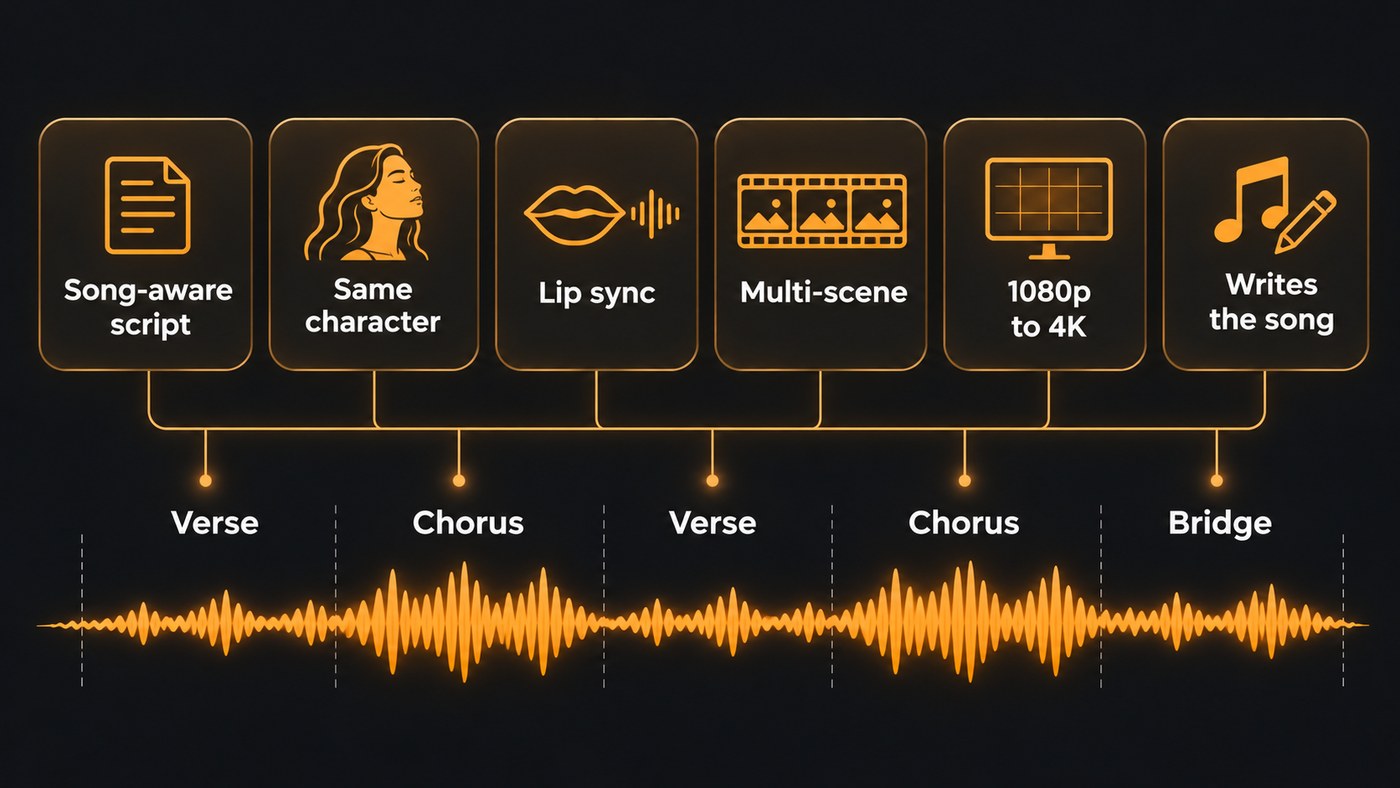
The most advanced AI music video tools, checked 7 November 2026
Listed alphabetically, with details from each tool's own pages. To generate single shots with models such as Veo 3.1, Kling or Seedance and cut them yourself, see our shortlist of AI video creators for a new single release.
Atlabs
- Song: Upload an audio file or paste a Suno link.
- Scripting: Atlabs says it analyses your track's tempo, mood and energy to generate a storyboard, then cuts scenes on the beat.
- Consistency: A consistent-character feature keeps your artist's appearance, clothing and style the same across scenes.
- Lip sync: With "Cast yourself", one photo puts you in the video as the main character, appearing across the story scenes and singing on camera.
- Scenes and resolution: Swap any scene, regenerate single clips and add beat-synced lyric captions. Paid plans add 1080p export, longer durations and premium models such as Veo 3.1.
- Best for: Starring in your own video without filming.
LTX Studio
- Song: Upload an MP3 or OGG track. The music video page doesn't describe generating music.
- Scripting: You set the style and cast, then adjust the motion and camera of each shot. LTX's release notes add a Storyboard Builder (6 January 2026) that turns briefs or scripts into shot-level storyboards, and Audio-to-Video (20 January 2026), which generates visuals synced to your audio's rhythm, tone and pacing.
- Consistency: Elements (28 October 2025) saves characters, props, environments and objects so you can reuse them in every shot.
- Lip sync: The music video page doesn't mention lip sync to a sung vocal.
- Scenes and resolution: Video Upscale (22 April 2026) takes any video to 4K or 8K with Topaz-powered models. You export as MP4, or as XML to keep editing in your own software.
- Best for: Directing every shot and delivering a 4K master.
OpenArt
- Song: Upload your own track. The page doesn't describe making the music.
- Scripting: OpenArt says its Director builds the video from the audio, cutting to the beat and reacting to the track's energy. It runs on GPT Image 2 for images and Seedance 2.0 for motion.
- Consistency: Pull a character from OpenArt's Characters library or lock one in from a reference image, and the same artist carries the vertical and wide cuts.
- Lip sync: In OpenArt's words, "When your artist sings on camera, the performance syncs to your vocals, so the mouth matches the words line by line, in any language."
- Scenes and resolution: A Scenes tab for single shots and a Timeline tab for the full cut. The page doesn't publish a resolution or maximum length.
- Best for: A fast performance video from a finished master.
Soundverse AI Music Video Generator
- Song: On the Prompt to Music Video tab, one prompt describes both the song and the video; Agent One makes the song first, then films. You can also paste your own lyrics, or upload a finished MP3, WAV, M4A or FLAC up to 50 MB.
- Scripting: Agent One writes a script and quotes the token cost for your approval before any scene is filmed. Leave direction on auto, or write the characters, setting, camera style and story beats yourself.
- Consistency: Up to nine image references for the cast and the setting.
- Lip sync: Turn it on and the lead sings to camera in time with the vocals. With Lip Sync on and the model left on Auto, it picks Seedance 2.5.
- Scenes and resolution: It films every second of the song and cuts the video to the music, in 16:9 or 9:16 at up to 1080p depending on the model. It doesn't film in 4K.
- Best for: Starting from a one-line idea. It needs Creator or above, and a full video uses more tokens than Creator includes monthly, so plan on a top-up.
So which is the most advanced?
None of the four leads on all six capabilities. Pick by the one you can't do without:
- You have no song yet: Soundverse. Of the four, its page is the only one that describes making the song and the video from a single prompt.
- You want to be on camera, singing: Atlabs with Cast yourself, or OpenArt with a saved character.
- You want a 4K master and full control: LTX Studio, with Elements, per-shot camera control, upscaling and XML export.
- You want to approve the plan and the cost first: Soundverse, where Agent One shows the script and the token cost before filming.
What are the most innovative AI platforms for generating music videos right now?
The new ideas in late 2026 are about holding a whole song together:
- Assistants that plan before they film. Soundverse's Agent One writes the script and quotes the cost first, and OpenArt's assistant, Ori, settles style, ratio and genre before generating.
- Saved characters. OpenArt's Characters library and LTX Studio's Elements make your artist a reusable asset, not a description you retype per shot.
- Longer single takes. In Soundverse, Seedance 2.5 renders clips of up to 30 seconds, so a whole chorus or a lip-synced verse fits in one shot.
- Models built for continuity. LTX's LTX-2.5 model, released through its API on 11 August 2026, includes Native Multishot, which "generates multiple connected shots while preserving character, environment, lighting, voice, style, and continuity across cuts," according to LTX's release notes.
How to make a music video from scratch with AI
- Finish the song first. If you start with an idea, generate the song and lock the lyrics. Every shot is timed to it.
- Map the structure. Note where each verse, chorus and bridge starts, and the tempo. Soundverse's Section Analysis returns section start and end times plus beats and downbeats on every plan, including Free.
- Write one line of direction per section. Verse one, the singer alone on a night bus; chorus, the doors open onto a lit street; bridge, a slow close-up.
- Build a reference pack. Three to five images: your character from the front, in the main outfit, the main location and one colour reference. Reuse it for every scene.
- Test the hardest 30 seconds. Run the chorus with lip sync before paying for the whole song. If the mouth drifts, use a dry lead vocal stem instead of the full mix.
- Fix scenes, not the whole video. Every tool here lets you rework single shots; in Soundverse, open the video in AI Studio, where a video lane's right-click menu can generate a replacement.
- Deliver two shapes. A 16:9 master for YouTube and a separate 9:16 cut for Shorts and Reels.
Our guide to making an AI music video from scratch goes deeper on shot planning.
Where Soundverse fits
Soundverse is an AI music platform that takes you from idea to audience. The AI Music Video Generator can make the song and its video from one prompt, or film a track you already have, with a script and a cost to approve first. For a sequence you plan shot by shot, Multi-Scene Video Builder takes up to 10 scenes of 4 to 15 seconds each, with optional first and last frames; first frames that show your character are its most reliable way to keep them consistent. Then open the result in AI Studio, where video sits on lanes above your tracks and exports reach 4K on Pro, though scenes are filmed at up to 1080p. On Pro and Max, AI Song Generator and Agent One start on Soundverse v9.
Licensing is set by plan: the Free plan is for personal use, and the Creator plan comes with a royalty-free license.
This walkthrough turns one prompt into a full song and a full music video, with every part left editable in AI Studio afterward.
FAQ
Can AI make a music video without any footage? Yes. All four tools here generate every shot from prompts and reference images. You still need the rights to any face you use.
Can AI make the song and the music video together? Yes. Soundverse's AI Music Video Generator takes one prompt for both on its Prompt to Music Video tab, makes the song first, then films the video. Our post on going from one prompt to a full song and music video shows the whole flow.
Which AI music video tool has the best lip sync? We found no public benchmark that compares these tools on sung vocals, so test your own chorus in each. Use a dry lead vocal stem: Soundverse's Lip Sync page notes that a clean vocal stem syncs far better than a full mix.
Can an AI music video be 4K? With a finishing step. LTX Studio upscales to 4K or 8K, and Soundverse AI Studio exports up to 4K on Pro from scenes filmed at up to 1080p. Atlabs lists 1080p export; OpenArt publishes no resolution.
Can I release an AI music video commercially? Usually on a paid plan. OpenArt says finished videos can be used commercially, LTX Studio sets it by tier, and Soundverse's video tools need the Creator plan or above, which comes with a royalty-free license. You need the rights to the song and any face shown.
Sign up for Soundverse free and start your next video from a single idea. More guides on the Soundverse blog.
