What Technical Infrastructure Supports Real-Time AI Video Rendering for Music?
Real-time AI video rendering for music, layer by layer: frame budgets, audio features, few-step models, GPU tuning, VJ hosts, NDI, SRT and the cloud.
Real-time AI video rendering for music works when every layer of the chain fits inside one frame's time: 33.3 ms at 30 fps, or 16.7 ms at 60 fps. The chain is audio analysis, a few-step generative model on a tuned GPU, a live graphics host such as TouchDesigner or Resolume, and a transport such as NDI or SRT.
Figures below come from the papers and vendors that publish them, checked on 21 November 2026.
What "real-time" means in AI video rendering: the frame budget
Divide one second by the frame rate and you get each frame's budget: 41.7 ms at 24 fps, 33.3 ms at 30 fps, 16.7 ms at 60 fps. In a simple serial chain, audio analysis, the model, compositing and encoding all share it: if the model takes 25 ms of a 30 fps budget, everything else gets 8.3 ms.
Speed also has two numbers. Throughput is frames per second out; latency is how long a change takes to reach the screen. The Self Forcing paper (Huang and colleagues, June 2025, revised November 2025) puts it this way: "we argue that true real-time performance requires both sufficient throughput (exceeding video playback rate) and lower latency than the perceptual threshold which could be application-dependent".
Music sets that threshold. At 128 BPM a beat lasts about 469 ms, so 700 ms of latency lands every change more than a beat late.
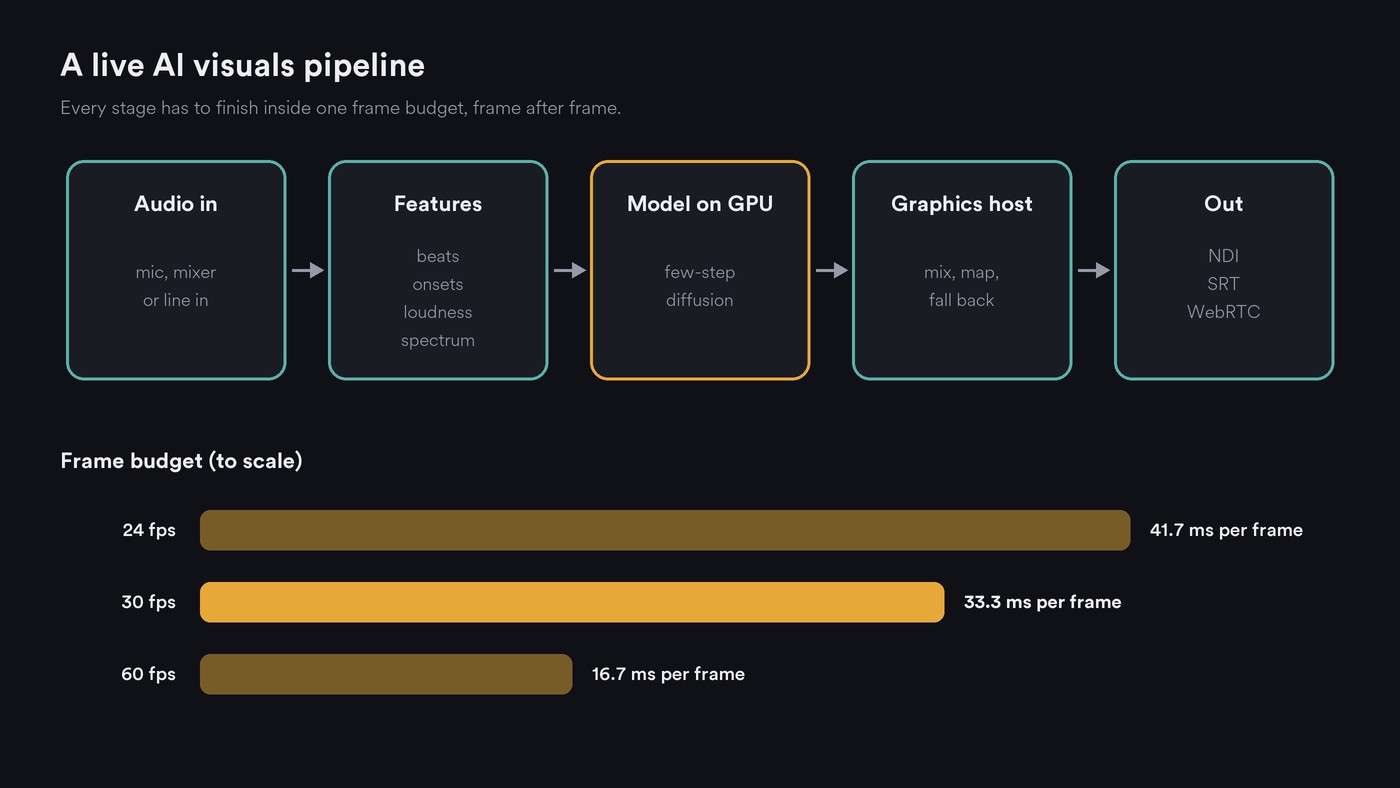
Layer 1: audio capture and feature extraction
A host takes audio from the DJ mixer's line out, an audio interface or the playback machine, and reduces it to a few control signals per frame:
- Loudness for brightness and scale.
- Spectrum bands from an FFT, so lows and highs drive different things.
- Onsets, where each hit starts, for flashes and cuts.
- Beats and tempo, so changes land on the bar.
The analysis window adds latency. Derivative's documentation for TouchDesigner's Audio Spectrum CHOP works it through: audio at 44,100 samples per second on a 60 fps timeline gives 735 samples per frame, and a 2,048-sample FFT looks back about 50 ms, or three frames. Bigger FFTs resolve frequencies better but describe an older moment.
Beat trackers need several beats to lock on, so rigs often take tempo from the source as MIDI clock or timecode; Resolume says Arena can sync to the DJ via SMPTE timecode. Our explainer on how AI visuals synchronize with audio covers beat maps and audio-reactive bands.
In an AI rig these signals steer the model: a kick raises image-to-image strength, a chorus switches the prompt.
Layer 2: a generative model fast enough for the beat
Standard diffusion takes dozens of steps. In the Self Forcing team's test on one NVIDIA H100 at 832 × 480, the open Wan2.1 1.3B video model made 0.78 frames per second and took 103 seconds to show its first frame. Three ideas close the gap.
Fewer steps. Distillation trains a fast student to copy a slow teacher. Latent Consistency Models (Luo and colleagues, October 2023) cut image generation to 2 to 4 steps. Adversarial Diffusion Distillation (Sauer and colleagues at Stability AI, November 2023) samples in 1 to 4 steps, and its authors call it the first method to make single-step, real-time image synthesis possible with foundation models.
Pipelining. StreamDiffusion (December 2023) batches the denoising steps of consecutive frames and skips work when the input barely changes. Its README, measured on an RTX 4090 with a Core i9-13900K, reports one-step SD-Turbo at 106.16 fps for text-to-image and 93.897 fps for image-to-image, and a four-step LCM-LoRA model at about 38 fps. One step fits 60 fps at about 9.4 ms a frame; four steps, at 26.3 ms, fit 30 fps only.
Streaming video models. StreamDiffusion runs an image model frame by frame, so live image-to-image tends to shimmer. Causal video models generate frame after frame with recent frames in memory. CausVid (December 2024) turned a bidirectional video model into an autoregressive 4-step generator with KV caching. Self Forcing reports 17 fps with 0.69 seconds of first-frame latency on one H100 at 832 × 480, and a frame-wise variant at 8.9 fps with 0.45 seconds; its README describes real-time streaming on a single RTX 4090.
Still, 17 fps is 58.8 ms a frame, so the host must hold, blend or interpolate frames to fill a 30 or 60 fps output.
Layer 3: GPU inference and optimisation
NVIDIA describes TensorRT as inference compilers, runtimes and model optimizations aimed at low latency and high throughput, using quantization, layer and tensor fusion, and kernel tuning. StreamDiffusion has a TensorRT path; its README notes the engine takes time to build but runs faster.
- Precision. NVIDIA's tooling supports FP8, FP4, INT8 and INT4 quantization, trading some quality for memory and speed.
- Steps. Each denoising step is another pass through the network, as StreamDiffusion's one-step and four-step results show.
- Resolution. 1920 × 1080 has about five times the pixels of 832 × 480. Generate small and upscale, or use AI for one textured layer under conventional graphics.
- Batching. Live, the batch is frames in flight: more raises throughput and latency.
- Memory. Self Forcing's README asks for an NVIDIA GPU with at least 24 GB, plus 64 GB of system RAM.
Put generation on its own machine if you can, so a stalled model never freezes the screens. Our guide to AI video hardware covers GPU memory for offline work.
Layer 4: the graphics host, from TouchDesigner to the browser
The model is one source; the host mixes it with everything else, maps it to the stage and covers for it if it stalls.
- TouchDesigner (Derivative): node networks for audio analysis, generative sources and outputs; its NDI Out TOP sends image and audio over IP to other NDI applications.
- Resolume Avenue and Arena: the Avenue & Arena page lists FFT audio analysis, BPM sync, NDI, Syphon and Spout inputs, capture cards, MIDI and OSC mapping, and on Arena, projection mapping and DMX. On 21 November 2026, Avenue was listed at €299 and Arena at €799 per computer.
- Notch: a GPU real-time graphics tool for Windows, per Notch's site, whose Blocks package a scene with its playback engine for media servers.
Browsers are catching up. WebGPU, a W3C Candidate Recommendation Draft dated 16 November 2026, gives web pages GPU rendering and computation. WebCodecs (W3C Working Draft, 19 November 2026) exposes the browser's video encoders with two latency modes. "Quality" may take longer and must not drop frames; for "realtime", the spec says: "User Agents MAY sacrifice quality to improve latency." That setting is the line between a live output and a file render.
Layer 5: getting frames to screens and streams
- Inside the venue: NDI carries video between computers on one network; Resolume describes it as any resolution, with alpha, at low latency. HDMI or SDI takes the final signal to the LED processor.
- Across the internet: SRT, the open-source Secure Reliable Transport protocol, targets sub-second live video. Its README says it keeps a constant end-to-end latency, retransmits lost packets and encrypts with AES, which suits a cloud GPU feeding a venue.
- To browsers: WebRTC handles interactive streams; our post on low-latency AI audio explains it and jitter buffers.
Local, cloud or edge: where should the model run?
- Local: lowest latency, no venue internet needed, but you carry and cool a large GPU.
- Cloud: data-center GPUs like the H100s above, plus a network buffer and jitter. Fine for streamed shows and installations.
- Edge: a GPU server near the stage keeps the round trip short; NVIDIA lists edge devices among TensorRT's deployment targets.
- Hybrid: analysis, compositing and outputs stay local, generation goes out, and the host falls back to prerendered loops if the stream stalls.
Either way, schedule changes musically: the tempo is known, so send a prompt change early and trigger it on the next downbeat.
Real-time generation vs offline rendering of a finished music video
A finished music video is rendered offline, so time per frame doesn't matter: many steps, high resolution, retakes, editing and a grade. CausVid's authors note that a bidirectional model processes the entire sequence, future frames included, to generate one frame. Fine for a render, impossible live. Real-time means causal, few steps, lower resolution and no retakes. A practical show uses both: offline loops on the beat plus one live generative layer.
Where Soundverse fits
Soundverse is an AI music platform that takes you from idea to audience. Its video tools make finished files, the offline side of this stack, ready to play out live. AI Video Generator makes clips of 3 to 30 seconds depending on the model, at up to 1080p, and suggests slow abstract clips, such as smoke or neon light, to play behind a set or stream. AI Music Video Generator has Agent One script, film and cut a video to your song at up to 1080p. Both need Creator or above.
In AI Studio, the Visualizer renders an audio-reactive visual for your song to MP4 from 10 scenes, in 16:9, 9:16, 1:1 or 4:5, and video exports at 24, 30 or 60 fps using the browser's encoders through WebCodecs in current desktop Chrome and Edge. Visual One runs hand and face tracking live in your browser, on your own device, turning gestures into chords.
This tutorial walks through AI Studio from a generated track to AI visuals on the video lane and a video export.
FAQ
Can AI generate music visuals in real time today? Yes, within limits. StreamDiffusion's one-step tests reach about 94 to 106 fps on an RTX 4090, and Self Forcing streams video at 17 fps at 832 × 480 on an H100. Expect lower resolution than an offline render.
What GPU do I need for real-time AI visuals? Published figures come from high-end NVIDIA cards, and Self Forcing's README asks for at least 24 GB of GPU memory. Test your exact model and resolution first.
Why do real-time AI visuals lag behind the beat? Analysis windows, model latency, compositing and transport add up. Self Forcing's lowest-latency variant still takes 0.45 seconds to its first frame, about a beat at 128 BPM, so trigger changes from the tempo grid ahead of time.
Should I use NDI or SRT for live AI visuals? NDI between computers on the same local network, such as a generation PC feeding the VJ laptop. SRT across the internet, where retransmission and a fixed latency handle packet loss.
Sign up for Soundverse free and make the clips and visualizers your set will run on. More guides on the Soundverse blog.

