Does AI Video Generation Require High-End Hardware for Rendering?
AI video hardware requirements depend on where it runs: cloud tools need only a browser, while open models like Wan need 8 to 80 GB of GPU memory.
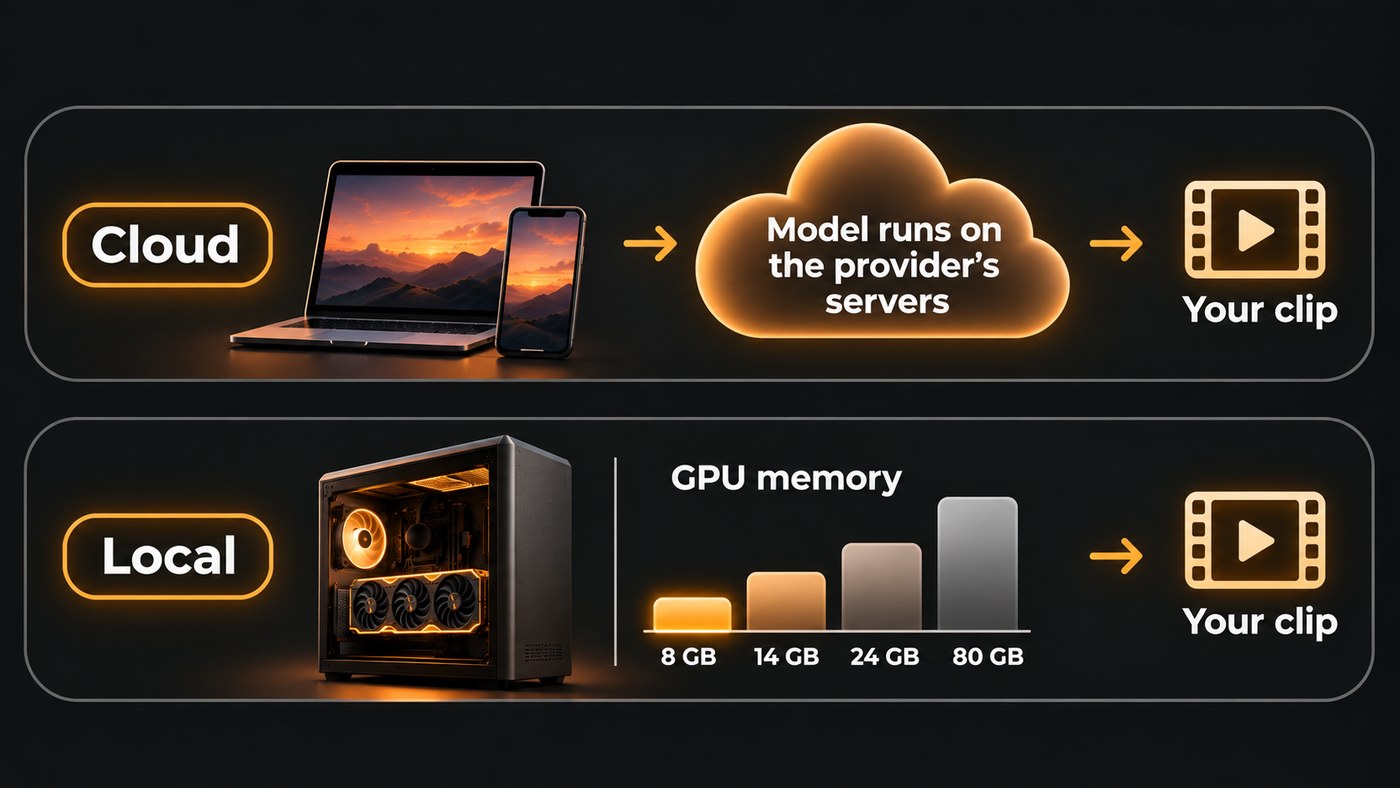
AI video hardware requirements depend on where the model runs. In the cloud, tools such as Veo 3.1 and Seedance 2.5 generate on the provider's servers, so a laptop or phone is enough. Locally, the GPU decides everything: Wan2.1's smallest model needs about 8 GB of GPU memory, and larger open models ask for 24 to 80 GB.
"Rendering" also covers two separate jobs. Generation is the model making the frames, and it is the heavy part. Export is encoding your finished edit into one video file, which is ordinary video work. Here is what each one asks of your machine, with figures from the model makers themselves.
Cloud vs local: where AI video actually renders
Cloud generation. You send a prompt, an image or a reference clip, the model runs on the provider's GPUs, and you download the result. Your own device only uploads, plays back and edits. When YouTube announced Veo 3 Fast in Shorts on 16 September 2025, it described free 480p clips with sound made from a phone. Closed models such as Veo 3.1 and Seedance 2.5 don't publish weights you can download, so a hosted service is the only way to use them.
Local generation. You download an open model's weights and your graphics card does the work. Two numbers decide whether this is practical. GPU memory (VRAM) decides whether a model runs at all. Speed decides whether a whole music video is realistic or a weekend project.
AI video hardware requirements for popular open models
Each figure below comes from the project's own README, checked in November 2026.
- Wan2.1 T2V-1.3B (Alibaba's Wan team). The Wan2.1 README says: "The T2V-1.3B model requires only 8.19 GB VRAM, making it compatible with almost all consumer-grade GPUs." It quotes about 4 minutes for a 5-second 480p clip on an RTX 4090, without optimizations such as quantization.
- Wan2.2 TI2V-5B. Makes 720p video at 24 fps from text or an image. The Wan2.2 README says its example command runs on a GPU with at least 24 GB of VRAM, such as an RTX 4090, with offloading switched on, and that it makes a 5-second 720p clip in under 9 minutes on a single consumer-grade GPU.
- Wan2.2 A14B (text-to-video and image-to-video). The larger 720p models' example commands need a GPU with at least 80 GB of VRAM. That is workstation or rented cloud hardware, not a gaming PC.
- HunyuanVideo 1.5 (Tencent). Weights released on 20 November 2025. The HunyuanVideo 1.5 README lists an NVIDIA GPU with CUDA support and a minimum of 14 GB of GPU memory with model offloading. A step-distilled 480p image-to-video version, added on 5 December 2025, generates videos within 75 seconds on a single RTX 4090, according to the same README.
Most musicians won't run these from a command line. ComfyUI, a node-based app that runs Wan, HunyuanVideo 1.5 and LTX-Video models locally, lists support for NVIDIA, AMD, Intel and Apple Silicon GPUs, and its README claims it "Can run even the biggest open source models on as low as 4GB vram + 8GB ram relatively quickly" by streaming model weights in and out of memory. Treat that as the floor for getting a model to run at all. Most of the makers' timings above were measured on an RTX 4090, a 24 GB card.
For musicians, one more open option is worth knowing: Lightricks' LTX-2 repository, checked in November 2026, includes an audio-to-video pipeline conditioned on an input audio file.
What one music video costs in GPU time
Speed matters more than it looks, because a music video is many clips. A three-minute song is 180 seconds, or 36 shots of 5 seconds each. Using the makers' own timings:
- Wan2.1 1.3B at 480p: 36 shots at about 4 minutes each is roughly 2 hours 24 minutes for one pass.
- Wan2.2 TI2V-5B at 720p: 36 shots at up to 9 minutes each is up to about 5 hours 24 minutes.
- Add retakes. Generated shots miss: wrong motion, a drifting face, a hand that melts. If you keep one take in three (our assumption for planning, not a benchmark), the 720p video becomes up to about 16 hours of GPU time.
That is fine for a weekend of drafts, and tough the week before a release. In the cloud the same shots run on the provider's hardware and you pay per second of video instead. Soundverse's AI Video Generator, for example, prices each clip by model, length and resolution and shows the estimate before you generate.
Do you need a powerful computer for the final render?
Not nearly as powerful. Once the clips exist, cutting them to the song and exporting is the same work as any music video edit.
In Soundverse's AI Studio, which runs in your browser, export also runs in the browser. Video export uses the browser's built-in video and audio encoders, which current desktop versions of Chrome and Edge include. Export is blocked for projects longer than 15 minutes or with more than 24 tracks. Video export goes up to 720p on Free, 1080p on Creator and 4K on Pro and Max.
Plan around one more limit: generation often tops out below your export resolution. Soundverse's AI Video Generator renders at 480p, 720p or 1080p depending on the model, and never in 4K. For a walkthrough of rendering inside the studio, see Render to Video Lane, which turns your track's visualizer into a 1080p video on the timeline.
Should you run AI video locally or in the cloud?
Go cloud if:
- You work on a laptop, a Mac or a PC without a recent NVIDIA card. The official Wan and HunyuanVideo instructions are written and benchmarked for NVIDIA GPUs.
- You want the closed models, such as Veo 3.1 and Seedance 2.5.
- Your release date is close and you can't wait hours for each pass.
Go local if:
- You already own an NVIDIA card with 16 to 24 GB of VRAM and enjoy setting up tools.
- You want unlimited drafts of loops, abstract backgrounds and visualizer textures.
- You want files to stay on your own machine.
Read the license first. Wan2.2's models are released under Apache 2.0. Tencent's HunyuanVideo 1.5 community license states that it does not apply in the European Union, the United Kingdom and South Korea. If you live in London or Berlin, it isn't an option for your release.
A practical split uses both: local drafts for mood and motion, cloud runs for the shots that open the video and carry the chorus. For a broader primer on making the video itself, read our AI music video generator guide.
Where Soundverse fits
Soundverse is an AI music platform that takes you from idea to audience. It's hosted, so the video models run on its side, not on your graphics card. AI Video Generator puts several models in one panel, including Veo 3.1, Seedance 2.5 and Gemini Omni Flash, for clips of 3 to 30 seconds depending on the model, at up to 1080p. AI Music Video Generator works from a whole song: Agent One writes a script, quotes the cost for your approval, then films the scenes and cuts them to the music. Both need the Creator plan or above.
Then cut and export in AI Studio from a desktop browser. Our post on the new AI models on Soundverse shows where to find each model.
Licensing is set by plan: the Free plan is for personal use, and the Creator plan comes with a royalty-free license.
This video runs one Halloween brief through each new model on Soundverse, including Veo 3.1, Seedance 2.5 and Gemini Omni Flash 1.1, and shows each result as it came back.
FAQ
How much VRAM do I need for AI video generation? For local generation, about 8 GB runs Wan2.1's small 480p model, 14 GB is HunyuanVideo 1.5's minimum with offloading, and 24 GB covers Wan2.2's 5B model at 720p. The largest open models ask for 80 GB. Cloud generation needs none of this.
Can I generate AI video on a Mac? In the cloud, yes, from a browser. Locally, the official Wan and HunyuanVideo instructions target NVIDIA GPUs; ComfyUI lists Apple Silicon support, but the model makers publish no Mac timings, so test one short clip before you plan a whole video around it.
Do I need a powerful computer to edit and export an AI music video? Far less than generation does. Editing and exporting finished clips is standard video work. In Soundverse AI Studio, video export runs in current desktop Chrome or Edge using the browser's built-in encoders.
Is running AI video locally cheaper than the cloud? Per clip, it can be, because there's no per-second fee once you own the card. You pay in hardware, power and hours instead: by the makers' own timings, one pass of a three-minute 720p video on Wan2.2's 5B model can take up to about five and a half hours.
Can I make AI videos on my phone? Yes, through cloud tools. YouTube's Veo 3 Fast in Shorts, announced on 16 September 2025, makes 480p clips with sound inside the YouTube app.
Sign up for Soundverse free and make your first clip without touching a GPU. More video guides on the Soundverse blog.
