What Are the Common Benefits of Using AI-Powered Voice Cloning for Podcast Production?
Voice cloning for podcast production: fixes without re-records, pickups, intros and sponsor reads, other languages, accessibility, and the limits of each.
The most common benefits of voice cloning for podcast production are fixing a misspoken word without a re-record, recording pickups while the host is away, keeping intros, sponsor reads and segment links consistent, making versions in other languages, improving accessibility and saving editing time. Each one depends on the host's written consent and honest disclosure where listeners would care.
This guide is for hosts and producers deciding where a clone of the host's voice earns its place in a real episode. Every vendor page and platform rule below was checked on 23 November 2026, with prices as each page showed them.
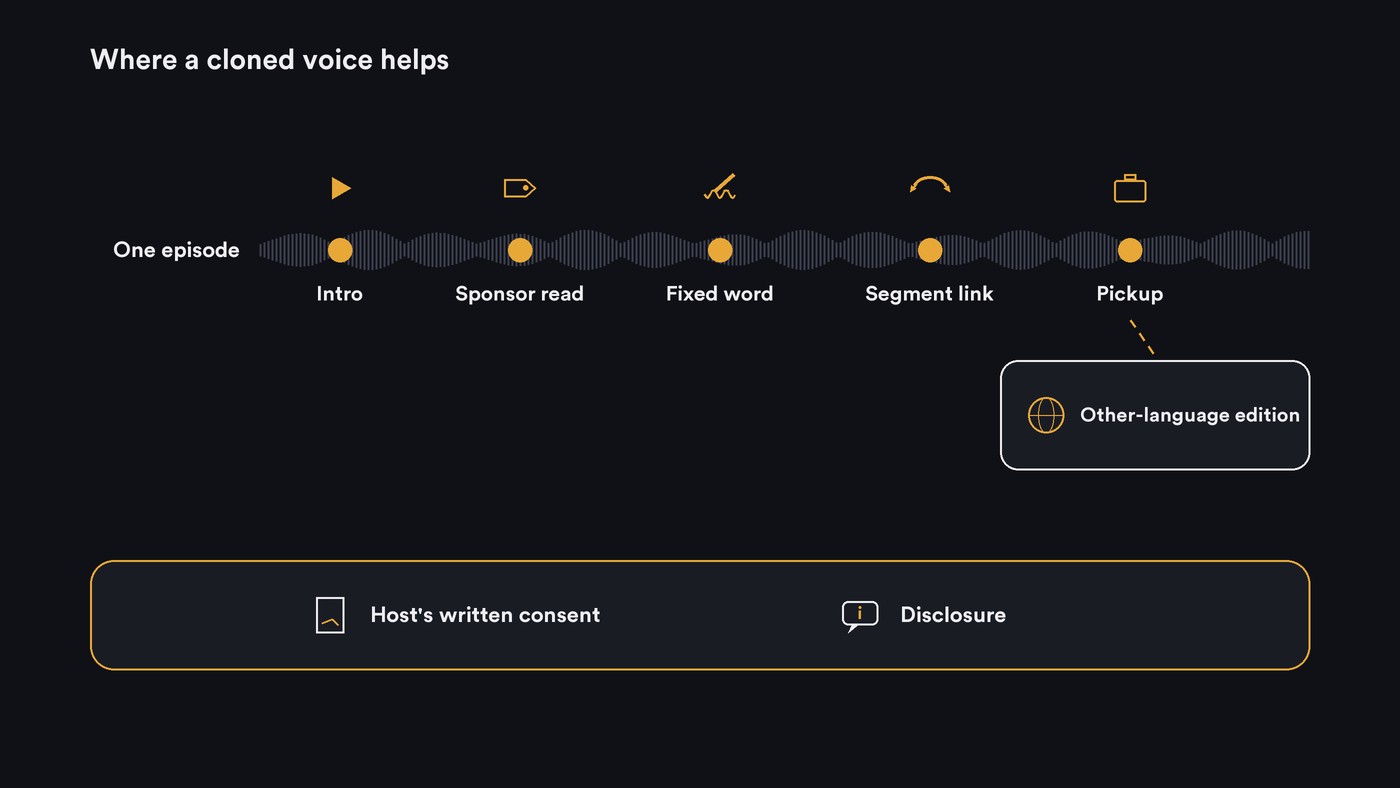
The benefits of voice cloning for podcast production, one by one
1. Fix a misspoken word or line without a re-record
In a real episode: you're editing minute 34 and the host said "2019" where the notes say "2021", or got a guest's company name wrong. You type the right words and generate them in the host's cloned voice. Descript documents exactly this: "When paired with a custom AI speaker, Descript's Regenerate feature can generate text-to-speech audio to fix a flubbed delivery, a misspeak, or a wrong spoken word in the original audio." Async, where podcastle.ai now redirects, says its voice cloning lets you fix pronunciation and regenerate only specific lines.
The limit: Descript's help page says Regenerate needs a custom AI speaker that the original speaker has authorized, supports English audio only and takes up to 250 characters per action. A one-word patch can also sound flatter than the words around it, so regenerate the whole sentence. Our guide to software that handles voice cloning and audio cleanup walks through matching a patch to the rest of the track.
2. Pickups when the host is away
In a real episode: the host is on a plane and the producer finds a missing transition, a sponsor's changed offer or a correction the lawyer asked for. The host approves a typed line by message, and it's generated in their voice that afternoon. On Riverside's AI Voice, only the account owner can generate speech in their own voice, so the host types it from their own account and the audio lands in the studio.
The limit: a pickup should say what the host would have said, word for word as approved. Use it for facts, housekeeping and transitions, never for new opinions or reactions the host didn't give. Riverside's page also caps AI Voice at 2,000 characters a time and 5,000 a month.
3. Consistent intros, sponsor reads and segment links
In a real episode: the cold open, "this episode is brought to you by", "after the break" and the outro all come out in the same voice and energy every week. Riverside pitches AI Voice for intros, ad reads, audio blogs and any other voiceover, and updating a promo code becomes a text edit.
The limit: many sponsors pay for the host's own read and endorsement. Check your insertion order before you voice an ad with a clone. Apple's guidelines also require all advertising to comply with applicable law, including disclosure of paid or sponsored content. And vary the script: a word-for-word identical read every week sounds canned.
4. Versions in other languages
In a real episode: a Spanish edition of an English interview show, voiced by the host's clone, reaches listeners the original can't. ElevenLabs lists Dubbing Studio from its Starter plan, Descript's Business plan translates and dubs video in more than 30 languages with a proofreading step, and Riverside says AI Voice is multilingual.
The limit: the clone may carry the host's accent into the new language, and a machine translation can miss idioms, names and jokes. A native speaker should review every script and listen to the result. Our step-by-step on how to use voice cloning to localize audio covers adaptation, review and mixing.
5. Accessibility
In a real episode: a host with laryngitis keeps a weekly schedule by typing the solo segments, and listeners who prefer audio get the show notes or the newsletter read in the host's voice. For a host whose voice is changing because of illness, a clone made earlier can keep the show recognisably theirs.
The limit: a cloned voice adds an audio format; it doesn't replace transcripts and captions, which deaf and hard-of-hearing listeners need. Our guide to how AI voice synthesis improves podcast accessibility covers transcripts, dubbed episodes and personal voices.
6. Time saved
In a real episode: you skip rebooking a guest for a two-word fix, setting up the mic for a ten-second line, and re-recording the same weekly reads.
The limit: you still listen to every generated line, on headphones and on a phone speaker, and someone signs off on the script. Plans also cap characters or credits each month, so heavy weeks can run out.
The conditions that keep these benefits safe
The host's own written consent
The tools enforce part of this. Descript won't regenerate a speaker's words unless that speaker has created and authorized a custom AI speaker, and Riverside only clones the account owner's own voice. A written agreement covers the rest. Put down:
- Which uses are allowed: corrections, pickups, intros, ad reads, translated editions.
- Who may generate lines, and who approves each script.
- How long the permission lasts and how the host can withdraw it.
- What happens to the voice model if the host leaves the show or the company is sold.
Co-hosts and guests need their own consent. Never clone a guest to fix their answer without asking them.
Tell listeners where it matters
Apple's rule is the most explicit of the three we checked. Its guidelines say creators using AI to generate audio, including synthetic voices and AI-synthesized replicas of real individuals, "must prominently disclose this to audiences in the content and metadata for each episode and show." A plain line in the show notes and a short spoken note in the episode cover it, for example: "Some corrections in this episode use an AI version of Maya's voice, made with her consent."
Each platform's rules, from its own help page (checked 23 November 2026)
- Apple Podcasts: section 1.11 above, plus section 1.12, which bans using AI to mislead or deceptively portray real-life events.
- YouTube: its page on disclosing use of GenAI content requires disclosure of realistic altered content, including content that makes a real person appear to say something they didn't. It lists cloning your own voice to create voice-overs or dubs among the examples that don't need disclosure, so a host voicing their own corrections differs from putting words in a guest's mouth.
- Spotify: its Platform Rules list, under deceptive content to avoid, recordings altered in a way that changes the meaning or context of the original and presented as true in ways that risk harm. Never regenerate a guest's words so they mean something else.
Voice cloning tools podcasters use, compared (checked 23 November 2026)
- Descript. Best for transcript editors who want fixes inside the edit. Regenerate replaces words in an authorized custom voice. Pricing: Free at $0; Hobbyist at $16 per person a month billed annually or $24 monthly, the first plan listing AI Speech with custom voice clones; Creator at $24 or $35; Business at $50 or $65, which adds translation and dubbing.
- ElevenLabs. Best for the most control over the clone itself. Starter lists Instant Voice Cloning, a commercial license and Dubbing Studio at $6 a month; Creator adds Professional Voice Cloning at $22 a month.
- Riverside. Best for hosts who already record there and only voice their own lines. AI Voice needs a Pro or Business account; its pricing page lists Pro at $29 a month, or $24 a month billed annually ($288 a year).
- Async (formerly Podcastle). podcastle.ai now redirects to async.com. Voice cloning with chat-based editing and single-line regeneration, protected by Voice Captcha. It has a free plan; check its pricing page for the current paid plans.
- Resemble AI. Its product notice says it has stopped offering voice generation as a commercial product and now focuses on detection, watermarking and security, useful for checking whether a clip is synthetic.
Where Soundverse fits
Soundverse is an AI music platform that takes you from idea to audience, built for independent artists who release music, and its tools cover a podcast's music and sound. The AI Speech Generator names podcasters among the people it's for: it gives intros, ad reads and segment links the same built-in voice every episode, straight from text, up to 3,000 characters a run. The AI Music Generator composes instrumentals from a prompt, from 15-second beds to multi-minute pieces, with stems on demand for your theme and transitions. AI Vocal Cleaner cleans a spoken track and sets it to −18 LUFS by default, or −23 LUFS for broadcast. Voice Swap lets you hear a scratch jingle in several voice models before you book a singer. In AI Studio, narration, a music bed and sound effects all sit on one timeline.
Licensing is set by plan: the Free plan is for personal use, and the Creator plan comes with a royalty-free license.
This walkthrough of Soundverse's Create tools shows AI Speech Generator from 0:39, alongside the song, music and sound-effect tools.
FAQ
Do I have to tell listeners I used my own cloned voice? On Apple Podcasts, yes: section 1.11 asks for prominent disclosure in the content and metadata of each episode and show. YouTube lists cloning your own voice for voice-overs or dubs as not needing disclosure. A short note in the show notes is the simplest way to meet the strictest rule.
Can a cloned voice read a host-read ad? Only if the sponsor agrees. Host-read deals often pay for the host's own read, so check the insertion order, and keep any required paid-content disclosure in the read.
What should a podcast voice clone agreement include? The allowed uses, who generates and approves lines, how long it lasts, how to withdraw, and what happens to the voice model if the host leaves.
Which benefit should a small show start with? Corrections. Fixing a wrong date or name without a re-record saves the most hassle for the least risk, because the host already said the line and the fix restores what they meant.
Sign up for Soundverse free to build your show's theme and music beds. More guides on the Soundverse blog.