How Can AI Voice Synthesis Be Used to Improve Accessibility in Podcasting?
Podcast accessibility with AI voice tools: transcripts, captions, dubbed episodes, narrated show notes and personal voices, plus W3C guidance and consent.
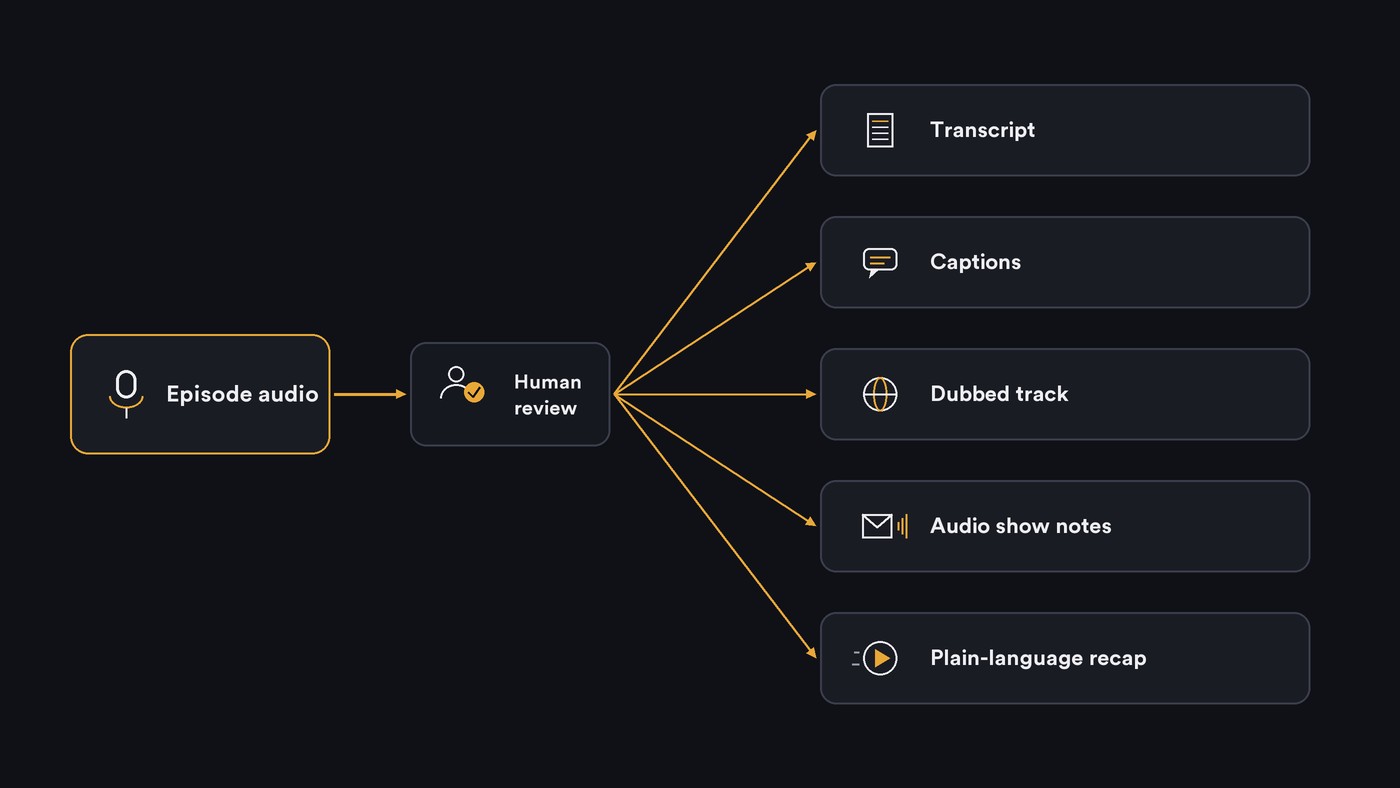
Podcast accessibility improves when AI voice and speech tools turn one audio file into several ways in: speech recognition drafts transcripts and captions, dubbing adds language tracks, synthetic narration reads show notes aloud, and a personal synthetic voice keeps a host on air after their speech changes. Each output still needs a human check before it publishes.
Strictly, transcription is speech recognition, the reverse of synthesis, but an accessible show needs both, so this guide covers the whole chain. Every policy below was read on its platform's own page on 23 November 2026.
Who an audio-only podcast leaves out
The W3C's media accessibility guidance on user needs (updated 29 November 2021) describes the people who miss out when information only exists as sound:
- Deaf listeners, many of whom read text well and get audio information from transcripts or captions.
- Hard-of-hearing listeners, who often listen to what they can and use captions to fill the gaps.
- People who have difficulty processing auditory information, who use transcripts to read at their own pace.
- People who don't understand the spoken language well but read it better, such as non-native speakers and people learning a new language.
- Deaf-blind people, who use a screen reader and braille to read transcripts.
Blind and low-vision listeners hear the episode fine, but often miss what lives around it: show notes, links, sponsor codes, and anything shown on screen in a video podcast.
What the W3C says a podcast should offer
The W3C's Transcripts page (updated 17 September 2024) is direct about audio-only media. For a prerecorded podcast, transcripts are required at WCAG Level A, the baseline level. For live audio, a transcript or live text stream sits at Level AAA. A video podcast needs captions at Level A.
Its definition: "Basic transcripts are a text version of the speech and non-speech audio information needed to understand the content." So a transcript covers laughter, music cues and other meaningful sounds as well as words. It can be plain paragraphs with speakers named, on the episode page or one clear link away.
Transcripts and captions: the AI step and the human step
Apple Podcasts. Per Transcripts on Apple Podcasts, Apple generates a transcript automatically after you publish, for English and ten other European languages, on iOS 17.4 or later. Listeners can read, search and tap a line to jump there. You can supply your own VTT or SRT file through the RSS transcript tag instead, and a VTT file can name each speaker. The app labels Apple's version "Automatically generated" and yours "Provided by" your show. Apple asks you to put host and guest names in the show and episode descriptions so they're spelled right. If your language isn't supported, link a transcript in the episode notes.
YouTube. Automatic captions come from speech recognition, and the help page warns they can misrepresent speech because of mispronunciations, accents, dialects or background noise: "You should always review automatic captions and edit any parts that haven't been properly transcribed."
A workable process:
- Record each voice on its own track and keep music low under speech. Our roundup of AI audio editors for podcast post-production covers the cleanup tools.
- Generate a draft transcript with word timings.
- Correct names, numbers, jargon and every negation. One missed "not" reverses a sentence.
- Add speaker names and meaningful sounds, such as [laughter] or [phone rings].
- Publish the corrected file to your host's transcript field and to YouTube, rather than leaving each platform's auto version live.
Translated and dubbed episodes for language access
A translated transcript is the cheapest step: run the corrected transcript through translation and have a fluent speaker read it before you post it.
Dubbed audio goes further. YouTube's automatic dubbing generates translated audio tracks, marks those videos "auto-dubbed" in the description, and lets viewers switch between the original and the dub. English episodes can be dubbed into Hindi, Spanish, French, German, Japanese, Portuguese and more; some languages get expressive speech that follows the original speaker's pitch and intonation.
The limits matter for podcasts:
- Videos over 120 minutes aren't eligible, and neither is speech that's too fast.
- You can't edit automatic dubs. If the original language is set wrong, the dubs come out mistranslated.
- YouTube warns of errors with proper nouns, idioms and jargon.
Have a native speaker spot-check each dub's first few minutes. Cross-posting each version to the right places is covered in our guide to how podcasters distribute across multiple platforms.
Audio versions of show notes and newsletters
Blind listeners often read text with a screen reader, so start with show notes that are real text: headings, descriptive link text instead of "click here", and sponsor codes written out in full.
Then add synthetic narration for people who would rather listen: a 60-second audio digest of the notes at the end of the episode, or a narrated newsletter. Have the voice spell codes letter by letter, and keep the text version live alongside it.
Clearer or slower versions for listeners who need them
Speed controls don't untangle four people talking over each other. A short plain-language recap does: write five or six sentences on the key points from the corrected transcript, and voice them in one clear, steady synthetic voice. If you need to direct pace and pauses in that read, our guide to AI voice synthesizers with expressive control for podcasting compares the controls. Label it as a recap and check it against the episode; summaries drop caveats.
When a host loses their voice: voice banking and personal voices
Voice banking means recording your voice while you still can, so a synthetic version can speak for you later.
Apple Personal Voice. Per Apple Support (published 13 October 2025), you make it on an iPhone, iPad or Mac by reading sentences aloud, and it's processed on the device. It speaks through Live Speech, VoiceOver and communication apps, including during calls, but apps can't capture its speech. It's limited to your own voice and your own personal, non-commercial use, so it suits a host's calls and daily life more than a monetised episode.
Vendor accessibility programmes. The ElevenLabs Impact Program offers free access to nonprofits, professors and their students, and individuals with accessibility needs, with an application route for people with permanent voice loss. Its healthcare strand aims to help people reclaim their voice identity through personalised AI voices used with assistive technology.
If your speech is changing, save clean, isolated recordings of yourself now, including the raw voice tracks of past episodes. Our guide to AI voice cloning services that allow commercial use covers each vendor's terms for a monetised show.
Consent and disclosure rules
- Spotify removes podcast content that impersonates another host's likeness, voice included, without their permission, whether by AI cloning or any other method.
- YouTube's GenAI disclosure policy requires you to disclose realistic AI content, including anything that makes a real person appear to say something they didn't. Caption creation, voice repair and cloning your own voice for voiceovers or dubs are listed as not needing disclosure.
- Apple Personal Voice works only with your own voice.
Platform rules set the floor. Say in the episode and the show notes when a synthetic voice is reading, and keep written consent from anyone whose voice you clone or translate.
Where human review is still needed
- Names, numbers, jargon and negations in every transcript and caption file.
- Speaker labels, which many tools don't add.
- Translations and dubs, which need a fluent speaker's ear.
- Synthetic narration, for mispronounced names and wrong emphasis.
- Recaps, for meaning a summary may have dropped.
A podcast accessibility checklist
- A corrected transcript for every episode, linked from the episode page.
- Your own VTT or SRT file on Apple Podcasts and YouTube.
- Captions on every video version and clip.
- Show notes with headings, descriptive links and written-out codes.
- A translated transcript or reviewed dub for your largest non-native audience.
- A short narrated recap for long or crowded episodes.
- A disclosure line wherever a synthetic voice is used.
A weekly accessibility routine
- Recording day: separate mic tracks, music low, guest names spelled in the run sheet.
- Edit day: generate the transcript and correct it against the audio at normal speed.
- Publish day: upload the transcript file, check captions on the video version, finish the show notes.
- Day after: generate the narrated recap or notes digest, then listen to it once.
- End of week: review dubs or translations, answer listener feedback on access, and update this checklist.
Where Soundverse fits
Soundverse is an AI music platform that takes you from idea to audience, built for independent artists who release music, and podcasters can use two of its tools for this work.
Audio Transcription takes podcasts and interviews up to 60 minutes and 500 MB, detects the language or lets you pick one of 12, and gives each word a timestamp for captions. Add speaker names yourself, and read the transcript through before you publish captions, as Soundverse's own page advises.
AI Speech Generator reads up to 3,000 characters per run in a built-in voice, each with a sample and tone and accent labels, including American, British, Australian and Indian English narrators. Use it for narrated show notes or a recap.
Licensing is set by plan: the Free plan is for personal use, and the Creator plan comes with a royalty-free license.
This walkthrough tours Soundverse's Analyze tools; the Audio Transcription part, from file to transcript, starts at 0:50.
FAQ
Is a transcript enough to make a podcast accessible? For an audio-only episode, a transcript meets the W3C's Level A baseline, provided it includes speaker names and meaningful sounds. Video versions also need captions, and accessible show notes help listeners who use screen readers.
Can I just use Apple's automatic transcripts? They're a good start, and Apple labels them "Automatically generated." Uploading your own corrected VTT or SRT file through your RSS feed lets you fix names and add speaker labels. For a language Apple doesn't support, link a transcript in the episode notes.
Do I have to disclose AI dubbing or a synthetic host voice? YouTube labels its own automatic dubs "auto-dubbed" and doesn't require disclosure when you clone your own voice for dubs. Making a real person appear to say something they didn't requires disclosure, and Spotify removes unauthorised voice clones of other hosts. Telling listeners plainly is good practice either way.
Sign up for Soundverse free and try Audio Transcription on your next episode. More guides for podcasters on the Soundverse blog.