Recommended Software That Handles Voice Cloning and Audio Cleanup Seamlessly
Software for voice cloning and audio cleanup in one podcast workflow: Descript, ElevenLabs, Riverside, Async and Adobe Podcast, with prices and consent.
The software that handles voice cloning and audio cleanup best in one place, for most podcasters, is Descript: Studio Sound cleans the recording and Regenerate fixes a flubbed word in your authorized voice clone. ElevenLabs, Riverside and Async also pair a cleanup tool with a clone of your own voice, and Adobe Podcast is a strong cleanup-only option.
Below: what one smooth workflow should cover, the tools that do both jobs, how each handles consent, and a step-by-step routine. Every page cited was checked on 23 November 2026, and prices are as each page showed them that day.
What a good voice cloning and audio cleanup workflow should do
Cleanup and cloning aren't separate jobs. A clone learns from whatever you feed it, noise included. ElevenLabs' Instant Voice Cloning docs say it plainly:
"The AI will attempt to mimic everything it hears in the audio. This includes the speed of the person talking, the inflections, the accent, tonality, breathing pattern and strength, as well as noise and mouth clicks." (ElevenLabs)
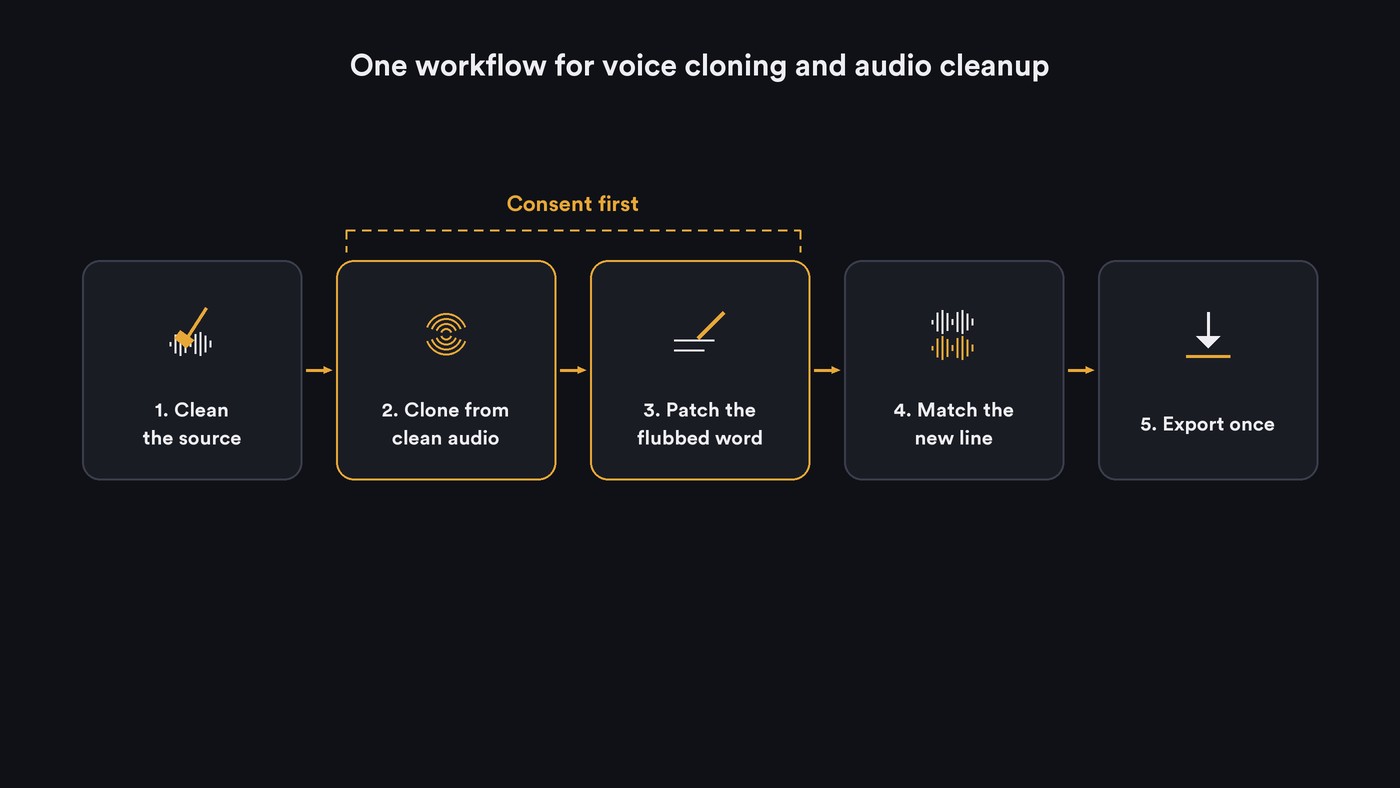
So "one smooth workflow" should mean five things:
- Clean the source before cloning, so the clone doesn't learn the room hum.
- Clone from that cleaned audio, or from a fresh take recorded in your best setup.
- Fix a flubbed word with the clone by typing, without a re-record.
- Match the generated line to the episode, so the patch doesn't sound brighter, drier or louder than the words around it.
- Export once, from one project, at your platform's loudness.
Software that handles voice cloning and audio cleanup, tool by tool
Descript: the most complete single project
Cleanup: Studio Sound reduces background noise and echo at the file level, with an Intensity slider. One detail matters for patches: Descript's help page says Studio Sound only works on recorded audio, so you convert AI speech to a standard audio layer before applying it.
Cloning and fixes: you create a custom AI Speaker, then Regenerate replaces words in the script with new audio in that voice. It needs an authorized custom AI Speaker, supports English only and takes up to 250 characters per action.
Consent: you record or upload a consent statement in English. Descript won't clone a deceased or non-consenting person, someone unable to record the statement, or audio from an AI source.
Price: the pricing page lists Free at $0, Hobbyist at $16 per person a month billed annually or $24 monthly, Creator at $24 or $35, and Business at $50 or $65. Hobbyist is the first paid plan listing Studio Sound and AI Speech with custom voice clones; the comparison table marks both as Limited on Free.
Best for: podcasters who edit by transcript and want cleanup, clone and patch in the same file.
ElevenLabs: strong clones, plus Voice Isolator
Cleanup: Voice Isolator removes background noise from uploads of up to 500 MB or one hour, according to ElevenLabs' docs.
Cloning and fixes: Instant Voice Cloning recommends one to two minutes of clear audio; Professional Voice Cloning trains on 30 to 180 minutes and takes hours. You generate the corrected line, download it and place it in your editor.
Consent: for an Instant clone you confirm you have the right and consent to clone the voice. Professional clones are limited to your own voice and require a verification step.
Price: the pricing page lists Free at $0, Starter at $6 a month with Instant Voice Cloning and a commercial license, and Creator at $22 a month with Professional Voice Cloning. Voice Isolator uses 1,000 credits a minute from the same monthly pool as speech, so Starter's 30,000 credits cover about 30 minutes of isolation if you spend them on nothing else.
Best for: the most control over the clone itself, with your editor of choice doing the assembly.
Riverside: record, clean and patch in the same studio
Cleanup: Magic Audio removes background noise and echo and evens out levels; the pricing page says it doesn't use AI credits.
Cloning and fixes: AI Voice samples your voice from your last two recordings in Riverside and turns typed text into audio, up to 2,000 characters a time and 5,000 a month, which lands in your studio for editing.
Consent: only the account owner can clone, and only their own voice. Riverside's page puts it this way:
"You can only generate speech in your own voice. Likewise, no one else can reproduce your voice." (Riverside)
Price: AI Voice needs a Pro or Business account. Pro is $29 a month, or $24 a month billed annually ($288 a year).
Best for: hosts who already record in Riverside and only need to patch their own lines.
Async: Magic Dust and voice cloning
The old podcastle.ai Revoice address now redirects to Async's voice cloning page.
Cleanup: Async's pricing page lists Magic Dust to clean any audio or video file, plus AI Noise reduction and AI Auto leveling.
Cloning and fixes: you record one sentence or upload audio to make the voice, then regenerate only specific lines with text-based editing.
Consent: the page says your voice is protected with Voice Captcha.
Price: the pricing page shows Free at $0 and lists Essentials, Pro and Teams plans, but the paid prices didn't render when we fetched it, so check them in your browser.
Best for: quick clones and line fixes for intros, sponsor reads and transitions.
Adobe Podcast: cleanup only, worth running first
Enhance Speech removes noise and echo from voice recordings. Adobe's features page says the Free plan handles audio only, files up to 30 minutes and 500 MB, one hour a day, with no strength control. Premium adds strength adjustment, video, bulk upload and files up to two hours. Use it as the cleanup step and pair it with one of the cloning tools above.
A note on Resemble AI
Resemble AI's product notice says it has stopped offering voice generation as a commercial product to focus on detection, watermarking and security, so it's no longer a cloning option for an episode.
For a wider cleanup shortlist, see our guide to top-rated software for cleaning up vocal recordings.
Step by step: clean, clone and patch a podcast episode
- Record each speaker on a separate track, at a level that never clips.
- Clean the voice track with Studio Sound, Voice Isolator, Magic Audio, Magic Dust or Enhance Speech. Start moderate: heavy settings can sound processed, and the clone will copy that too.
- Build the clone from clean, consistent audio. ElevenLabs suggests aiming for −23 to −18 dB RMS with a true peak of −3 dB. Descript's help adds that your delivery during the consent script shapes how the AI Speaker sounds, so read it in your normal show voice and setup. In Riverside, your last two recordings are the sample, so make them good ones.
- Patch the flubbed word. In Descript, highlight the words, press Regenerate and type the fix. Elsewhere, generate the corrected sentence, not a single word, so the intonation lands naturally.
- Match the patch. Convert Descript AI speech to an audio layer and apply Studio Sound like the rest of the track, add a little room tone under the edit, and check the patch level against the surrounding words.
- Listen on headphones, then on a phone speaker. Patches give themselves away in breaths and sibilance.
- Export once at your platform's loudness target. Our guide to AI audio editors for podcast post-production lists what each platform asks for.
Cloning a guest's voice: consent comes first
Riverside and ElevenLabs' professional tier won't clone anyone but the account holder. Descript accepts an uploaded consent statement for someone else's voice. If a guest agrees, get it in writing too: which lines, which episodes, for how long, and how they can withdraw. For the commercial terms behind cloned voices, see AI voice cloning services that allow commercial use.
Which one should you pick?
- You edit by transcript and want one project: Descript.
- You want the most control over the clone: ElevenLabs, with your current editor.
- You record in Riverside and patch only your own lines: Riverside.
- You mostly need intros and sponsor reads: Async.
- You only need cleanup: Adobe Podcast, then any editor.
Where Soundverse fits
Soundverse is an AI music platform that takes you from idea to audience, built for independent artists who release music, so its voice cloning is for singing: Train Voice Clone makes a voice the AI Song Generator sings new songs in. Two tools help a podcast around the edges. AI Vocal Cleaner lists podcasters among the people it's for and cleans one spoken track of up to 10 minutes: it removes noise, hum and clicks, softens harsh S and P sounds, and can set loudness to −23, −18 or −14 LUFS with peaks under −1 dB. It works on every plan, Free included. The AI Speech Generator reads up to 3,000 characters per run in a built-in voice for intros and ad reads. Licensing is set by plan: the Free plan is for personal use, and the Creator plan comes with a royalty-free license.
FAQ
Can I clone a guest's voice to fix their line?
Only with their consent, and only where the tool allows it. Riverside and ElevenLabs' Professional Voice Cloning are limited to your own voice; Descript accepts a consent statement the guest records. Keep a written agreement as well.
Should I clean audio before or after cloning?
Before. A clone copies noise, reverb and mouth clicks from its sample, so clean the source first, then run the same cleanup on generated lines so they match the episode.
Is there free software that does both?
Descript's Free plan includes limited Studio Sound, Regenerate and custom voice clones, and Adobe Podcast's Free plan runs Enhance Speech on files up to 30 minutes. For a full episode, expect to need a paid plan.
Will listeners hear the patched word?
Sometimes, if the patch is one word or its tone differs. Regenerate a full sentence, match cleanup and level, and leave a natural breath before and after.
Sign up for Soundverse free to clean a spoken track with AI Vocal Cleaner. More guides on the Soundverse blog.