What Technical Factors Impact the Audio Quality of AI-Generated Tracks?
AI music audio quality explained: sample rate, neural codec artifacts, long-form drift, vocal clarity, stereo, loudness and export format, with fixes.
AI music audio quality comes down to a handful of technical factors: the sample rate and channels the model generates, the neural codec or autoencoder that turns its tokens or latents back into sound, how much context it holds, how it handles lyrics, and how the file is leveled and exported.
Some are fixed when the model is built. Others are yours: the take you keep, the stems, the master and the export format. Below is each factor, how it sounds and what to do. Papers and platform pages cited were read on 19 November 2026.
What decides AI music audio quality
- Sample rate and channels: a dull top end, or a narrow, mono-ish image.
- Decoder artifacts: metallic hats, smeared transients, phasiness, a faint whine.
- Context length: songs that wander or lose the hook.
- Vocal intelligibility: mumbled or skipped words.
- Stereo image: width that falls apart in mono.
- Loudness and peaks: clipping, and crunch after streaming encodes.
- Export format: MP3 artifacts stacked on top of everything else.
Sample rate and bit depth of the output
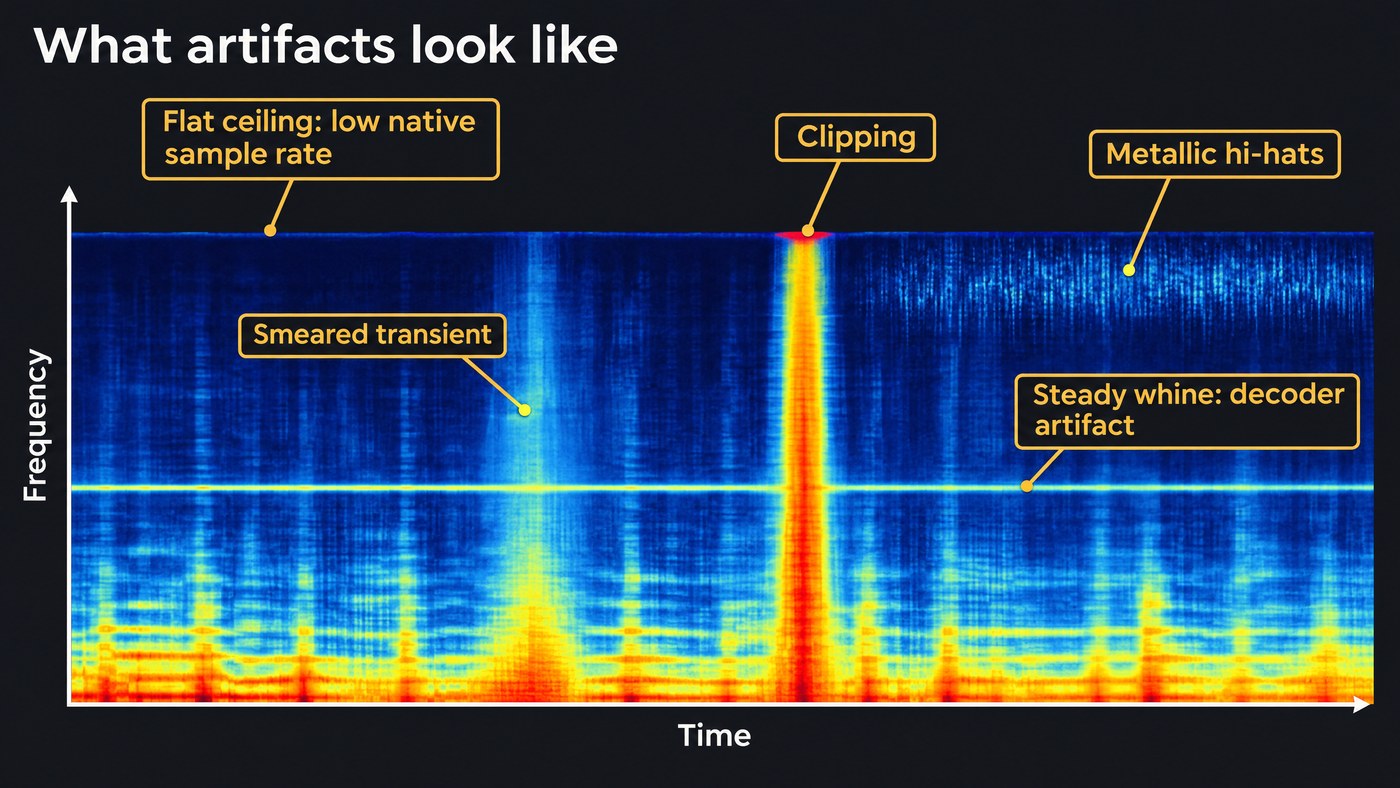
Every model generates at a fixed sample rate, and nothing can exist above half of it. Meta's MusicGen works on 32 kHz audio, downmixed to mono unless stated otherwise, so its output stops at 16 kHz. Stability AI's Stable Audio models generate stereo at 44.1 kHz. Upsampling a 32 kHz file to 48 kHz changes the number on the file, not the sound: the air and cymbal shimmer above 16 kHz were never generated.
Check it on a spectrogram: look for a flat ceiling across the top. A hard edge around 16 kHz points to a 32 kHz source or a low-bitrate MP3 somewhere in the chain.
Bit depth is set by the export, not the model. Keep 24-bit or 32-bit float files while you edit and mix, so gain changes don't add noise, and only make a 16-bit file at the end, with dither. Apple's Apple Digital Masters program, for comparison, is built around 24-bit studio masters.
Codec and latent compression: where artifacts come from
Most music generators don't predict audio samples directly. They generate tokens from a neural audio codec, or a continuous latent from an autoencoder, and a decoder rebuilds the waveform. Our explainer on tokenization in AI music covers the token side; the decoder is where much of the sound is won or lost.
The DAC codec (NeurIPS 2023) squeezes 44.1 kHz audio about 90 times, into 8 kbps of tokens, and Stable Audio's long-form model works on a latent at 21.5 frames a second. The DAC authors list what earlier codecs got wrong: tonal artifacts, pitch and periodicity artifacts, and imperfect high frequencies. Even after their improvements, they write: "we find that high-frequency modeling is still challenging for these models especially at high sampling rates."
What that sounds like in a mix:
- Metallic or swishy hi-hats and cymbals. Noisy, fast, high-frequency sounds are the hardest to rebuild. The DAC team found a finer spectral loss improved cymbal crashes and singing vocals, a hint of where decoders struggle.
- Smeared transients. Kicks and snares lose their snap; plucked notes blur at the start.
- Phasiness. A hollow, swirly or underwater quality when phase is rebuilt badly. In one test trained on reconstruction loss alone, the DAC authors heard buzzing because the model hadn't learned phase.
- A faint whine. Deezer researchers showed in an ISMIR 2025 paper that the upsampling layers in many decoders leave small, regular spectral peaks. By their count, EnCodec's decoder creates 161 of them, and earlier work described the effect as audible pitched noise.
- Harmonic distortion. Stable Audio's authors removed the tanh function at the end of DAC's decoder because it added harmonic distortion.
Training audio counts as well: part of Stable Audio Open's music data was variable-bitrate MP3s, and a model can only be as clean as the audio it learned from.
What to do: generate several takes and keep the cleanest, since artifacts vary from take to take. Split the stems and treat the worst part: tame metallic hats with a gentle low-pass or de-esser or replace them with a sample, bring back attack with a transient shaper, and notch a steady whine you can see on a spectrogram.
Context length and long-form drift
A model only hears so much at once. In their long-form music paper, Zach Evans and colleagues note that text-to-music models have generally been trained on 10 to 30 second segments, and that stretching them to longer pieces yields only local coherence. Their model trains on up to 4 minutes 45 seconds so full-song structure can emerge.
Drift sounds like a second chorus that doesn't match the first, a vocal whose tone shifts between verses, or tempo and key that slip where an extension joins.
What to do: generate at full length when the tool allows, rather than stitching short extensions. Extend from a passage that represents the song, check tempo and key after every extension, and regenerate only the section that went wrong.
Vocal intelligibility
Clear words need a model that's told what to sing and when. The Stable Audio Open paper shows the opposite case: its speech comes out unintelligible because the model isn't conditioned on spoken words. Song models condition on lyrics, usually as phonemes, but alignment is still the weak spot. The authors of JAM, a 2025 lyrics-to-song model, write that high word and phoneme error rates show earlier open models often misalign or omit lyrics. JAM adds word-level timing and reports cutting those error rates by more than three times.
Dense arrangements make it worse, since guitars and synths mask consonants, and decoder smearing blurs "s" and "t" sounds.
What to do: write short lines with clear stresses, spell tricky words phonetically, ask for a sparser arrangement under the verses and regenerate any line that fails. Then de-ess and EQ the separated vocal. Our explainers on how AI singing synthesis works and the limits of AI vocal synthesis go deeper.
Stereo image and mono compatibility
MusicGen works in mono by default and gets stereo through fine-tuning, while Stable Audio trains its autoencoder with a loss on the mid-side signal as well as left and right. Generated width can still be fragile: swirling sides, wandering instruments, off-center bass, or hats and vocal that thin out in mono.
What to do: watch a correlation meter and listen in mono. Keep the low end centered and re-pan separated stems if the image wanders.
Loudness, clipping and true peak
A generated file can arrive loud and limited, with peaks at full scale. The waveform between samples can overshoot 0 dBFS, and lossy streaming encoders turn that overshoot into distortion. Spotify's loudness guidance normalizes playback to −14 LUFS by default, recommends keeping masters below −1 dB true peak, and below −2 dB for masters louder than −14 LUFS. In its words: "Louder tracks are more susceptible to extra distortion when encoded for streaming." Apple's Digital Masters page offers free tools that create and decode 256 kbps AAC files, so you can hear the encode before release.
What to do: turn the file down before processing so your plugins have headroom. Master from WAV or stems, aim at your loudness target and set a true-peak ceiling of −1 dBTP. Limiting won't undo clipping already baked in; a new take or a rebuilt part fixes more. For affordable options, see our roundup of AI mastering services for singer-songwriters on a budget.
Export format: WAV and FLAC vs MP3
WAV and FLAC are lossless; FLAC just stores the same data in less space. MP3, AAC and OGG are lossy: they discard detail the encoder judges inaudible, again at every re-encode, so the losses stack. A generated track carries its decoder's artifacts, an MP3 export adds its own, and a streaming service encodes again, to Ogg/Vorbis or AAC for Spotify's lossy streams.
Converting an MP3 to WAV restores nothing. Keep lossless files from download to master, and make MP3s only for previews.
A quick quality check before you release
- Listen on studio headphones, then on a phone speaker and earbuds.
- Open a spectrogram and look for a flat ceiling, steady whine lines and blurred drum hits.
- Sum to mono and check the vocal and hats survive.
- Measure integrated LUFS and true peak across the whole song.
- Read the lyrics along with the vocal, and play the song once start to finish, listening for drift.
- Fix what you found with a new take, a regenerated section, stem edits or mastering.
Where Soundverse fits
Soundverse is an AI music platform that takes you from idea to audience, built for independent artists who release music. It publishes no sound-quality score for Soundverse v9, its newest song model on Pro and Max, so judge takes by ear.
AI Studio exports audio at 44.1, 48 or 96 kHz as 16-bit, 24-bit or 32-bit float WAV, 16-bit or 24-bit FLAC, or MP3, AAC and OGG at up to 320 kbps, with an optional loudness target and true-peak normalizing to −1 dBTP. The Free plan exports MP3; WAV, FLAC, AAC and OGG need Creator. Analysis One shows gated LUFS, 4× oversampled true peak, an overs counter and stereo correlation, and Mastering One masters toward targets from Club −7 to Broadcast −23 LUFS. Stem Separator gives 2 or 6 stems as lossless WAV or FLAC, and Inpainting, on Creator and above, rewrites about a minute at a time and keeps the rest.
Soundverse's Edit walkthrough shows Inpainting from 0:12 and Stem Separator from 1:28.
FAQ
Why do hi-hats in AI-generated songs sound metallic? Noisy, fast, high-frequency sounds are the hardest for a neural decoder to rebuild, and codec researchers still name high frequencies as a weak spot. Split the stems and tame the hats with a low-pass filter or a de-esser, or replace them with a sample.
Does downloading WAV instead of MP3 improve an AI track? It keeps what the model made without adding MP3 artifacts on top, which matters once you process and master, and again when streaming services re-encode. It can't remove artifacts already in the generation.
Can mastering fix AI artifacts? Partly. Mastering sets loudness, tone and peaks and can soften harshness, but it works on the whole mix. Metallic hats, smeared drums or a mumbled word are better fixed with stems, a regenerated section or a new take first.
Sign up for Soundverse free and run your next track through the checks above. More guides for producers on the Soundverse blog.
