The Most Effective AI Mastering Services for Singer-Songwriters on a Budget
Budget AI mastering services for singer-songwriters: BandLab, Logic Pro, SoundCloud, Soundverse and Matchering, with real costs and gentle settings.
The best budget AI mastering services for a singer-songwriter are BandLab's free mastering, Logic Pro's Mastering Assistant, SoundCloud's Artist plans, Soundverse AI Studio's Mastering One and the open-source Matchering. They're the most effective AI mastering services for singer-songwriters on a budget because each costs little or nothing and suits songs that need polish more than volume.
We checked each one on its own site on 7 November 2026. Below: what a vocal-led song needs from a master, the shortlist with real costs, a cheap workflow that gets good results, and when to pay a person instead.
What singer-songwriters need from budget AI mastering services
A voice with guitar or piano isn't a club track. It has wide dynamics, open space and a lead vocal that carries the meaning. A budget master has three jobs:
- Bring the song up to a sensible streaming level without flattening the quiet verse.
- Keep the vocal clear and the top end smooth.
- Make every song on your EP sit at a similar level.
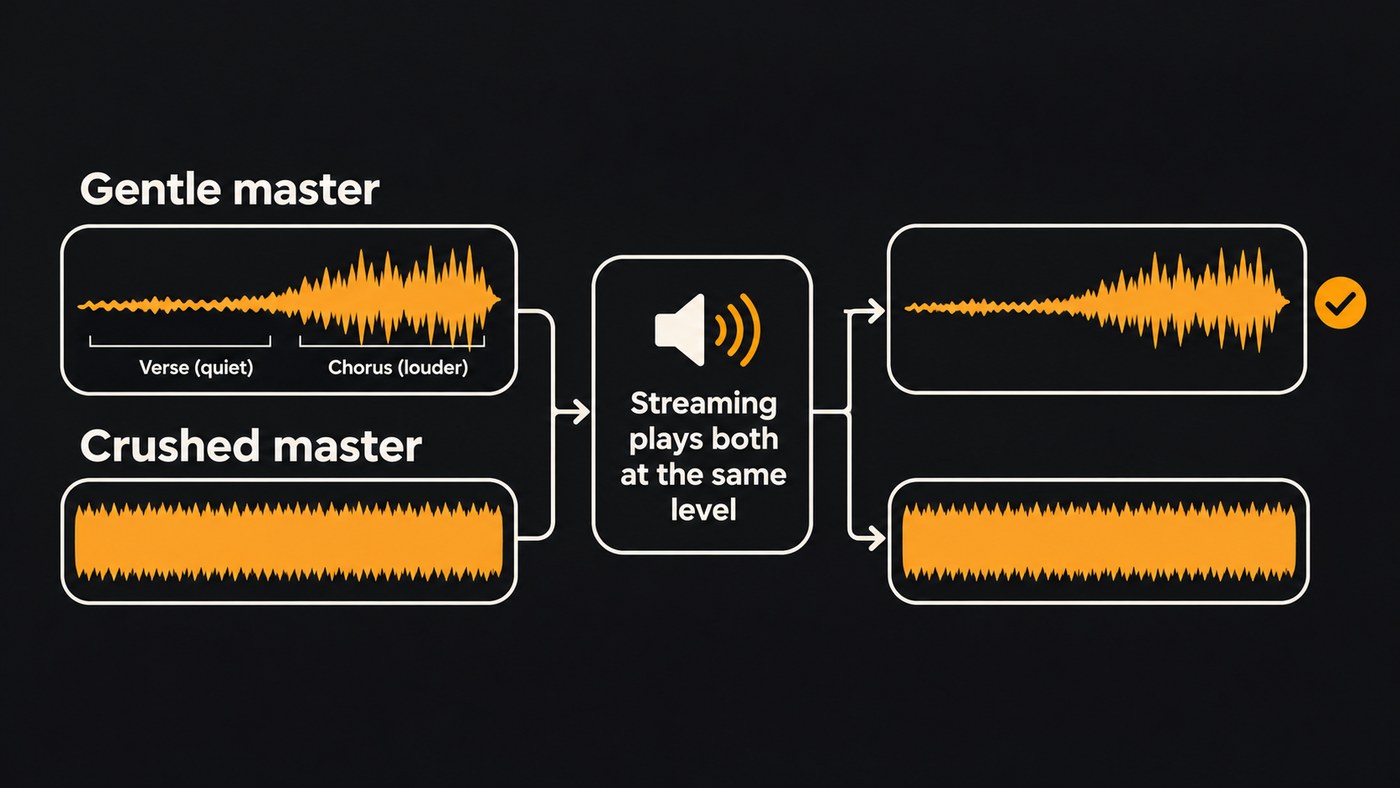
Loudness first. Spotify turns loud masters down, and its loudness guide for artists also covers the other direction: "Positive gain is applied to softer masters so the loudness level is -14 dB LUFS." Spotify adds that it takes each track's headroom into account when it does this, so a very quiet master with high peaks can still play a little lower than others.
For a ballad, that points to a master around −14 LUFS integrated with true peaks below −1 dB, which is Spotify's own recommendation. Pushing an acoustic song much louder mostly costs you the lift into the chorus.
The shortlist: effective AI mastering on a budget
1. BandLab Mastering: free, in the browser or on your phone
BandLab's mastering page offers free song mastering with four presets. You select an audio or video file, choose the preset that sounds best, then adjust input gain and intensity. You can also master entire albums or EPs by drag and drop. Membership adds customization and lets you master as many tracks as you want.
The page lists eight preset styles without saying which four are free. For a vocal-and-guitar song, try Natural, which BandLab describes as balanced dynamics with gentle compression, or Universal first if they're available to you, and keep the intensity low.
Costs: free; Membership for more control. Best for: a first release, and songwriters who write and record on a phone.
2. Logic Pro Mastering Assistant: fine control if you're on a Mac
Mastering Assistant sits on the stereo output of a Logic Pro project, after any other plug-ins, and analyzes your mix. Apple's guide describes four Character options. Transparent is the default, Apple designed Clean for EDM and acoustic music, and Punch suits rock. For warmer songs, Apple writes: "For deep low end and refined high end, choose Valve, which is a good option for both acoustic music and hip-hop."
A loudness knob sets the level, and its center position gives around −14 LUFS integrated. An Auto EQ slider sets how much tonal correction is applied. Note that the Character options need Logic Pro on an Apple silicon Mac or Logic Pro for iPad.
Costs: per Apple's Logic Pro page, Logic Pro for Mac is $199.99 as a one-time purchase, or part of Apple Creator Studio at $12.99 a month or $129 a year after a 30-day free trial. Best for: songwriters who already record in Logic and want to finish the song in the same session.
3. SoundCloud Artist plans: mastering credits plus distribution
If SoundCloud is already where your listeners find you, its paid artist plans include mastering. SoundCloud's pricing page listed:
- Artist: $3.25 a month, billed yearly at $39, with 1 free mastering credit a month and 2 distributed tracks a month.
- Artist Pro: $8.25 a month, billed yearly at $99, with 3 mastering credits a month and unlimited distribution.
The free Basic plan doesn't include mastering credits. One credit a month fits a one-single-a-month habit. If you expect several attempts per song, Artist Pro's three credits give you more room.
Costs: $39 or $99 a year. Best for: songwriters who release regularly and build their audience on SoundCloud.
4. Soundverse AI Studio: free mastering inside a browser studio
AI Studio includes Mastering One: you pick a genre and a loudness target, from Club −7 to Broadcast −23 LUFS, and it listens to two seconds of your mix and sets its own controls. It runs on every plan at no token cost, Free included.
The catch for a release is the format. The Free plan exports MP3, and WAV export needs Creator or higher, as the pricing page shows.
Costs: free to master; Creator for WAV export. Best for: songwriters who also want to record, arrange or mix in the same browser tab.
5. Matchering: free and open source, if you're comfortable with tech
Matchering takes your track and a reference track, then masters yours to match the reference's RMS level, frequency response, peak amplitude and stereo width. It's free under the GPL-3.0 license and runs as a Docker web app or a Python library. The Python version needs Python 3.8 or higher and a machine with 4 GB of RAM.
The reference does all the steering, so choose it carefully. Match a sparse ballad to a dense pop single and you'll likely get a master that's louder and brighter than the song wants. Pick a released song with similar instruments and a similar arrangement.
Costs: free. Best for: songwriters with a clear reference in mind and the patience to set it up.
Which budget option fits you
- You write and record on your phone: BandLab.
- You record in Logic on a Mac: Mastering Assistant, with Clean or Valve as your starting point.
- You release about once a month and your fans are on SoundCloud: an Artist plan.
- You want to record, mix and master in a browser without paying per master: Soundverse AI Studio.
- You have the perfect reference song and don't mind a setup step: Matchering.
How to get a good master from a cheap service
- Fix the mix first. Mastering can't pull a buried vocal forward. Set the vocal level, tame harsh "s" sounds and clean up low rumble in the mix. Our guides on how to mix vocals like a pro and how to make vocals sound professional cover the basics.
- Take the limiter off your stereo bus and leave some headroom, so the mastering engine has room to work.
- Export a WAV of the mix at your session's sample rate, not an MP3.
- Start gentle. Use a low intensity and a natural or transparent preset, aiming near −14 LUFS.
- Compare at matched volume. Turn the master down until it's as loud as your mix, then listen. Check the quietest intro and the biggest chorus on headphones, laptop speakers and a phone.
- Read a meter. Confirm the integrated loudness and that true peak stays below −1 dB. Our tour of the AI Studio plugin ecosystem shows the meters available in the browser.
- Master an EP as a set. Use the same preset on every song, then play the songs back to back and nudge any that stand out.
- Keep the unmastered mix. You can re-master it later with a better tool or an engineer.
When a budget AI master isn't enough
An AI master can only polish what's already in the mix. If two different services both make your song sound harsh, thin or pumping, the problem is in the mix or the recording, and our comparison of automated vs professional AI mixing shows where automation helps there. For a vinyl pressing, a sync pitch or an album you've spent months on, a human mastering engineer is worth saving for.
Where Soundverse fits
Soundverse is an AI music platform that takes you from idea to audience. For a singer-songwriter on a budget, the useful part is AI Studio, a multitrack studio in your browser. You can record vocals and instruments track by track, add harmonies or ad-libs over a take, or import a mix you made elsewhere as MP3, WAV, OGG, M4A or AAC.
Mix One maps your tracks using 18 genre templates and shows where they mask each other. Mastering One sets the loudness, and Analysis One shows LUFS and true peak, all on every plan at no token cost.
The honest limits: the Free plan gives you 3 AI Studio projects with 3 tracks each and MP3 export, while WAV and stems need Creator. Recording has no count-in, punch-in or take comping, so record full takes. Licensing is set by plan: the Free plan is for personal use, and the Creator plan comes with a royalty-free license.
This video shows Mix One and Mastering One mixing and mastering a track by genre inside AI Studio.
FAQ
What's the cheapest way to master a song for Spotify? BandLab's mastering and Matchering cost nothing. Soundverse's Mastering One also runs at no token cost on every plan, though the Free plan exports MP3 only. Whichever you use, send your distributor a WAV and aim near −14 LUFS.
Is AI mastering good enough for acoustic music? Often, yes, if you keep it gentle. Apple even describes Logic's Clean character as designed for EDM and acoustic music. Listen closely to quiet passages for pumping and to the vocal for harsh "s" sounds before you accept a master.
How loud should a singer-songwriter master be? Around −14 LUFS integrated, with true peak below −1 dB, matches Spotify's guidance for artists. A slightly quieter master is fine for a sparse song. Going much louder rarely helps, because Spotify turns louder masters down.
Should I master each song on an EP separately? Master them with the same service and settings, then compare them back to back. BandLab lets you master a whole album or EP by drag and drop.
Sign up for Soundverse free and master your next song in AI Studio. More guides for songwriters on the Soundverse blog.
