What Are the Limitations of Current AI Vocal Synthesis?
AI vocal synthesis limitations in 2026: diction, expression, voice drift, long notes, harmonies, artifacts, one-word edits, rights and platform rules.
The main AI vocal synthesis limitations in late 2026 are mispronounced lyrics (worst in less-covered languages), loose control over expression, a voice that drifts between takes, shaky long notes, harmonies you can't pull apart, artifacts that lossy streaming files make more obvious, and no easy way to change one word. Voice consent and platform rules sit on top.
Each one has a practical workaround. Below, every limit gets what you'll hear and what to do about it. Tool and policy details come from each company's own pages, checked on 14 November 2026.
What are the common limitations of current AI singing engines?
Most of them share a cause: a singing model predicts a plausible performance from text, a melody or a reference, and can't know which word matters to you. Prompt-based generators give you the least control. Note-based vocal synths, which sing from MIDI and typed lyrics, give you more control for more work.
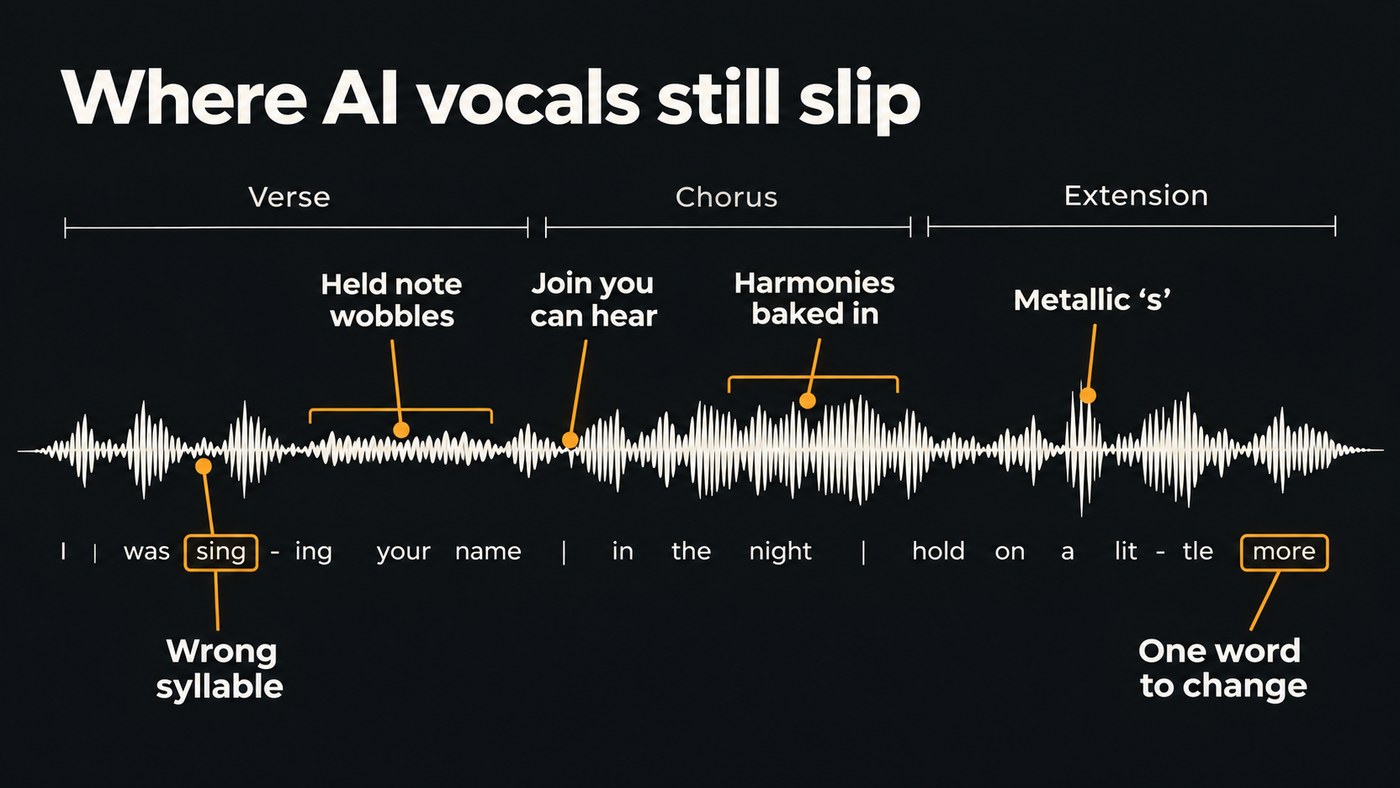
1. Diction and lyric errors, especially outside English
What you hear: skipped or swapped words, stress on the wrong syllable, an accent borrowed from another language. Languages with less singing data behind them usually suffer most.
ACE Studio's lyrics documentation says that if a syllable is unsupported or unrecognized in the selected language, the note is sung with a default syllable such as "da". Prompt-based tools often publish no language list at all: Soundverse publishes none for Soundverse v9 and suggests testing a short verse first.
Workarounds:
- Generate one verse before you write the whole song in a new language.
- Respell problem words phonetically and write numbers as words. If romanised lyrics fail, try the native script.
- In a note-based synth, edit the phonemes on the problem note directly.
- Translate for singing, not for reading. Soundverse's Translate Lyrics has a Match syllables option that aims for each line's original syllable count.
- Play the result to a native speaker before release.
2. Expressive control
What you hear: a vocal that's in tune and on time but doesn't mean anything in particular. Verse and chorus at the same intensity, the same vibrato on every long note, breaths in odd places or none at all.
Workarounds: give the model a human performance to follow, such as a hummed or sung guide; describe the delivery section by section; and comp the best phrases from several takes. Our guide to the challenges of expressive AI vocals works through breath, vibrato, dynamics and emotion.
3. Keeping one voice consistent across a song or an album
What you hear: the second chorus sounds like a slightly different singer, or track four of your EP sounds like someone else. Soundverse's AI Singing Generator page notes that every take comes out differently and that each take sings only about the first 350 characters of your lyrics, so a vocal built from several takes can drift. Model versions matter too: Soundverse v9 can't extend a song, so extensions run on Soundverse v8. Listen closely to that join.
Workarounds:
- Use one trained voice for the whole project. Soundverse's Train Voice Clone, on the Creator plan and up, builds a reusable voice from one recording with at least 15 seconds of singing.
- Keep a project sheet with the same clone, model version and style wording for every song.
- Run every song's vocal through the same chain of EQ, compression and reverb.
- Play the whole record in order before release. Drift shows up back to back.
This walkthrough records a short sample, creates an AI voice from it, then has the AI Song Generator sing a described song in that voice.
4. Long held notes and transitions
What you hear: a held note that wavers, thins or changes colour halfway, a jump into falsetto that smears, or a seam where one section or take meets the next.
Workarounds:
- Write holds a little shorter and let a pad or the reverb carry the tail.
- Comp the long note from the take where it holds best, crossfading on a consonant or a breath, where edits hide.
- In a note-based synth, spread a held syllable across several notes as a melisma; ACE Studio's lyrics docs mark those notes with a dash.
- Regenerate only the problem section (see limitation 7).
5. Harmonies and backing vocals
What you hear: stacked harmonies baked into the vocal, with no way to move, mute or retune one line. Splitting the finished mix rarely gives you clean, separate harmony lines, and Soundverse's Voice Swap page notes that on a full mix it separates the lead first and leaves backing vocals out.
Workarounds:
- Build harmonies as separate parts. Sing or program each line on its own track so it can be tuned, panned and balanced.
- Convert one line at a time. Voice Swap re-sings a solo vocal in another voice while keeping your phrasing and timing, so give it each harmony as its own file.
- For a group sound, Soundverse's AI Singing Generator has a Choir style.
- For thickness, a doubler such as Soundverse's VocalDuality One adds up to four copies of a take, though doubles aren't harmonies.
6. Artifacts, and how the vocal sounds after export
What you hear: a metallic shimmer on held notes, smeared "s" sounds, torn breaths. Export choices matter too. Spotify's loudness guidance recommends keeping masters below -1 dB true peak, which it says is best for its lossy formats (Ogg/Vorbis and AAC) and avoids extra distortion in transcoding.
Workarounds:
- Work from WAV files at every step, not MP3.
- De-ess before reverb, so a bright reverb doesn't spread the smear.
- Leave that true-peak headroom instead of limiting harder.
- Before release, bounce an MP3 or AAC copy and check it on earbuds and a phone speaker.
Our guide to subtle vocal artifacts covers what to keep and what to repair.
7. Changing one word without regenerating the song
What you hear: nothing, until you need "Tuesday" to become "Friday". In a prompt-based generator, a new run is a new performance, and the take you liked is gone.
Workarounds:
- Inpaint the line. Soundverse Inpainting, on the Creator plan and up, rewrites a section you select, up to about a minute at a time, and returns the whole song with everything else unchanged. On its default model, the new lyrics are sung word for word.
- In a note-based synth, retype the lyric on that note and render again.
- If the vocal is your own, punch in the word and match its tone with EQ.
- Generate a few versions of the line and comp the best.
8. Rights and consent around voices
AI makes it easy to sing in a voice that isn't yours. Use only your own voice or one whose owner has given explicit consent, and keep that consent in writing. Soundverse's Train Voice Clone won't start training until you confirm the voice is yours or that the singer has given explicit consent.
Spotify's policy, announced on 25 September 2025, is direct: "Vocal impersonation is only allowed in music on Spotify when the impersonated artist has authorized the usage."
On the legal side, the US Copyright Office's report on copyright and AI covers digital replicas in Part 1 (31 July 2024), where it recommended a federal digital replica law, and the copyrightability of AI-generated outputs in Part 2 (29 January 2025). Laws differ by country, so get advice before releasing anything built on someone else's voice. On Soundverse, licensing is set by plan: the Free plan is for personal use, and the Creator plan comes with a royalty-free license.
9. Platform and distributor rules on AI vocals
As of 14 November 2026:
- Spotify shows AI credits that artists submit through their label or distributor, launched as a beta in April 2026 per an update to its AI protections announcement, though not all distributors let artists disclose yet.
- YouTube asks music partners to declare content as Fully Gen AI, Partly Gen AI or No Gen AI. Its help page says that if partners give no information, YouTube relies on its own signals and may designate content as fully or partly Gen AI.
- Deezer said on 21 July 2026 that tracks it detects as AI-generated are removed from algorithmic recommendations and editorial playlists, and that it will take down AI tracks used for streaming fraud or not streamed for six months.
- Bandcamp has the strictest rule. Its 13 January 2026 policy states: "Music and audio that is generated wholly or in substantial part by AI is not permitted on Bandcamp."
- Distributors each set their own rules and disclosure fields, and those change too. Read the current policy before you upload. Our checklist of what to prepare before uploading music for distribution includes the AI notes to keep.
Where Soundverse fits
Soundverse is an AI music platform that takes you from idea to audience, built for independent artists who release music. Three of its tools answer limits above. Inpainting rewrites one selected line and leaves the rest of the song as it was. Train Voice Clone gives you one reusable voice from a single take. Voice Swap, on every plan including Free, changes the voice of a take while keeping your phrasing, a practical way to build harmonies one line at a time. On Pro and Max, songs start on Soundverse v9.
If you want to edit pitch curves and phonemes note by note, a piano-roll vocal synth such as ACE Studio is built for that job.
FAQ
Are AI vocals good enough to release? In a busy mix they often are. In an exposed ballad, every wrong syllable and wobbly hold shows. Fix what you can, then play the song to someone who doesn't know how it was made.
Why does my AI singer mispronounce words in my language? Often because the model has less singing data for that language, or because of spelling and stress. Test one verse, respell problem words phonetically, try the native script, and put stressed syllables on strong beats.
Do I have to disclose AI vocals? Spotify shows AI credits that you submit through your distributor, YouTube asks music partners to declare Gen AI use, and Bandcamp doesn't allow music generated wholly or in substantial part by AI. Where a disclosure field exists, fill it in honestly.
Can I use an AI voice that sounds like a famous singer? Not without their permission. Spotify allows vocal impersonation only when the impersonated artist has authorized it, Bandcamp prohibits using AI to impersonate other artists, and many places have laws protecting voice and likeness.
Sign up for Soundverse free and fix your next AI vocal one line at a time. More vocal guides on the Soundverse blog.
