Recommended Professional Software for Cleaning Up Noisy Podcast Recordings
How to clean up noisy podcast recordings by noise type: iZotope RX, Clarity Vx, Adobe Podcast, Descript, Auphonic and dxRevive, with prices and an order.
To clean up noisy podcast recordings, start with the noise you hear, because each problem has its own fix. The professional software for cleaning up noisy podcast recordings we'd recommend: iZotope RX for hum, clicks and clipping, Waves Clarity Vx for traffic, Adobe Podcast or Descript for echo and laptop mics, dxRevive for codec damage, and Auphonic for crosstalk.
We checked every product page on 23 November 2026, during Black Friday sales, so where a page showed a sale price and a list price we give both, in US dollars.
Name the noise before you buy anything
Solo each speaker's track on headphones and note what you hear in the first five minutes. Most noisy episodes have two or three problems at once, and the order of fixes matters as much as the tool.
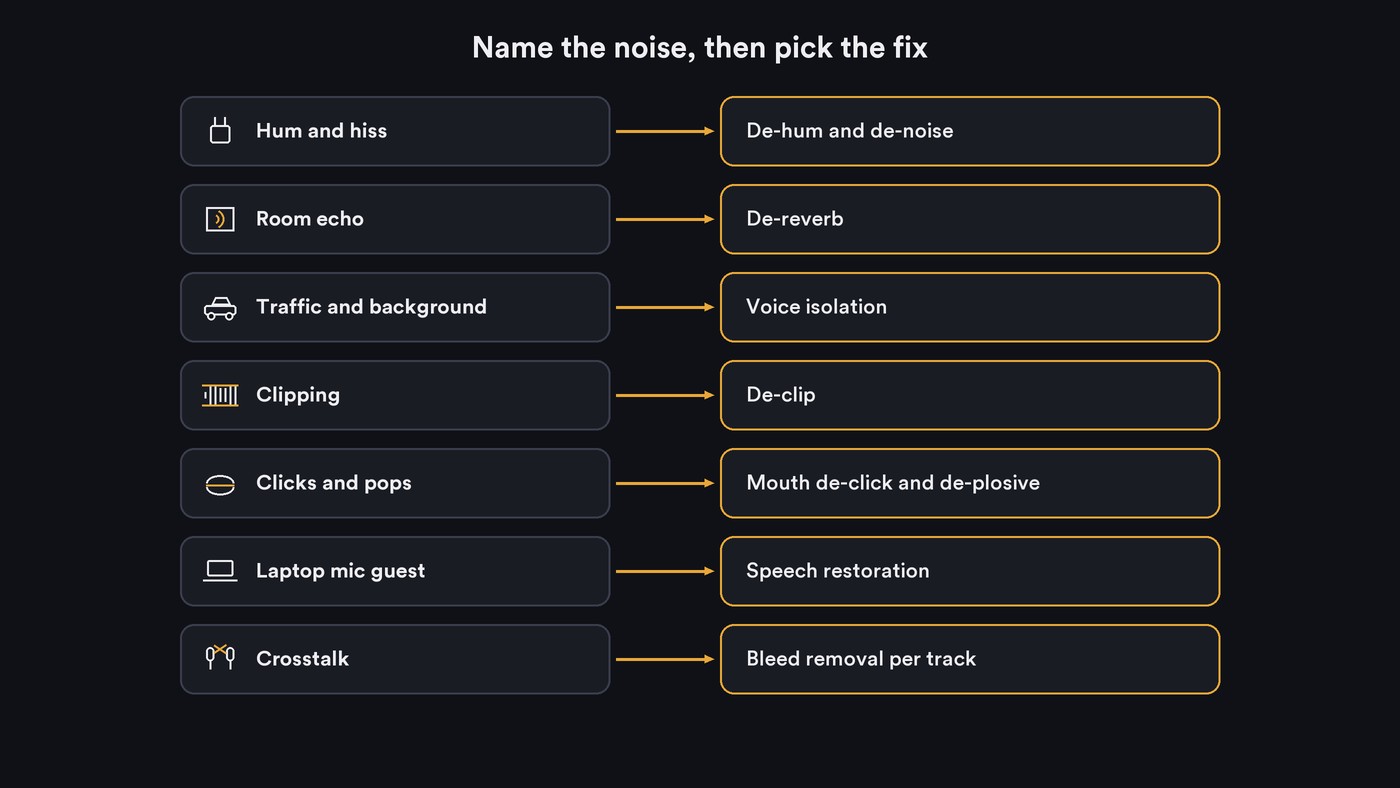
Which professional software fixes which noise
Constant hum and hiss
A steady tone under every word, from mains power or a ground loop, or a flat hiss from a cheap interface. The easiest problem, because the noise doesn't change.
- iZotope RX 12. De-hum (hum, wireless ring and interference) and Voice De-noise are in all three editions, Elements included. The RX page listed Elements at $99, Standard at $399 and Advanced at $1,399.
- DaVinci Resolve. Blackmagic's Fairlight page lists a de-hummer for power line hum and a noise reduction plugin you can teach by selecting a stretch of noise and clicking "learn".
- Soundverse AI Vocal Cleaner removes background noise, hum and clicks from one solo voice track (more below).
Room echo
The voice sounds like it was recorded in a kitchen or a stairwell, and every phrase leaves a short tail.
- iZotope RX 12. De-reverb is in every edition. Dialogue Isolate, in Standard and Advanced, is built to rescue speech buried under noise and reverb, podcasts included.
- Adobe Podcast Enhance Speech removes noise and echo from voice recordings. Per the features page, the free plan takes files up to 30 minutes and 500 MB, one hour a day, with no strength control. Premium adds strength control, longer files and more hours a day, with a 30-day free trial.
- Auphonic lets you set noise, reverb and breath reduction separately.
Background noise and traffic
Noise that changes: a passing bus, an air conditioner cycling on, voices next door.
- Waves Clarity Vx. The product page names air conditioners, room rumble, rain, traffic, airplane flyovers and background talking as its targets, with one knob, in real time. The Broad 2 network is for severe noise and for separating a main voice from background voices. It showed $34.99 in a sale, against a $199 list price.
- iZotope RX 12 Voice De-noise works in real time on everything from air conditioning to street noise.
- DaVinci Resolve Studio ($295) adds AI voice isolation, a music remixer and a dialogue separator, per the Studio page. Handy if your video podcast already lives in Resolve.
Clipping
Crackle or fuzz on laughs and loud words, because the input gain was set too hot.
- iZotope RX 12 De-clip, in all editions, repairs digital and analog clipping.
- Accentize dxRevive lists recovery of clipped audio among its restoration jobs.
- Auphonic's Studio Voice model, per its features page, repairs distorted or clipped voices as well as codec artifacts.
Mouth clicks and plosives
Wet clicks between words, lip smacks, and the low thump of P and B sounds on a close mic.
- iZotope RX 12. Mouth De-click is tuned for clicks and lip smacks, and De-plosive removes plosive pops and mic bumps. Both are in Standard and Advanced.
- Auphonic has a De-Esser and De-Plosive in its AutoEQ, and can remove breaths and mouth noises if you choose.
- Soundverse AI Vocal Cleaner has De-ess and De-plosive switches, both on by default.
Guests on bad laptop mics
Thin, distant and boxy, often with the watery smear of a video-call codec.
- Descript Studio Sound. Descript's help page is direct: "Turn on Studio Sound when a recording sounds noisy, echoey, or like it was captured on a laptop mic." An Intensity slider sets how much is applied, and it uses AI credits. On the pricing page, Free has limited Studio Sound, and Hobbyist is $16 per person a month billed yearly ($24 monthly).
- Accentize dxRevive restores missing frequencies, removes codec artifacts from Skype or Zoom calls and restores band-limited phone audio, all processed locally. The dxRevive page showed dxRevive at $59 (list $99) and dxRevive Pro at $199 (list $299), with a 7-day free trial.
- Adobe Podcast Enhance Speech is the quick free test for one guest file.
Crosstalk between mics
Two people in one room on two mics: each mic picks up the other speaker, so every line sounds doubled and hollow.
- Auphonic multitrack. Upload each mic as its own track. Auphonic says its multitrack processing works out when, and on which track, each speaker is active, then applies per-track denoising, adaptive noise gates and mic bleed removal. Its pricing page shows 2 free hours of processed audio a month (with a jingle), and the S plan, 9 hours a month, at $13 a month or $11 billed yearly.
- iZotope RX 12 De-bleed, in Standard and Advanced, removes bleed with a reference track in Classic mode; iZotope's example is headphone bleed.
- Any editor. Cut or gate each mic while its speaker is silent. Slow, and it works.
One editor for all of it: Adobe's Audition page pitches it for audio cleanup, restoration and podcast editing, with an Essential Sound panel, at US$22.99 a month on an annual plan billed monthly.
Order of operations for a noisy episode
- Copy the raw files. Work on duplicates, with one track per speaker if you recorded that way.
- Deal with crosstalk first, while the tracks are still separate: bleed removal or gating per mic.
- Repair clipping and clicks before any noise reduction, so a de-noiser doesn't treat a click or a crushed peak as part of the voice.
- Remove hum, the steady tonal noise.
- Reduce background noise.
- Reduce room echo.
- Restore the laptop-mic guest with dxRevive or Studio Sound in place of steps 4 to 6 on that track, not on top of them; stacking an enhancer over separate de-noise and de-reverb is the fastest way to over-process.
- EQ, de-ess and level the speakers, then set loudness on the final mix. Loudness targets and the rest of the chain are in our guide to AI audio editors for quick podcast post-production.
How to avoid over-processing
Noise reduction fails quietly: you stop hearing the noise, push harder, and the voice falls apart. Listen for:
- Warbling, a watery, underwater shimmer on held vowels.
- Lisps, where S sounds go soft or whistly and word endings vanish.
- A pumping floor, noise that drops out under words and swells back in the gaps.
Then:
- Compare against the raw track at matched loudness at three points: the start, the loudest laugh and the quietest guest answer.
- Use the strength controls. Adobe Premium's strength adjustment, Descript's Intensity slider and AI Vocal Cleaner's Cleanup strength exist for this; Soundverse's own page warns that more strength can start to sound processed. Waves makes the same point on the Clarity Vx page: "Or, when the voice’s context matters (as can happen with film, podcasting, or social media videos), dial back the reduction to re-introduce some of the background."
- Leave a little room tone, which sounds more natural than gated silence, and check on a phone speaker and earbuds before you export.
When to re-record instead
- The noise is as loud as the voice. Descript's help page warns that with very loud background noise, Studio Sound may not be able to separate the speech from the noise and can leave a flat, silent waveform.
- The whole take clipped, not just a few peaks.
- The echo outlasts the gaps between words, so the tail of one word sits under the next.
- A guest's laptop audio is the whole interview. Next time, ask guests to record a local backup and send you the file.
- It's a short segment such as an intro or an ad read, where re-recording is quicker than a rescue.
For sung vocals rather than speech, our roundup of top-rated software for cleaning up vocal recordings covers the singer's side.
Where Soundverse fits
Soundverse is an AI music platform that takes you from idea to audience, built for independent artists who release music, so it isn't a podcast editor. Two of its tools still help with a noisy episode. AI Vocal Cleaner lists podcasters and voice-over artists among the people it's for. It removes background noise, hum and clicks from one solo voice track, softens harsh S and SH sounds, reduces P and B pops, and can set loudness to −23, −18 or −14 LUFS with peaks kept under −1 dB. Each run takes one vocal of up to 10 minutes, so clean a long episode in parts; the result reports how many decibels of noise came out and the noise floor left. It works on the Free plan.
If your only copy of a segment has music under the voice, Stem Separator's 2-stem split returns the vocal and the backing as separate files; AI Vocal Cleaner's page says a full song needs that split first. Licensing is set by plan: the Free plan is for personal use, and the Creator plan comes with a royalty-free license.
Soundverse's Edit walkthrough: the Stem Separator part starts at 1:28 and runs from input to result.
To patch a flubbed word with an authorized voice clone after cleanup, see our guide to software for voice cloning and audio cleanup.
FAQ
What is the best professional software to clean up noisy podcast recordings? There isn't one winner. iZotope RX 12 is the deepest toolkit, with separate modules for hum, clicks, clipping, echo and bleed. For a one-click fix, try Adobe Podcast Enhance Speech or Descript Studio Sound; for shows with several mics, Auphonic's multitrack processing.
Can I remove echo from a podcast recording? Short room reflections, yes: RX De-reverb and Dialogue Isolate, Adobe Enhance Speech, Auphonic and dxRevive all reduce reverb. A long tail that runs under the next word rarely cleans up well, so treat the room or re-record.
Is there free software that cleans podcast audio? Yes, within limits. Adobe Podcast's free plan enhances files up to 30 minutes, Auphonic processes 2 hours a month free, Descript's Free plan includes limited Studio Sound, and Soundverse's AI Vocal Cleaner works on the Free plan.
Sign up for Soundverse free and run your noisiest guest track through AI Vocal Cleaner. More podcast and audio guides on the Soundverse blog.