Top AI Audio Editors for Quick Podcast Post-Production?
AI podcast editor shortlist graded on the fast chain: noise cleanup, filler and silence cuts, leveling, loudness targets and export, plus a 30-minute plan.
The best AI podcast editor for quick post-production depends on how much you want automated. Auphonic and Cleanvoice process an upload in one pass, Descript and Riverside cut fillers while you edit a transcript, Adobe Podcast rescues noisy speech, and iZotope RX and Hindenburg PRO suit hands-on editors. Every one should cover cleanup, cuts, leveling and loudness.
We graded each tool on its own pages, read on 21 November 2026. Prices and limits change, so check before you subscribe.
The fast podcast post-production chain
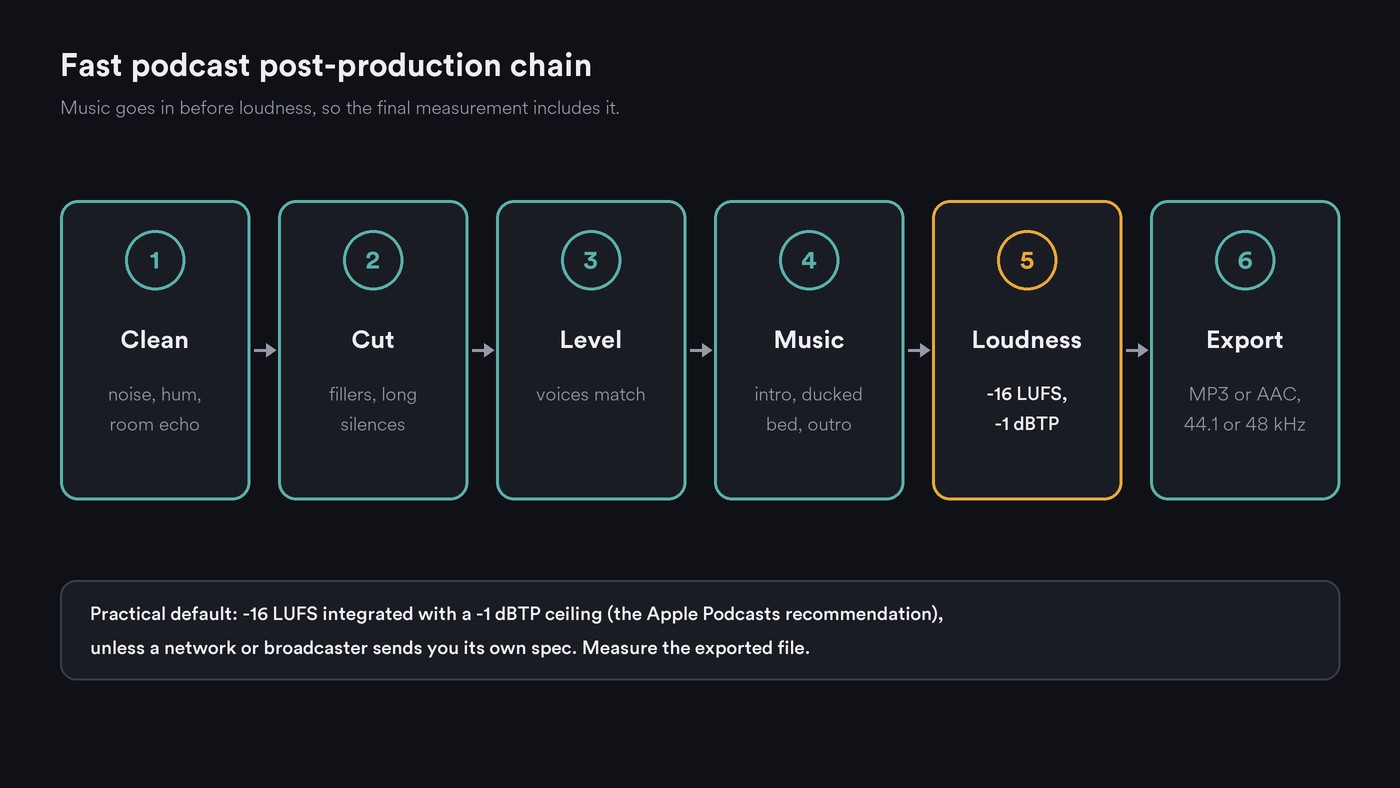
Quick post-production is the same six steps in the same order, whichever app runs them:
- Clean. Take noise, hum and room echo off each voice track first, so later cuts don't reveal jumps in background noise.
- Cut. Remove filler words, false starts and long silences. Leave some breaths, or the speech starts to sound stitched together.
- Level. Bring host and guest to the same perceived volume, with gentle compression.
- Add music. Intro, a bed ducked under the opening lines, stings between segments, outro.
- Set loudness on the whole mix to a published target, with a true-peak ceiling. Music comes before this step because the final measurement has to include it.
- Export in the format your host wants, with title, artwork and chapters.
Podcast loudness targets: which page says which number
- Apple Podcasts: its audio requirements page recommends overall loudness around −16 dB LKFS with a ±1 dB tolerance and a true peak no higher than −1 dBFS, measured under ITU-R BS.1770-5. Order matters: "The preconditioning steps need to occur before the encoding process." For RSS feeds Apple accepts MP3 or AAC, recommends AAC, and at 44.1 or 48 kHz lists 64 to 128 kbps for mono and 128 to 256 kbps for stereo.
- Spotify: the loudness normalization page on Spotify for Artists says it adjusts tracks to −14 dB LUFS and advises keeping true peak below −1 dB TP. It's written for music, and the Spotify podcast pages we read give no separate figure.
- Auphonic: its features page gives −16 LUFS for podcasts as its example target, next to broadcast specs such as EBU R128 and ATSC A/85.
- Descript: the audio export help page offers Normalize volume settings of Off, Peak, −14, −16, −18, −23 and −24 LUFS.
The practical default: −16 LUFS integrated with a −1 dBTP ceiling, unless a network or broadcaster sends you its own spec. Measure the exported file, not the plugin; our list of automated mastering pitfalls explains why.
Top AI audio editors for quick podcast post-production
Auphonic
- Covers: nearly the whole chain in one upload. The features page lists noise and reverb reduction, an Intelligent Leveler that balances speakers, music and speech, automatic cutting of filler words, coughs and silence (with cut lists you can export to your editor), loudness targets with a true-peak limit, automatic ducking of music tracks in multitrack productions, speech-to-text with shownotes and chapters, and automatic publishing.
- Free tier: 2 hours of processed audio a month, and free productions come with a jingle.
- Best for: weekly shows that want identical processing on every episode, with no editing session.
Descript
- Covers: clean, cut, loudness and export. Its pricing page lists Studio Sound for noise and speech enhancement, Remove Filler Words, Shorten Word Gaps, Remove Retakes and Edit for Clarity, with transcription in 25 languages. Local audio export gives MP3, WAV or M4A at 44.1 or 48 kHz with a loudness target.
- Plans: Free is $0 with 60 media minutes a month, 100 AI credits once and limited Studio Sound. Hobbyist is $16 per person a month billed yearly ($24 monthly) with 10 media hours.
- Best for: hosts, including video podcasters, who like editing a transcript like a document.
Adobe Podcast (Enhance Speech)
- Covers: cleanup, plus transcript-based editing in Adobe Podcast Studio. The features page lists no filler removal or loudness target, so pair it with a tool that handles those.
- Limits: per the features page, Free enhances audio files up to 30 minutes and 500 MB, one hour a day, with no strength control. Premium adds strength adjustment, bulk upload, files up to 2 hours and 1 GB, and four hours a day, with a 30-day trial.
- Best for: rescuing one noisy or echoey recording fast.
Riverside
- Covers: recording and editing in one place. Magic Audio reduces background noise, balances levels, removes reverb and enhances voice clarity in one click, and the pricing page listed removing silences and filler words under Pro.
- Caveat: the pricing page showed a staging-environment notice when we loaded it, so we don't quote its prices.
- Best for: shows that already record remote guests on Riverside.
Cleanvoice
- Covers: the cut step, done well. Cleanvoice removes filler words, stutters, mouth sounds and dead air from every speaker's track in one pass, and takes out background noise, hum and echo. For video, its FAQ says "Preserve Length mutes the edits instead of cutting them", which keeps picture and sound in sync.
- Free tier: 30 minutes of credits at sign-up, with every feature.
- Best for: interview shows full of ums, especially on video.
iZotope RX 12
- Covers: the deepest cleanup. iZotope's RX 12 announcement (29 April 2026) describes an enhanced Dialogue Isolate for de-noising and de-reverb, naming podcasts, and a Trim silence feature that finds and deletes silence in long files. List prices: Elements $99 (six plugins around the Repair Assistant), Standard $399, Advanced $1,399. izotope.com rate-limited our check, so these come from the announcement.
- Best for: editors who fix hum, clicks and reverb by hand inside a DAW. Our guide to software for cleaning up vocal recordings compares RX with other repair tools.
Hindenburg PRO
- Covers: a spoken-word editor built for journalists and podcasters. Its product page says it converts everything to WAV, sets broadcast-ready levels, transcribes interviews offline, and publishes to several formats and loudness levels at once. It comes in Standard, Plus and Premium, with a trial.
- Best for: narrative and interview shows edited the way radio is.
Alitu
Alitu's site returned a block page to our checks on 21 November 2026, so we can't grade it from its own pages.
For desktop and free options beyond podcasting, see our comparison of free vs paid AI audio editing software.
Which AI podcast editor should you pick?
- Done in one upload: Auphonic.
- Lots of ums, on video: Cleanvoice with Preserve Length, or Descript.
- Remote guests recorded on Riverside: stay in Riverside.
- One noisy file to fix today: Adobe Podcast Enhance.
- Radio-style storytelling: Hindenburg PRO.
- Hard repairs: iZotope RX.
Get started with a reliable AI audio production tool for your podcast
Here is a 30-minute first episode for a 20 to 30-minute conversation, with each voice on its own track:
- Minutes 0 to 3, set up. Start one project, import each speaker's WAV file plus your intro, bed and outro music.
- Minutes 3 to 8, clean. Run noise reduction on each voice. Listen to the quietest and loudest 30 seconds; if voices sound watery, lower the strength.
- Minutes 8 to 15, cut. Run filler and silence removal, then fix the three edits that matter most: a false start, a long tangent and a dead pause.
- Minutes 15 to 18, level. Apply the leveler or auto-level so host and guest match.
- Minutes 18 to 22, music. Place the intro, dip the bed under the opening lines, add a sting between segments and the outro.
- Minutes 22 to 26, loudness. Normalize the full mix to −16 LUFS with a −1 dBTP ceiling, then check the bounce on a meter such as Analysis One.
- Minutes 26 to 30, export. Export AAC or MP3 at a bit rate in Apple's range, add title, artwork and chapters, and play the first and last minute on a phone.
Save the settings as a preset or template, and episode two starts at step 2.
Where Soundverse fits
Soundverse is an AI music platform that takes you from idea to audience, built for independent artists who release music, and several of its tools cover podcast steps. AI Vocal Cleaner removes background noise, hum and clicks from one solo voice track, softens harsh S and P sounds, and can set loudness to −23, −18 or −14 LUFS with peaks under −1 dB. It takes files of up to 10 minutes and only cleans, without cutting anything, so clean a long episode in parts and set the final −16 in your editor. Audio Transcription handles up to 60 minutes with word timestamps for show notes and captions, but doesn't label speakers. Media Converter has a For Podcast preset (MP3, 128 kbps mono) and pulls the audio out of a recorded video call. AI Studio's browser export stops at 15 minutes, so use it for your intro, beds and outro. Licensing is set by plan: the Free plan is for personal use, and the Creator plan comes with a royalty-free license.
This video shows adding automation to audio tracks in Soundverse AI Studio, the kind of volume curve you'd draw to dip a music bed under speech.
FAQ
Can AI edit a podcast without me? Auphonic and Cleanvoice process an upload with no editing session, and Descript and Riverside cut fillers in a click. Still listen through: an automatic cut can clip a word, and only you know which tangent to drop.
What loudness should my podcast be? Apple Podcasts recommends about −16 dB LKFS, ±1 dB, with true peak no higher than −1 dBFS. Spotify's −14 LUFS figure comes from a page written for music. If a network gives you a spec, use theirs.
Is Adobe Podcast Enhance free? Yes, within limits: files up to 30 minutes and 500 MB, one hour a day, without strength control. Premium raises that to 2-hour files and four hours a day.
How do I get started with a reliable AI audio production tool for my podcast? Pick one tool that covers cleanup, cuts and loudness in a single pass, such as Auphonic, Descript or Riverside, run your first episode through the 30-minute plan above, and save the settings. Add a repair tool such as RX only when a recording needs it.
Sign up for Soundverse free and clean, transcribe and convert your next episode's audio. More guides on the Soundverse blog.

