Top-Rated Software for Cleaning Up Vocal Recordings in 2026
Top-rated software to clean up vocal recordings in 2026: iZotope RX 12, Clarity Vx, Antinode Clear, Acon Digital and free Audacity, by problem.
The top-rated software for cleaning up vocal recordings in 2026 is iZotope RX 12 for deep repair, Waves Clarity Vx for one-knob AI noise removal, Antinode Clear for noise and room reverb, Acon Digital Restoration Suite 3 for one-time-purchase value, and Audacity to clean up vocal recordings for free. Pick the one that fixes the problem you actually hear.
We checked each product's own page on 7 November 2026. Prices and sales change every few weeks, so this guide sticks to what each tool does and who it suits.
First, name the problem in your take
Most "bad vocal" complaints fall into a handful of buckets, and each one has its own kind of tool. Solo the vocal, listen on headphones, and note which of these you hear:
- Steady noise such as hiss, a laptop fan, air conditioning or mains hum. You need a de-noiser or a de-hum.
- Room sound: the voice sounds boxy, or every phrase leaves a short echo tail. You need de-reverb first, then EQ.
- Clicks, mouth noise and plosive thumps on P and B sounds. You need a de-click module.
- Clipping, where the take was recorded too hot and the loud notes crackle. You need a de-clip module that rebuilds the peaks.
- Harsh S and SH sounds. You need a de-esser.
- Bleed, where the guitar, the beat or your headphone mix leaks into the vocal mic. You need source separation or a de-bleed tool.
- Noise only in the gaps between phrases. A gate, or simply cutting the silences, often sounds cleaner than heavy de-noising.
The shortlist: software to clean up vocal recordings
iZotope RX 12 (Elements, Standard, Advanced). iZotope announced RX 12 on 29 April 2026 in three tiers. Elements is six plugins centred on Repair Assistant, aimed at musicians and content creators who want quick fixes. Standard is the tier iZotope pitches at music producers, and Advanced is the full post-production suite. The RX 12 upgrades that matter most to singers are Dialogue Isolate, which iZotope says now handles de-noising and de-reverb for dialogue and vocals, Music Rebalance as a real-time plugin, and a rebuilt De-bleed for headphone bleed. Check which tier includes the module you need before you buy. Best for singers and producers who want one toolbox for every problem and don't mind learning a spectrogram editor.
Waves Clarity Vx. Waves sells it as AI-powered noise removal for vocals and voice that works in real time inside your DAW, with no rendering. You pick one of three neural networks: Broad 1 keeps a second voice when there is one, Broad 2 is for severe noise and for pulling a main voice away from background voices, and Broad ECO is a lighter dialogue-only option. A Double mode processes the two stereo channels separately. Producer and engineer Andrew Scheps is quoted on the product page: "Clarity Vx does with one knob, in real time, what used to take painstaking tweaking and offline processing." Best for home vocals with traffic, air conditioning or room rumble behind them.
Antinode Clear (formerly Supertone Clear). A de-noise and de-reverb plugin built around three knobs: voice, ambience and voice reverb. That split is useful for singers, because you can pull down a bare room's echo without touching the noise, or the other way round. It runs in real time, comes in AU, VST3, VST and AAX formats, and is a one-time purchase. The free trial outputs noise every 60 seconds, which still lets you judge it on your own takes. Best for vocals recorded in an untreated, echoey room.
Acon Digital Restoration Suite 3. Four plugins (DeNoise 3, DeHum 3, DeClick 3 and DeClip 3) plus an all-in-one plugin that analyses a few seconds of audio and adds the modules it thinks you need. Acon says DeNoise 3 and DeHum 3 now use AI-based processing with no noise profile required, DeClick 3 also removes thumps from P and B sounds, and DeClip 3 rebuilds clipped peaks from the audio around them. It's sold on one-time pricing with no subscription. Best for a restoration kit on a budget, and for takes that clipped.
Audacity (free). Audacity's Noise Reduction works in two passes: you select a few seconds of noise on its own and press Get noise profile, then select the whole take and apply. According to the Audacity manual (updated 5 November 2026), the defaults are 6 dB of reduction, a sensitivity of 6 and frequency smoothing of 6 bands. The manual is clear about its limits: it suits constant background noise and won't remove one-off sounds such as a door slam. Audacity also has Noise Gate, Click Removal, Clip Fix and a high-pass filter. Best for zero budget and steady noise.
A note on Adobe Podcast Enhance Speech. Adobe describes it as a free AI filter for cleaning up spoken audio. It's built for speech, so if you run a sung vocal through it, compare the result against the raw take before you keep it.
How to clean up vocal recordings without making them sound robotic
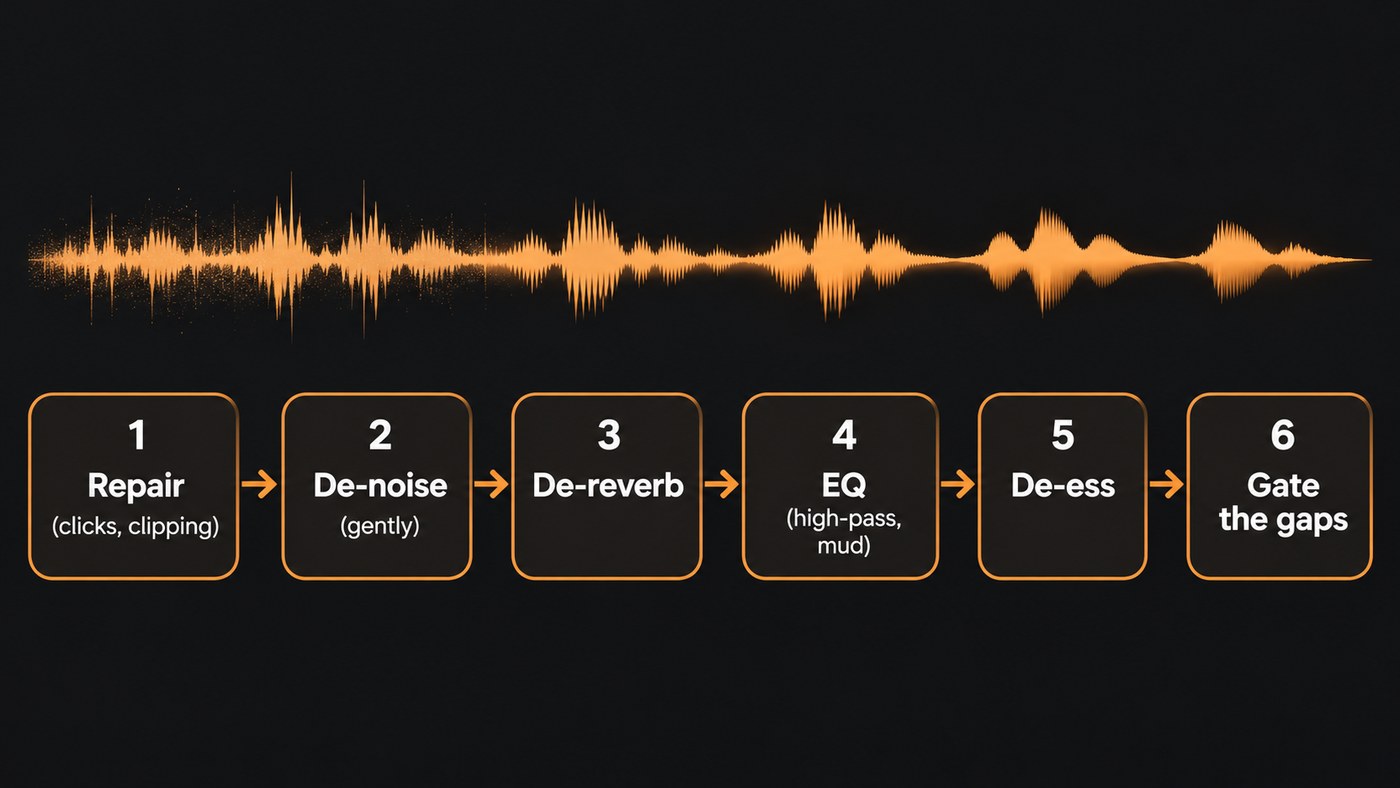
The order matters. Each step makes the next one easier, and doing them backwards is how vocals end up sounding watery.
- Keep the raw take. Work on a copy so you can always go back.
- Repair the damage first. Remove clicks, mouth noise, plosive thumps and clipping before anything else, because a de-noiser can mistake them for part of the voice.
- De-noise lightly. In Audacity, start at the 6 dB default. In Clarity Vx or Clear, turn the reduction up until the noise drops, then back it off a notch. The Audacity manual puts it well: "A modest reduction that leaves some noise behind usually sounds better than a total kill."
- Listen to what you removed. Audacity's Noise only output, Acon's option to hear exactly what's being taken out, and similar delta or difference modes all do the same job. If you can hear words or breaths in the removed signal, you've gone too far.
- Reduce room reverb next, if it's still a problem.
- EQ. High-pass the rumble (start around 80 to 100 Hz for most voices and move it by ear), cut boxiness in the low mids, and add a little presence back if the cleanup dulled the top end.
- De-ess before reverb, so sibilance doesn't splash into the tail.
- Gate or cut the gaps between phrases instead of de-noising harder.
- A/B at matched volume. A louder version nearly always sounds "better", so match levels before you decide.
Can software rescue a badly recorded vocal?
Partly. Modern AI de-noise and de-reverb can save a take that would have been unusable a few years ago, but every tool has a ceiling. The Audacity manual warns that pushing noise reduction too far produces the metallic, watery artefacts these tools are known for, and that applies to AI tools too once you lean on them hard.
Re-record if the noise is as loud as the voice, if the whole take is distorted, or if the room reverb is longer than the gaps between your phrases. Then fix the cause: get closer to the mic, hang a duvet behind you, switch off the fan or AC while you track, and leave headroom on your input gain. Our guide on how to produce vocals for a clear sound covers the recording side in detail.
Free or paid: what a singer-songwriter really needs
- Start free with Audacity if your only problem is steady background noise.
- Buy one tool for the problem you hit most often: Clarity Vx for noise, Antinode Clear for room echo, Acon Digital for a mix of noise, hum and clipping on a budget, or RX 12 Elements if your problems vary from song to song.
- Step up to RX 12 Standard if you edit vocals every week or work on other people's recordings.
Once the take is clean, the mix is where it starts to sound finished. Our guide to mixing vocals like a pro picks up from here.
Where Soundverse fits
Soundverse is an AI music platform that takes you from idea to audience. It isn't a dedicated restoration suite: there's no broadband de-noise or de-reverb model in it, so use one of the tools above for hiss and room echo. What Soundverse covers is the tone and sibilance side of cleanup, in your browser.
In Soundverse AI Studio, EQ One cuts the mud and boxiness a small room adds to a vocal, and De-Esser One tames harsh S sounds with six bands between about 4.8 and 10.8 kHz, with a DELTA switch to hear only what it removes. Mix One's Fix tone applies a high-pass and cuts for mud, boxiness, harshness and honk. The studio's effects use no tokens on any plan, Free included. If you don't want to open a DAW, Apply Effect can run High Pass, Noise Gate and Compressor over a take and save a new WAV while keeping your original (it uses tokens). If a guitar bleeds into a phone demo, Stem Separator's 2-stem split pulls the vocal and the backing apart.
Soundverse's Edit walkthrough: the Apply Effect part starts at 1:04 and shows a track going in and the processed copy coming out.
FAQ
What is the best free software to clean up vocal recordings? Audacity. Its Noise Reduction handles steady hiss, hum and fan noise well if you profile a clean stretch of noise first, and it includes a noise gate, click removal and EQ filters. It won't remove one-off sounds or room echo.
Can you remove room echo from a vocal recording? Up to a point. Antinode Clear has a dedicated voice reverb knob, and iZotope says RX 12's Dialogue Isolate handles de-reverb for vocals as well as dialogue. Short, boxy reflections clean up far better than a long, cathedral-like tail.
Why does my vocal sound robotic after noise reduction? Too much reduction, or a noise profile that included part of your voice. Back the amount off, re-profile from a stretch that is noise only, and accept a little leftover noise, which the mix will usually cover.
Should I clean up vocals before or after mixing? Before. Repair, de-noise and de-reverb the raw take first, then mix with EQ, compression and effects. Compression raises quiet parts, so any noise you leave in will get louder.
Can Soundverse remove background noise from a vocal? Not broadband noise like hiss or traffic. Soundverse can gate the gaps between phrases, high-pass rumble, EQ out boxiness and de-ess, and it can split a vocal from music bleeding into it. For steady noise under the voice, use a dedicated de-noiser first.
Sign up for Soundverse free and try AI Studio's EQ and De-Esser on your next take.
More guides on the Soundverse blog.
