Are There Ways to Influence Camera Movement in AI Video Generation?
Control camera movement in AI video: the moves models understand, how to word them, which tools have camera controls, and how start and end frames help.
Yes, you can steer camera movement in AI video in three ways: name the move in your prompt with standard film terms such as dolly in, pan or orbit; use the camera controls or presets that some tools provide; and pin the shot with a start image, an end frame or a reference clip. Using two together works best.
Every vendor page below was checked on 19 November 2026.
The camera moves AI video models respond to
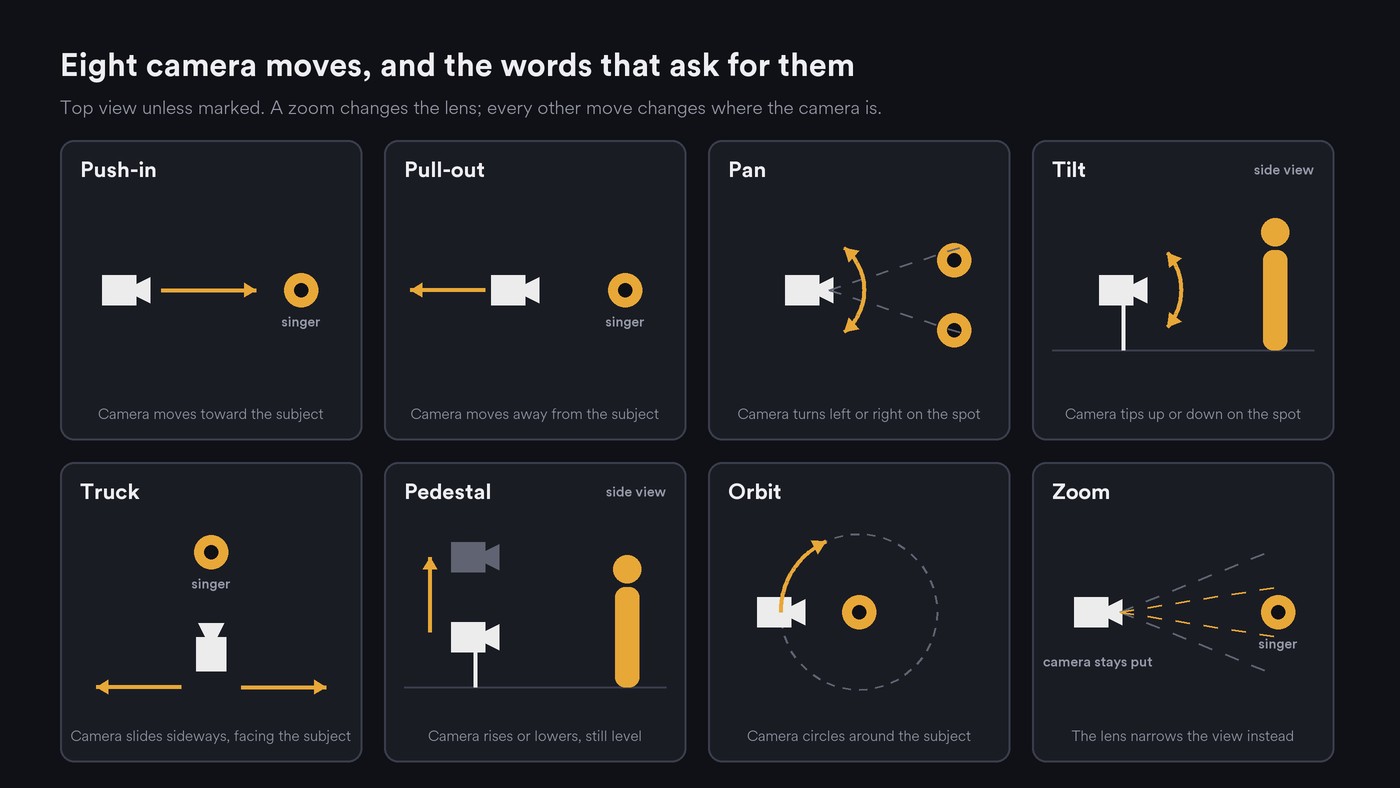
Google's Veo prompt guide (last updated 19 November 2026) and Runway's guide to AI camera prompts (21 August 2026) share one core vocabulary, and tools with camera controls name their presets with the same words:
- Static, or locked-off. The camera doesn't move. Spell it out, because video models are built to produce motion.
- Push-in (dolly in) and pull-out (dolly out). The camera travels toward or away from the subject. A push-in builds into a hook; a pull-out reveals the room.
- Pan and tilt. The camera turns left or right, or up or down, from one spot.
- Truck. The camera slides sideways, often alongside someone walking.
- Pedestal and crane. A pedestal raises or lowers the camera while it stays level; a crane rises or falls in a sweep.
- Orbit and arc. The camera circles the subject. Runway calls a full circle an orbit and a partial curve an arc.
- Handheld. Small, uneven shake that reads as documentary or live footage.
- FPV and aerial drone. Fast flying moves through or over a space. Veo's guide lists aerial shots; Higgsfield offers FPV Drone as a preset.
Zoom versus dolly costs the most retries. Veo's guide defines a zoom as the lens changing focal length while the camera stays put. In a dolly the background shifts against the subject; in a zoom everything magnifies together. Ask for "dolly in" for depth, "slow zoom in" for a flat, watchful feel and "crash zoom" for a hit.
How to word camera movement in an AI video prompt
- One move per shot. OpenAI's Sora 2 prompting guide (updated March 2026) says: "Movement is often the hardest part to get right, so keep it simple. Each shot should have one clear camera move and one clear subject action." Runway adds that Gen-4.5 can combine moves if you describe what comes into view at each stage, with one move per clip as the reliable fallback.
- Name the move early. Runway suggests "The camera [motion] as the subject [action]" when you start from an image. Put the move before the style words.
- Give it a speed or a duration. Runway's guide: "Models have no default camera speed, so this is essential when you're describing camera movement in an AI prompt."
- Tie the camera to the subject. "Camera follows her down the corridor." Without that link, Runway notes, a walking subject can look like she's gliding.
- Say where the move ends. "Pan left to reveal the drummer" lands; a bare "pan left" drifts.
- Ask for what you want. Runway's prompting guide recommends positive phrasing, so write "static shot, locked-off camera", not "no camera movement". Drop words like "cinematic" and "dynamic camera", which don't tell the camera where to go.
Weak: Cinematic shot of a singer on a rooftop, dynamic camera, epic.
Better: Slow dolly push-in over 4 seconds, from a medium shot to a close-up, on a singer on a rooftop at dusk, city lights behind her, 35mm lens. She sings toward the camera and barely moves.
Which AI video tools have dedicated camera controls
Some tools add controls on top of the prompt:
- Kling. Its camera control guide, dated 24 November 2025, describes six basic moves (horizontal, vertical, zoom, pan, tilt and roll) and four Master Shots, such as Move Left and Zoom In, with a displacement value for how far the camera travels. The page doesn't say which Kling models offer it, so check the panel for yours.
- Luma Dream Machine (Ray2). Luma launched Camera Motion Concepts on 31 March 2025: 15 named moves, including push in, pull out, orbit, crane, bolt cam and aerial drone, which you can combine in plain language. Luma says they work with image-to-video, start and end keyframes and loops.
- Higgsfield. Its Camera Controls page lists more than 50 named presets, from Dolly In and 360 Orbit to FPV Drone, Snorricam and Bullet Time.
- Seedance. ByteDance's Seedance 2.0 page says images, audio and video can serve as references to control performance, lighting, shadow and camera movement. A reference clip of the move is the lever.
- Runway. Its camera guide says to use settings for an exact, repeatable path and words for feel and purpose, and warns that pointing the two in different directions produces warped, unstable motion. Runway's help-centre pages on its camera settings returned a block page when we tried to fetch them, so we don't list those settings here.
- Google Veo and OpenAI Sora. Their prompting guides handle camera direction in the prompt. Veo's guide notes that some advanced camera angles and lenses aren't officially supported.
Pin the move with image-to-video and start and end frames
Prompt words describe a path. Frames fix where it starts and ends.
- Start frame. The image supplies composition, subject and light, so the prompt only has to describe motion. OpenAI's guide says Sora uses an input image as the anchor for the first frame.
- Start and end frames together. A wide shot of the stage as the first frame and a close-up of the singer from the same angle as the last frame is a push-in by construction. Keep lens, light and camera height the same in both, or the model may invent a cut or a morph.
- Check the image for motion cues. Runway's prompting guide warns that motion blur, mid-action poses and directional lines imply motion, and that contradicting them takes more tries.
- Reference video. Where a tool copies a move from a clip, film it on your phone: walk slowly toward a chair for a push-in, or circle a mic stand for an orbit. One continuous take, no cuts.
- Loops. Use the same image as first and last frame so the camera returns home.
Why camera moves fail, and how to fix them
- Subject drift. On an orbit or long push-in, the model invents parts of the person it never saw, and faces or outfits change. Use a quarter arc instead of a full orbit, slow it down and start from a three-quarter view. Our guide on why AI video struggles with human motion explains why a moving camera and a moving body confuse models.
- Warping backgrounds. Fast moves through busy scenes stretch edges. Slow down or cut before the warp.
- Conflicting instructions. "Static shot" plus "orbit", a prompt that pans left while a setting pans right, or a still full of motion blur. Remove one.
- The wrong move. You asked for a dolly and got a flat zoom. Write "dolly in, the camera moves forward through the room".
- Unwanted cuts. Runway's prompting guide says these can mean the shot needs a longer duration. If they persist, ask for one continuous shot.
Camera movement in AI music videos: cutting moves to the beat
- Plan moves in bars. At 120 BPM a bar of 4/4 lasts 2 seconds, so a two-bar push-in is a 4-second move. Put that in the prompt, generate a little longer and trim.
- Cut in with the move under way. If a clip opens with a still moment, trim it so the camera is already travelling on beat one.
- Match energy to the section. Locked-off shots and slow push-ins in the verse, a pedestal up through the build, orbits, handheld or FPV in the chorus.
- Aim the end frame at the drop. Push into the speaker cone over the last two bars of the build, then hard-cut on the drop.
- Keep lip-sync shots calm. A singing mouth reads best on a static shot or a slow push-in.
- Carry direction across cuts. If one shot trucks left, keep the next moving left or start it still. Our guide to coherence in AI video sequences covers screen direction, and our explainer on how AI video reads rhythm and tempo shows why cuts should come from beat timestamps.
Where Soundverse fits
Soundverse is an AI music platform that takes you from idea to audience, and its video tools take camera direction in all three ways above. AI Video Generator offers several video models in one panel: describe the subject, motion, light and camera, and Enhance can build out a short idea. Use first / last frame works with every model that generates new clips. With Seedance 2.0, you can add a short clip of a camera move, such as a slow pan across a room, as a reference video, and it follows that movement in a new shot.
Multi-Scene Video Builder films up to 10 scenes of 4 to 15 seconds, each with a first frame and an optional last frame; turn Auto-generate direction off to describe the camera movement for the whole video. AI Music Video Generator lets you set the characters, setting, camera movement and story yourself, then cuts the video to your song. These tools need the Creator plan or above. Licensing is set by plan: the Free plan is for personal use, and the Creator plan comes with a royalty-free license.
FAQ
What's the difference between a dolly and a zoom in AI video? A dolly moves the camera, so the background shifts against the subject and the shot gains depth. A zoom changes only the lens, so everything magnifies together. Name the one you want.
Can I control how fast the camera moves? Yes, with words. Add slow, steady or rapid, or a duration such as "over 4 seconds". Runway's guide notes that models have no default camera speed, so a move without one can come out too fast.
Why does the camera move when I asked for a static shot? Video models are built to produce motion. Write "static shot, locked-off camera" and "minimal subject motion only", as Runway's prompting guide suggests, then stabilize in your editor if a little drift remains.
Can I copy a camera move from a real video? In tools that take reference video, yes. Film the move yourself as one continuous take, or use footage you have the rights to, and describe the new subject in the prompt.
Sign up for Soundverse free and direct your next music video shot by shot. More guides on the Soundverse blog.
