Are There Limitations to How Much a Synthetic Voice Can Be Manipulated After Generation?
How far you can edit a synthetic voice after generation: pitch and formant limits, time-stretch artifacts, comping, and when to regenerate instead.
Yes: once a synthetic voice is rendered to audio, every change is signal processing on a finished take, and quality drops the further you push. Pitch shifts sound chipmunked or hollow unless formants are corrected, big time-stretches turn grainy, and artifacts baked into the render rarely come out. Small edits work. Big changes mean regenerating.
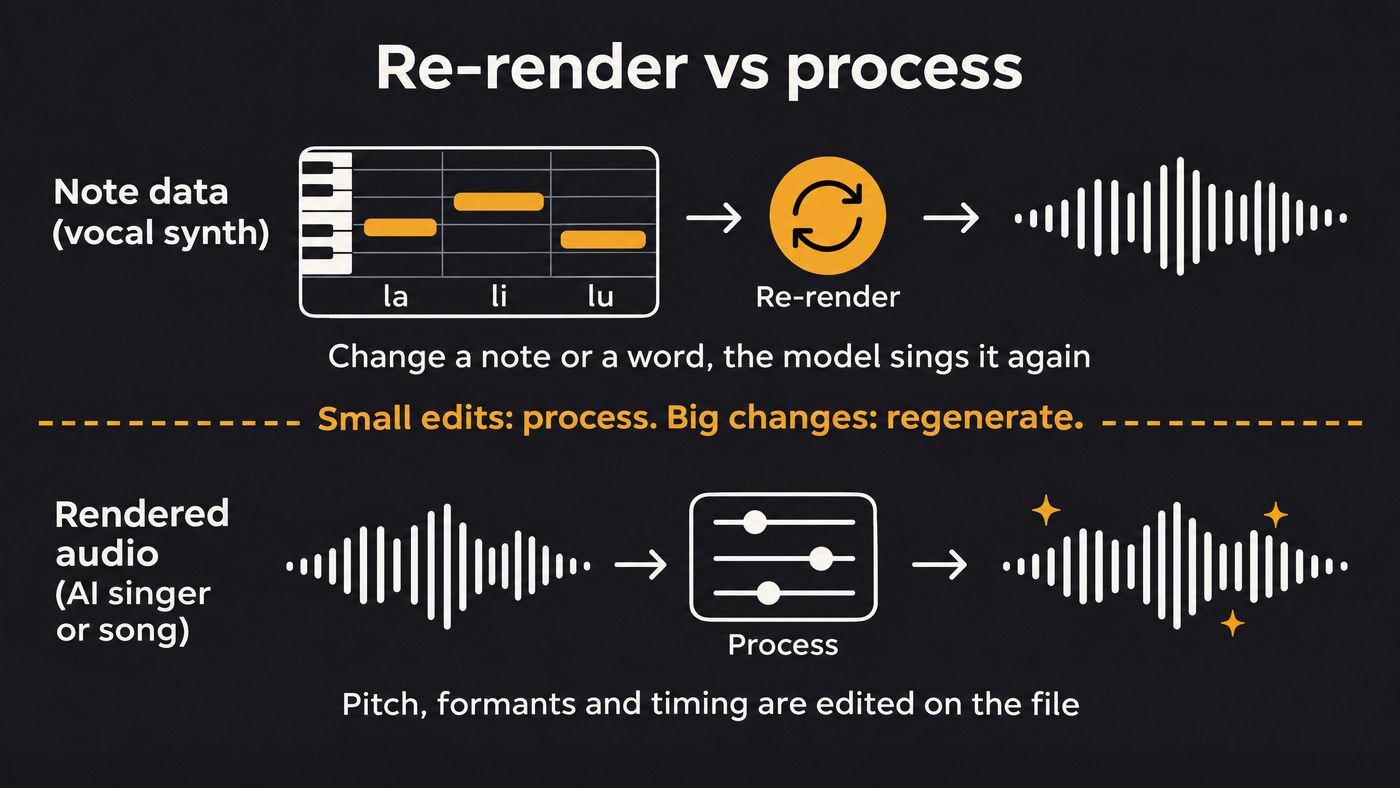
Your room to move depends on where the voice lives. In a note-based vocal synth the performance is still data, so the model sings a change again. In a file from an AI singer or song generator the performance is printed, and you edit it like a recording. Tool details come from each maker's documentation, checked on 19 November 2026.
Re-render vs process: why a baked AI vocal edits differently
In a vocal synth such as ACE Studio, you change notes, lyrics or curves and the model renders that passage again. ACE Studio's Vocal Parameters documentation shows how deep that goes: when the melody, lyrics or pitch change, the model regenerates its parameters for the affected section, and "even a single changed lyric regenerates every parameter in that piece." Its Cloud Rendering page adds that on V2 models only the modified area is re-rendered. A note moved up a third comes back with tone parameters generated for the new pitch, because the model sang it there.
A rendered file has no notes to go back to. Melodyne, Auto-Tune or your DAW's pitch tool estimates pitch and tone from the waveform, moves them, then rebuilds the sound, and the rebuild leaves traces. Max Morrison and colleagues, in a paper posted to arXiv on 5 October 2021 and submitted to ICASSP 2022, put it plainly: "even existing DSP-based methods for pitch-shifting and time-stretching induce artifacts that degrade audio quality." On an AI vocal, processing also stacks on whatever the render left in the file, so a faint edge can turn obvious after a big shift.
How far can you pitch-shift a synthetic voice?
Pitch and vocal character are separate things. Celemony's Melodyne 5 manual describes formants as areas of emphasis in a sound's spectrum that stay in the same frequency ranges whatever note is sung, and calls them characteristic of a sound's timbre. They tell the ear how big the singer is.
Shift the pitch without protecting them and the singer changes size with the note. AutoTune's guide to formant shifting by Brian Davitt (1 September 2026) uses a fifth as its example: shift a vocal up that far and the formants ride along, so it sounds thin and strained, the chipmunk sound. Shift down and the voice sounds oddly large.
What the tool makers suggest:
- Turn formant preservation on. The Ableton Live 12 manual says Complex Pro's Formants control at 100% keeps the original formants even through large transpositions. iZotope RX and AutoTune Pro 11 have formant controls too.
- Correct only part of the way. iZotope's RX 9 Help for Time & Pitch notes that a voice's formants can shift slightly when we sing. For a +7 semitone shift of a voice, it suggests a Formant Correction setting between 0 and +2 semitones for a more natural result.
- Go easy on formant moves. The AutoTune guide calls a formant shift of 1 semitone either way already significant, and suggests 0.3 to 0.7 semitones to separate a double from the lead.
- Use a mode built for one voice. iZotope recommends its Solo algorithm for a single voice with a clear pitch, and warns that too small a window sounds like squeaking while too large a window turns grainy.
For a whole part in the wrong register, re-sing it instead. Soundverse's Voice Swap shifts the pitch up to 24 semitones either way while it re-sings the take in a voice model, and AI Studio shifts a clip up to 12 semitones either way. For note-level edits, see how to adjust the pitch and vibrato of synthesized vocals.
Time-stretching limits: when a synthetic vocal turns grainy
Ableton's manual describes its Warp Modes as repeating or omitting tiny segments of audio, and notes that larger grains can cause audible artifacts. iZotope's Radius accepts stretch ratios from 12.5% to 800%, far beyond what a vocal survives cleanly, and its docs list the failure modes: smeared transients, a stuttering artifact, and phasiness that its Pitch Coherence control trades against roughness.
Soundverse's own timing tool keeps its stretches small. AI Vocal Quantizer moves whole phrases toward the beat grid and keeps any stretch between 0.94× and 1.08× of the original speed, with Preserve formants on by default. AI Studio's Stretch, from 0.25× to 4×, is better suited to sound design than repair.
How to stretch a synthetic vocal cleanly:
- Put stretch markers inside held vowels. Consonants smear first, so leave them at their original length.
- Move phrases instead of stretching them. Sliding a whole phrase is far less audible than stretching every syllable.
- Regenerate for a tempo change. If the song moves more than a few BPM, render the vocal again at the new tempo.
Artifacts you can't edit out
Processing reduces some problems: harsh S sounds, noise, clicks, plosives and level jumps. Others are part of the voice itself:
- A wrong vowel or word. Formant tools change how big the voice sounds, not which vowel it sings.
- A metallic or buzzy tone across the take. It lives in every harmonic. EQ softens it; it doesn't remove it.
- Baked harmonies, doubles or reverb. Separation rarely gives clean lines back; Voice Swap's page notes that on a full mix it converts only the lead.
- A flat delivery. Tuning won't add feeling, and heavy correction flattens vibrato further.
For workarounds, see the limitations of current AI vocal synthesis.
Splitting and comping synthetic takes
Soundverse's AI Singing Generator page notes that every take comes out differently. Use that: treat several runs like several passes from a singer.
- Keep everything identical across takes: model, voice, style and lyrics, so the timbre matches.
- Line the takes up on one timeline. AI Studio splits, trims, fades and moves clips.
- Cut on consonants or breaths, where joins hide, with short crossfades.
- Match level and brightness before you judge which phrase is better.
- Listen across every join. If the second chorus sounds like another singer, regenerate that section.
For comping and crossfades in general, see the common techniques for editing audio stems.
Regenerate the phrase or fix it?
Fix it when a note or two is off, the timing drifts or S sounds are harsh. Regenerate when a word or its pronunciation is wrong, the melody is wrong, the artifact is in the tone, or the fix needs a bigger shift than sounded clean in your tests.
Regenerating no longer means losing the take you liked. Soundverse Inpainting, on the Creator plan and above, rewrites a section you select, up to about a minute at a time, and returns the whole song with everything else unchanged. On its default model, new lyrics are sung word for word. In a vocal synth, retype the lyric and re-render that phrase.
This walkthrough of Soundverse's Edit tools shows Inpainting from 0:12, Stem Separator from 1:28 and Voice Swap from 2:18.
A vocal processing chain for synthetic vocals
The chain is the one you'd use on a recorded vocal, with a lighter hand on tuning:
- Clean up noise or clicks a separated stem brought along.
- Tune lightly, or not at all. Many AI vocals arrive on pitch. Soundverse's AI Autotune corrects at 80% on Natural, 90% on Tight and 100% on Hard tune, and its Custom mode has Adaptive strength, which eases off on breathy sounds.
- Tighten timing. AI Vocal Quantizer's page suggests 30% to 60% strength for vocals.
- EQ and compress. Start with a high-pass and add presence carefully, because bright synthetic S sounds get louder with it.
- De-ess after brightening and before reverb. Soundverse's De-Esser One page suggests placing it above the reverb so sibilance doesn't splash into the tail.
- Add space with delay and reverb, or start from one of AI Vocal Effects' presets.
When to go back to the source
Some problems were set before the vocal was rendered. Fix them there:
- Wrong words or pronunciation: the lyrics. Respell the word as it sounds and generate again.
- Wrong notes: the melody. Correct the MIDI or hum a new guide. Soundverse's MIDI to Song Generator sings your lyrics over 5 to 60 seconds of a .mid melody.
- Wrong voice or register: the reference. Use a cleaner reference, or re-sing the take in another voice with Voice Swap.
- Wrong feel: the performance. Sing a guide and convert it; conversion keeps your phrasing.
Where Soundverse fits
Soundverse is an AI music platform that takes you from idea to audience, built for independent artists who release music, with tools on both sides of the fix-or-regenerate line. To regenerate, Inpainting rewrites a selected section with new lyrics and leaves the rest of the song as it was, on the Creator plan and above. To re-sing, Voice Swap converts a take into another voice model, keeps your timing and phrasing, and shifts the pitch up to 24 semitones either way, on every plan including Free. To process, AI Studio splits, trims, fades and pitch-shifts clips, and the Vocal Production tools handle tuning, timing, cleanup and effects on a solo vocal.
Soundverse has no note-by-note formant editor. For that, use Melodyne or a vocal synth.
FAQ
How many semitones can I shift an AI vocal before it sounds fake? There's no single number. It depends on the voice, the tool and whether formants are corrected; AutoTune's guide uses a fifth as its example of an uncorrected shift that sounds chipmunked. For a part in another register, re-sing it with voice conversion.
Can I change the words of an AI vocal after it's generated? Not by editing the audio. Regenerate the line: inpaint that section, retype the lyric in a vocal synth and re-render, or punch in a sung word and match its tone with EQ.
Should I fix an AI vocal in Melodyne or regenerate it? Use Melodyne for a few wrong notes, timing slips and vibrato. Regenerate for wrong words, a wrong melody or an artifact in the tone, since no pitch editor can rebuild those.
Sign up for Soundverse free and try a pitch shift in Voice Swap on one of your own demos. More vocal guides on the Soundverse blog.
