How Does Social Media Integration Work With Music Distribution Services?
Social media integration in music distribution: how tracks reach TikTok, Instagram and YouTube libraries, timing, payouts, opt-outs and profile linking.
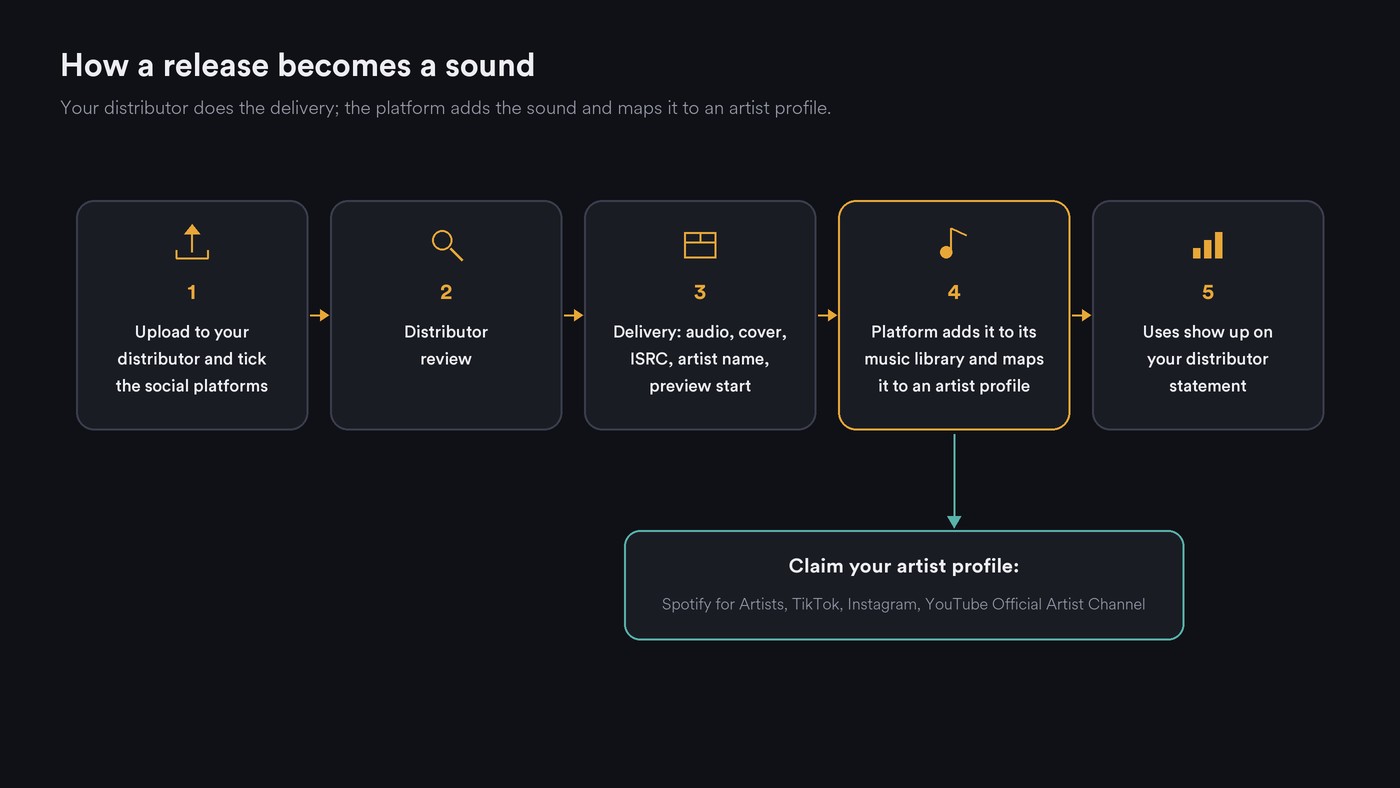
Social media integration in music distribution works through your distributor: you tick TikTok, Instagram and Facebook, YouTube or Snapchat at upload, and it delivers the audio, cover, ISRC and artist name to each platform. The track becomes a sound people add to videos, matching systems find other uses, and earnings come back on your distributor statement.
Distributors and labels feed these music libraries. Snap's creator guide, for example, says you get into Snap Sounds through an independent distributor or your label. Every term comes from the distributor's or platform's own page, read on 21 November 2026.
How a distributor delivers your track to social platforms
You upload once and choose the destinations. Amuse's guide to getting music on social media has you pick the social platforms in the final release details, before review. Ditto says to select TikTok in the Stores section of its Release Builder, and you can add TikTok to an older release later with "Add stores".
Two pieces of metadata matter most:
- ISRC and artist name. Platforms use them to identify the recording and attach it to an artist profile. See why ISRC codes matter.
- The preview start. Ditto says TikTok takes up to 60 seconds of audio from the start point you pick and puts it in the music library. Amuse also lets you set the TikTok start time at upload, and changes it later if you send the release ID, ISRC and new start time. Set it to your hook, not the intro.
Each platform then handles the track its own way:
- TikTok (and CapCut). Your clip becomes a sound in the library. TuneCore's stores page lists TikTok and CapCut as separate destinations. TikTok's help centre and TikTok for Artists pages didn't load for us, so TikTok details here come from distributors.
- Instagram and Facebook. Meta's music library takes the track for posts and Reels. Meta's Music Guidelines (effective 26 March 2024) say music may not be available in every country and that videos should always have a visual component.
- YouTube. Your release appears as Art Tracks on a Topic channel, and if you opt in, Content ID claims uploads that use it. Our guide to how distributors handle Content ID explains references, claims and allowlists.
- Snapchat. Sounds lets people add licensed song clips to Snaps and Stories, delivered by your distributor or label.
How long until your song shows up as a sound
Distributors publish different estimates:
- TuneCore: about one day to approve your upload, then your song on TikTok after about five business days, per its TikTok page.
- Ditto: a minimum of 14 days from upload to going live on TikTok, and around 5 to 7 days for Instagram's music library, per its TikTok and Instagram pages.
- DistroKid and CD Baby: their help centres blocked our requests, so we can't quote their timings.
If you want the sound live on release day, upload at least three weeks ahead, and longer if you're also running pre-saves (our pre-save guide explains why). For store-by-store timings, see our distribution turnaround times.
To find your sound, Amuse's TikTok article says to type your artist name and song title in full under Add Sound, or search and open the Sounds tab.
How usage is paid, and where you see it
- TikTok. The two distributor pages we read disagree. Ditto (6 March 2026) says TikTok pays on the number of videos created with your song, not views. Amuse (9 September 2026) says TikTok moved to a per-view system with no fixed rate. Amuse's UGC matching page (19 October 2026) adds that most TikTok earnings come from people picking your track from the library; uses TikTok detects in uploaded videos pay less consistently.
- Instagram and Facebook. Amuse says a track can earn when it's chosen from the library or detected in a video, and Meta may monetize, mute, restrict or block that video. Not every use is paid.
- YouTube. Amuse says a Content ID match puts a claim on the video, ads may run, and the revenue is collected for you. TuneCore's stores page adds that you earn when your Art Tracks are streamed.
The money reaches you on your distributor's statement, split by platform. Expect a lag: TuneCore says there's typically a two-month delay on earnings, and Ditto says to allow up to two months for TikTok royalties. For each distributor's fee on social income, see our list of distributors with easy social media monetization.
Opt-in and opt-out: when to switch social platforms off
Social delivery is a checkbox per release, and sometimes it should stay unticked. Ditto's page on releases removed from Meta (22 October 2026) explains that Meta keeps its audio to original, fully owned content. Its ineligible list, repeated for TikTok, includes:
- Non-exclusive beats, purchased or leased. Producers: if you license a beat to many artists, leave it out, or your buyers' videos get flagged.
- Samples, loops or sound effects from libraries.
- Soundalikes such as slowed or reverb versions, and cover versions, even with mechanical licenses.
- Creative Commons and public domain material, such as hymns, classical pieces and holiday songs.
- AI-generated or assisted content. Amuse likewise lists AI-generated music as ineligible for UGC monetization and says AI-generated releases can't have Content ID. If AI helped make your track, read your distributor's current rules first.
Leave them off, too, for music written for a client's videos unless the client agrees, since their uploads can get matched.
Linking and verifying your artist profiles
- Spotify for Artists. Spotify's access page says a person reviews each profile request, with links to your website or socials, which can take a few days. Releasing through a preferred distributor gives instant access. Before your first release, ask your distributor for your artist link, then contact Spotify with it and the release's UPC or EAN.
- Instagram and Facebook. RouteNote's linking guide (10 March 2026) says your Instagram must be a verified artist account, which also requires a Facebook business page. RouteNote then links the music if you send the ISRC, both page links and a streaming link to the same track.
- TikTok. Amuse describes the claim: TikTok Studio, then Artist Hub or TikTok for Artists, Apply now, find your artist profile and tap Claim, with screenshots from your distributor dashboard as proof. Feedback comes within 30 days, and approval adds the Music Tab and Artist Tag. Linking songs needs a verified or certified artist account, and TikTok for Artists isn't available in every country.
- YouTube Official Artist Channel. YouTube's OAC page merges subscribers from your Topic channel, any Vevo channel and your own channel. You need at least one official release delivered by a distributor or label, and the route is direct: "Please contact your label or distributor to request an Official Artist Channel."
Use one spelling of your artist name everywhere; every platform matches on it.
A pre-release timing checklist
- Four weeks out: finish the master, decide which social platforms each track goes to, and note the second where your hook starts.
- Three to four weeks out: upload, tick the platforms, set the preview start, and save the ISRC and UPC.
- Same week: send the Spotify for Artists request with your artist link and UPC, and ask your distributor about an Official Artist Channel.
- Release day: search the sound in each app, then post your first video using the library sound. Amuse notes that TikTok may not recognize a track you added to the video before uploading.
- Week one: check that every profile shows the right songs and fix any that don't.
Common problems and how to fix them
- Wrong artist profile. Amuse's wrong artist page guide says "stores may occasionally have trouble matching your releases to the correct artist profile. This process is automated, so it is not always foolproof." Fixes run per store: the content mismatch form in Spotify for Artists, your distributor for a wrong YouTube Topic channel (which YouTube usually corrects within a few weeks, per Amuse), and TikTok for Artists if you're certified.
- Claims on your own uploads. Ask your distributor to allowlist your channel; the Content ID guide linked above walks through it.
- The sound doesn't appear or your video is muted. Amuse lists the usual causes: a Business account on TikTok, which can only use the stock library; a video longer than one minute using commercial music; and audio added before upload instead of picked from the library. On Meta, check whether music is available in your country.
- The release vanished from a platform. Check it against Ditto's ineligible list above, then ask your distributor what was flagged.
Where Soundverse fits
Soundverse is an AI music platform that takes you from idea to audience. It isn't a distributor: it doesn't deliver music to stores or social platforms, and it doesn't register tracks for Content ID. Your distributor does all of that.
Soundverse fits before the upload, in making the release and its social assets. Asset Studio designs cover art, Instagram story backgrounds and a YouTube thumbnail from your track in one look, without text, so you add the lettering. Caption & Copy Writer writes Reels hooks, Instagram captions and DSP metadata such as genre and mood tags. Release Planner turns a finished track into a dated rollout split by platform, with pre-save and smart link deadlines; it plans but doesn't post. Licensing is set by plan: the Free plan is for personal use, and the Creator plan comes with a royalty-free license.
This video shows Asset Studio turning an uploaded track into matching cover art, story templates, a thumbnail, a tour poster and a merch mockup.
FAQ
Do I need a distributor to get my song into TikTok and Instagram sound libraries? For the licensed music libraries, yes. Snap's creator guide sends artists to a distributor or label, and the distributors quoted here deliver to TikTok and Meta the same way. Pick one that lists the platforms you want, then tick them at upload.
Can I add social platforms to a song that's already out? Usually. Ditto has an Add stores option for existing releases, and Amuse delivers older releases to Facebook, Instagram and TikTok on request for subscribers to its distribution plans.
Should I turn off social platforms for a beat I sell to other artists? Yes, if you sell it non-exclusively. Ditto lists non-exclusive beats as ineligible for Meta and TikTok, and registering one can flag every buyer's video.
Sign up for Soundverse free and build your next release's visuals, captions and rollout plan from the track itself. More release guides on the Soundverse blog.

