Describe How Motion Capture Data Can Influence AI Video Generation Outputs
How motion capture data shapes AI video: pose maps, driving videos, depth and camera tracks, what improves, what breaks, consent, and a dance workflow.
Motion capture data influences AI video generation by handing the model a performance to follow instead of a movement it has to invent. Joint positions and rotations from a suit, cameras or phone video become pose maps, depth renders or a driving video that steer each frame, so a performer sets the timing and the model sets the look.
Sources below are papers and official docs, checked on 21 November 2026.
What motion capture data actually is
Four kinds of capture produce it:
- Marker-based optical. Reflective markers on a fitted suit, tracked by infrared cameras around a calibrated space. Hidden markers leave gaps to clean.
- Markerless optical. Ordinary cameras and software that finds the body in each view. Move.ai, for example, says it has pioneered markerless capture since 2019 and lists no suits or markers among the benefits.
- Inertial (IMU) suits. Body-worn sensors measure orientation, with no camera volume. Rokoko's Smartsuit Pro II page lists 9-degree-of-freedom sensors at 200 fps with ±1 degree orientation accuracy, plus a sensor-fusion update that reduces drift and resists magnetic interference.
- Video pose estimation. A model reads normal footage and outputs keypoints per frame. OpenPose from Carnegie Mellon detects up to 135 keypoints per person: a 25-point body and foot skeleton, 21 points per hand and 70 on the face.
Suits and optical volumes give a 3D skeleton with a rotation for every joint on every frame, usually saved as FBX or BVH. Pose estimation gives 2D keypoints. Capture rates rarely match video, so a 200 fps take gets resampled to your edit's 24, 25 or 30 fps, or to the generator's own rate.
How motion capture data steers AI video generation
- Pose sequences as control signals. ControlNet (Zhang, Rao and Agrawala, February 2023) added spatial conditioning to a pretrained image model and tested edges, depth, segmentation and human pose as conditions; its code uses OpenPose to read the skeleton. Feed it one skeleton per frame and the poses follow your data, but each frame is generated alone, so the look flickers.
- Pose-guided image animation. Animate Anyone (Hu et al., November 2023) takes one character image and a pose sequence. A pose guider directs the movement, a ReferenceNet keeps the character's details, and temporal modelling smooths the frames.
- Motion transfer from a driving video. The Everybody Dance Now paper (ICCV 2019) extracted poses from one dancer and mapped them onto another person. Current tools hide that step. Kling's Motion Control guide (5 March 2026) takes a 3 to 30 second action video plus a character image. Wan-Animate (September 2025) extracts the skeleton from a reference video, then animates your character or swaps it into the footage, with separate face features because a skeleton carries no expression.
- 3D body, depth and normal maps. Champ (March 2024) fits the SMPL body model to the motion and adds rendered depth, normal and semantic maps to the skeleton, so the model sees body shape and volume. ControlNet's code lets you stack conditions such as pose and depth.
- Camera tracks. A capture stage can record a virtual camera as well as the body. CameraCtrl (April 2024) adds a plug-in camera module to a video diffusion model so a clip follows a given camera path. In Kling's default orientation mode, the camera follows the motion reference too.
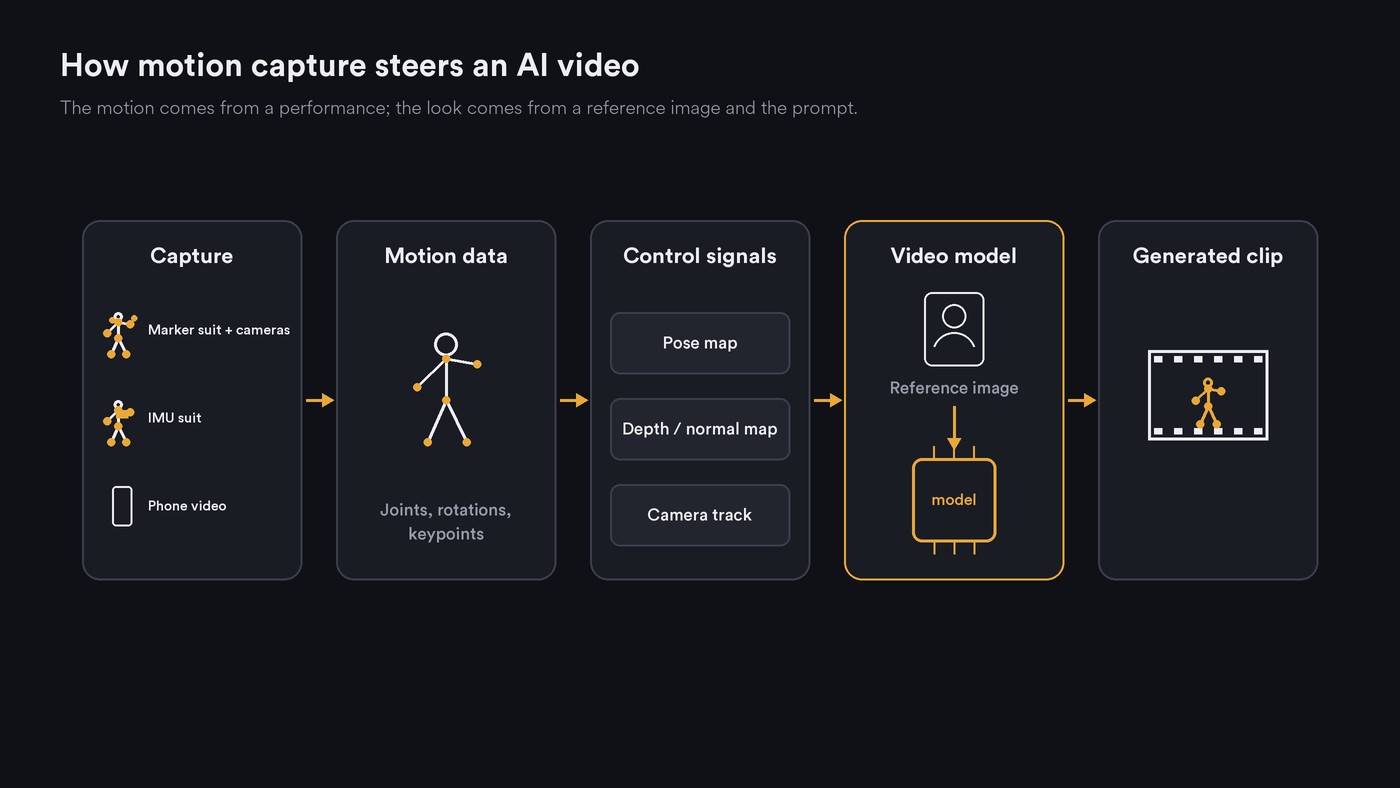
The bridge from 3D capture to most video models is a render: draw the skeleton, depth or normals from the planned shot's camera, and that 2D video becomes the control signal.
What improves when motion data drives the model
- Timing. Real accents, holds and pauses survive. If the dancer moved to the track, the clip moves to the track.
- Physical plausibility. Weight shifts, balance and the arc of a jump come from a real body.
- Choreography that matches the beat. A prompt can't say the left arm hits on beat three of bar five. A captured routine already does.
- Consistency across shots. One take can drive a wide, a close-up and several characters. Motion holds; appearance still depends on the reference image, as our explainer on why temporal consistency is hard in AI video explains.
What still breaks
Motion data narrows the weak spots in our post on why AI video generators struggle with human motion without removing them.
- Hands. Hand keypoints are small and often wrong in fast moves or wide shots, and a bad keypoint becomes a bad finger. MimicMotion (June 2024) uses pose confidence to guide generation and to weight regions in training, which its authors report reduces image distortion.
- Occlusion. When a limb passes behind the body, pose estimation guesses or drops it and the generator fills the gap. Kling asks for one performer with the entire body and head visible.
- Foot sliding and contact. Estimated or retargeted motion often loses ground contact, so feet skate and limbs pass through the body. A 2021 contact-aware retargeting paper by Villegas and colleagues calls a hand passing into the torso a typical artifact of motion estimation.
- Identity drift. The skeleton says nothing about the face. Kling's March 2026 Motion Control update centres on keeping facial identity stable across angles and expressions.
- Retargeting to different proportions. A tall dancer's skeleton on a short, big-headed mascot misplaces hands and feet. Kling advises a character image whose proportions match the video, and the Wan-Animate preprocessing guide warns: "If there is a significant mismatch in body proportions between the reference and driving characters, artifacts or deformations may appear in the final output."
For stylised game casts, the Animate-X paper (October 2024) names the gap: "most existing methods only apply to human figures, which usually do not generalize well on anthropomorphic characters commonly used in industries like gaming and entertainment."
Consent, likeness and who owns the motion
A capture take is a performance, and a driving video can carry a dancer's recognisable style onto a character who looks nothing like them.
- Get consent for the specific use. Write down that the take may drive AI generation, onto which characters, in which outputs and for how long. Mocap recorded for game animation may not cover generative use.
- Treat it as personal data. The EU's GDPR counts behavioural characteristics, not only faces and fingerprints, as biometric data when technical processing lets them identify someone. Get legal advice before building a dataset from performers' movement.
- Faces need their own permission. The reference image sets the identity, so use a face you own or have rights to.
- Disclose realistic results. Article 50(4) of the EU AI Act requires deployers who generate deep fakes to disclose that the content is artificially generated or manipulated; for evidently artistic work, a disclosure that doesn't spoil the work is enough. The text as published in 2024 applies it from 2 August 2026; check for later amendments before you rely on the date.
- Check licences and union terms. OpenPose is free for non-commercial use only, with commercial licences through Carnegie Mellon. SAG-AFTRA's site returned a 403 error to our reader, so check its current video game agreement directly if your performers are members.
Our guide to the ethics of AI music video production covers disclosure and credits.
A practical workflow for a dance music video
- Map the song. Get the tempo, downbeats and section times. At 120 BPM a bar of 4/4 lasts 2 seconds, so an 8-bar phrase runs 16 seconds; plan one shot per phrase. Our explainer on how AI video reads rhythm and tempo shows how beats are found.
- Record the reference. One performer, full body and head in frame, a locked-off camera, a plain background, fitted clothes. Play the track out loud, clap once on the count-in for sync, and shoot each phrase as one continuous take.
- Extract the pose. Run pose estimation on the take, or render the suit's skeleton from the planned shot's angle. Resample to the generator's frame rate; Wan-Animate's guide notes a lower rate speeds generation but can make motion stutter.
- Retarget and check. If proportions differ, retarget first, then scrub the pose video for swapped legs, missing hands and jumps.
- Generate. Pair the pose or driving video with a character image framed the same way, full body to full body. Make two or three takes per phrase.
- Fix. Review at quarter speed for skating feet, extra fingers and face drift. Trim before the first bad frame or cover a broken hand with a cutaway.
- Cut to the beat. Lay the clips over the master audio, line up the clap, and cut on downbeats. Keep the song as the only soundtrack.
Where Soundverse fits
Soundverse is an AI music platform that takes you from idea to audience, built for independent artists who release music. Its video tools work from prompts and reference media, so pose-driven clips made elsewhere can sit alongside them on the same timeline.
AI Video Generator makes clips of 3 to 30 seconds, depending on the model, at up to 1080p. You can start or end a shot on images you choose, guide it with reference images, video or audio where the model accepts them, or describe one change to an existing clip. Use only faces you own or have permission to use.
For step 1, Section Analysis returns section start and end times plus tempo, beats and downbeats; treat it as a starting map and check boundaries by ear. In AI Studio, clips sit on video lanes above the song's tracks, ready to cut on the bar.
This walkthrough turns a song, a character image and a prompt into a full music video with planned scenes, a lip-synced performance and cuts to the music. It uses no motion capture but shows the cutting stage.
FAQ
Is motion capture data the same as a pose sequence?
Not quite. Motion capture usually means a 3D skeleton with joint rotations over time. A pose sequence is a series of 2D keypoint images, the form most video models take. You get from one to the other by rendering the skeleton from a chosen camera.
Do I need a mocap suit to drive AI video?
No. Most motion-control tools estimate the pose themselves from one clean phone video. A suit or optical volume earns its cost when you need 3D data for several camera angles, or the same take for game animation too.
Why do the feet slide in my generated dance clips?
A 2D pose doesn't know where the floor is, and retargeting to different leg lengths makes it worse. Clean contacts in 3D data, keep feet in frame, and trim where skating shows.
Sign up for Soundverse free and plan your next dance video around the song's beats. More guides on the Soundverse blog.

