Why Do AI Video Generators Sometimes Struggle With Human Motion?
Why human motion in AI video breaks: physics, hands, occlusion, fast moves and training data, what model makers admit, and how to get better dance shots.
Human motion in AI video goes wrong because video models learn what footage looks like, not how a body works. They have no skeleton, joint limits or gravity built in, so fast moves, crossing limbs, spins and hands fall outside the patterns they can copy reliably, and small errors grow from frame to frame.
That doesn't rule out dance or performance shots. It means planning around known weak spots, most of which the model makers describe themselves. Sources below were checked on 19 November 2026.
Why human motion in AI video is so hard
Eight separate problems stack up, and a dance shot tends to hit all of them at once.
1. Models are trained to match pixels, not movement
Google's Veo 3 model card calls latent diffusion the de facto standard for modern video models: compress footage, learn to turn noise into that compressed form, then decode it to frames. Training rewards frames that look right. Plausible motion has to be picked up along the way.
The VideoJAM paper (February 2025) names this as the root cause: "Despite tremendous recent progress, generative video models still struggle to capture real-world motion, dynamics, and physics. We show that this limitation arises from the conventional pixel reconstruction objective, which biases models toward appearance fidelity at the expense of motion coherence." Its fix was to make the model predict motion alongside pixels, which the standard recipe doesn't.
2. No skeleton and no physics engine
Knees bend one way, feet push against the floor, and a jump comes down at the speed gravity sets. A video model has no explicit version of these rules, only examples. In an ICML 2025 study, Bingyi Kang and colleagues trained video models on simple simulated objects and found they generalised case by case, imitating the closest training example instead of learning the physical rule.
Runway's Gen-4.5 research post (1 December 2025) lists a related failure it calls success bias: actions succeed too often, like a badly aimed kick that still scores. In a dance clip, that's a landing nobody could stick, or a lift with no effort in it.
3. Frame-to-frame consistency
Temporal consistency means the same arm, face and costume carry on frame to frame. Meta's Movie Gen paper (October 2024) lists the failures its raters looked for: morphing, blurred or distorted objects, and content that abruptly appears or disappears. It singles out fast-moving content such as sports as the case where keeping a consistent appearance is especially difficult. Bodies fail it more visibly than smoke, because everyone knows how many arms a person has.
4. Hands and fine articulation
Movie Gen compresses video 8 times in height, width and time before generating, and its authors note that reconstruction quality drops for high-frequency detail and fast motion. At that ratio, a hand about 48 pixels across in a 720p wide shot spans roughly six latent positions, so a single finger is smaller than one unit the model works in.
The example code for the open Wan2.1 model on GitHub ships a negative prompt that lists extra fingers, poorly drawn hands, fused fingers, misshapen limbs, three legs and walking backwards. The failures are common enough to be written into the sample code.
5. Occlusion and crossing limbs
When an arm passes behind the body or two dancers cross, the model has to remember a limb it can't see and return it to the right place. Movie Gen names occlusion, things reappearing after being hidden, as one of the hard cases for frame consistency, and our post on the limitations of generative video for music covers Runway's matching warning about object permanence. Spins are the worst case: face, arms and the left-right order of the legs all vanish and return within a second.
6. Fast motion, frame rate and clip length
Movie Gen generates up to 16 seconds at 16 frames per second, and Wan2.1's example renders 81 frames at 16 fps, about five seconds. At 16 fps, a hand flicking out at 3 metres per second moves about 19 cm between frames. With 8x compression in time, Movie Gen stores one step for every 8 frames, half a second at 16 fps, and the decoder fills in the rest. A sharp accent on the beat can fall entirely between two stored steps. Other models use other ratios, but the principle holds.
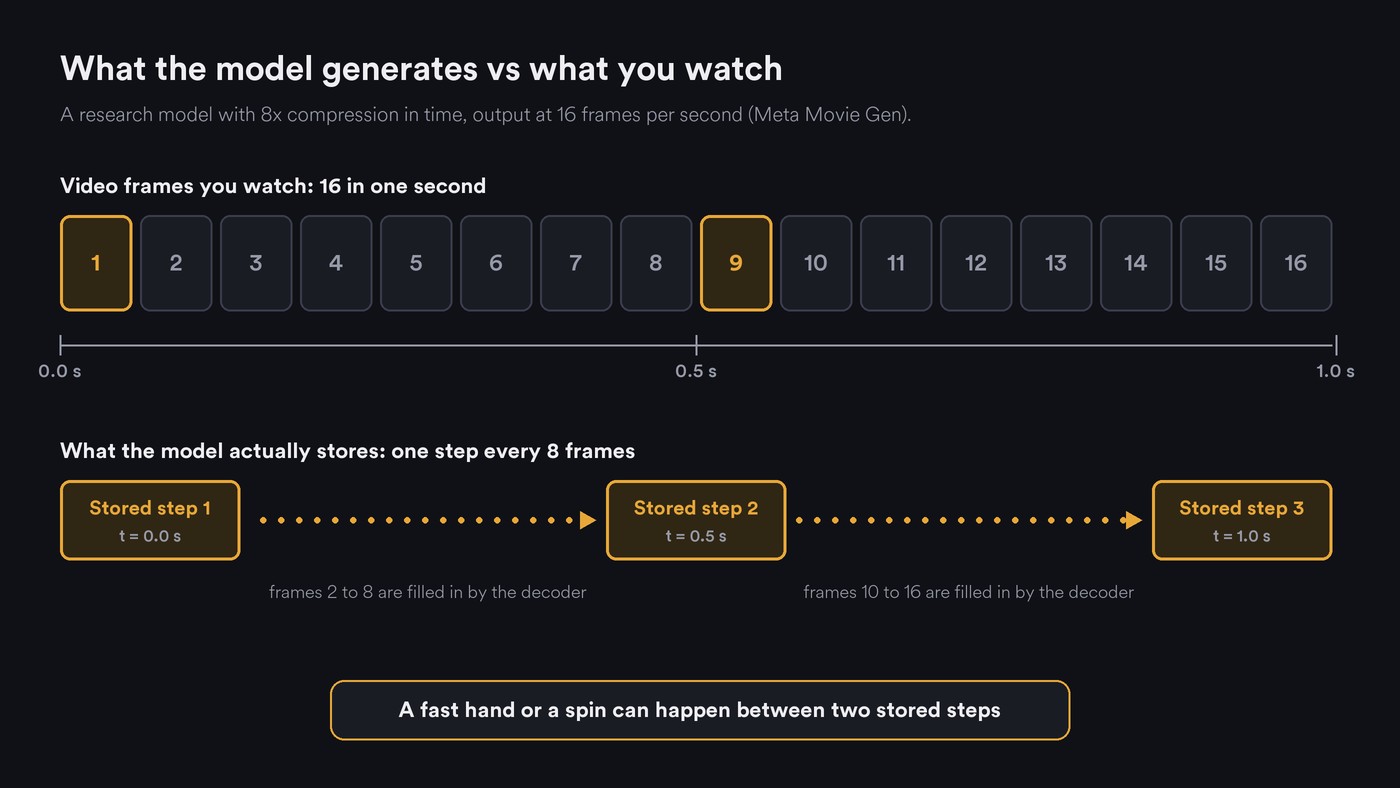
Clip length cuts both ways: long clips let errors pile up, and very short ones chop a move before it lands. Raising the frame rate afterwards doesn't rescue fast moves, as our explainer on frame interpolation shows: interpolators ghost them.
7. Training data bias
Models reproduce what they saw most. Movie Gen's pipeline removed clips with no motion, kept clips whose motion scored as reasonable, and dropped clips with frequent jittery camera moves. It also mixed 60% horizontal and 40% vertical video, preferring horizontal clips for their longer duration, better look and steadier motion. Fast choreography, extreme poses and rare dance styles are thin in a set built like that. The paper adds that for unusual subjects and activities, limited training data can leave a video static or with only the camera moving.
8. Camera motion and subject motion get mixed up
In pixels, a dancer moving left and a camera panning right look alike. To give Movie Gen camera control, Meta trained a separate classifier for 16 kinds of camera motion and added its labels to the training captions. Kling's Motion Control guide asks for motion reference videos filmed as one continuous take, with no cuts, shot changes or camera movement. Prompt a spinning dancer and an orbiting camera together, and the model has to untangle two motions it already confuses.
What model makers say about AI video and human motion
Google's Veo 3 model card (published 23 May 2025, updated 13 January 2026) lists under known limitations: "While Veo 3 demonstrates incredible progress, creating realistic, dynamic, or intricate videos, maintaining complete consistency throughout complex scenes or those with complex motion, remains a challenge."
- ByteDance: the Seedance 1.0 technical report (June 2025) opens by saying current models still struggle to balance prompt following, motion plausibility and visual quality at the same time.
- Runway: the Gen-4.5 post claims objects move with realistic weight, momentum and force, then lists causal reasoning, object permanence and success bias as limitations common to AI video models.
- Kling: its Motion Control guide (March 2026) recommends steady, moderate movements over overly fast ones.
Every lab claims better motion, and every lab still lists motion among its open problems.
How to get better dance and performance shots
- Drive the motion from real footage. Film the move yourself, or a dancer who agrees to it, and use a tool that takes a reference video. Kling's checklist is a good template for any motion reference: one continuous shot, full body and head visible, no cuts or camera moves, steady moderate speed, and room in the character image for the move.
- One move per shot, 4 to 6 seconds. At 100 BPM a bar of 4/4 lasts 2.4 seconds, so a 5-second clip holds two bars with a little to trim. Cut between moves on the beat instead of asking for a 20-second routine.
- Pick angles that keep limbs apart. Front or three-quarter, full body for footwork, medium for upper-body performance. Film spins, partner work and floor rolls for real.
- Move the camera or the body, not both. For complex choreography, write "static shot, eye level". For a camera move, keep the action simple: a singer at the mic during a slow dolly in.
- Describe motion like a choreographer. Name the body part, direction, tempo and weight: "steps to her left on each beat, arms loose, slow and controlled". "Energetic dancing" leaves the model to invent a routine.
- Give the hands a job. On the mic, in pockets, on a guitar strap. Keep fretting, piano runs and finger tutting for footage you shoot.
- Try generating slower, then speeding up. Ask for slow movement and play it at 1.5x or 2x in the edit, so each frame has less to invent. Test it on your model first.
- Review at quarter speed. Look for extra fingers, swapped legs and sliding feet, then cut just before the first bad frame.
- Keep lip sync and dance in separate shots. Our guide to lip sync and character replacement with Seedance 2.5 covers the performance side.
Where Soundverse fits
Soundverse is an AI music platform that takes you from idea to audience. In its AI Video Generator you choose from several video models, start or end a shot on images you pick, and guide it with reference media. Each run comes out differently, so run a shot again if it misses.
For motion, Seedance 2.0 follows a camera move from a short reference clip, such as a slow pan. Seedance 2.5 takes up to 10 reference videos to keep characters and motion on brief, and its character-replacement workflow puts the person from your reference image into a clip you supply. Only use a face you own or have permission to use.
Lip Sync makes a character image sing up to 15 seconds of vocal; illustrated and anime-style characters work best, because the video model blocks realistic faces. The video tools need the Creator plan or above.
This short demo shows Agent One making someone on screen sing new words, from a prompt or from audio you provide.
FAQ
Why do AI-generated dancers grow extra fingers or limbs?
Hands and limbs are small, fast and often hidden, and models compress video before generating it, so fine detail gets rebuilt from patterns. When a limb disappears and returns, the model can redraw it in the wrong place, or twice. Slower moves and hands with something to hold help.
Will newer AI video models fix human motion?
They keep improving, and research such as VideoJAM targets the cause directly. The same companies that claim better motion still list complex motion and physics as open limitations, so plan around them for now.
Is it better to film real dance footage?
For choreography that matters, yes. Use it as a motion reference and let the model handle the look, or cut real dance shots in with generated scenes. Only use footage of people who've agreed to it.
What clip length works best for AI dance shots?
Four to six seconds holds one clean move in most models, and you can cut several moves together on the beat. Longer takes suit slow performance shots, where little changes from frame to frame.
Sign up for Soundverse free and plan your next performance video around what video models do well. More guides on the Soundverse blog.
