How Does Automated Music Editing Software Differ From Traditional Digital Audio Workstations?
Automated music editing software makes edit decisions for you; a DAW hands you the tools. Compare control, speed, precision, export and hybrid workflows.
Automated music editing software makes edit decisions for you: it cuts a song to a target length, removes pauses, splits stems, rewrites or extends a section, or masters toward a loudness target. A traditional digital audio workstation (DAW) gives you the tools to make each of those decisions yourself, clip by clip, on a timeline.
The line between the two has blurred. Desktop DAWs now ship assistants, and browser studios put automated edits on a full multitrack timeline. So the useful question for any edit is who makes the call: you or the software. We checked every vendor feature below on its own page on 19 November 2026. We make Soundverse, so its details come from our own pages.
What a traditional DAW does
A DAW is the app where a song gets recorded, arranged, mixed and exported. Logic Pro, Ableton Live, FL Studio, Pro Tools and Cubase share the same core:
- Multitrack recording of vocals and instruments, with takes you can comp and crossfade.
- Editing at clip and sample level: cut, trim, fade, nudge, time-stretch and quantize.
- MIDI sequencing in a piano roll, driving virtual instruments.
- Mixing with faders, sends, buses and automation.
- Plugins in VST3, AU or AAX format for EQ, compression, reverb and instruments.
- Export of a stereo master, stems, MIDI and a project you can reopen.
A DAW does nothing until you tell it to, and that's the point: every cut lands where you put it.
Most DAWs have added a few assistants too. On its Logic Pro page, Apple says: "Mastering Assistant listens to your track and transforms it using analog mastering magic that you can adjust to get your project ready for release." Its Session Players are AI-powered musicians that play synth, bass, keyboard and drum parts that follow your chords. Ableton's Live 12.3 release notes (25 November 2025) added stem separation to Live Suite that runs on your own computer, and Image-Line's FL Studio 2026 notes (7 July 2026) added a Remix a song option that loads a track and stem-separates it in one click. For a ranked list, see the best AI DAWs in 2026.
What automated music editing software does
Automated editing takes a goal and returns a finished edit. You ask for a 30-second version, a fixed line or no long pauses, and the software picks the cut points, crossfades or new audio. The main kinds:
- Cutting to length. Adobe added Remix to Audition in 2015. Its Audition blog post (30 November 2015) explains that it analyzes a song with beat detection and source separation, finds loops and transitions, and rearranges the song to a target duration you type or drag. Adobe's help pages returned an error to our checker, so this comes from that post.
- Removing silence and filler. Descript's Shorten word gaps tightens every pause longer than a duration you set, and its filler word tool finds "um" and "uh" in English transcripts, with an Avoid harsh cuts option that skips fillers it can't remove cleanly. Both suit podcasts, voiceovers and spoken intros more than songs.
- Stem-based remixing. Split a mix into vocals, drums, bass and other parts, then rebalance, mute or replace one. Soundverse's Stem Separator gives 2 or 6 stems, or, on Creator and above, a maximum split with a MIDI file for each part.
- Rewriting and extending sections. Soundverse Inpainting, on Creator and above, regenerates a section you select, up to about a minute at a time, from new lyrics or style tags, and returns the whole song with only that part changed. Extend Music adds up to 85 seconds of new instrumental per run, before the start or after the end.
- Repair and mastering assistants. iZotope says of its RX Repair Assistant: "It listens to your audio and suggests a great starting point for fixing common noise issues." Adobe offers Enhance Speech, which it describes as a free AI filter for spoken audio. Soundverse's Mastering One listens to two seconds of your mix and sets itself toward the loudness target you pick.
- Edits on request. Inside Soundverse AI Studio, Agent One moves, trims and splits clips, or cuts bars 9 to 17 and closes the gap, when you ask in plain words.
In every case you approve a result instead of building it.
Automated music editing software vs a DAW, point by point
- Control. In a DAW you set every parameter. Automated tools expose a few: Audition's Remix offers Edit Length, a Timbre or Harmonic emphasis, a Minimum Loop in beats and Maximum Slack, and Descript lets you define what counts as a gap. Past those settings, the software decides.
- Speed. Automation wins on repetitive jobs. Adobe's 2015 post put Remix analysis at around 4 seconds per minute of music. Cutting the same song to 30 seconds by hand means finding bars that loop and crossfading on the beat.
- Learning curve. Automated tools ask for an outcome. A DAW asks you to learn routing, gain staging, editing tools and shortcuts before it pays off.
- Precision. A DAW edits to the sample and repeats exactly. Automated edits work at the level of phrases and sections, and generative ones vary: our Extend Music page says each run is a new take, so you listen across the join and run it again if it doesn't fit.
- Plugin support. Desktop DAWs host third-party VST3, AU or AAX plugins. Many automated tools don't; Soundverse AI Studio has built-in instruments and effects and doesn't load VST or AU plugins. Some assistants arrive as plugins themselves, as RX Repair Assistant does.
- File formats and export. A DAW exports a master, stems, MIDI and a reopenable project. Automated tools often return one rendered file: Inpainting and Extend Music give back the whole song. Check that you can get stems or lossless audio before you build on a result.
- Collaboration. Desktop projects usually live as local files, shared by sending stems or the session folder. Browser tools can share one live project; in AI Studio, the owner invites people by email or link and everyone edits the same timeline.
When each one wins
Automated editing wins when:
- the goal is clear and measurable, such as a 30-second cut, a cleaner word or a loudness target;
- you need several versions fast: a clean edit, a short cut and an extended intro;
- all you have is a finished stereo file, because the session is gone;
- the material is speech, where silence and filler removal saves real time.
A DAW wins when:
- you're recording and comping performances;
- the arrangement needs bar-by-bar decisions about feel;
- your sound depends on particular plugins or hardware;
- the job is the final mix for release, where every move should be deliberate.
What a hybrid workflow looks like
Most producers use both, in one of two directions.
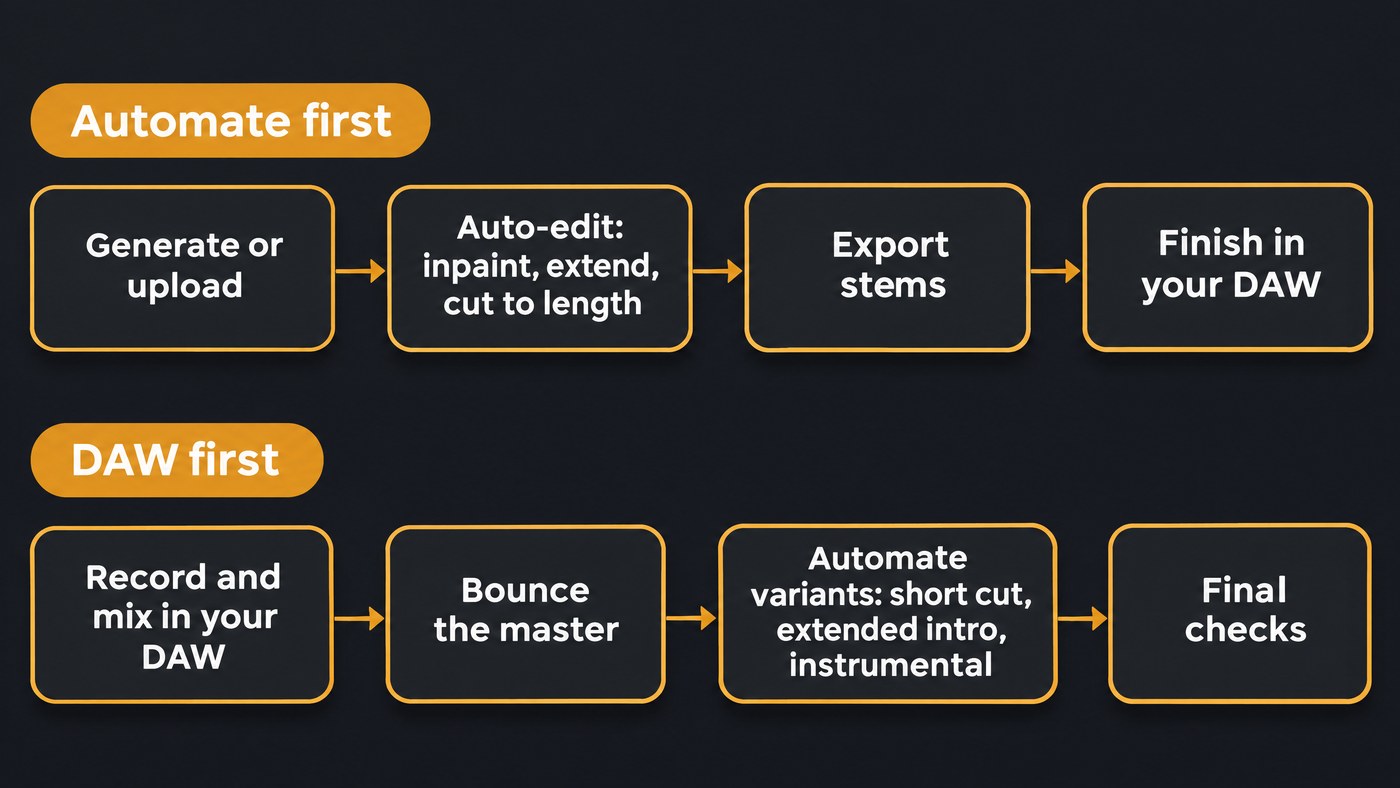
Automate first, finish in a DAW:
- Start from a generated song or a rough bounce, and fix the structure with automated tools: inpaint the weak line, extend the intro, cut a shorter edit.
- Split stems and export them as WAV.
- Import the stems into Logic Pro, Ableton Live or FL Studio at the song's tempo.
- Re-record the parts that matter, usually the lead vocal, and replace generated parts you don't love.
- Mix with your own plugins, then master by hand or use an assistant's master as a draft.
DAW first, automate the variants:
- Record and mix as usual.
- Run a repair assistant on a noisy take and keep only the modules you need. In iZotope's own walkthrough, the author switches off everything except noise reduction and adjusts it to taste.
- Bounce the master, then let automation make the variants: a 30-second social cut, an extended DJ intro, an instrumental from the stems.
- Tidy the spoken intro or podcast promo with silence and filler removal.
Two habits keep either direction safe. Keep the original file next to every automated edit, and compare versions at matched loudness, since louder tends to sound better at first. For the mixing and mastering halves of the question, see how automated mixing differs from manual EQ and how AI mastering compares to a mastering engineer.
Where Soundverse fits
Soundverse is an AI music platform that takes you from idea to audience, built for independent artists who release music. AI Studio is a multitrack DAW in the browser with automated edits built into the timeline: right-click a clip for Extend Music, Remix Track or Separate Stems, or right-click a selected range to inpaint it, and the result lands as a new clip that never overwrites an existing one. With its Studio switch on, Agent One arranges clips and sets volume, pan and effects when you ask, though it can't change the project tempo.
It has limits a desktop DAW doesn't: no VST or AU plugins, no count-in, punch-in or take comping, and browser export is blocked past 15 minutes or 24 tracks. On Creator and above, stems export as WAV, FLAC or MP3 in a ZIP, ready to finish in your main DAW. Licensing is set by plan: the Free plan is for personal use, and the Creator plan comes with a royalty-free license.
This walkthrough runs through Soundverse's Edit tools, including Inpainting, Extend Music, Stem Separator and Voice Swap, from input to result.
FAQ
Will automated music editing software replace DAWs? Not for recording, comping or plugin-heavy mixing, where every decision should be yours. The two are converging instead: DAWs keep adding assistants, and automated tools keep adding timelines. Most producers use automation for repetitive edits and keep a DAW for the final say.
Can automated tools edit a song I recorded myself? Yes, if the tool accepts uploads. Soundverse Inpainting takes MP3, WAV, AAC, OGG, M4A or FLAC, and Extend Music takes MP3, WAV, AAC, OGG or M4A. You need the rights to anything you upload.
Does automated editing lower audio quality? It can. Stretching a remix to hit an exact length, as Audition's Stretch to exact duration option does, and regenerated sections can both leave artifacts. Listen across every join on headphones, and export lossless files if you plan to keep working on the track.
Which DAWs have automated editing built in? Logic Pro has Session Players, Mastering Assistant and Stem Splitter. Ableton Live Suite separates stems locally, and FL Studio 2026 can load and stem-separate a song in one click. Soundverse AI Studio adds generative edits such as Inpainting and Extend Music.
Sign up for Soundverse free and try automated edits in AI Studio. More production guides on the Soundverse blog.
