Which Distribution Service Is Easiest for a Podcaster to Use for Releasing Original Music?
Music distribution for podcasters: which services are easiest for releasing your theme or soundtrack, plus ISRCs, artwork rules and Content ID traps.
For music distribution for podcasters, the easiest service assigns your ISRC for you, spells out its artwork and audio rules, and lets you control YouTube Content ID so your own episodes don't get claimed. Judged on their own help pages, Amuse and RouteNote are the easiest starts, and CD Baby is simplest on price: one fee, no renewals.
A podcast host can't do this job, and neither can Soundverse: we make AI music tools and don't deliver music to stores. Prices and policies below come from each company's own pages, checked on 21 November 2026, in US dollars. Where a help centre blocked our checker, we say so.
Your podcast host is not a music distributor
Your host sends episodes to podcast apps through an RSS feed. It doesn't put a song into the Spotify or Apple Music catalogue, and Spotify's help centre is blunt about trying: "Podcasts, including those submitted via Spotify for Creators, should not be used to distribute music tracks, DJ mixes, or similar musical content." The same page says Spotify can remove podcasts or episodes that break the rule regardless of the music's licensing, and points musicians to a preferred provider instead.
So your theme lives two lives: inside your episodes, delivered by your host, and as a release, delivered by a distributor.
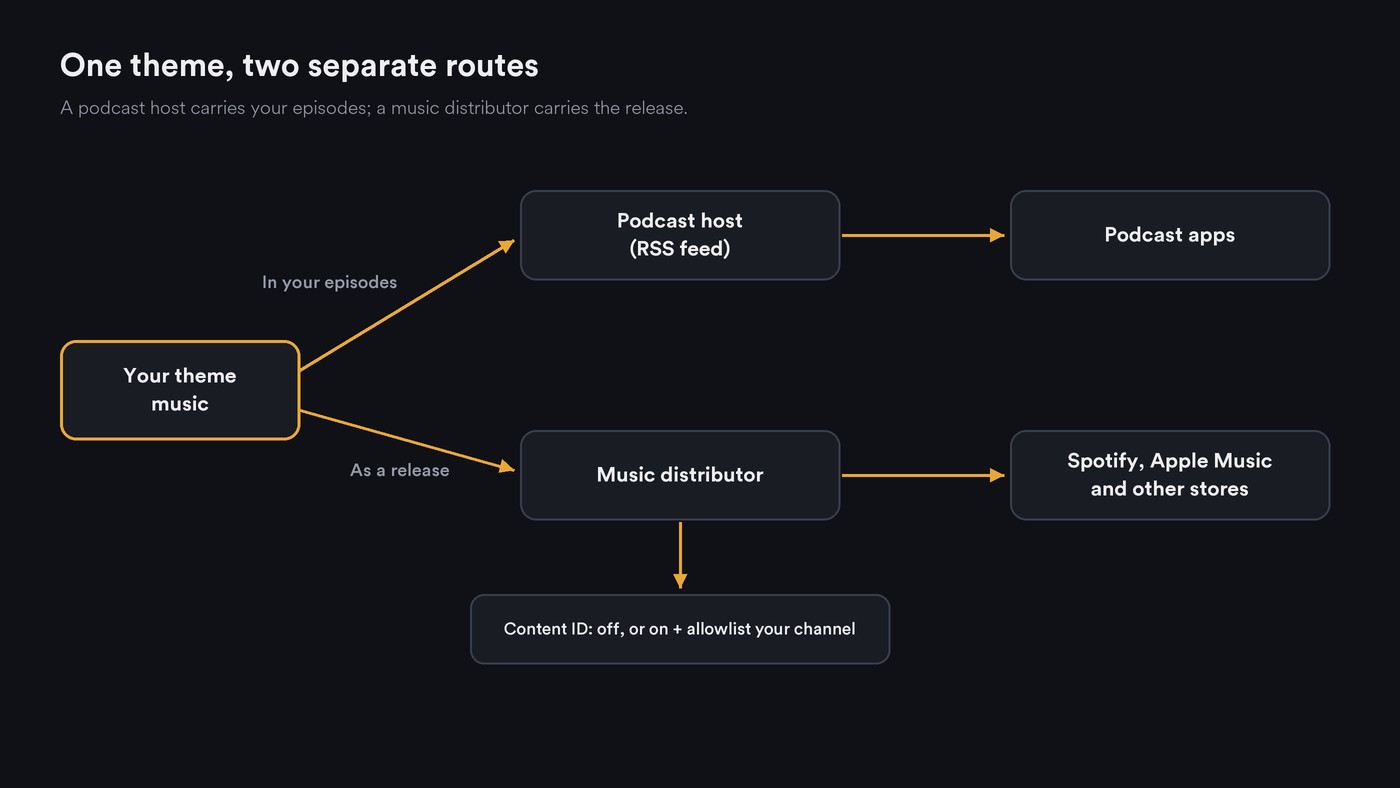
What "easiest" means when you're not a musician
- A price model that fits one release. Free with a revenue cut, one fee per release, or a yearly plan. A podcaster releasing one theme rarely needs unlimited uploads.
- A short upload form. Title, artist name, genre, language, vocals yes or no, explicit flag and credits, with few industry terms to look up.
- Artwork rules in plain words. Amuse's upload guide asks for a square JPG or PNG of at least 1400 × 1400 px (3000 × 3000 recommended), with only the artist name and title as text and no logos or social handles. A podcast cover with a URL or guest names fails that test.
- ISRC handled for you. The 12-character recording code should be assigned when you leave the field blank.
- Payout setup you can finish. Check which payout methods and account types a service supports, especially if the show runs through a company.
- Content ID you control. The trap that matters most for podcasters; see below.
Music distribution for podcasters: seven services graded
Amuse: easiest to follow. Its step-by-step upload guide (updated 22 October 2026) walks through every field. Leave ISRC blank and Amuse assigns one, mark Vocals "No" for an instrumental theme, and flag AI-generated contributions per role in the credits. Content ID is an optional toggle per track. Its pricing page lists the Artist plan at $23.99 a year, says your music stays live if you stop paying (with a 25% royalty commission), and sets 14 days of lead time for a scheduled date on Artist. Suits a podcaster releasing a theme plus a few soundtrack cues.
RouteNote: easiest free start. Its pricing models page offers Free, with no fees and 85% of revenue paid to you, or Premium at $10 for a single, then $9.99 a year from the following year, for 100% of streaming and download revenue. RouteNote's help article on codes says ISRCs and UPCs are generated free when you leave those fields blank. Suits a one-off theme where presence matters more than income.
CD Baby: simplest on price. Its cost page lists $9.99 once for a single with no annual fees, keeping 9% of digital distribution revenue, plus free UPC and ISRCs and YouTube Content ID monetization. CD Baby's help centre blocked our checker on 21 November 2026, so we couldn't confirm how to opt out of Content ID or allowlist a channel. Ask support before uploading if you post video episodes.
DistroKid: built for frequent releases. Its pricing page lists Musician at $24.99 a year with unlimited uploads, while a customizable release date needs Musician Plus at $44.99. Its help centre also blocked our checker, so its ISRC and Content ID steps aren't verified here. Suits a show that releases a soundtrack every season.
TuneCore: a set release day on the base plan. Its pricing page lists the CORE plan at $22.99 a year with release on your schedule, revenue splits and YouTube Content ID. TuneCore's help centre blocked our checker too, so ask how to exclude your channel before you opt in.
LANDR: stays live if you cancel. Its distribution page starts at $24 a year and says your music stays live even if you cancel your subscription. LANDR's Content ID page says monetization requires exclusive ownership of every element and music that isn't fully AI-generated.
Ditto: cheapest yearly plan, no Content ID on Starter. Its pricing page lists Starter at $19 a year, with YouTube Content ID and Official Artist Channel setup on Pro at $59. For a podcaster that's a plus: on Starter, Ditto doesn't register your theme in Content ID, so the release can't trigger claims on your episodes through Ditto.
Music in the show vs music as a release
Your show can use your own theme without any distributor. A release adds a song listeners can save, an artist profile and royalties.
If you want those, plan a separate release version:
- Length. Amuse's audio requirements page (updated 12 November 2026) says a single can't be shorter than 1 minute, and tracks under 30 seconds aren't eligible for store payouts. A 15-second sting won't do; release a full version and keep the short edit for episodes.
- Files. The same page asks for WAV or FLAC, 16- or 24-bit, 44.1 kHz or higher, in stereo.
- Ownership. Release only music you own outright. If the theme was built on stock tracks, non-exclusive loops or leased beats, Amuse lists those as ineligible for Content ID, and the source license may not allow a release at all.
- Artist name. Release under the show's name or your own, and search the stores for that name first. Our guide to choosing a distributor for a first single covers the artist-profile checks.
Content ID and your own episodes
If your theme goes into Content ID and you post video episodes to YouTube, Content ID can claim your own uploads. RouteNote's allowlisting explainer (31 August 2026) puts it simply: the system recognises the audio, not who uploaded it. You have three choices:
- Leave Content ID off. On Amuse it's a per-track toggle, and Ditto Starter doesn't include it. For a theme that mostly plays inside your show, this is the simplest option.
- Allowlist your channel. YouTube's allowlist is only for partners using Studio Content Manager, so you ask your distributor and give it your channel ID, the 24-character string starting with "UC". It works going forward only, existing claims aren't released automatically, and every partner that owns the asset must add your channel. RouteNote says it has long offered channel allowlisting.
- Leave the claims alone. Amuse's YouTube claims page says: "If Amuse claims one of your own videos, there's usually nothing you need to do." The money then reaches you through Amuse rather than your channel. You can release a claim in the Amuse web app, but releasing is permanent and can take up to 5 days.
AI-made music adds one more rule. Amuse's upload guide says AI-generated content is automatically excluded from YouTube Content ID, Meta and Qobuz. For the full mechanics of claims, disputes and Art Tracks, see how distribution platforms handle Content ID.
Your first release, step by step
- Make the release version of your theme, at least 1 minute long. If you haven't made the theme yet, start with our guide to AI platforms for custom podcast theme music.
- Export a stereo WAV at 44.1 kHz, 16- or 24-bit, mastered so it doesn't clip.
- Make square cover art at 3000 × 3000 px with only the artist name and title on it.
- Create your distributor account and add payout details before you upload.
- Fill in the form: a single's title matches the song, primary genre, language, Vocals "No" for an instrumental, Original, ISRC left blank, and AI credits wherever the form asks.
- Decide Content ID before you submit: off, or on with your channel ID ready to allowlist.
- Schedule the date at least two weeks out so review and any fixes fit, then submit.
- After it's live, claim your artist profile and add the song link to your show notes.
Where Soundverse fits
Soundverse is an AI music platform that takes you from idea to audience. It isn't a distributor and doesn't deliver music to Spotify, Apple Music or any other store; the upload goes through the service you pick above. Soundverse fits in making and preparing the music:
- AI Music Generator has Podcast - Intro, Podcast - Background and Podcast - Outro themes for instrumentals that share one style.
- Extend Music adds up to 85 seconds per run, and you can extend again, so a short sting can become a full release version.
- Mastering One masters toward targets such as Streaming −14 or Apple Music −16 LUFS, on every plan. WAV downloads come with paid plans.
- Asset Studio makes square cover art designed from your track, with no text in the image.
- Copyright Checker fingerprints a track for matches with released recordings before you submit. Soundverse calls it a recognition check, not legal clearance.
Licensing is set by plan: the Free plan is for personal use, and the Creator plan comes with a royalty-free license.
This video shows Asset Studio turning an uploaded track into matching cover art and other release visuals.
FAQ
Can my podcast host put my theme song on Spotify as music? No. Spotify's policy says podcasts shouldn't be used to distribute music tracks, and it can remove episodes that try. Use a music distributor for the release and your host for episodes.
Is there a free way to release my podcast theme? RouteNote's Free model charges no fees and pays you 85% of revenue. You can upgrade a release to Premium later if it starts earning.
Will releasing my theme get my own YouTube episodes claimed? Only if the release is in Content ID. Leave Content ID off, ask your distributor to allowlist your channel, or accept the claims and collect through the distributor.
Does Soundverse distribute my podcast music? No. Soundverse helps you make, extend, master and package the music, and the release itself goes through a distributor such as those above.
Sign up for Soundverse free and make the full-length version of your theme. More release guides on the Soundverse blog.

