Best AI Platforms for Creating Custom Podcast Theme Music?
Custom podcast theme music with AI: write a motif brief, build a full theme, sting, outro and bed from one take, and check each platform's rights terms.
The best AI platforms for custom podcast theme music, such as Stable Audio, ElevenLabs Music, AIVA and Soundverse, take a clear brief, let you turn one motif into a full theme, a 5 to 10-second sting, an outro and a bed, and offer a plan whose license covers a monetized show.
We checked each platform on its own pages on 21 November 2026. We make Soundverse, so its entry sticks to our own feature pages. Loops and background beds are a different job, covered in our guide to choosing an AI tool for custom podcast loops; this one is about the signature theme.
What makes a podcast theme work
A theme is the sound people link to your show. Good ones share four traits:
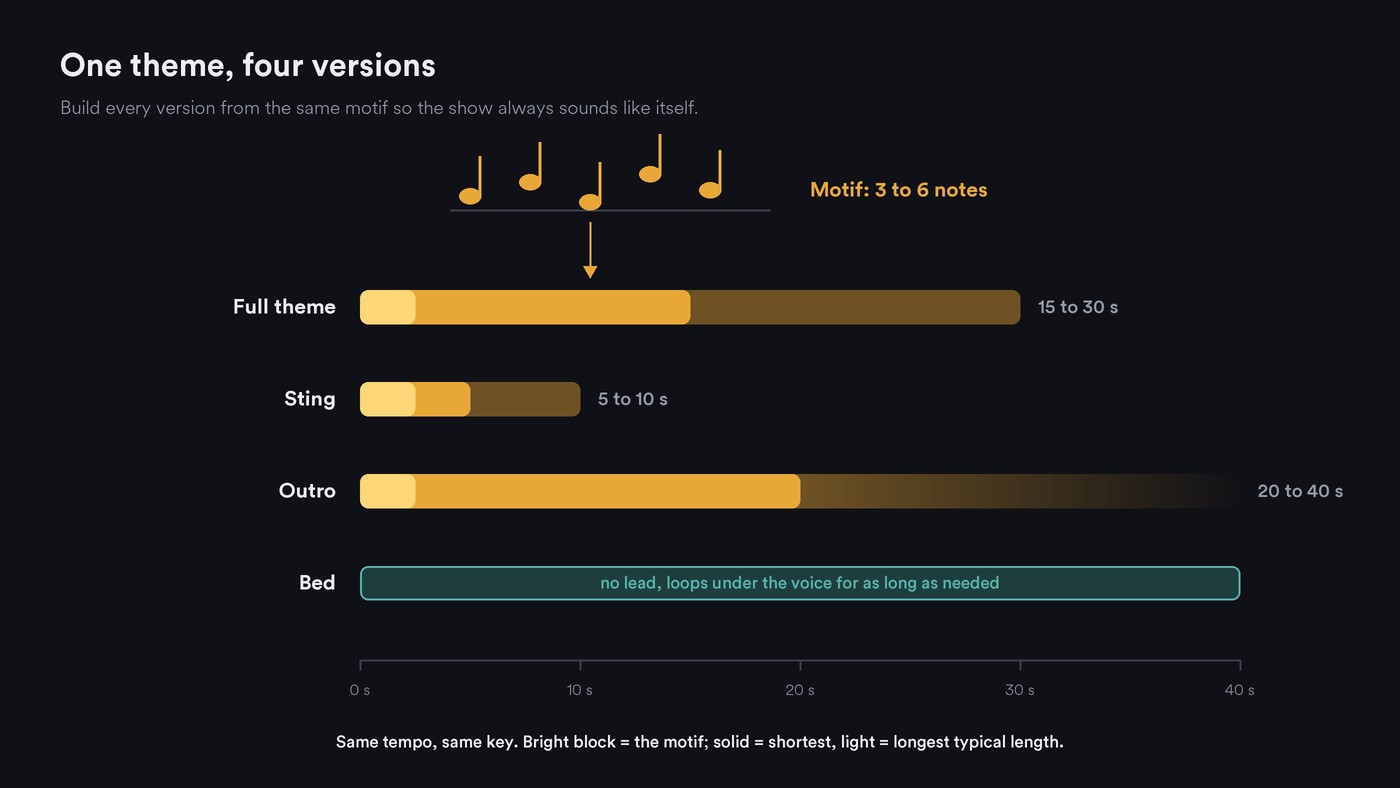
- A motif you can hum. Three to six notes, two bars at most, played by one lead sound: a muted trumpet, a plucked synth, a whistle, a detuned piano.
- One tempo and key. Every version shares them, so a sting cuts into the bed without a jolt.
- A version family. A full theme of 15 to 30 seconds, a 5 to 10-second sting for segment breaks and social clips, an outro of 20 to 40 seconds that ends on a resolved chord, and a bed variant with the lead removed, quiet enough to talk over.
- A sound that is yours. A theme from a shared generator is new, but not automatically exclusive. Soundraw's license FAQ, for example, says occasional overlaps in melody or sound are possible.
How to brief an AI generator for a podcast theme
Use one sentence that names the job, then the details:
"[Genre] theme for a [show type] podcast, [mood], led by [one lead instrument] playing a short repeating motif, with [two or three supporting instruments], [tempo] BPM, [length] seconds, clean ending, no vocals."
Examples:
- True crime: dark minimal electronic, tense, led by a four-note detuned piano motif over pulsing synth bass, 84 BPM, 20 seconds, ending on a held low note.
- Tech interview: bright indie-electronic, curious, led by a plucked synth motif with tight drums, 112 BPM, 15 seconds.
- Comedy chat: loose funk, playful, led by a muted trumpet riff with slap bass, 100 BPM, 20 seconds, ending on a stab.
Stability AI's prompt guide lists genre, instruments, mood and energy, and BPM as the basics; Soundverse's AI Music Generator takes the same ideas as tags, with up to two genres, three vibes, five instruments and a tempo. Keep the brief fixed and generate six to ten takes. Our explainer on how AI models read mood words in prompts helps you choose them.
How to keep one theme consistent across versions
Four prompts give you four different tunes, so build every version from one master take:
- Choose the master. Pick the take whose motif you can still hum after one listen.
- Cut the sting from it. Trim the two or four bars where the motif lands, with a short fade.
- Extend it for the outro. Soundverse's Extend Music adds up to 85 seconds of new instrumental per run, after the end or before the start, and Stable Audio offers continuation from the end. Listen across the join.
- Strip it for the bed. Split stems, then mute the lead and thin the drums. Our guide to editing audio stems covers the fades and balance.
- Rework one section with inpainting, which regenerates a selected passage and keeps the rest; Soundverse, Stable Audio and ElevenLabs all offer it.
- Re-arrange the motif for a new season. Stable Audio's audio-to-audio can change the instrument while broadly keeping the notes. Soundverse's Similar Music Generator page suggests feeding in your podcast's current theme for a fresh instrumental in the same feel. AIVA's MIDI downloads let you replay the motif on any instrument.
- Lock the levels. Export WAV at the episode's sample rate, matched to the episode's loudness, with names like show_theme_sting_6s.wav.
This walkthrough of Soundverse's Edit tools shows Extend Music from 0:36 and Stem Separator from 1:28, the two steps that turn a theme into an outro and a bed.
Rights for a monetized podcast theme
Check these in each platform's own terms:
- Commercial use: does your plan allow it, and does it name podcasts?
- Ownership or license: do you own the output or hold a license?
- Attribution: do you have to credit the vendor?
- Content ID: can you register the theme?
- Broadcast: does it cover radio, if your show is syndicated?
- After you cancel: can published episodes keep the theme?
Ownership has a legal layer too. In announcing Part 2 of its AI report on 29 January 2025, the U.S. Copyright Office wrote: "It concludes that the outputs of generative AI can be protected by copyright only where a human author has determined sufficient expressive elements." The same release says prompts alone don't count, while creative arrangement or modification of the output can. If you want a theme you can defend as yours, write or hum the motif yourself, edit and arrange what the AI gives you, and keep the project files. Laws differ by country. Our comparison of AI music generators for royalty-free commercial use covers wider commercial terms.
AI platforms for custom podcast theme music, graded
Stable Audio. Stability AI's Stable Audio 3.0 prompt guide, published 18 August 2026, documents the most tools for a version family: single-instrument stems, audio-to-audio variations, inpainting, continuation, and exact lengths up to about six minutes on 3.0 Large. It's designed mainly for instrumentals. Rights: the guide says you own your outputs and can commercialize them. The stableaudio.com app returned no readable plan text to our check. Best for: building every version from one motif.
ElevenLabs Music. The Music Terms (last updated 9 October 2026) allow no downloads on Free. Paid plans below Enterprise Music permit commercial use except film, TV, radio and studio games, and the Starter, Creator and Pro plans are for individual use only. Attribution is required only on Free, and lossless WAV starts at Pro. Its docs add Audio Reference on paid plans and section editing. Best for: solo hosts whose show doesn't air on radio.
AIVA. Its pricing page lists more than 250 styles, your own style models, audio or MIDI influences, and track editing. Free means AIVA owns the copyright and you credit it. Standard (€11 a month, billed annually) allows monetization only on YouTube, Twitch, TikTok and Instagram, which leaves podcast apps out. Pro (€33 a month, billed annually) gives you the copyright and WAV export. Best for: a theme you want to own and edit note by note.
Soundraw. Its homepage describes a Mixer for instruments, intensity and length, with bar-level edits and WAV stems on Artist Pro and Artist Unlimited. The license page lists radio among permitted uses and marks registering Content ID as not OK. Best for: shaping a theme bar by bar without a DAW.
Beatoven.ai. Its homepage says every download comes with a non-exclusive perpetual license covering podcasts and monetization, while Beatoven stays the owner. It doesn't describe version tools there, and its pricing page returned a 404 to our check. Best for: a quick theme when a license is enough.
Mubert Render. Its Render page offers a Jingle track type and a Track Editor for sections, stems, tempo and key. The license page lists podcasts among permitted uses, needs Pro or Ultra for commercial use, gives a certificate per download, and says plainly: "Mubert owns all the rights to the tracks generated." Content ID registration isn't allowed on any plan. Best for: a sting and quick variants.
Soundverse. Instrumentals from tags, plus tools that turn one take into a full family; see Where Soundverse fits below.
Hiring a composer. The non-AI option suits a show that wants a theme it owns outright or live players. Put it in writing: an assignment or an exclusive license naming every place the show runs, the deliverables (full theme, sting, outro, bed, stems, WAV), revisions and credit.
A one-hour theme-building plan
- Minutes 0 to 10: write the brief. Genre, mood, one lead instrument, tempo, 20 seconds, no vocals.
- Minutes 10 to 25: generate. Eight takes from the same brief on one or two platforms.
- Minutes 25 to 35: shortlist. Play each once and hum it back; drop any you can't. Play the top three under 30 seconds of your own voice on a phone speaker.
- Minutes 35 to 50: build the family. Trim the full theme to a bar line, cut the sting, extend the outro, mute the lead stem for the bed.
- Minutes 50 to 55: match loudness to your episodes and export WAV files with clear names.
- Minutes 55 to 60: save the paperwork. Keep your plan level, the license terms and the date in the project folder.
Where Soundverse fits
Soundverse is an AI music platform that takes you from idea to audience, built for independent artists who release music; podcasters can use the same tools for a theme. AI Music Generator makes instrumentals with no vocals from a prompt plus genre, theme, vibe, instrument and tempo tags, including Podcast - Intro and Podcast - Outro themes, and Pro and Max add Soundverse v9. Similar Music Generator, on Creator and above, takes 30 seconds of a reference you own, such as your current theme, and returns a new instrumental in that feel. Extend Music lengthens a take from either end, Inpainting rewrites one section on Creator and above, and Stem Separator splits the theme into 2 or 6 stems so you can mute the lead for the bed. AI Studio is where you trim, fade and export. Licensing is set by plan: the Free plan is for personal use, and the Creator plan comes with a royalty-free license.
FAQ
How long should podcast theme music be? A full theme usually runs 15 to 30 seconds, a sting 5 to 10 and an outro 20 to 40. Build all of them from one take so they share tempo, key and motif.
Can I own an AI-generated podcast theme? It depends on the vendor and on your own input. AIVA's Pro plan gives you the copyright, while Beatoven.ai and Mubert keep ownership and license the music to you. The U.S. Copyright Office says AI output is protected only where a human author determined enough of its expressive elements.
Can I register an AI theme in Content ID? Not on Soundraw or Mubert, whose license pages rule it out. For other platforms, check the terms for your plan before you register anything.
Sign up for Soundverse free and sketch your show's theme today. More guides on the Soundverse blog.

