Is It Possible for AI to Replicate Breathiness and Subtle Vocal Artifacts?
Yes, AI can replicate breathiness and subtle vocal artifacts. Which tools draw them in, how to add real breaths, and how to fix the glitches AI adds.
Yes, AI can replicate breathiness and subtle vocal artifacts: breath intakes, an airy tone, a hoarse onset, a sigh at the end of a line. How well depends on the tool. Note-based vocal synths let you draw these details in, voice conversion carries them over from your own take, and full-song generators add them only some of the time.
"Artifacts" covers two different things, and the difference matters. Some are human details you want more of. Others are glitches the AI adds that you want gone. This guide deals with both. Tool details come from each maker's own pages, checked on 7 November 2026.
What counts as breathiness and subtle vocal artifacts
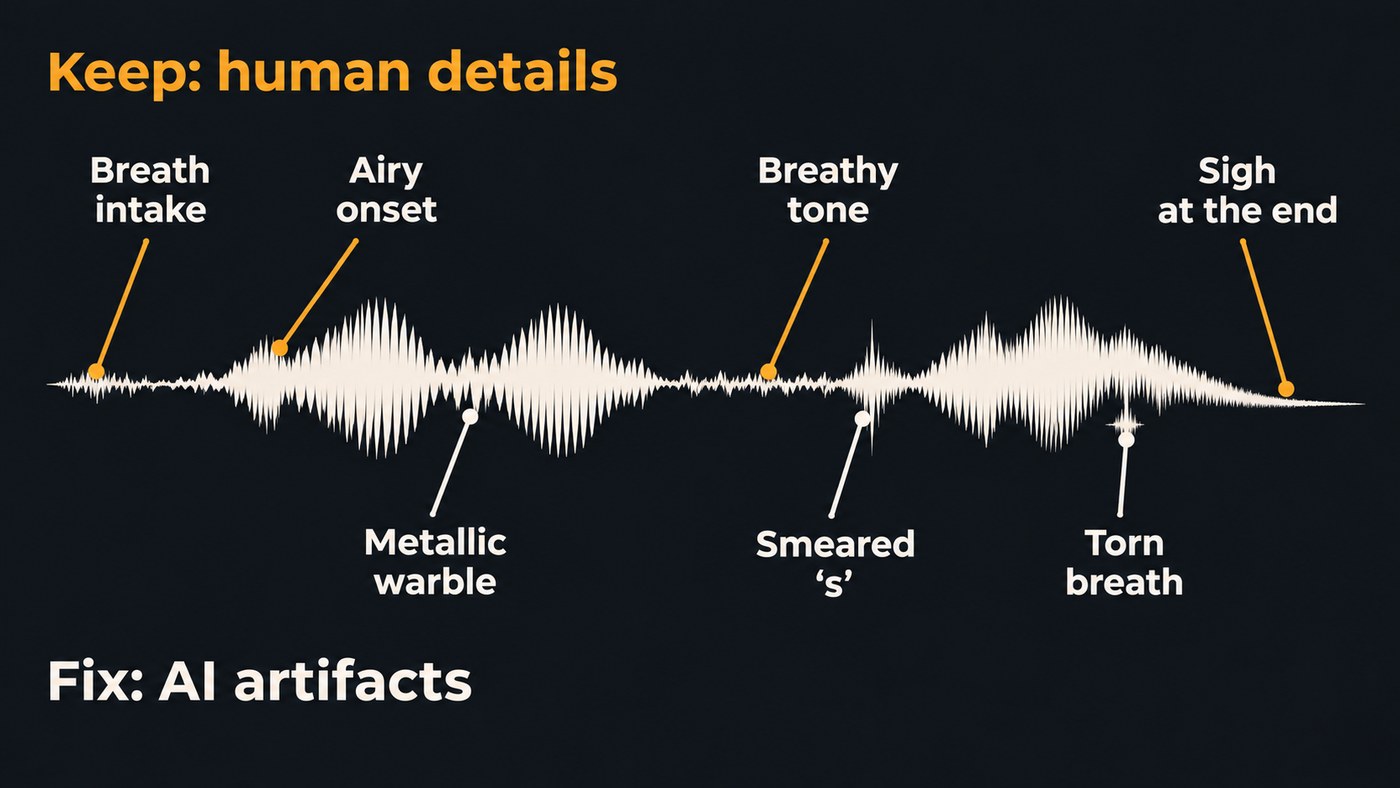
The human details that make a vocal believable:
- Breath intakes before a phrase: deep before the chorus, barely there before a quick line.
- Breathy tone, where air leaks through the voice on a soft verse.
- Airy onsets, a small rush of air before the first vowel.
- Hoarse or cracked notes, where the voice roughens or flips on a high or emotional word.
- Sighs and fall-offs, where the pitch drops away at the end of a long note.
- Mouth noise, the small clicks you hear on a close-miked take.
The machine artifacts that give an AI vocal away:
- A metallic warble or shimmer on held notes
- "s" and "t" sounds that smear or hiss
- Breaths that chirp or tear, or the same breath pasted before every line
- Fine detail that sounds smoothed over, as if the vocal had been heavily denoised
Why breath and texture are hard for AI
A sung vowel has a clear pitch. A breath, a whisper or an aspirated "h" has none, and vocal models treat the two differently. ACE Studio's pitch editing docs make the split visible: a dashed curve is "voiceless pitch", which the docs describe as a breathy voice or aspirated sound.
Researchers say control over these textures still lags behind pitch and timbre. The TechSinger paper by Wenxiang Guo and colleagues, accepted at AAAI 2025 and last revised on arXiv on 21 April 2025, opens with the problem: "existing methods rarely provide precise control over vocal techniques such as intensity, mixed voice, falsetto, bubble, and breathy tones, thus limiting the expressive potential of synthetic voices."
The full paper explains why. In a breathy tone, the harmonics are less distinct and there's more noise, because the vocal cords don't fully close. Its technique predictor did poorly on "bubble", a cry-like, stuttering sound, which the authors found so random from one use to the next that it was hard to model. The rougher and less regular the detail, the harder it is to generate on purpose.
Voice conversion has the opposite problem: it can damage breaths that were already in your take. The open-source RVC WebUI has a setting for exactly this, labelled in its interface text: "Protect voiceless consonants and breath sounds to prevent artifacts such as tearing in electronic music."
Which AI tools can replicate breathiness
Note-based vocal synths: draw it in
Note-based synths such as ACE Studio sing from MIDI and lyrics and let you shape each phrase. For ACE Studio's V2 models, its vocal parameters docs list:
- Breath blocks. Add all places breaths at the start of phrases; click before a phrase to add one by hand, and drag its left edge to make it longer.
- Dynamic. One envelope from soft to powerful. Pull it down for a softer, more delicate verse.
- Air, Falsetto, Tension and Energy. More Air makes the voice raspier and brighter; lower Tension makes it softer. The docs advise keeping changes small.
- Voiceless pitch. ACE's pitch curve guide draws a hoarse start to a note as a short voiceless dash with a quick pitch attack, and a sigh as an overshoot at the end of a long note.
This route gives the most control and takes the most work. Our guide to the most realistic AI vocal synthesis for singer-songwriters compares the note-based options.
Voice conversion: start from your own breaths
If you can sing the part, sing it with the breaths and texture you want and change only the voice. Soundverse Voice Swap changes the voice, not the performance, so the phrasing and timing of your take carry through. The breaths you sang are in the input; whether they survive cleanly is what to listen for.
- Give it a clean, dry lead. Voice Swap's page says a clean lead vocal gives it the clearest input.
- If a breath tears, try another voice model on the same take.
- If you run RVC yourself, lower the protect value for more protection, accepting that the interface warns it may reduce indexing accuracy.
Voice clones and references: train the texture in
A clone learns from the recording you give it, so give it the texture you want. Soundverse's Train Voice Clone page suggests training one clone from a breathy take and another from a belted one, describing each, and picking the one a song needs. For more on recording clone material, see which AI tools clone a specific vocal timbre best.
One trap: in Soundverse's AI Singing Generator, the whispering and ASMR Singing styles have no voice of their own and are sung in one of eight built-in voices, usually female pop. A breathy voice reference of 30 seconds or more, of a voice you may use, is the better route.
Full-song generators: describe, regenerate, repair
Full-song generators decide the breaths for you. In Soundverse's AI Song Generator, Style of Music takes any style text, so "breathy, close-miked female vocal, whispered verse, full chorus" is a valid input. Every run comes out differently, so make several takes and keep the best. If one line comes out glitchy, Inpainting, on the Creator plan and up, regenerates just that line and leaves the rest as it was.
This walkthrough shows Agent One training a voice clone from one take and then singing a new song in it, the same route you'd use for a breathy clone.
How to add believable breaths to an AI vocal
When the vocal you have sounds airless, add the breaths yourself:
- Record a breath pack. Fifteen or twenty of your own breaths on the mic you sing on: short catch breaths, long deep ones, through the mouth and through the nose.
- Place them where a singer needs air: before long lines, before high notes and on the first line after a rest. ACE Studio's breath guide singles out long lines and high notes too.
- Match the breath to the line. Small and quick before a fast verse line, deeper and audible before the chorus.
- Never repeat one breath twice in a row. Identical breaths are a giveaway.
- Butt each breath up to the first word with a short crossfade, so it belongs to the phrase.
- Set breath levels before compression, then check again after. Heavy compression brings quiet sounds up with everything else.
- Send the breaths to the same reverb as the vocal, so they sit in the same room.
How to fix AI artifacts and keep the human ones
- Start clean. Soundverse's voice tools ask for dry vocals with no music behind them: Train Voice Model notes that background music, noise and reverb all lower quality.
- Regenerate before you repair. A new take or an inpainted line often fixes a warble faster than editing does.
- De-ess before reverb. A bright reverb exaggerates smeared "s" sounds. AI Studio includes De-Esser One, which works on several sibilance bands at once, and its effects use no tokens.
- Repair clicks and tails spectrally. Our guide to software for cleaning up vocal recordings covers the tools.
- Tune gently around breathy passages. Logic Pro's Flex Pitch has a Keep Unvoiced Formants option that processes only voiced formants and keeps sibilant and plosive sounds as they are, which Apple says gives a more natural result.
- Turn breaths down; don't gate them out. A vocal with no breaths at all is one of the quickest tells.
For the rest of the chain, see how to mix vocals like a pro.
Where Soundverse fits
Soundverse is an AI music platform that takes you from idea to audience, built for independent artists who release music. For breathy, textured vocals, the strongest routes start with your own voice. Train Voice Clone, on the Creator plan and up, builds a clone from one take with at least 15 seconds of singing, so a breathy take gives you a clone for the AI Song Generator to sing new songs in; on Pro and Max, songs start on Soundverse v9. Voice Swap, which runs on every plan including Free, re-sings a take you recorded in another voice while keeping your performance. When one line glitches, Inpainting redoes only that line.
Soundverse doesn't let you draw breaths or air curves note by note. For that level of detail, a note-based synth such as ACE Studio is the better tool.
FAQ
Can AI sing a voice crack or a hoarse note? Note-based synths come closest: ACE Studio draws a hoarse start to a note as a short voiceless dash, and its Falsetto and Tension controls change how the voice sits. Prompt-only generators produce these details by chance, so if you need one on a specific word, sing it yourself and use voice conversion.
Why do the breaths in my AI vocal sound fake? Usually because they're identical, too loud, or in places no singer would breathe. Replace them with your own recorded breaths, vary their length and level, and put them where the phrase needs air.
Should I remove the breaths from an AI vocal? Rarely. Turn harsh ones down and delete only the ones that chirp or tear. An airless vocal sounds more synthetic than one with a few imperfect breaths.
Can a voice clone copy my breathy tone? A clone learns from the take you give it, so train it on the tone you want to hear. Record that take dry, in a quiet room, across a range of notes, and keep a second clone for your full-voiced songs.
Sign up for Soundverse free and run your breathiest take through Voice Swap. More vocal guides on the Soundverse blog.
