Which Audio Editing Platforms Offer the Best AI Stem Separation Features?
AI stem separation compared across SpectraLayers, RX 12, Moises, LALAL.AI, Logic Pro, Ableton Live, FL Studio and Soundverse: stems, MIDI, formats, SDR.
For AI stem separation, the deepest feature sets in November 2026 belong to Steinberg SpectraLayers Pro 13 and Moises, which split the most kinds of parts. Logic Pro adds drum-kit detail inside a DAW, iZotope RX 12 rebalances finished masters, LALAL.AI pulls single instruments, and Soundverse's maximum split returns a MIDI file per stem.
Ableton Live 12 Suite and FL Studio cover the four-stem basics. Below is what each platform's own manual or product page says it does, checked on 19 November 2026, followed by what published research says about quality. For DAW-only detail, including Pro Tools, Cubase and Fender Studio Pro, see our comparison of DAWs with AI stem separation.
AI stem separation features, platform by platform
Steinberg SpectraLayers Pro 13 (desktop)
- Stems: the Unmix Song manual page lists vocals, drums, bass, guitar, piano, sax and brass, and other. Any instrument you untick folds into Other.
- Going deeper: Unmix Drums splits a drum layer into kick, toms, snare, clap, hi-hat, ride and crash, and other modules include Unmix Two Voices, Unmix Multiple Voices and Unmix Instrument.
- Quality control: Fast, Balanced and High modes, plus an option to pull sax and brass first.
- Editing: every stem becomes a layer you can repair on the spectrogram, and SpectraLayers opens on the timeline of ARA 2 hosts such as Cubase.
- Edition: Steinberg says Elements includes selected AI processes such as vocal unmixing, while Pro has the most complete set.
iZotope RX 12 Music Rebalance (desktop and plugin)
- Stems: Stem Split returns vocals, bass, percussion and others.
- Accuracy check: iZotope's Music Rebalance guide says the four stems null against the original file, so summed together they recreate the mix.
- Editing: Stems View gives each stem its own spectrogram, so tools like Spectral Repair or De-hum work on one part at a time.
- In your DAW: a real-time plugin changes each element's level without exporting anything.
Moises (web, desktop and mobile)
- Stems: Moises's stem separation page lists 27 separation targets on its top tier. Some go finer than the usual stems: rhythm and solo guitars, grand piano as well as piano and keys, and reeds as well as brass.
- Automatic mode: listens first, then separates up to seven top-level parts on its own.
- Models: Standard for speed, Hi-Fi for accuracy on the Pro plan.
- Input: audio or video files, or a pasted link. Moises says it never trains its models on your uploads, and the stems open in Moises Studio for editing.
LALAL.AI (web, desktop, mobile and plugin)
- Stems: you choose which stem types to extract: vocals and instrumental, drums, bass, electric or acoustic guitar, piano, synthesizer, strings, wind, or voice and noise. A Lead/Back mode returns lead vocal, backing vocal, instrumental, and backing plus instrumental.
- Where it runs: LALAL.AI works in the browser, in desktop apps for Windows, macOS and Linux, on iOS and Android, through an API, and as a VST plugin that runs locally in your DAW on the Pro plan.
- Files: MP3, OGG, WAV, FLAC, AIFF, AAC and M4A plus common video formats, with a choice of output format and uploads up to 2 GB on paid plans.
- Worth knowing: processing minutes count the file length times the number of stem types you select.
Logic Pro, Ableton Live 12 Suite and FL Studio (inside the DAW)
- Logic Pro: Apple's Stem Splitter guide covers vocals, drums, bass, guitar, piano and other, then kit pieces from the drum stem. Presets decide which stems come out alone and which merge into a submix. It needs an M1 or later Mac.
- Ableton Live 12 Suite: four stems (vocals, drums, bass, others) separated on your computer with no internet connection, per Live's manual. Since Live 12.4 you can separate just a time selection, or merge two or three stems into one track, and the stems keep the source file's bit depth.
- FL Studio: Producer Edition and up splits vocals, drums, bass and instruments.
Soundverse Stem Separator (browser)
- Stems: 2 (vocals and backing), 6 (vocals, drums, bass, guitar, piano, other) or a maximum split, listed as 14+ stems, that adds parts such as strings, synth, keys, flute, FX, and brass and woodwinds, with a MIDI file for each stem.
- Files: songs up to 50 MB in MP3, WAV, FLAC, AAC, OGG or M4A. The 2- and 6-stem splits export as WAV, FLAC or MP3, and the maximum split as WAV plus MIDI.
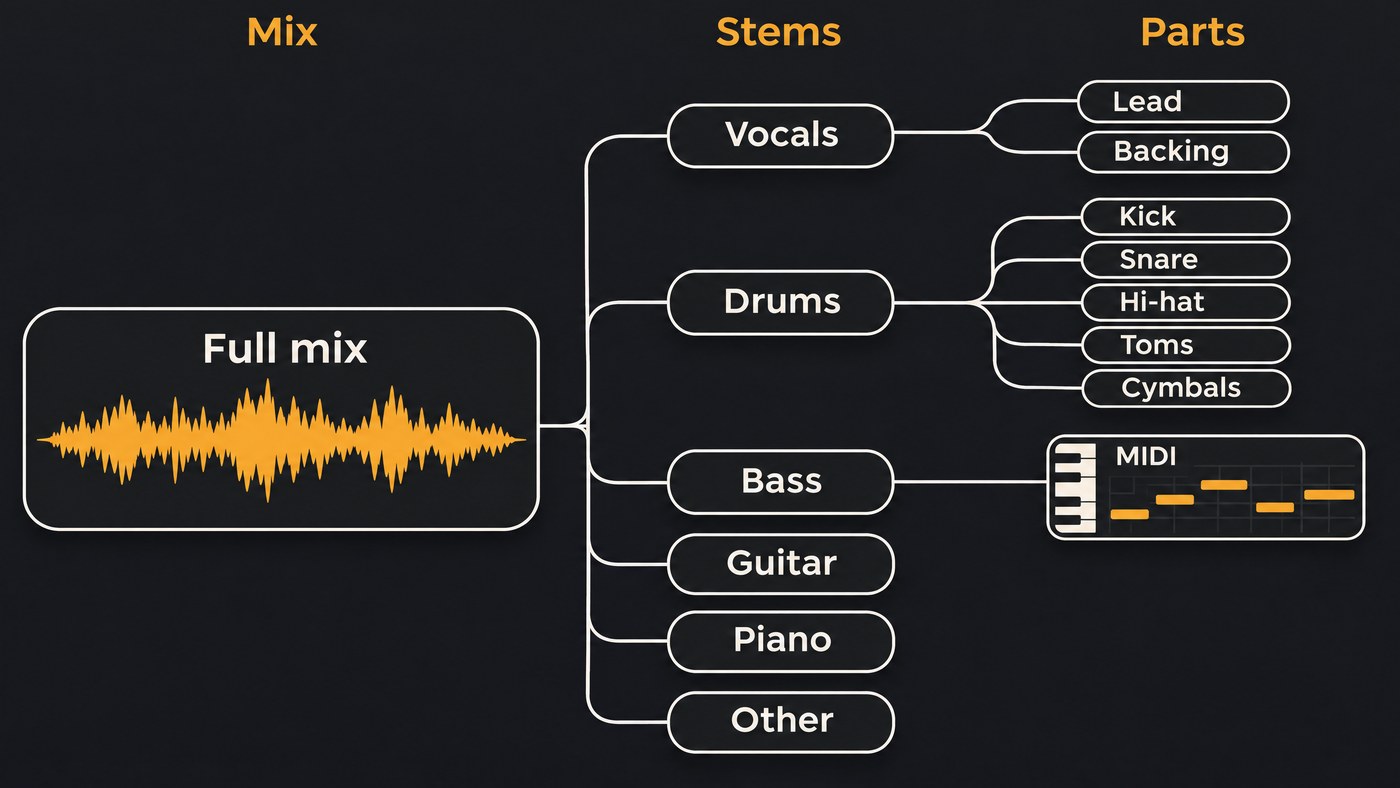
Formats, MIDI per stem, and local vs cloud
- On your machine: SpectraLayers, RX and Logic run as desktop software, Ableton says Live separates without an internet connection, and LALAL.AI says its plugin runs locally. That suits unreleased songs and very long files.
- In the cloud: Moises, LALAL.AI's web app and Soundverse need no powerful computer, but you upload the file and work within size limits, from 50 MB per song on Soundverse to 2 GB on LALAL.AI's paid plans.
- MIDI per stem: Soundverse's maximum split writes a MIDI file for every stem automatically. In Live, the Convert Harmony, Melody and Drums to New MIDI Track commands turn one stem at a time into MIDI.
- Lossless output: Moises exports lossless files at up to 192 kHz, and Soundverse offers WAV or FLAC for 2- and 6-stem splits. Start from a WAV master whichever tool you use.
How good is the separation? What the benchmarks say
Researchers score separation with signal-to-distortion ratio (SDR) in decibels, where higher means cleaner stems. The standard test set is MUSDB18, which the SigSep project describes as 150 full-length songs, about 10 hours, each with drums, bass, vocals and other stems.
- HT Demucs (Meta AI, November 2022): its Demucs repository reports 9.00 dB SDR on the MUSDB HQ test set and 9.20 dB with fine-tuning, trained with 800 extra songs. The repo is no longer maintained.
- BS-RoFormer (ByteDance, September 2023): the paper reports 9.80 dB average SDR on MUSDB18HQ for a smaller version trained without extra data, while the full system, trained with 500 extra songs, placed first in the music separation track of the Sound Demixing Challenge 2023.
- Progress over time: the 2023 challenge summary found its best system beat the 2021 winner by more than 1.6 dB, and it added listening tests with producers and musicians.
Treat these numbers with care. They score four stems only, so guitar, piano and kit pieces go unmeasured. On its experimental six-stem model, the Demucs README says: "Quick testing seems to show okay quality for guitar, but a lot of bleeding and artifacts for the piano source." The organizers of the Music Demixing Challenge 2021 also noted that MUSDB18 "is also subject to several biases resulting from a focus on Western pop music and a limited number of mixing engineers being involved."
None of the commercial pages we read publishes a current MUSDB score for its own model. Ableton only says its High Quality mode scores a higher SDR than High Speed. So the best test is your own hardest chorus. For the technology behind the numbers, read how AI stem separation works.
Recommended AI tools capable of separating stems from existing audio files
- Remix or sample prep that needs a deep split: SpectraLayers Pro 13 or Moises.
- A vocal sitting too low on a finished master: RX 12 Music Rebalance.
- One instrument from many files: LALAL.AI, with batch processing and an API.
- Separate kick, snare and hi-hat: Logic Pro, SpectraLayers' Unmix Drums or Moises.
- Notes as well as audio: Soundverse's maximum split.
- Already in Live or FL Studio: the built-in four-stem split is often enough for a quick edit.
- No budget: see our roundup of free ways to isolate vocals from mixed music.
Where Soundverse fits
Soundverse is an AI music platform that takes you from idea to audience, built for independent artists who release music. Stem Separator runs in your browser from AI Tools, from a song's menu in your Library, or on a clip in AI Studio, where the stems land on new tracks below the clip. The 2- and 6-stem splits are on the Free plan, and the maximum split with MIDI needs Creator or above. On the Free plan, you can split 6 stems and then run Audio to MIDI on the one stem you want as notes.
It can only separate what's already in your mix and won't create a missing part. Files are capped at 50 MB, so very long recordings suit a desktop tool better.
Licensing is set by plan: the Free plan is for personal use, and the Creator plan comes with a royalty-free license.
From 1:28, this walkthrough shows Stem Separator splitting a song, from input to finished stems.
FAQ
Which platform separates the most stem types? Moises lists 27 targets on its top tier. SpectraLayers Pro 13 splits a song into seven stems and the drums into seven more, and Soundverse's maximum split is listed as 14+ stems with MIDI.
Is local or cloud stem separation better? Quality depends on the model, not where it runs. Local tools keep unreleased music on your computer and skip upload limits, while cloud tools run on modest laptops and phones.
Do separated stems add up to the original mix? iZotope says RX 12's four stems null against the original. For other tools, flip the polarity of the original against the summed stems and listen to what's left.
Can I release a song made from separated stems? Only with the rights to the source recording. Stems from your own masters are yours; stems from someone else's record still need their permission.
Sign up for Soundverse free and split your first song into stems in your browser. More production guides on the Soundverse blog.
