Best AI Vocal Processing Software for High-Quality Studio Results
The best AI vocal processing software for studio results in 2026: AI de-essers, smart EQ, tuning and doubles, level riding and mixing assistants.
The best AI vocal processing software for high-quality studio results is a chain of specialists, one per job: sonible smart:deess and smart:EQ 4 for sibilance and tone, iZotope Velvet for de-essing on a budget, Synchro Arts Revoice Pro 5 for tuning and doubles, Waves Vocal Rider for level, and RoEx for a check on the whole mix.
We checked every product below on its maker's own site on 7 November 2026, in the middle of the Black Friday sales, so treat the prices as a snapshot.
What AI vocal processing software actually does
A studio vocal goes through the same jobs whatever software you use: clean the take, tune and align it, even out its level, shape its tone, tame the S sounds, compress it, then add reverb and delay. The AI part, where there is one, listens to your take and sets a starting point for one of those jobs.
Machine learning helps most where older tools made you hunt for a frequency or a threshold. sonible's de-esser, for example, recognises individual phonemes instead of reacting to the level in one band. Mixing assistants go further and suggest settings for the whole track. None of them knows how the song should feel, which is why every tool below shows you what it changed.
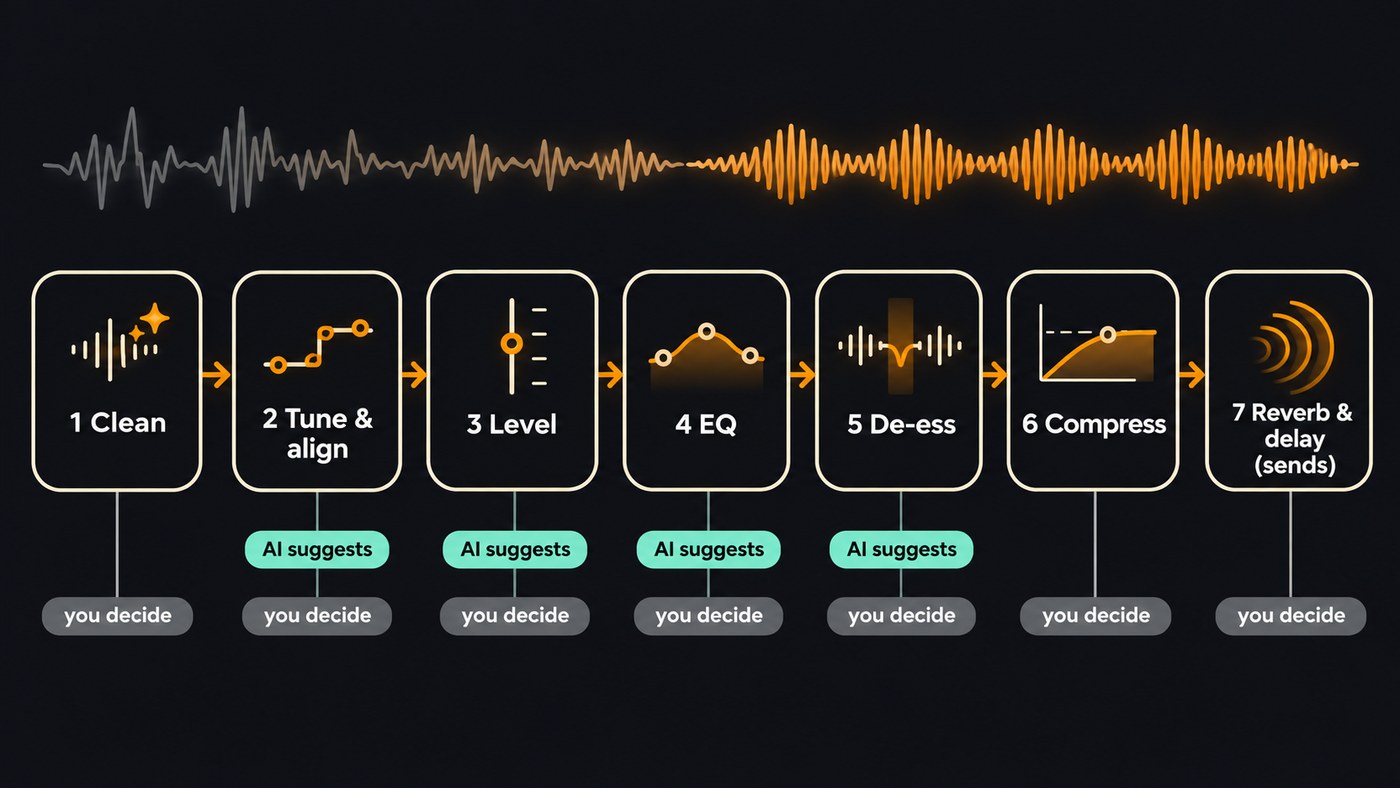
The shortlist: AI vocal processing software by job
sonible smart:deess (de-essing). According to sonible's product page, smart:deess identifies S, Z, Sh, Ch, T and P sounds in real time and processes the whole sibilant, not only its loudest part, with Color controls for a soft, balanced or sharp character. It can also brighten dull or lisping sibilants. sonible describes your role plainly: "Your job then is to review the analysis and refine the results." It needs about 70 ms of look-ahead, so it isn't for zero-latency live use, and it's built for vocal tracks and buses rather than full mixes. It was €129, with a 30-day free trial, on 7 November 2026. Best for bright pop and rap vocals full of S and T sounds.
sonible smart:EQ 4 and smart:comp 3 (tone and dynamics). The smart:filter in smart:EQ 4 balances a track toward a target Profile, including vocal Profiles, or toward a reference track you load. In group mode you put up to 10 tracks together, set the vocal to the front and the beat further back, and it reduces masking between them. smart:comp 3, which sonible calls a spectro-dynamic compressor, proposes tailored compression settings. Each was €129 on 7 November 2026. Best for a vocal that disappears into a busy beat.
iZotope Velvet (de-essing on a budget). iZotope launched Velvet on 7 May 2025 at a $49 list price. It splits the vocal into sibilance and tonal channels: Sibilance learn finds the harsh frequencies and sets EQ nodes, Lift and Tame shape the tone toward target profiles, and one fader removes mouth clicks. iZotope also lists Nectar 4 among its mixing plugins (Nectar 4 Advanced was $299 on 7 November 2026), but its product pages wouldn't load for us that day, so compare it on izotope.com yourself. Best for a first smart vocal plugin on a small budget.
Synchro Arts Revoice Pro 5 (tuning, timing and doubles). Revoice Pro 5 aligns, tunes and doubles. SmartPitch decides when to match the pitch of doubles and harmonies to the lead, and when to leave them alone, and Automatic Matching copies pitch, timing, vibrato and volume from one take to another. It runs in AU, VST3 and AAX hosts on Mac and Windows, and was listed at $299, on sale for $150, on 7 November 2026. Best for stacked choruses where four takes need to sound like one tight performance.
Waves Vocal Rider (level). Vocal Rider moves the vocal's gain toward a target level you set, by up to 12 dB in either direction, the way fast fader moves would. Feed it a submix of the instruments and the target follows the music, and it can write its moves as editable automation. Waves doesn't pitch it as AI; it's here because levelling a vocal before compression is a step many home mixes skip. It was $29.99 in the Black Friday sale on 7 November 2026, against a $199 list price. Best for singers whose quiet verses and belted choruses sit far apart.
RoEx Automix and Mix Check Studio (mixing assistant). RoEx runs in your browser. Automix analyses your stems (WAV or MP3), applies mix settings for your genre and returns a mixed and mastered file. Mix Check Studio flags muddiness, harshness or imbalance in a finished mix, with free basic feedback. RoEx says it never trains its models on your audio, and its FAQ is candid about the limits: "AI mixing provides consistent, high-quality results quickly, while human engineers still offer unique creative direction." Best for hearing whether your vocal sits right against the beat before you pay anyone.
Soundverse AI Studio (a free vocal chain in the browser). Our own studio has a de-esser, EQ, compressor, vocal doubler and ten one-click vocal chains built in, free on every plan. It doesn't load third-party plugins, so it suits songs you finish in the browser. Details and limits are below.
What about de-noise and de-reverb?
Clean the take before any of the tools above, because compression and EQ boosts make noise louder. We compared de-noise and de-reverb options, from iZotope RX 12 to free Audacity, in our roundup of software for cleaning up vocal recordings. If the noise is as loud as your voice, record the line again.
How to build a studio vocal chain with AI tools
- Start from your best comped take, dry. Print any cleanup first and keep the original.
- Tune and align before you mix. Pitch detection works best on a dry vocal. Align doubles and harmonies to the lead now too.
- Level the phrases. Use clip gain or a level rider so the vocal reaches the compressor steadily, with phrases within 3 to 4 dB of each other.
- Let the AI EQ propose, then trim it. High-pass most voices around 80 to 100 Hz, cut mud between 200 and 400 Hz only if you hear it, and keep boosts small.
- De-ess after anything that adds brightness. EQ boosts and compression make S sounds harsher, so the de-esser goes after them and before reverb.
- Compress gently. A 3:1 to 4:1 ratio with 3 to 6 dB of gain reduction on the loudest words is a common start. Two compressors doing a little each usually beat one working hard.
- Add space on sends. Reverb and delay on aux sends keep the dry vocal clear.
- Judge it in the mix at matched loudness. A louder version always sounds better for a moment, so match levels before you compare.
Our guide to mixing vocals like a pro goes deeper on EQ and compression, and the one on layering vocals for a professional sound covers what to do with the doubles you just aligned.
Can AI vocal plugins replace a mix engineer?
Not on their own. They get a home vocal to a clean starting point fast, but they can't judge taste: how breathy the verse should feel, which word in the hook should jump out, whether the reverb should sound like a small room or a hall. sonible's advice to review and refine, and RoEx's note about creative direction, make the same point. Use the AI to set things up and your ears to finish, and when a release really matters, pay an engineer for the final mix or a second pair of ears.
Which AI vocal processing software should you buy first?
- Harsh S sounds: smart:deess, or Velvet if €129 is more than you want to spend.
- Your vocal gets lost in the beat: smart:EQ 4 in group mode.
- Quiet verses, loud choruses: Vocal Rider.
- You stack doubles and harmonies: Revoice Pro 5.
- No DAW yet: RoEx or Soundverse AI Studio in the browser.
- Noise or room echo: a restoration tool first, from our cleanup roundup.
Where Soundverse fits
Soundverse is an AI music platform that takes you from idea to audience, built for independent artists who release music. The AI Studio plugins give you a browser vocal chain at no cost. De-Esser One has six dynamic bands between about 4.8 and 10.8 kHz and a DELTA switch to hear what it removes, VocalDuality One makes up to four doubles, and the Effect chain preset menu loads ten vocal chains, from Rap Vocals to Radio-Ready Vocal and Stacked Doubles. Mix One flags mud, harshness and sibilance on each track. With its Studio switch on, Agent One adds effects and sets EQ when you ask in words; the request uses tokens, the effects don't.
Know the limits: AI Studio doesn't load VST or AU plugins, VocalTune One's pitch correction isn't applied on export, and EQ One has no dynamic mode. Licensing is set by plan: the Free plan is for personal use, and the Creator plan comes with a royalty-free license.
This tour of the AI Studio plugin rack covers its instruments, effects and meters, including De-Esser One, VocalDuality One and VocalTune One.
FAQ
What is AI vocal processing software? Plugins and apps that listen to a vocal and set or suggest processing for it: detecting sibilant phonemes, balancing EQ toward a vocal profile, matching doubles to a lead, or flagging where a vocal clashes with the beat. You still set the final amount by ear.
Is AI vocal processing good enough for a commercial release? It can be. The AI only sets the starting point; the processing itself is standard mixing work. A clean, well-performed take processed with care will hold up next to other releases, and a noisy or off-pitch take will still sound like one.
What order should vocal plugins go in? Cleanup, tuning, level, EQ, de-essing and compression, with reverb and delay on sends. De-ess after anything that adds brightness and before reverb, so sibilance doesn't splash into the tail.
Is there free AI vocal processing software? Soundverse AI Studio's effects, Mix One included, are free on every plan and use no tokens, with nothing to install. RoEx's Mix Check Studio gives free feedback on a mix, and sonible's smart:deess has a 30-day free trial.
Sign up for Soundverse free and put De-Esser One on your next vocal.
More vocal and mixing guides on the Soundverse blog.
