The Best AI Tools for Lyrics-to-Audio Production Workflows
The best AI tools for lyrics-to-audio production, step by step: write, sing, arrange, mix and master, with the right tool and a dated price for each.
The best AI tools for lyrics-to-audio production workflows each handle one step: Soundverse AI Lyrics Writer to draft, VOCALOID6, ACE Studio or Soundverse MIDI to Song to sing, AI Stem Generator to arrange, RoEx Automix or Mix One to mix, and LANDR or Mastering One to master. Chained together, they keep the melody, voice and sound your call.
One-prompt song generators can turn finished lyrics into a full track in one go, and that's the fastest route to a demo. We compare those in how to choose an AI tool that handles both lyric writing and full song arrangement. This guide covers the other case: you want to choose the melody, the voice, the parts and the loudness yourself, one step at a time. Prices below were checked on each company's own page on 7 November 2026.
The lyrics-to-audio workflow in five steps
- Write. Lyrics with section tags and singable line lengths.
- Sing. Words and melody become a vocal.
- Arrange. Parts are built around that vocal.
- Mix. Levels, tone and space so every part is heard.
- Master. Final tone and loudness for release.
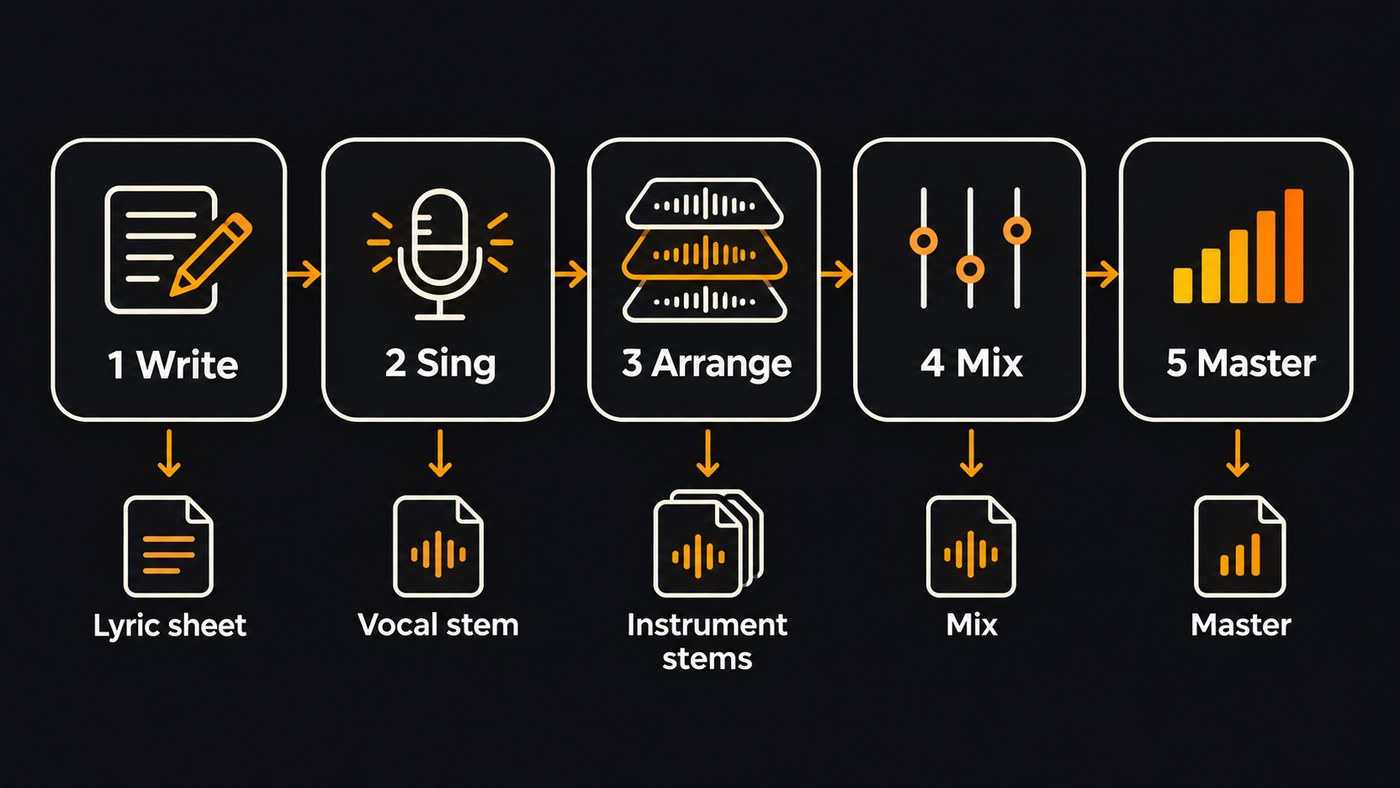
Each step leaves you a file: a lyric sheet, a vocal stem, instrument stems, a mix, a master. Keep them all. When one step goes wrong, you redo that step instead of the whole song.
Step 1: Write lyrics a voice can sing
- Soundverse AI Lyrics Writer. Drafts a whole song or just an Intro, Verse, Chorus, Bridge or Outro, in one of 8 moods and 64 genres. Drafting from its panel is free on every plan. Use it for the section you're stuck on, then rewrite the lines in your own words.
- Soundverse Translate Lyrics. For releases in more than one language. It translates into 11 languages, keeps tags like [Verse] and [Chorus], and its Match syllables option aims each line at the original's syllable count so it still fits the tune.
- RhymeZone. A free rhyming dictionary rather than an AI tool, with near rhymes and results you can sort by syllables. Handy when an AI draft rhymes too predictably.
Before you move on, tag every section and keep the syllable count of verse two close to verse one, so both can share a melody. Write numbers and names the way they're sung. For a side-by-side of how much say each generator gives you over the words, see which AI music generators allow the most control over lyric generation.
Step 2: Turn the words into a sung vocal
Pick the tool by what you already have.
You have the melody as notes. Note-based vocal synths sing exactly the pitches and rhythms you enter.
- VOCALOID6 (Yamaha). Yamaha describes it simply: "Just input the melody and the lyrics, and this technology transforms your computer into a fabulous vocalist." Its buy page listed it at USD 225.00 before tax, with 25 voices, for Windows and macOS as VST3, AU and ARA2. A single voicebank can sing a mix of Japanese, English and Chinese, you can export your MIDI, and the free trial runs 31 days. Best for producers who want to shape accents and vibrato note by note.
- ACE Studio. Its vocal synth turns MIDI and lyrics into a sung part, with more than 160 ready-made voices and AI instruments in the same app. The pricing page listed the Artist plan at $16.58 a month, billed yearly, as rent-to-own: after two years the subscription becomes a lifetime license. Best for DAW producers who want voices and instruments from one subscription.
- Soundverse MIDI to Song Generator. Export 5 to 60 seconds of your lead line as a .mid, add lyrics, and get a complete sung song that follows your tune, with the words sung exactly as written. It runs on the Free plan with Soundverse v6. Best for hearing a topline as a full song before you build the real arrangement.
You have the melody in your head. Melody to Song Generator takes 5 to 60 seconds of humming, singing or playing, plus your lyrics, and builds a song that follows the tune.
You have only the words. AI Singing Generator returns an a cappella vocal, singing about the first 350 characters per take, so lead with the chorus. AI Song Generator's Custom mode takes up to 3,000 characters of lyrics (400 on Free) and sings them word for word over a full arrangement, on Soundverse v9 if you're on Pro or Max.
You'll sing it yourself in the end. Treat the AI vocal as a guide, then record your own take over the arrangement. For more singing tools compared, see the best AI singing generator platforms for independent artists.
Step 3: Arrange the music around the vocal
With a vocal stem in hand, build the music to fit the voice rather than squeezing the voice into a finished track.
- Soundverse AI Stem Generator. Upload the a cappella, keep Stem set to Instrumental, describe a style, and get a backing built around your singing. Or add one layer at a time, such as drums, bass, keyboard or strings, each as its own track. It needs the Creator plan or above.
- Agent One in AI Studio. Ask for "a funky bassline that fits this song" and it writes MIDI parts (beats, basslines, chords, pads and leads) on their own tracks, which you can edit in the piano roll.
- Your DAW. If your vocal came from VOCALOID6, export the MIDI and write parts around the same notes. If you started from a one-prompt song, Stem Separator splits it into 2 stems, 6 stems or every part with its own MIDI file, so you can replace parts with your own playing.
Three habits keep an arrangement clear. Keep busy parts out of the vocal's octave. Change something each section, such as drums entering in chorus one and strings in the last chorus. Get to the vocal quickly.
Step 4: Mix the vocal and the parts
- RoEx Automix. RoEx takes your multitrack stems and returns a mixed and mastered track in minutes, and its Mix Check Studio gives free feedback on a mix you upload. RoEx says it doesn't use your music for AI training. Best when you've exported stems from any of the tools above and want a balanced starting point fast.
- Soundverse Mix One. In AI Studio, give each track a type, pick one of 18 genre templates and click Auto-Place. Mix One pans each part and carves clashing ones apart, and its Fix tone button applies the cuts it finds for mud, boxiness and harshness. It's free on every plan and uses no tokens. Its carve is a fixed EQ dip, so finish by ear.
- Your own vocal chain. EQ, compression, de-essing and reverb, in that order, still do most of the work on a lead vocal.
Mix One places a project's stems by genre, then Mastering One goes on the master chain, and the raw, mixed and mastered versions are compared.
Step 5: Master for streaming
Loudness targets matter less than many people think. Spotify's help page is direct: "We adjust tracks to -14 dB LUFS, according to the ITU 1770 standard." A master pushed far louder than that gets turned down in playback, but the dynamics it gave up don't come back.
- Soundverse Mastering One. Pick a genre and a target, such as Streaming −14 or Apple Music −16 LUFS, set a true peak ceiling between −3 and 0 dBTP, and press Master. It listens to two seconds of your mix and sets its own controls, free on every plan. It can't fix a muddy mix, so sort that out in step 4.
- LANDR. LANDR Mastering costs $10 for a single track with no subscription, and you can preview masters free before you pay. Its reference mastering matches your track to a song you upload, and LANDR Studio plans include unlimited online mastering.
Whichever you use, compare the master and the mix at matched loudness. Louder almost always sounds better for the first ten seconds.
One-click song or step-by-step workflow?
Use a one-click generator when you need a demo tonight or want to hear one lyric in three genres. Use the five-step workflow when the melody is already yours, when you'll replace the AI vocal with your own, or when you're releasing the song and need stems you can mix. Many songwriters do both: a quick generation to find the style, then the step-by-step build for the version they release.
Where Soundverse fits
Soundverse is an AI music platform that takes you from idea to audience, built for independent artists who release music. It covers all five steps in one account: AI Lyrics Writer for the draft, MIDI to Song Generator or AI Singing Generator for the vocal, AI Stem Generator for parts that fit it, and AI Studio's Mix One and Mastering One to finish, with the studio's effects using no tokens.
Two limits are worth knowing. AI Studio doesn't load third-party VST or AU plugins, so a vocal from a desktop synth comes in as an audio file. And some steps need a paid plan: AI Stem Generator needs Creator, as do WAV and stem exports.
Licensing is set by plan: the Free plan is for personal use, and the Creator plan comes with a royalty-free license.
FAQ
What is a lyrics-to-audio workflow? It's the chain from written lyrics to a finished, mastered track: write, sing, arrange, mix and master. AI tools can handle any step, and you can swap in your own voice or playing at any point.
Can AI sing my lyrics to my own melody? Yes. VOCALOID6 and ACE Studio sing the notes you enter. Soundverse's MIDI to Song Generator follows a .mid melody, and Melody to Song Generator follows a hummed or played clip of 5 to 60 seconds.
Do I need a DAW for this workflow? No. Soundverse runs every step in the browser, and RoEx and LANDR work online. Desktop vocal synths such as VOCALOID6 run on their own or as plugins inside a DAW.
How loud should I master an AI song? Spotify normalizes playback to −14 LUFS, so a streaming master near that level keeps its dynamics. Mastering One has Streaming −14 and Apple Music −16 targets, and LANDR says its masters are optimized for streaming.
Sign up for Soundverse free and take your next lyric from draft to master in one place. More songwriting and production guides on the Soundverse blog.
