Best AI Music Tools for Gaming Soundtracks?
AI music tools for gaming, graded on loops, stems, stingers and game licences: Soundverse, Mubert, AIVA, ElevenLabs, Stable Audio, Beatoven.ai, Suno.
The best AI music tools for gaming give you loops that repeat cleanly, stems you can layer, and a licence that covers a shipped game. Soundverse, Mubert, AIVA, ElevenLabs Music, Stable Audio and Beatoven.ai each meet part of that list. Song generators such as Suno suit trailers and title songs better than in-game score.
We read each vendor's own pages on 20 November 2026, with the FMOD and Steamworks documentation. Plans change, so check again before you buy.
What game music needs that linear music doesn't
A song plays once. Game music waits for the player, so it needs:
- Loops that repeat cleanly. A menu cue can run for twenty minutes, so the loop point lands on a bar line with no click.
- Stems for vertical layering. Pads, melody, percussion and brass as same-length files, so the game fades layers in as tension rises.
- Intensity variations. Explore, tension and combat versions of one cue in the same key and tempo.
- Stingers and transitions. One- to four-bar cues for a discovery, a death or a level clear, and bridges that switch states on the beat.
- One theme across levels. A motif that returns in every area, re-orchestrated rather than replaced.
- Middleware-ready audio. Adaptive music usually lives in FMOD Studio or Wwise, which need bar-aligned files.
FMOD's event authoring documentation shows why the bar line matters: "A loop region functions as a paired transition marker and destination marker, and so causes the playback position to loop over the specified range." Transition regions can be quantized too, so a jump to combat happens only on the bars you pick, using the event's tempo markers. Audiokinetic's Wwise documentation blocked our requests on 20 November 2026, so read its music pages directly.
None of the tools below exports an FMOD or Wwise project. They hand you audio files, and the adaptive logic stays your job.
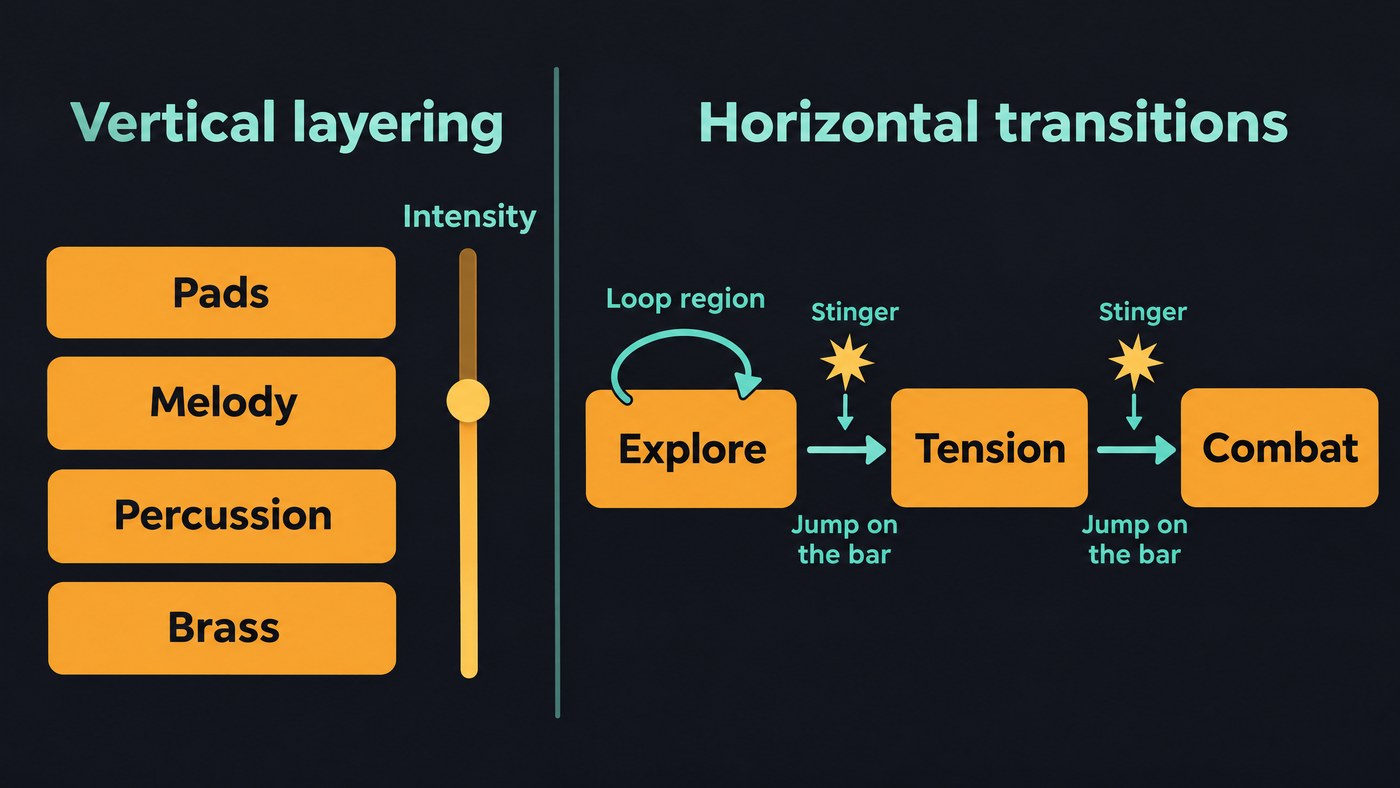
The best AI music tools for gaming, graded on those needs
Soundverse
Best for: themes, loops, layers and sound effects in one account. Soundverse is an AI music platform that takes you from idea to audience.
- Loops and length: AI Music Generator makes instrumentals with a Gaming theme and vibes such as Epic, Mysterious or Calm. On Creator and above, an additional engine adds a Type control (Loop or Ambience) and a Length setting from 15 seconds to five minutes. Extend Music continues a cue in the same style, tempo and key.
- Stems: Stem Separator splits a cue into 2 or 6 stems, or a maximum split with MIDI per stem on Creator and above. AI Stem Generator (Creator and above) adds one new part, such as Percussion or Brass, for a combat layer.
- Exports: AI Studio exports one stem file per track in a ZIP from Creator, and audio as WAV, FLAC, AAC or OGG at up to 96 kHz. Free exports MP3.
- Sound effects: AI Sound Effects Generator makes clips from half a second to 30 seconds, including menu clicks, on every plan. Audio to JS turns a short sound into JavaScript for browser games.
- Rights: Licensing is set by plan: the Free plan is for personal use, and the Creator plan comes with a royalty-free license.
Mubert
Best for: long generated beds and in-app generation through its API. The pricing page lists "Music in finished apps, games & services" on Ultra only, shown at $89 a month before a Black Friday discount. Pro and Ultra add the full Track Editor, with stem edits inside sections and BPM and key changes. Paid plans download WAV. On every plan, "Tracks cannot be published on music streaming platforms", which rules out a soundtrack album.
AIVA
Best for: composers who want MIDI to arrange. The pricing page shows MIDI on every plan, WAV on Pro and tracks up to 5 minutes 30 seconds. Standard allows monetization "only on Youtube, Twitch, Tik Tok and Instagram", so a paid game needs Pro (€33 a month billed annually, plus VAT), which reads "Copyright owned by YOU". There's no loop mode; you build loops and layers from the MIDI in a DAW.
ElevenLabs Music
Best for: section edits on cues for smaller studios. You can regenerate one section at a time, with 2 and 4 stems on Starter and Creator and up to 6 on Pro. The Music Terms (updated 9 October 2026) give self-serve plans "All online and offline commercial use permitted, except film, TV, radio, and Studio Games". An Indie Game, which those plans cover, has earned under $500,000 since release, from a developer with under $1,000,000 in game revenue last year. Bigger games need Enterprise Music, and Free can't download.
Stable Audio
Best for: instrumentals and sound effects on your own hardware. Stability AI's comparison page (9 September 2026) says Stable Audio 3.0 makes instrumentals and sound effects up to 6 minutes 20 seconds, with open weights for its Small, Small SFX and Medium models. Under the Community License "you own the audio you generate and can distribute and commercialize it"; organizations above $1 million in annual revenue need Enterprise. The hosted app starts at $12 a month.
Beatoven.ai
Best for: quick background cues. The homepage FAQ lists Games among its uses and gives a "non-exclusive perpetual licence" per downloaded track (MP3 or WAV), while Beatoven.ai keeps ownership and bars direct streaming releases. It also makes sound effects. Its pricing page returned "Not Found" on 20 November 2026.
Suno and Udio
Best for: a sung title theme or trailer track. Suno's pricing page lists no downloads and no commercial rights on Free; Pro ($10 a month, or $8 billed yearly) has 20 song downloads a month and Premier ($30, or $24) has 60, both with commercial use and stem separation. It adds: "See the terms of service for limitations on commercial use." Udio's pricing page showed no readable text and its help centre doesn't state whether downloads are on, so check your account first.
Show Me the Best AI Software Options for Generating Custom Soundtracks for Indie Games
- Solo developer needing music and SFX: Soundverse on Creator.
- Composer arranging in a DAW: AIVA Pro, for MIDI per level.
- Indie game under ElevenLabs' thresholds: a paid ElevenLabs self-serve plan.
- Self-hosting or heavy sound design: Stable Audio, under $1 million a year.
- Music generated inside a running app: Mubert Ultra or its API.
- A planned soundtrack album: avoid Mubert and Beatoven.ai, whose terms bar streaming releases.
Our guide to platforms for royalty-free background tracks covers these vendors' attribution and Content ID rules for video.
Workflow: from theme to adaptive stems to engine
- Fix the theme. Make 8 to 16 bars of the motif at a set tempo and key, say 100 BPM in D minor. A 4/4 bar lasts 240 ÷ BPM seconds, so 16 bars is 38.4 seconds.
- Make intensity versions. Same tempo and key, new mood: Calm, Mysterious, Epic. Discard any take whose tempo or key drifts.
- Split or build layers. Separate each version into 6 stems, or add a Percussion or Brass part over the calm version. Every stem starts at bar 1 and runs the same length. See our guide to editing audio stems.
- Cut loops on the bar. Trim to whole bars and lay the last bar's reverb tail over the start. Our guide to looping music for smooth playback walks through it.
- Make stingers. Short cues in the same key for a win, a loss and a discovery, plus UI sounds.
- Export. One 48 kHz, 24-bit WAV per stem, named like
forest_combat_brass_100bpm.wav. - Build the FMOD event. Stems on tracks in one event, a tempo marker at 100 BPM, a loop region over the section, layer volumes on an Intensity parameter, and transition regions quantized to the bar.
- Test and log. Trigger every transition at its worst moment, and record tool, plan, date and prompt for each cue.
If the game also needs music-video footage for cutscenes, see our guide to downloading AI music videos for a game project.
Store policies on AI music: Steam's disclosure rules
Valve's Steamworks Content Survey asks about generative AI in content that ships with your game: "This includes content such as artwork, sound, narrative, localization, etc." It has two categories:
- Pre-Generated: made with AI tools during development. Valve reviews it like any other content, against your promise that the game contains nothing illegal or infringing.
- Live-Generated: made by AI while the game runs. You also describe the guardrails that stop it producing illegal content. Music generated by an API during play falls here.
Disclosure isn't a pass: the FAQ says products must follow Steam's content rules either way. Other stores set their own rules, so check each before launch.
Where Soundverse fits
Soundverse suits game developers and composers who want the score, its layers and the sound effects in one account. Generate level cues with the Gaming theme, switch to Loop on Creator for menus, and lengthen cues with Extend Music. In AI Studio, split cues into stems, add a layer with AI Stem Generator, and export one WAV per track for FMOD or your engine. It doesn't build middleware events, so the adaptive logic stays in your tools.
This video ranks 50 AI music tools in a tier list, from song generators and DAWs to video tools.
FAQ
Can I use AI-generated music in a commercial game? Yes, if the plan you made it on covers games: on the pages we read, Mubert Ultra, AIVA Pro, a paid ElevenLabs plan for an Indie Game, or Stable Audio's Community License below $1 million. On Steam, disclose it in the Content Survey.
Which AI music tools make loops for games? Soundverse's additional engine on Creator has a Loop type, and Mubert can change a track's duration. Otherwise you cut the loop yourself, on bar lines, and listen to the join many times in a row.
Do AI music tools give stems for adaptive music? Soundverse, Mubert and ElevenLabs offer stems, and Suno's paid plans include stem separation. Separated stems can carry bleed, so solo each one before building layers on it.
Can I release my game's AI soundtrack on streaming services? It depends on the tool. Mubert and Beatoven.ai bar it, and ElevenLabs permits it from Creator up. Check before you write the soundtrack.
Sign up for Soundverse free and sketch your game's main theme today. More guides on the Soundverse blog.

