17 Workflows You Didn't Know Soundverse's Agent One Could Run For You
Agent One doesn't just respond to prompts, it runs complete multi-step workflows with one tap. Here are 18 pre-built recipes that take you from idea to finished result without a single manual step in between.
Most people who use Agent One discover it the same way. They type something, get a result, refine it, and slowly realise the thing they're talking to is doing a lot more than they initially thought.
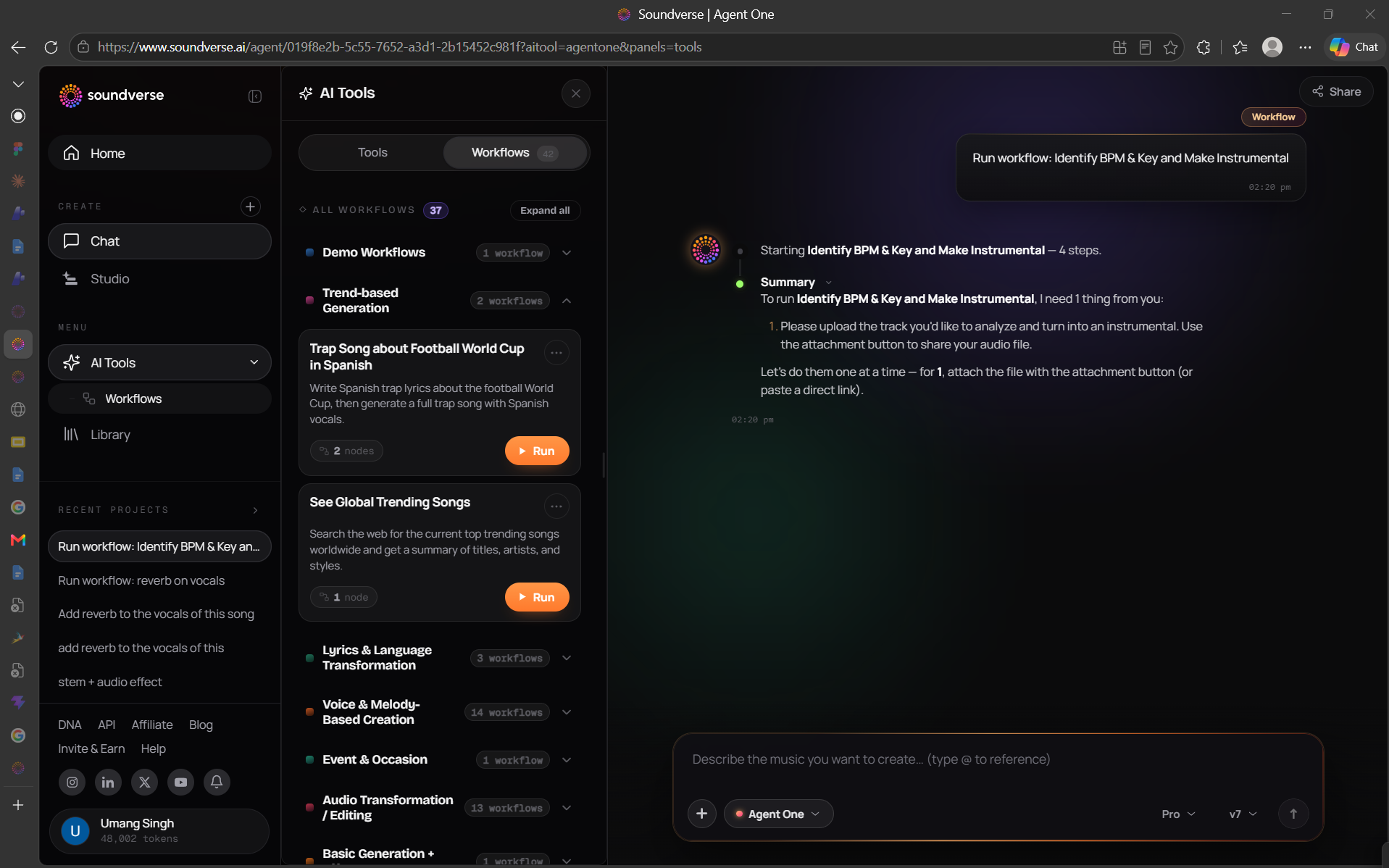
But there's a whole other side of Agent One that most creators never find a tab inside the AI Tools menu called Workflows. 17 pre-built, multi-step recipes that run end-to-end with one tap. No prompting required. No figuring out which tools to chain. Just tap, wait, and get a finished result.
Here's what those 17 workflows are, what they do, and when to reach for them.
How Workflows Work Before the list, a quick explanation of what a workflow actually is. Every workflow is a pre-configured sequence of tool calls that Agent One runs automatically, from start to finish. Some are three steps. Some are six. All of them produce something complete not a draft that needs more work, but a finished, usable output. To find them: open the AI Tools menu inside Agent One, switch from the Tools tab to the Workflows tab. You'll see them grouped into four categories with the most popular ones surfaced at the top.
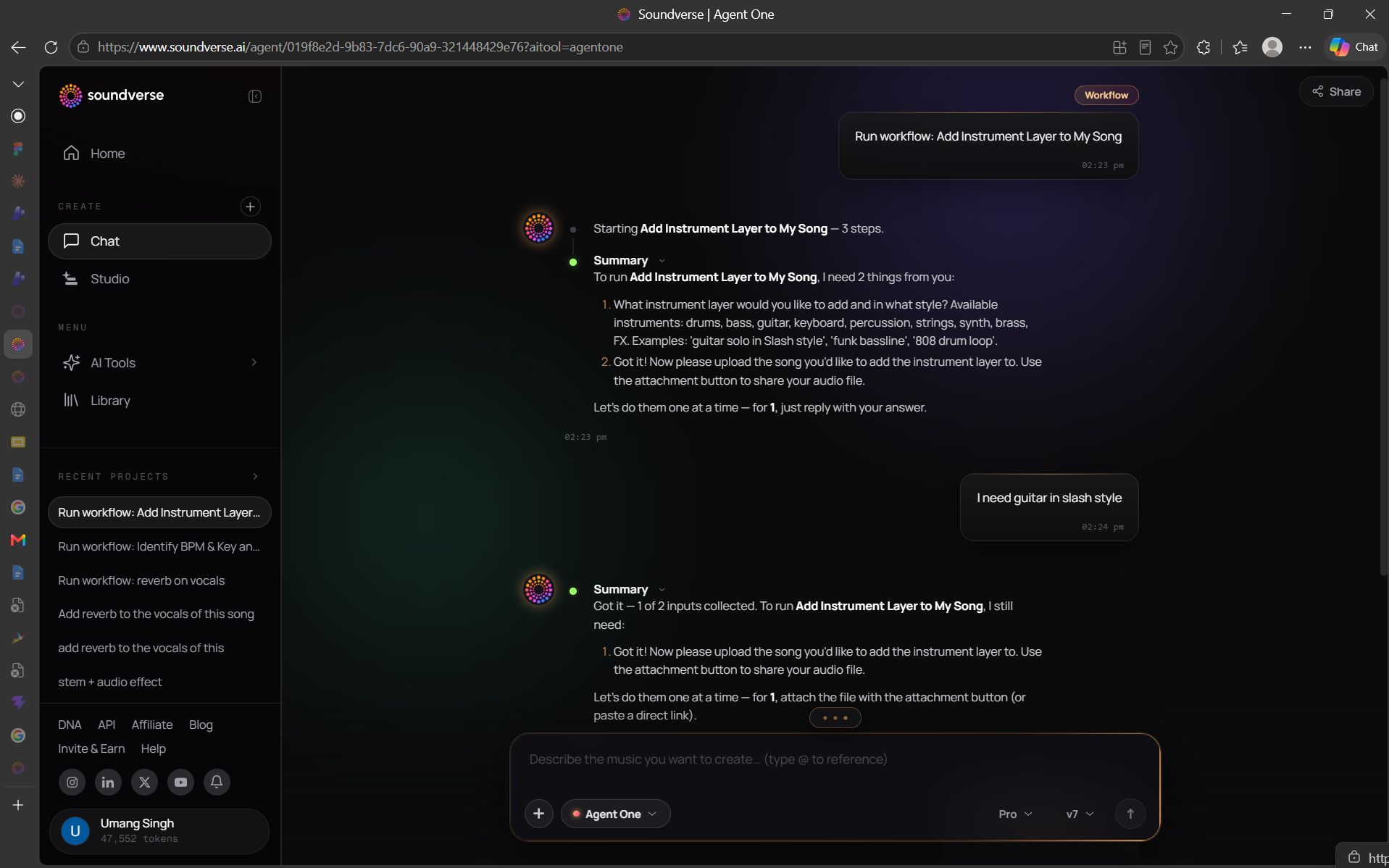
One more important thing, workflows are launchpads, not rails. You can start any workflow and immediately take over with your own instructions. The sequence is a starting point. The conversation continues from there.
Category 1 — Basic Generation + Effects These workflows combine generation with the effects engine. You describe what you want, and the workflow handles both the music and the production treatment.
1. Trending Genre Song with Reverb Three steps. Agent One searches the web for the top trending genre right now, generates a full song in that style, then applies reverb to the final output. Great for creators who want to stay relevant without spending time on trend research. You show up, it does the homework.
2. Lo-Fi Conversion Drop in any uploaded track. Agent One slows the tempo slightly, applies a low-pass filter, adds subtle vinyl noise and light distortion, and returns a lo-fi version of your original. One tap to transform a clean production into something bedroom-studio warm.
3. Underwater Effect Chain Applies a specific combination of low-pass, reverb, and subtle chorus to create the underwater or distant-room effect that's become a production staple. Works on full tracks or isolated stems.
4. TikTok Hook Boost Identifies the hook section of your song using Section Analysis, then applies a vocal gain boost and high-shelf brightness specifically to that region. The rest of the song stays untouched. Built for short-form content where the first few seconds determine everything. ** 5. Karaoke Instrumental Creator** Runs Stem Separator on any uploaded song, isolates and mutes the vocal stem, and returns a clean instrumental. The fastest way to create a backing track from any finished song.
Category 2 — Voice and Melody-Based Creation These workflows start from your voice or a melodic input. No lyrics, no genre knowledge, no production background required just something to sing or hum.
6. Turn Humming Into a Full Song One step that does a lot. Record or upload a hummed melody and this workflow runs Melody-to-Song, builds a complete arrangement around your motif, generates lyrics, and renders vocals. Twenty seconds of humming in. A finished song out.
7. Song in Your Voice Two steps. Captures or uses an existing voice sample, builds a Voice Clone model, then generates a full song using that voice as the lead. The output sounds like you without you having to record a full vocal performance.
8. Voice-to-Instrument Lead Hum a melody and this workflow converts it into a realistic instrumental performance guitar lead, sitar, bansuri, or any of the available instruments. Then stacks harmonised counter-melodies and layers the result over your existing track. For non-instrumentalists who compose by singing. ** 9. Translate and Resing** Takes a finished song, translates the lyrics into your chosen language, re-renders the vocal in that language, and relayers it over the original instrumental. One workflow to create a fully localised version of any track. Works across 10 or more languages.
10. Chorus-Only Language SwapBold A more surgical version of translate and resing keeps the verses in the original language and only translates and re-renders the chorus. Useful for international releases where you want the hook to land in a specific market without changing the whole song.
Category 3 — Trend-Based Generation These workflows lead with a web search. They're built for creators who need to react to what's happening in music right now rather than working from a static idea.
11. See Global Trending Songs One step. Pulls today's global trending songs from the web and returns a clean summary: titles, artists, genres, and what's driving the trend. Not a generation workflow. An intelligence workflow. Use it before you create to understand what's resonating right now.
12. Genre-Specific Trending Pull A more targeted version of the above, query a specific genre rather than global charts. "Top Afrobeats this month" or "popular synthwave released this year" returns a focused trend report you can feed directly into a generation workflow. ** 13. Batch Generation in a Trending Style** Combines the trend search with bulk generation. Identifies the dominant trending style, then generates ten tracks in that style simultaneously. Fast inventory building for content creators who need volume.
14. Morning Inspiration Routine A scheduled or on-demand workflow that generates three songs every morning, two in your personal DNA style, one in a trending genre. Opens each session with fresh creative material waiting for you rather than a blank canvas.
** Category 4 — Reference-Based Generation** These workflows start from an external reference, a YouTube link, an uploaded track, or a song from your library and create something new inspired by it.
** 15. Lo-Fi Remix of an Uploaded Song** Takes any track from your library or a new upload and generates a lo-fi remix, matching the original structure and vibe but with the lo-fi treatment applied throughout. Different from the Lo-Fi Conversion workflow in Category 1 because this generates a new version rather than processing the original. ** 16. BPM and Key Matched Instrumental** Extracts the tempo and key from a vocal-led reference track, then generates a new instrumental that matches both without copying the original melody or arrangement. Built for artists who want a bespoke backing track that fits their reference without any licensing issues.
17. Stitched Arrangement Takes two separate references, one for song structure, one for production style and generates something that combines both. The arrangement logic from reference A, the sonic character from reference B. Useful for producers who have a clear structural vision but want a completely different sonic world around it.
The Right Way to Use Workflows Workflows save time. But they're most powerful when you treat them as a starting point rather than a final product.
Tap a workflow, get the output, then keep talking to Agent One. Change the lyrics. Swap the vocal. Adjust the mix. Take it somewhere the workflow didn't anticipate. The workflow gets you to a strong starting point in seconds, the conversation takes it the rest of the way. The best sessions usually start with one tap and end somewhere completely unexpected. That's the point.
The Bottom Line You've been building your workflow manually every time you open Agent One. These 18 recipes do the building for you from trend research to full production, from a hummed melody to a finished song, from a YouTube reference to five beat variations. Open the Workflows tab. Pick one. See where it takes you.
Find all 17 workflows inside Agent One at soundverse.ai
Social Links:
Instagram: https://www.instagram.com/soundverse.ai
TikTok: https://www.tiktok.com/@soundverse.ai
Twitter: https://twitter.com/soundverse_ai
LinkedIn: https://www.linkedin.com/company/soundverseai
Youtube: https://www.youtube.com/@SoundverseAI
Facebook: https://www.facebook.com/profile.php?id=100095674445607
## Join Soundverse for Free and make Viral AI Music

We are building more product experiences. Keep checking our Blog to stay updated about them!