AI Video Creation Tools Suitable for High-Volume Marketing Campaigns
AI video creation tools for high-volume marketing campaigns: brand kits, batch variants, resizing, dubbing, APIs, seats, ad rights and cost at scale.
The AI video creation tools suitable for high-volume marketing campaigns are the ones that put brand kits, batch variants, resizing, translation, team seats and an API in writing. On their own pages (21 November 2026), Runway, Synthesia, HeyGen, Creatify, Kapwing and VEED document most of that; Adobe Firefly and Google's video models supply generated footage.
This is for marketing teams and agencies making many versions of one campaign. We read each vendor's own pages on 21 November 2026. Canva's pages blocked our requests, so it isn't graded. Several pages showed Black Friday offers, so check regular prices.
What high-volume marketing video needs from a tool
Eight things separate a tool that makes one good ad from one that makes two hundred:
- Templates and brand kits. Logos, fonts, colours and end cards saved once, ideally one kit per client.
- Batch generation and variants. Several outputs from one setup, so a new hook or call to action doesn't mean a new edit.
- Aspect-ratio versions. Wide, square, 4:5 and vertical. Check whether the tool reframes or just crops.
- Localisation, dubbing and captions. Check the monthly minutes, not only the language count.
- API or bulk workflows. Programmatic generation or automation connectors.
- Team seats and approvals. Shared workspaces, comments on the frame, roles and seat billing.
- Usage rights for ads. Commercial use by plan, watermarks, and partner-model terms.
- Cost per video at scale. Credits or minutes times variants and retries, not the plan price.
AI video creation tools for high-volume campaigns, tool by tool
The order isn't a ranking. Each entry says who the tool suits and what its own pages document. Soundverse has its own section further down.
Runway
For teams generating original footage and ads in one shared workspace. The Runway Team plan costs $69 per seat a month, or $55 billed yearly, and every seat adds 6,900 credits to one pooled balance. It lists up to 100 Brand Kits, 24 parallel generations, API access and frame-accurate comments with @mentions. Runway's own pitch for marketing teams: "Take one campaign concept across every format and market. Brand Kits keep video ads, A/B variants, and localized versions consistent." The pricing page also lists Runway Ads, for generating, testing and publishing ads, on every paid plan.
Where it stops: generation is billed by the second, so variants made by regenerating footage add up quickly.
Synthesia
For presenter-led explainers and product videos in many languages. The Synthesia pricing page lists 140+ languages and voices, 1-Click Translation of whole videos, monthly AI dubbing minutes, live collaboration, and an API for creating and translating videos. On Business, admins manage Brand Kits, and a workspace holds up to 10 editors with unlimited guests.
Where it stops: Basic plan videos carry a Synthesia watermark, and the individual plans include a single editor, so a team starts at Business.
HeyGen
For avatar and translated spokesperson videos with team seats. HeyGen's pricing page lists 175 languages and dialects from the Creator plan ($29 a month), editing and proofreading of translated scripts from Pro ($49), and a brand kit. Its Business plan is $149 a month, with extra members at $20 per seat, and adds integrations with n8n, Make, HubSpot and Zapier. API pricing is separate.
Where it stops: the free plan gives 3 videos a month with a watermark, which is enough to test the look and not much else.
Creatify
For performance ad teams selling products and apps. Creatify lists URL to Video, Ad Clone, AI avatars, an Ad Launcher and support for 75+ languages. On its pricing page, Business plans start at $195 a month ($136 billed yearly) with 10 seats and 10 brand spaces, and a separate API Starter plan is $99 a month for 500 API credits, at about 5 credits per video by Creatify's estimate.
Where it stops: it's built for direct-response ads, and API credits are a separate balance from app credits.
Kapwing
For turning one approved edit into many cuts, subtitles and languages. Kapwing's pricing page lists a Brand Kit with custom fonts, a shared workspace, comments on the video, a Resizer, auto-translated subtitles in over 60 languages and SRT/VTT downloads. Pro ($16 a month) includes dubbing up to 50 minutes a month and Business ($50) up to 200. SAML single sign-on is on Enterprise.
Where it stops: it's an editor first. Generated footage comes from elsewhere.
VEED
For subtitles and translations at volume. VEED's pricing FAQ says paid plans include unlimited subtitle generation, subject to a fair-use limit of 50 hours a month, while translations count by the minute: translating a 30-minute video into Spanish uses 30 minutes, and each further language uses 30 more. Plans are charged per seat, and VEED also sells subtitle and lip-sync APIs.
Where it stops: translation minutes, not subtitles, are the budget to watch.
invideo AI
For prompt-to-video drafts that a team then edits together. Its pricing page (21 November 2026) lists seat-based plans with multiplayer editing and a timeline editor from the Basic plan, plus UGC ad and voice-cloning tools. The page was showing a Black Friday offer, so compare the regular price.
Adobe Firefly
For teams already working in Adobe apps. The Firefly video generator page lists 16:9 and 9:16 output, MP4 downloads up to 4K, and partner models next to Adobe's own. Read its rights note closely: "Commercial usage eligibility depends on the model used." Adobe's developer site lists a separate Creative Production API that runs workflows over many assets with batch execution.
Google Flow and Gemini Omni
For generated shots on a small budget, and for developers. Google Flow's help centre gives every account 50 credits a day, more on Google AI plans. For bulk work in code, Google's video generation docs say the Veo 3.1 Preview models in the Gemini API shut down on 22 October 2026, and point developers to Gemini Omni Flash, which makes 3 to 15 second videos with native audio, or to Veo 3.1 on Google's enterprise platform.
Where it stops: you get clips; captions, resizing and approvals happen elsewhere.
How to keep quality and brand consistent at volume
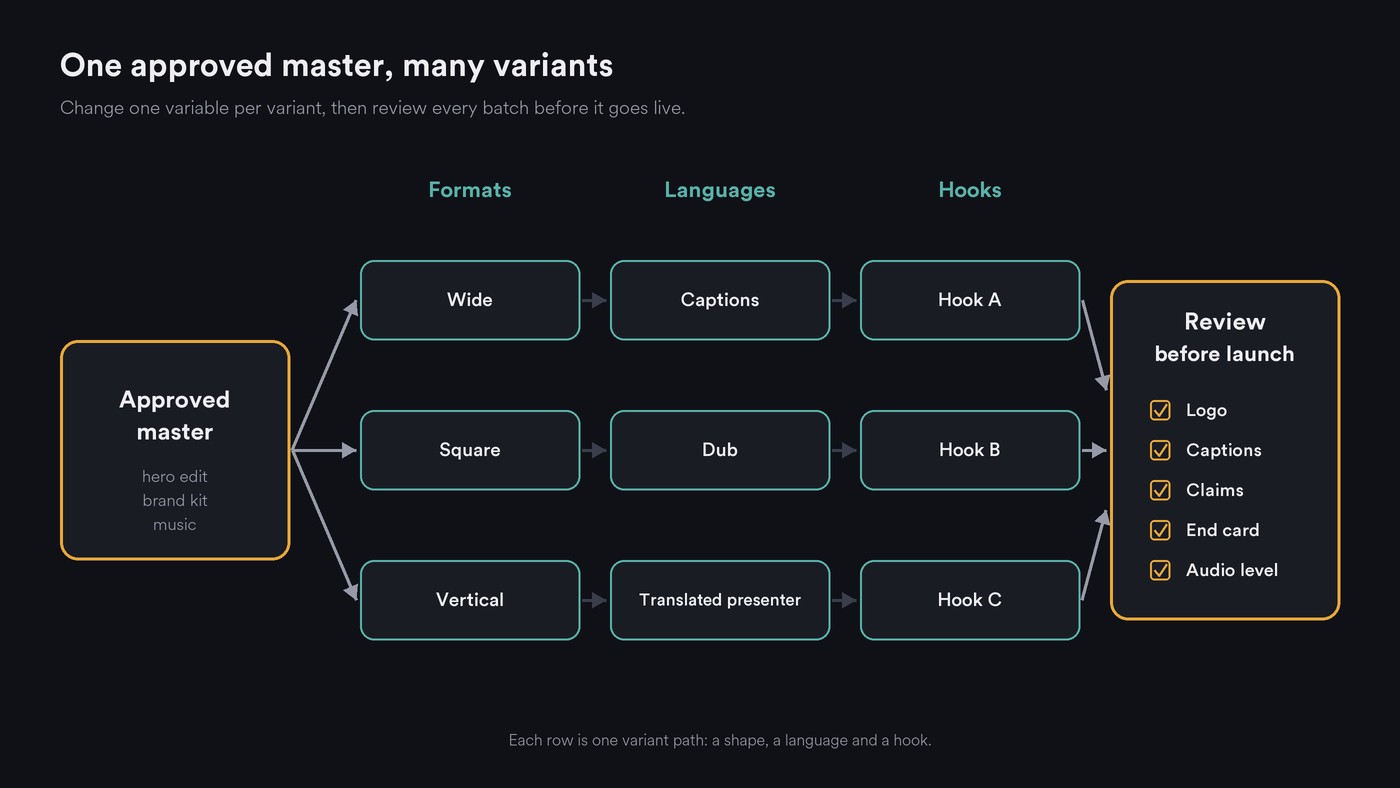
- Approve the master first. Lock one hero edit, its brand kit and its music before any variant exists. Our guide to AI video platforms with custom branding has a brand-kit checklist.
- Change one variable per variant. Hook, offer, language or format, so results show what worked. Name files by it: spring_hook2_es_9x16.
- Reuse references. Give every generation the same product shots, character images and style sentence. See how to keep AI video sequences coherent.
- Lay out each shape on purpose. Reposition text and logo for vertical instead of cropping the wide master.
- Check every language with a fluent speaker. Names, prices and legal lines first.
- Review in two passes. A lead signs off the master; a reviewer checks each batch for logo, captions, claims, end card and audio level.
- Keep a rights log. Note the tool, model, plan and source of every input.
- Export to one spec sheet. Agree codecs and sizes per placement; our guide to AI video file formats lists the common ones.
Cost per video at scale
Work it out per finished variant: generated seconds times credits per second times variants, plus retries, plus minutes of translation and dubbing.
A worked example with Runway's own numbers: its pricing page says Gen-4.5 uses 12 credits per second, so a 15-second clip is 180 credits. Twenty freshly generated 15-second variants come to 3,600 credits before a single retry, more than the Pro plan's 2,250 monthly credits and about half of one Team seat's 6,900.
Variants edited from an approved master draw on minute allowances instead, such as Kapwing's dubbing or VEED's translation minutes. So generate a few masters and edit many variants. Creatify's API Starter works out at roughly 100 standard videos a month by its own estimate.
Usage rights for ads
- Commercial use by plan and model. Adobe's note above applies to any tool hosting several models.
- Watermarks. Synthesia Basic, HeyGen's free plan and Kapwing Free mark exports.
- Faces and voices. Custom avatars and voice clones need the person's written consent.
- Music. The soundtrack needs rights for paid placement too; see AI music for high-volume content.
- Platform labels. Check each ad platform's rules on labelling realistic AI-generated people.
Where Soundverse fits
Soundverse is an AI music platform that takes you from idea to audience. It's built for artists, not ads, but covers a campaign's sound and short clips. AI Music Generator makes instrumentals with no vocals, with Advertisement, Corporate and Ads & Trailers themes plus a vibe and a tempo, so each cut can get its own bed. In AI Studio, Describe and Generate Audio reads a video and fills separate music, effects and dialogue tracks timed to each scene, on Creator and above. AI Video Generator turns a prompt, an image or product photos into a 3 to 30 second clip at up to 1080p on Creator and above, and Media Converter crops a finished video to 16:9, 9:16, 1:1 or 4:3. The pricing page lists Enterprise and API plans with custom seats and high-volume API access.
Licensing is set by plan: the Free plan is for personal use, and the Creator plan comes with a royalty-free license.
This video shows AI Studio reading a video scene by scene and adding background music, sound effects and dialogue on the timeline.
FAQ
Which AI video tool is best for hundreds of ad variants? It depends on the variant. Generated footage: Runway Team, with pooled credits and 24 parallel generations. Product ads from a web page: Creatify. Translated presenters: Synthesia or HeyGen. Caption and format variants: Kapwing or VEED.
Which AI video creation tools have an API for bulk work? Runway (API access on Team), Synthesia, HeyGen, Creatify (API plans from $99 a month) and VEED all list one. Google offers Gemini Omni Flash through the Gemini API, and Adobe lists a Creative Production API for batch workflows.
How do I localise one ad into many languages? Start with translated captions, then dub where the voice carries the message. Budget by minutes, since VEED counts each language separately, and have a fluent speaker check every version.
Can I use AI-generated video in paid ads? Usually on paid plans, but check the plan and the model. Get written consent for any real face or voice, and follow each platform's labelling rules.
Sign up for Soundverse free and give your next campaign's cuts their own music. More guides on the Soundverse blog.

