Paid Subscription Plans for an AI Video Maker That Syncs With Audio Tracks
Which paid plan gets you an audio-synced AI video maker? Compare Kaiber, Freebeat and Soundverse on beat sync, lip sync, video length and rights.
An audio-synced AI video maker is worth paying for when its paid tier includes the kind of sync your song needs: beat-matched cuts, scenes mapped to song sections, or lip sync. To find a paid subscription plan for an AI video maker that syncs with audio tracks, compare Kaiber Creator, Freebeat and Soundverse Creator, checked on 7 November 2026.
Each does a different kind of sync, and the tier you need depends on which one your release calls for. Here is how to tell them apart, what each plan includes, and how to test sync yourself before you pay.
What "syncs with audio tracks" can mean
Four different features hide behind the same phrase:
- Beat-synced cuts. The tool cuts your images or clips so each change lands on a beat. Good for many short clips from one photo shoot.
- Song-mapped scenes. The tool reads the structure of the song and generates new scenes for each section, so the chorus looks different from the verse.
- Lip sync to a vocal. A character's mouth follows your vocal line. Good for performance shots when you can't film one.
- Audio-reactive visuals. Motion and light respond to the waveform, as in a visualizer. Good for electronic and ambient tracks.
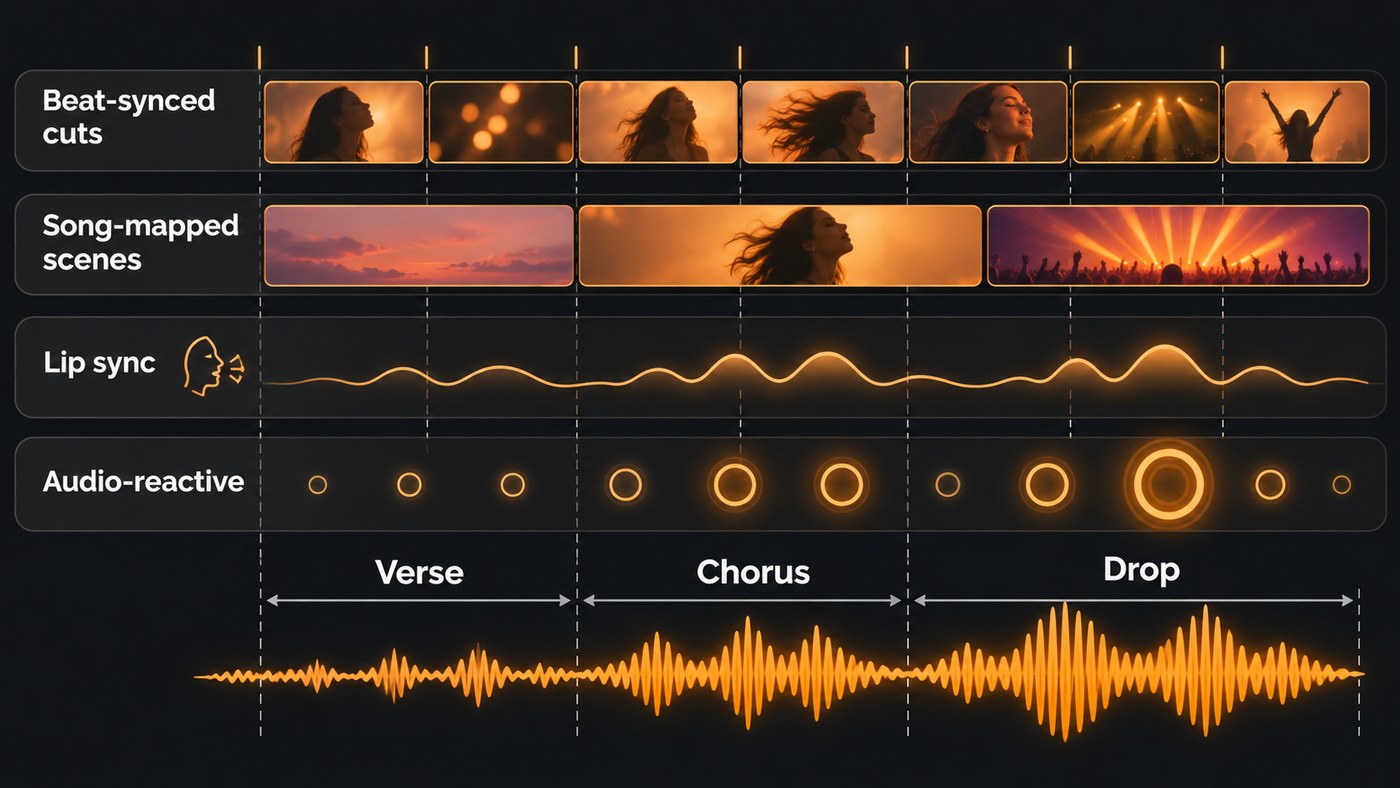
Most paid plans include more than one of these, so decide which matters most for this release before you compare prices.
Audio-synced AI video maker plans compared
Every detail below comes from each tool's own site or help centre, checked on 7 November 2026. Prices and credit amounts change often, so confirm them on the pricing page on the day you subscribe.
Kaiber: Beat Sync and music video workflows
- How it syncs: Kaiber's help centre puts it plainly: "Beat Sync turns your sounds and visuals into beat-synced videos." You upload images or clips and a track, trim to the section you want, choose 9:16, 16:9 or 1:1, and it generates a batch with no prompting. Instant Cut and Shuffle Cut use your own media; Motion Cut and Scene Cut generate new clips from it.
- Full music videos: Music Video Sequence analyses the structure of your track and maps clips to it, from 30 seconds to 4 minutes, at 540p, 720p or 1080p. Music Video Montage 2.0 runs up to 3 minutes and builds reference sheets for character, clothing and location so faces stay consistent from clip to clip.
- Which plan: Kaiber's plans guide leaves Beat Sync out of Starter. Creator adds commercial use rights, Beat Sync batches of up to 2 videos and Auto-Clip; Pro raises batches to 10. Credits roll over month to month, and a low-cost 5-day trial converts to Creator Monthly.
- Best for: Musicians who post several short clips per release from one set of photos or footage.
Freebeat: beat and lip sync from a finished track
- How it syncs: Freebeat says its visuals automatically sync to BPM, beats, drops and song sections across the whole track. It also makes lip-synced singing, beat-matched dance motion and lyrics timed karaoke-style.
- Inputs and output: Upload your own audio or link a track from YouTube, TikTok, Suno or Udio. Videos run from 15 seconds to about 6 minutes, exported at 720p or 1080p.
- Which plan: Freebeat lists Free, Basic, Pro, Ultimate and Creator plans, and its homepage notes that it's now part of Yamaha Creator Pass. Its FAQ says generated visuals, avatars, images and background music come with a commercial-use license, subject to its Terms of Use. It also reminds you that "you are responsible for ensuring you have the necessary rights to any third-party materials you upload, including music, photos, or other copyrighted assets."
- Best for: Full-length performance, dance or lyric-style videos made straight from a finished master.
Soundverse: song-aware video next to the song
- How it syncs: AI Music Video Generator takes your finished track (MP3, WAV, M4A or FLAC up to 50 MB), writes a script, films every second of the song and cuts the video to the music. Turn on Lip Sync and the lead sings to camera in time with the vocals.
- Single shots: The Lip Sync tool makes a character image sing up to 15 seconds of your vocal, in clips of 4 to 15 seconds at up to 1080p. Illustrated and anime-style characters work best, because its video model blocks realistic human faces.
- On the timeline: AI Studio puts video on its own lane above your tracks, analyses imported audio for tempo and key, and renders an audio-reactive visualizer for your song to MP4.
- Which plan: The video generation tools need Creator or above. AI Studio is on every plan, including Free, with video export at 720p on Free, 1080p on Creator and up to 4K on Pro. Monthly tokens reset each month and don't roll over.
- Best for: Artists who want the video built around the song, then edited in the same studio.
Also worth a look
Neural Frames, which drives audio-reactive motion from your track's stems, and Rotor, an automated editor for Canvas loops and social cuts, are covered in our shortlist of AI video tools for a new single release. For word-by-word timing, see the best AI video generator for lyric videos.
How to test audio sync before you pay
Free tiers and trials exist for this. Run the same test on each tool:
- Pick a hard 30 seconds. Choose a section with a clear change, such as the drop or the first chorus. Easy sections hide sync problems.
- Work out where the beats fall. One beat lasts 60 ÷ BPM seconds, and one bar of 4/4 lasts 240 ÷ BPM. At 120 BPM that's a beat every 0.5 seconds and a bar every 2 seconds.
- Scrub the cut points. Step through the export frame by frame around the drop. At 30 fps one frame is about 33 milliseconds, so you can see whether a cut lands on the beat or a frame or two after it.
- Test lip sync with a clean vocal. Export the lead vocal stem and use it instead of the full mix. Soundverse's Lip Sync page notes that sync is weaker with a full mix.
- Price the full song. Multiply the cost per second or per clip by your song's length. A 3:30 single is 210 seconds of video.
- Export the format you'll post. A 16:9 master for YouTube and a 9:16 cut for Shorts and Reels.
For planning scenes section by section once you've chosen a tool, read our guide to making AI music videos that match song structure.
What to check on the plan page
- The sync feature is in your tier. Kaiber keeps Beat Sync off Starter, so the cheapest plan won't do beat-synced batches.
- Maximum length. Kaiber's Music Video Sequence stops at 4 minutes and Montage 2.0 at 3; Freebeat goes to about 6. Soundverse's music video generator films the whole song you upload, so cost grows with length.
- Credit rollover. Kaiber credits roll over month to month; Soundverse's monthly tokens don't. If you release every few months, rollover matters.
- Resolution. All three reach 1080p for generated video. Soundverse's music video generator doesn't film in 4K, though AI Studio exports up to 4K on Pro.
- Commercial rights. Kaiber lists commercial use rights from Creator, and Freebeat grants a commercial-use license subject to its Terms of Use.
- Rights to your inputs. Only upload tracks, faces and images you own or have permission to use. Linking a song from YouTube or TikTok doesn't give you the rights to it.
Where Soundverse fits
Soundverse is an AI music platform that takes you from idea to audience, so its video tools start from the song. AI Music Video Generator writes a script for your track, quotes the token cost for your approval before anything is filmed, then films the scenes and cuts them to the music, with an optional lip-synced performance. For a single singing shot, Lip Sync turns a character image and a short vocal into a clip. Then open everything in AI Studio, where video sits on its own lane above your tracks and you can trim each clip against the song.
Licensing is set by plan: the Free plan is for personal use, and the Creator plan comes with a royalty-free license. The video generation tools need the Creator plan or above.
This short demo shows Agent One turning a song and a character image into a lip-synced vertical reel for Instagram, YouTube Shorts or TikTok.
FAQ
Is there a free AI video maker that syncs with music? Freebeat has a free plan for testing, and Kaiber offers a low-cost 5-day trial with Beat Sync included. Soundverse is free to sign up and AI Studio works on the Free plan, but its video generation tools need Creator or above.
Can an AI video maker sync to a song I made somewhere else? Yes. Freebeat and Soundverse's AI Music Video Generator both take an uploaded track, and Kaiber Beat Sync works from the sound you upload. You need the rights to the song either way.
Which Kaiber plan includes Beat Sync? Creator and above. Kaiber's plans guide lists Beat Sync batches of up to 2 videos on Creator and up to 10 on Pro, while Starter covers Canvas and Editor without Beat Sync.
Why does AI lip sync drift off the vocal? Usually because the tool hears the full mix. Split the lead vocal out first, for example with Soundverse's Stem Separator, and feed the lip sync tool that stem. Keep each clip short and check it before you cut it into the edit.
Sign up for Soundverse free and build your next video around the song itself. More guides on the Soundverse blog.
