How to Choose an AI Tool for Creating Custom Audio Loops for Your Podcasts
AI audio loops for podcasts: what a loop needs (no vocals, clean loop point, BPM bar maths, stems, rights) and which AI tools document each one.
Good AI audio loops for podcasts come from a tool that makes instrumentals with no vocals, lets you set length and tempo, exports WAV with stems or a quieter bed, and licenses the result for a monetized show. To choose an AI tool for creating custom audio loops for your podcasts, test those five points on one brief before paying.
Every tool below was checked on its own pages on 21 November 2026. We make Soundverse, so its entry sticks to our own pages.
What a podcast loop needs
A podcast loop sits under a voice for minutes without drawing attention, then steps forward for the intro and outro. Check these before you judge the sound:
- No vocals. Sung words fight spoken ones, so use an instrumental-only tool or switch.
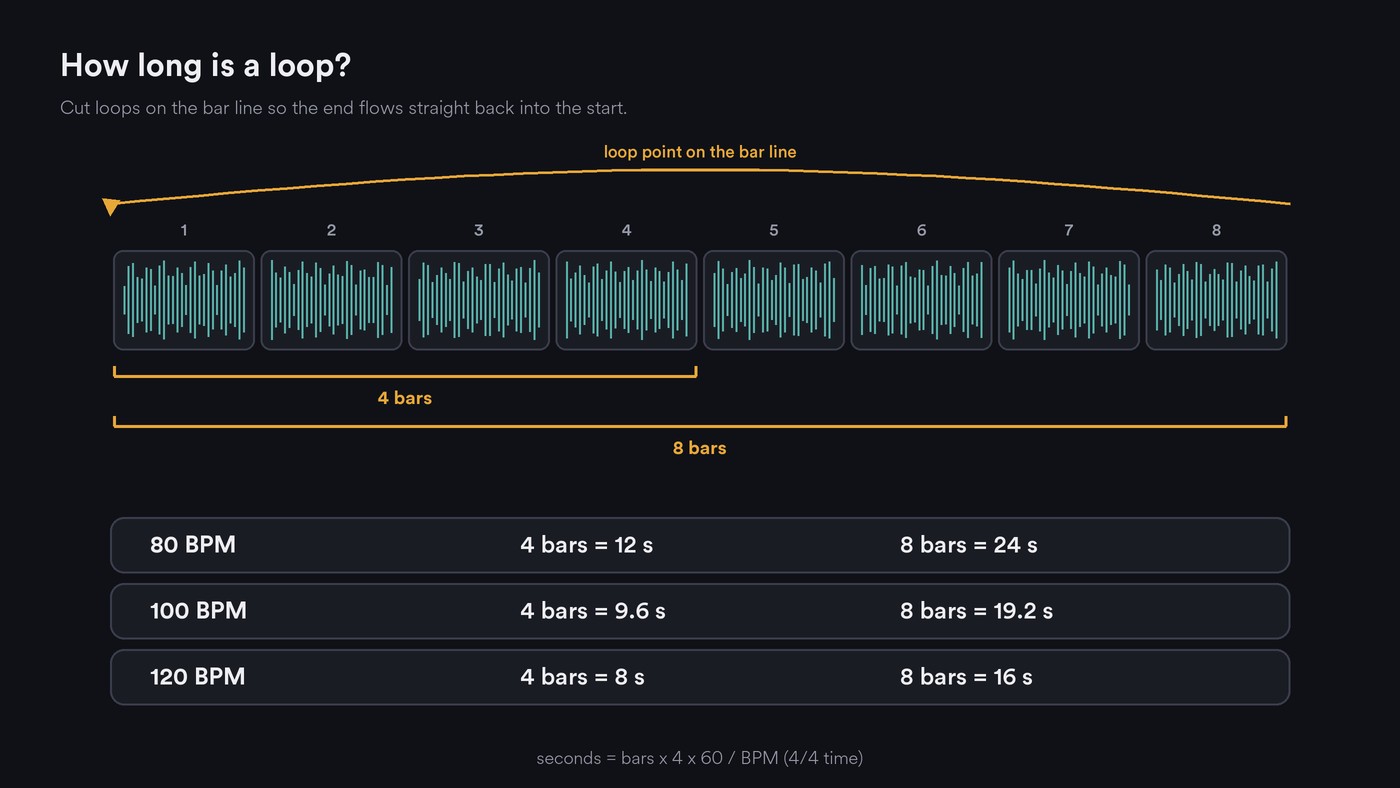
- A clean loop point. The end flows back into the start with no click, gap or chopped reverb tail.
- Length control. A show needs a 2 to 4-second sting, an intro of roughly 8 to 15 seconds, a bed that runs through a segment, and an outro.
- A tempo you choose. Knowing the BPM lets you cut on bar lines and keeps every piece in one tempo family.
- Stems or a quieter bed. The full mix suits the intro; under talk you want pads, bass and soft rhythm, and stems let you build that.
- Loudness and ducking. The bed dips under the voice and returns in pauses, and sparse beds duck more cleanly than busy ones. Master intros and outros to the episode's integrated loudness.
- WAV masters. MP3 encoders add a little silence at the start and end of a file, which can open a gap at the seam.
- Rights for a monetized podcast. Ads and sponsorships are commercial use. Check which plan allows it, any credit rule, and whether you own the audio or hold a license.
Bar maths: how long 4 or 8 bars last
In 4/4 time, seconds = bars × 4 × 60 ÷ BPM.
- 80 BPM: one bar lasts 3 seconds, 4 bars 12, 8 bars 24.
- 100 BPM: 4 bars last 9.6 seconds, 8 bars 19.2.
- 120 BPM: 4 bars last 8 seconds, 8 bars 16.
It works backwards too: for a 15-second intro of exactly 8 bars, 8 × 4 × 60 ÷ 15 gives 128 BPM. At 48 kHz, 8 bars at 120 BPM come to 768,000 samples, which is how precisely you can place a cut.
If a detector reads 180 BPM on a track that feels like 90, our explainer on how AI identifies key and tempo covers half and double readings.
Test an AI loop tool in 20 minutes before you choose
- Fix one brief, such as: warm lo-fi instrumental, 90 BPM, soft piano and brushed drums, no vocals, sits under conversation.
- Make three pieces in each tool: a 10-second intro, a bed of at least 60 seconds and a 2-second sting.
- Put the bed under a minute of your own voice and listen on a phone speaker at low volume. If you notice the music before the words, it's too busy.
- Loop the bed five times and listen for the seam.
- Check the downloads for WAV, stems and the length you asked for.
- Read the license for the plan you'd buy and find the words covering podcasts and monetization.
Score each from 1 to 3 on speech fit, loopability, length, exports and rights. Our guide to creating instrumentals with text-to-audio models helps with the brief.
AI tools for custom podcast loops, checked on their own pages
Soundverse AI Music Generator and AI Studio
- Speech fit: AI Music Generator makes instrumentals only. Its Podcast - Intro, Podcast - Background and Podcast - Outro themes make a matching set when you keep the genre and vibe tags the same, and you can add a tempo tag.
- Length and loop: the numbered Soundverse versions choose the length themselves. On Creator and above, one additional engine adds a Length setting from 15 seconds to five minutes and a Type control you can set to Loop.
- Editing: Stem Separator gives 2 or 6 stems on every plan, so you can drop the drums for a bed. In AI Studio you split, trim and fade clips, draw volume automation and stretch a clip from 0.25× to 4×. Free exports MP3; WAV and stem ZIPs need Creator.
- Rights: Licensing is set by plan: the Free plan is for personal use, and the Creator plan comes with a royalty-free license.
Stable Audio
- Fit and length: Stability AI's Stable Audio 3.0 prompt guide (18 August 2026) says the model is designed mainly for instrumental work, suggests naming the BPM, and outputs the exact length you ask for, up to about six minutes on 3.0 Large. It describes no loop mode, so you set the loop point yourself.
- Parts: a TrackType: Instrument tag asks for a single instrument, handy for building a sparse bed layer by layer.
- Rights: the guide says you own your outputs and can commercialize them; stableaudio.com didn't respond to our check, so read its plan terms there.
ElevenLabs Music
- Length: the Eleven Music docs say: "Generated music has a minimum duration of 3 seconds and a maximum duration of 5 minutes." Ask for an instrumental; you can regenerate one section, but no loop mode is described.
- Formats: MP3 at 44.1 kHz and 128 to 192 kbps, or WAV.
- Rights: ElevenLabs' Music Terms (updated 9 October 2026) allow no downloads on Free. Paid plans below Enterprise Music allow commercial use except film, TV, radio and studio games, so check Enterprise if your show also airs on radio.
Beatoven.ai
- Fit: Beatoven.ai generates background music from a description, lists podcasts among its uses, downloads MP3 or WAV, and mentions stems.
- Rights: a license to monetize your content comes with every download; Beatoven keeps ownership and doesn't allow release on streaming services.
- Gaps: the homepage doesn't describe length or loop controls, and the pricing page returned a 404 to our check.
Soundraw
- Length and arrangement: Soundraw's Mixer sets the length and toggles instruments, with bar-level mute, solo and intensity edits. Mute the busy parts in the bars under speech.
- Stems and rights: WAV stems on Artist Pro and Artist Unlimited; the Creator plan downloads MP3. Paid plans include commercial use as background music.
Mubert Render
- Loop and length: Mubert Render's generator offers Track, Loop, Mix and Jingle types with a duration setting and a BPM choice, and its Track Editor changes sections, stems, tempo and key.
- Rights: the license FAQ says monetized content needs Pro or Ultra (Pro listed at $39 a month, billed monthly), while Free and Creator are non-commercial. Mubert keeps the rights, issues a certificate per track, and bars Content ID registration.
AIVA
- Control: over 250 styles and MIDI downloads on every tier, so you can rebuild a clean loop in any DAW.
- Rights, the podcast catch: per its pricing page, Free is non-commercial with credit to AIVA. Standard (€11 a month, billed yearly) allows monetization only on YouTube, Twitch, TikTok and Instagram, which leaves podcast apps out. Pro (€33 a month, billed yearly) gives you the copyright and WAV export.
A non-AI option: GarageBand and Apple Loops
- Loop and tempo: Apple's GarageBand for Mac user guide says an added Apple Loop always matches the project tempo, and pressing L loops a region continuously.
- Rights: the loop licence is royalty-free for your own compositions, but: "individual audio loops may not be commercially or otherwise distributed on a standalone basis, nor may they be repackaged in whole or in part as audio samples, sound effects or music beds." Build your bed from several loops and your own parts.
For full commercial terms, see our comparison of AI music generators for royalty-free commercial tracks.
How to loop an AI track cleanly in an editor
- Find the BPM you prompted, or read it with Tempo & Key Detector, then set the project tempo and snap to grid.
- Start on beat 1 of a bar after any fade-in, since AI tracks often open differently from how they continue.
- End exactly 4, 8 or 16 bars later, using the bar maths.
- Fix the seam. Cut at zero crossings or add 5 to 10 ms fades. If a reverb tail gets chopped, lay a copy under the first beat or crossfade end into start.
- Loop it ten times on earbuds, listening for a click, a level jump or a cut tail.
- Make variants: the full loop for the intro, a bed with drums and lead muted, a 2-bar sting and an outro ending on a held chord.
- Duck it under the voice with volume dips or a compressor keyed from the voice, released slowly enough that the bed swells back gently.
- Export WAV at the episode's sample rate, named by tempo and length, such as bed_90bpm_8bars.wav.
If the intro also needs a picture, see our guide to video generators for podcast intros.
Where Soundverse fits
Soundverse is an AI music platform that takes you from idea to audience, built for independent artists who release music; podcasters can use the same tools for their own theme. Make an intro, a bed and an outro with AI Music Generator's Podcast themes, read the BPM with Tempo & Key Detector, then cut each piece to bar lines in AI Studio and draw volume dips under your voice. AI Sound Effects Generator makes the stingers: describe a two-second whoosh or a short impact and set any length from 0.5 to 30 seconds in half-second steps.
From 0:11, this walkthrough of Soundverse's Analyze tools shows Tempo & Key Detector reading a track's BPM and key, the number the bar maths starts from.
FAQ
Which AI tool should I choose for creating custom audio loops for my podcasts? Choose on the checklist: instrumental output, length control, loop editing, WAV and stems, and podcast monetization on your plan. Mubert lists a Loop type, Stable Audio sets exact lengths, Soundraw edits bar by bar, and Soundverse's Podcast themes give a matching intro, bed and outro.
How long should a podcast intro loop be? Most fit in 8 to 15 seconds. Land on a bar line: 4 bars at 100 BPM last 9.6 seconds, and 8 bars at 128 BPM last exactly 15.
Can I loop a 30-second clip under a whole episode? You can, but repetition shows under long talk. Alternate two loops in the same key and tempo, and leave some conversation unscored.
Sign up for Soundverse free and make your intro, bed and outro in one sitting. More guides on the Soundverse blog.

