Professional AI Platforms That Turn Audio Tracks Into Visual Content, Compared
Audio-to-video AI compared: how Neural Frames, Hedra, Wan2.2-S2V, Sync Labs and Soundverse read your track, what they make and who each suits.
The professional AI platforms that turn audio tracks into visual content differ most in what their audio-to-video AI listens to. Checked on 14 November 2026, Neural Frames reads stems, rhythm and lyrics, Hedra Character 3 and the open Wan2.2-S2V model animate a face from your vocal, Sync Labs re-syncs filmed footage, and Soundverse builds a video around the song.
That difference decides what you get back. A tool that only hears loudness can pulse on the kick but can't tell a verse from a chorus. A tool that reads the vocal can make a character sing and ignore the drums. Choose the listener first, then the look.
How audio-to-video AI listens to a track
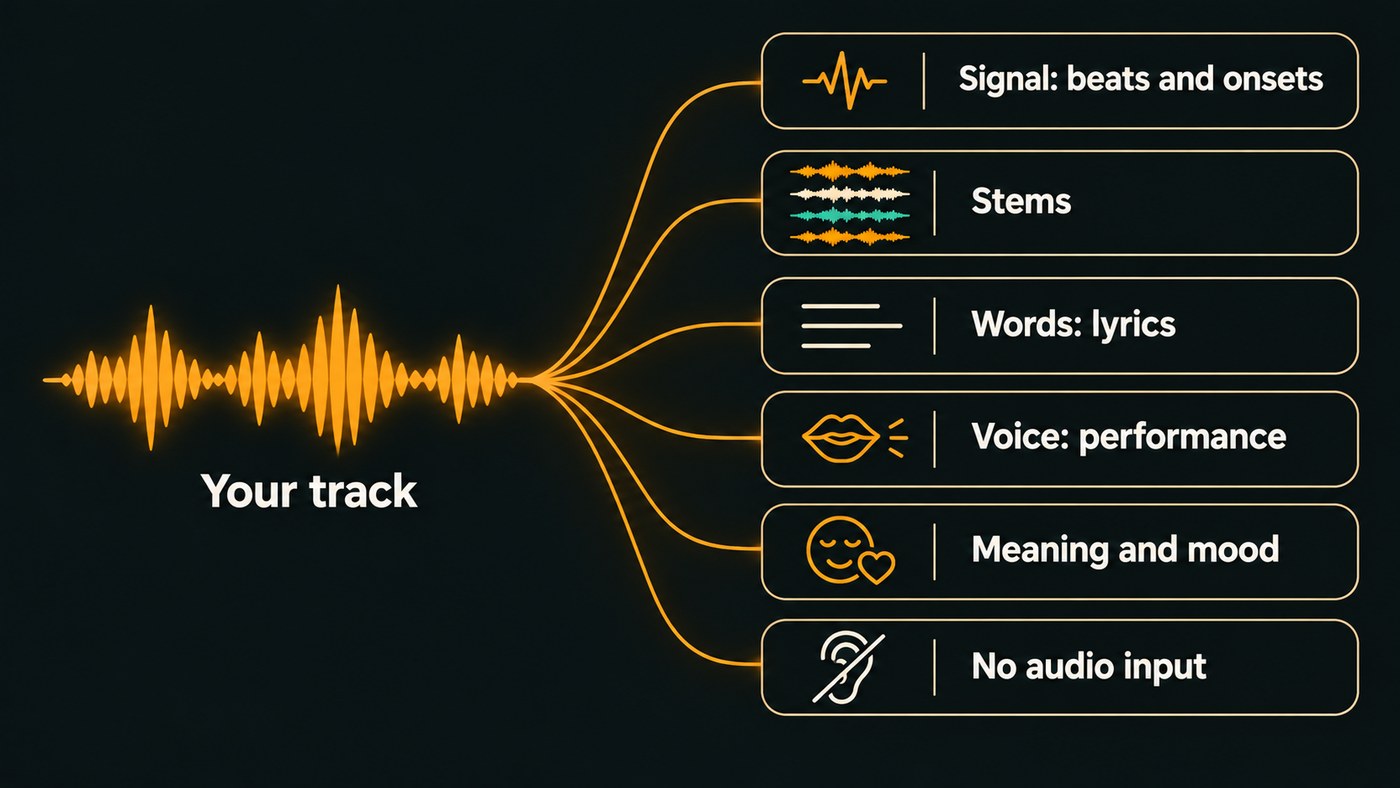
A tool can read your audio in a few ways, and most platforms combine two or three:
- Signal. Loudness, frequency bands and onsets, the instant a note or hit begins. This drives pulses, flashes and zooms, as in a classic visualizer.
- Stems. The tool separates drums, bass, vocals and the rest, then gives each its own visual job, so the kick can cut while the bass moves the camera.
- Words. Speech recognition writes out the lyrics with timings for captions and lyric videos. Heavy vocal effects make it mishear.
- Voice. The vocal drives a face and body: mouth shapes, head turns, sometimes gestures. Input quality matters more here than anywhere else.
- Meaning and mood. The newest research models try to read emotion and intent. In the OmniHuman-1.5 paper (August 2025), ByteDance researchers wrote that existing avatar models' "motions typically synchronize with low-level cues like audio rhythm, lacking a deeper semantic understanding of emotion, intent, or context." Their model uses multimodal language models to plan movement from what the audio means as well as its rhythm.
And some tools don't listen at all: they generate their own sound and take no audio input, so syncing is your job in the edit.
Audio-to-video AI platforms compared
Each entry below was checked on the tool's own site on 14 November 2026. For each one: how it reads the audio, what it outputs, the control you get and who it suits.
Neural Frames
- How it reads the audio: Neural Frames says its audio engine analyzes your song's rhythm, energy and structure, extracts 8 stems, and pulls out the lyrics, key and tempo automatically. It is the most complete listener on this list.
- What it outputs: Audio-reactive videos, lyric videos with captions from the extracted lyrics, and full-length music videos.
- Control: Autopilot goes from song to video in two clicks, a Frame-by-Frame Editor works shot by shot, and a Text-to-Video Editor puts models such as Kling and Runway on a timeline. It lists 10+ modulation parameters for tying visuals to stems.
- Who it suits: Producers of electronic and beat-led music who want parts of the arrangement to drive the picture.
Hedra Character 3
- How it reads the audio: The vocal. Hedra's Character 3 page lists the input as text, image and audio, with audio required, and describes the model as suited to talking and singing video.
- What it outputs: One character performing from a start frame, up to 10 minutes long, at 540p, 720p or 1080p. It was released in March 2025.
- Control: The portrait, the audio and a text description of the delivery. Hedra's FAQ is direct: "Because the model uses audio as the core driver for facial animation, your audio quality heavily dictates the output." It asks for audio without background noise or heavy reverb, which for a song means the dry lead vocal.
- Who it suits: Artists with a persona or illustrated alter ego who need a whole song performed on camera.
Wan2.2-S2V (open model)
- How it reads the audio: Audio plus a reference image, with an optional text prompt and an optional pose video. The Wan2.2 repository introduced S2V on 26 August 2025 as audio-driven cinematic video generation, and its own pose-and-audio example uses a singing clip.
- What it outputs: Video at 480P or 720P. Unless you set a clip count, the length follows the length of your audio.
- Control: Everything, because you run it yourself, under the Apache 2.0 licence. The catch is hardware: the README says the single-GPU command needs at least 80GB of VRAM.
- Who it suits: Small studios and technical producers who would rather rent GPU time than pay per-second credits.
Sync Labs (sync.so)
- How it reads the audio: A voice track against footage you already have. You upload a video and give it a voice by cloning, generating or using the audio from the clip. Its current models are sync-3, lipsync-2-pro and react-1.
- What it outputs: The same video with new mouth movement, which it calls visual dubbing, on movies, podcasts, games and animations. The homepage doesn't mention singing, so test a sung line first.
- Control: An API, plus plugins for Premiere and DaVinci Resolve, so it works inside an edit you've already cut.
- Who it suits: Artists who filmed a performance to a demo and changed the vocal later.
Soundverse
- How it reads the audio: The whole song. The AI Music Video Generator takes an MP3, WAV, M4A or FLAC of up to 50 MB; Agent One writes the script around it, films every scene and cuts the video to the music. With Lip Sync on, the lead sings in time with the vocals. The page doesn't publish how the track is analysed.
- What it outputs: Full music videos in 16:9 or 9:16 at up to 1080p, an audio-reactive Visualizer in AI Studio, and release stills from Asset Studio, which reads your track's style before it designs.
- Control: You approve the script and its token cost before filming, write the direction or leave it on auto, and add up to nine image references. Every clip then sits on the AI Studio timeline.
- Who it suits: Independent artists who want the song, its video and its release images in one place. The video generator needs Creator or above.
Video models that don't listen
Strong general models make beautiful B-roll without hearing your song. According to its page on Soundverse, Gemini Omni Flash 1.1 takes no audio input, so it can't lip-sync to your vocal, and Veo 3.1 works from a prompt, frames or reference images. Both can make their own soundtrack (on Veo 3.1 it can be switched off), which you replace with your master before cutting on the beat yourself.
More tools that read your track are covered elsewhere: Atlabs, LTX Studio and OpenArt in our look at the most advanced AI music video tools, Kaiber and Freebeat in paid plans for AI video makers that sync with audio, and lyric-first tools in the best AI video generators for lyric videos.
Which audio-to-video platform fits your release
- A visualizer where the kick and the bass do different things: Neural Frames.
- A character who sings the whole song: Hedra Character 3, or Wan2.2-S2V if you have the GPUs.
- Footage you already shot, with a vocal that changed: Sync Labs.
- A full video, release stills and the song itself in one place: Soundverse.
- Cinematic B-roll: any strong general video model, cut by hand.
How to check what a tool really listens to
Product pages rarely say exactly what the analysis does. Five short tests, about 10 seconds each, show you for a few credits.
- Click test. Render a metronome at your song's tempo. If the image pulses on every click, the tool reads onsets. If nothing moves in time, it isn't reading the signal.
- Solo test. Run the same passage twice, drums only and then pads only. A stem-aware tool moves differently each time; a loudness-only tool does the same thing, just weaker.
- Breakdown test. Pick bars where the beat drops out. Tools that read structure change scene or calm down there. Loudness readers simply freeze.
- Lyric test. Compare auto captions with your lyric sheet on your busiest line. Every misheard word is cleanup you'll do by hand.
- Vocal swap test. For performance tools, render one line with two different takes. The mouth should change with the take. If it barely does, the tool is animating loosely around the audio.
Feed each listener the input it hears best: a mastered WAV for signal and stem readers, the dry lead vocal for voice readers, and a vocal without heavy effects for lyric readers.
Where Soundverse fits
Soundverse is an AI music platform that takes you from idea to audience, so the audio side is ready before the video starts. The AI Music Video Generator films a full video to your track, with an optional lip-synced performance. In AI Studio, the Visualizer renders an audio-reactive MP4 in 16:9, 9:16, 1:1 or 4:5, and your clips sit on video lanes above the tracks. Asset Studio designs cover art, story backgrounds, a YouTube thumbnail, a tour poster and a merch mockup from your track, and runs on the Free plan.
Section Analysis gives you section times, tempo, beats and downbeats to cut against, and Audio Transcription times every word for lyric videos. Both run on Free. Licensing is set by plan: the Free plan is for personal use, and the Creator plan comes with a royalty-free license.
This demo shows Asset Studio turning an uploaded track into matching cover art, story templates, a thumbnail, a tour poster and a merch mockup.
FAQ
What is audio-to-video AI? Software that analyses a song (its beats, stems, lyrics or vocal) and generates or edits visuals from that analysis. The analysis sets the ceiling: a beat reader cuts and pulses, a voice reader animates a singer.
Can AI make a whole music video from just my song? Yes. Soundverse's AI Music Video Generator and Neural Frames' Autopilot both start from a finished track. Expect to rework a few scenes.
Which tools can make a character sing my vocal? Hedra Character 3 handles up to 10 minutes from one portrait, and Wan2.2-S2V does it if you run the model yourself. In Soundverse, Lip Sync takes up to 15 seconds of vocal, and Seedance 2.5 up to 30 seconds with a portrait. Use the dry lead vocal for all of them.
Do I need a powerful computer for audio-to-video AI? Not for hosted platforms, which only need a browser. Running Wan2.2-S2V on a single GPU needs at least 80GB of VRAM, according to its README.
Sign up for Soundverse free and give your next track a picture that follows the music. More guides on the Soundverse blog.
