Where Can I Sign Up for an AI Music Video Generator That Creates Visuals From My Song Lyrics?
Where to sign up for an AI music video generator that turns song lyrics into scenes, a step-by-step to your first video, and four alternatives.
You can sign up for Soundverse's AI music video generator free at soundverse.ai/signup. Its Music Video Storyteller reads your song's lyrics and sections and writes a scene-by-scene story, and AI Music Video Generator films a video from that direction on the Creator plan. Neural Frames, Freebeat, Revid and Rotor also offer free sign-ups, and each uses your lyrics differently.
That difference matters more than the sign-up form. Some tools only put your words on screen as captions. A few paint the words into the artwork. Fewer let the lyrics decide what happens in each scene. Below you'll find where to register for each, how the lyrics actually shape the picture, and a step-by-step from a new account to your first lyric-driven video. Every detail comes from each company's own site, checked on 19 November 2026.
Where to sign up for an AI music video generator that reads your lyrics
- Soundverse: soundverse.ai/signup. New accounts get 1,000 free tokens, no card needed. The story tool that reads your lyrics runs on the Free plan; filming the video needs Creator or above.
- Neural Frames: start from its lyric video maker, which sends you to the Songs page and asks you to sign in if you aren't already. Its FAQ says you can sign up free without a credit card, and the free plan includes 20 seconds of video with a watermark.
- Freebeat: use the Login or Start free trial buttons on freebeat.ai. Its FAQ says a free plan lets you test the generator before upgrading.
- Revid: the Revid sign-in page says "Sign in or create your free account", with Google or email.
- Rotor Videos: the Rotor sign-up page asks for an email and a password. Its lyric video page says you can try it free and only pay to download.
How lyrics drive scenes vs. just showing up as captions
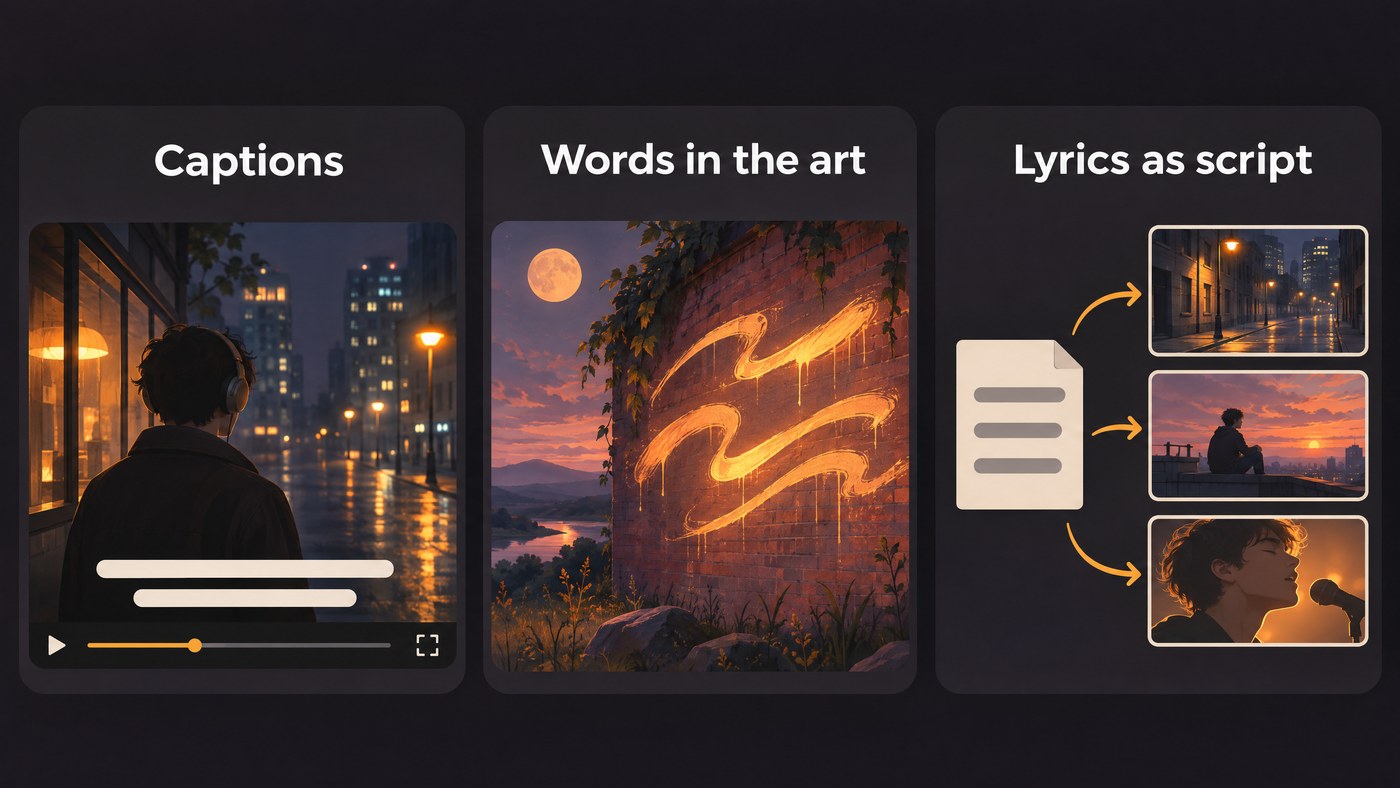
Three different things get sold as "lyrics to video". Know which one you're signing up for.
- Lyrics as captions. The tool transcribes your vocal, times each line or word, and lays the text over a background: stock clips, AI footage, a visualizer or your own video. The picture doesn't change with what the words mean. Rotor auto-syncs your lyrics over its own clips, effects and templates. Revid's animated lyrics generator analyses the audio at the word level so each word lands as it's sung, over AI video, AI images, stock footage or your own visuals, and it outputs 9:16.
- Lyrics inside the artwork. Neural Frames writes your words into the generated scenes, as lettering on a wall or a sign in a landscape, and its Smart Lyrics feature interprets what to show. Proofread every frame. Its FAQ warns that "correcting the source lyrics does not guarantee perfectly rendered text in every scene."
- Lyrics as the script. Here the lyrics decide the story: who is in the video, where it happens and what happens in each section. Soundverse's Music Video Storyteller reads the song's sections and lyrics and writes that story section by section, from a hook in the opening seconds to the ending. It writes the story only and films nothing, so you hand those beats to AI Music Video Generator to shoot.
Freebeat sits between the first and third. Its homepage describes an AI director that plans storylines and shots around the song's BPM, beats and sections, plus synced lyrics with karaoke-style timing that you switch on.
The strongest lyric videos usually combine two of these: scenes that follow the story of the words, and clean captions on the lines people will sing back.
Step by step: from sign-up to your first lyric-driven video
This walkthrough uses Soundverse, because the song, the story and the filming all happen in one account.
- Create your account. Go to soundverse.ai/signup and continue with Google, Microsoft, Apple or, in supported countries, your phone number. Add your name and pick an @handle. You start with 1,000 free tokens, which Soundverse's pricing page says is enough for about three full songs.
- Bring in the song, or make it from your lyrics. You can upload a finished MP3, WAV, M4A or FLAC of up to 50 MB that you have the rights to. No song yet? Open AI Song Generator, switch to Custom mode and paste your lyrics, up to 3,000 characters, with tags such as [Verse] and [Chorus]. Custom mode sings your words exactly as written.
- Let the lyrics write the story. Open Music Video Storyteller and pick the song. Choose a look (Live action, Anime, Painterly or Mascot) and a shape: 9:16 for Shorts and Reels, or 16:9 for YouTube. Add up to three characters and a location, or a photo of yourself, then click Write the story. Writing the story is free (analysing a new song uses a few tokens), so try several ideas for the same track.
- Move to Creator when you're ready to film. AI Music Video Generator needs the Creator plan or above. Every second of the song is filmed, so cost grows with length, and Soundverse's FAQ says even a 60-second video uses more tokens than a month of Creator includes. Expect to add a top-up, and check the current numbers on the pricing page.
- Turn the story into direction. In AI Music Video Generator, choose Custom, then Use Existing Song. Switch off Auto-generate direction and write the characters, setting, camera style and story beats yourself, using the Storyteller's plan for each section. Add up to nine image references for the cast and setting. Turn on Lip Sync if you want the lead singing to camera, and only use a face you own or have permission to use.
- Set the output and approve the cost. Leave Model on Auto or pick one, set the resolution and the aspect ratio, and click Create. Agent One writes the script and quotes the token cost, and nothing is filmed until you approve. It then films the scenes, cuts them to the music and renders the video in your chat. Open it in AI Studio to keep editing.
- Add on-screen lyrics if you want them. AI Music Video Generator films scenes; its page doesn't describe lyric text on screen. For captions, run Audio Transcription with Word timestamps on to get a start time for every word, then place the lines in your video editor. For a quick vertical lyric video with the cover art and scrolling lyrics, the Soundverse iPhone app exports one, and the Android app shares one as an MP4.
- Label it when you upload. YouTube's help page says: "We require creators to disclose AI-generated or altered content that seems realistic." Its list of what needs disclosure includes AI music that's the main focus of the video.
Help me choose an AI tool to create music videos from my lyrics
Start from what you want the words to do.
- The lyrics should decide the story: Soundverse. Storyteller plans the video by section from your lyrics, and AI Music Video Generator films it in 16:9 or 9:16 at up to 1080p, with optional lip sync.
- The words should be part of the artwork: Neural Frames. Lettering inside the generated scenes, plus optional synced captions in 10 fonts and 10 colours, line by line.
- A beat-synced video with karaoke lyrics, and maybe the song too: Freebeat. Its menu lists song models such as Suno V6 and Lyria 3.5 next to its music video and lyric video tools, and its FAQ lists 16:9, 9:16 and 1:1 exports at 720p or 1080p.
- Fast vertical animated lyrics: Revid. Word-level timing in 9:16, from an uploaded MP3 or WAV or a pasted Spotify or Suno link.
- A clean template lyric video with no editing: Rotor Videos. Auto-synced lyrics over its clips and templates, free to try and paid at download.
If captions are your main goal, our ranking of the best AI video generators for lyric videos compares the text tools in more depth. For full music videos, see the best AI music video generators in 2026.
Where Soundverse fits
Soundverse is an AI music platform that takes you from idea to audience, and it starts from the song. In one account you can hear your lyrics sung in AI Song Generator, get a section-by-section story from Music Video Storyteller, then have AI Music Video Generator film the scenes and cut them to the music. When you also want words on screen, Audio Transcription gives you the timing to place them in any editor. The video tool needs Creator or above, and Agent One quotes the cost before filming. Licensing is set by plan: the Free plan is for personal use, and the Creator plan comes with a royalty-free license. For more ways to build a video around the words, read our guide to creating lyric-based AI music videos.
This walkthrough shows a song, a character image and a prompt becoming a full music video, with planned scenes, a lip-synced performance and cuts to the music.
FAQ
Can I sign up for an AI music video generator for free? Yes. Soundverse, Neural Frames, Freebeat, Revid and Rotor Videos all let you create an account without paying. Free tiers are for testing: Neural Frames' free plan covers 20 seconds of video with a watermark, Rotor charges when you download, and Soundverse's music video tool needs the Creator plan.
Will the AI understand lyrics that aren't in English? It depends on the tool. Soundverse's Audio Transcription detects the language and can be set to one of 12, including Spanish, Hindi, Japanese and Arabic. Neural Frames says non-English songs work but that transcription and lettering quality can vary, so check every line before you render.
Do I need a finished song first? No. On Soundverse, Custom mode in AI Music Video Generator can generate the song from your lyrics before filming, and its Prompt to Music Video tab makes a song and its video from one prompt. Freebeat also lists song models. If you upload a track, you need the rights to it.
What's the difference between a lyric video and a music video from lyrics? A lyric video puts the words on screen, timed to the vocal. A music video from lyrics uses the meaning of the words to choose the cast, places and action, and may show no text at all. A common plan is to release both: the full video on YouTube and a lyric cut for Shorts and Reels.
Sign up for Soundverse free and turn your lyrics into a story you can film. More guides on the Soundverse blog.
