What AI Music Creation Software Would You Suggest for a Small Label Looking to Streamline Demos?
AI music software for labels: the tools a small label can use to streamline demos, from writer-session songs and toplines to stems, review and terms.
The best AI music software for labels that want to streamline demos covers four jobs: quick songs or instrumentals for writers' sessions, sung toplines, stems for producers, and one shared place for comments and versions. Suno, ACE Studio, Soundverse, BandLab, Logic Pro and Splice Create each handle part of that; pick by the step that costs your team most.
A label's demo problem is repetition. The same steps run for every artist on the roster, and time disappears into chasing files, re-exporting at the wrong spec and asking who changed what. We checked every tool below on its own site on 19 November 2026, and held Soundverse, our own product, to the same standard.
What a small label's demo workflow needs
- Idea capture: voice memos, lyric notes and hummed hooks turned into something the team can play.
- Writer-session starters: an instrumental or rough song in the artist's lane, so writers start from a groove, not silence.
- Topline and vocal demos: lyrics sung on a real melody, so A&R judges the song rather than the singer.
- Stems for producers: separate parts, full quality, named so they import cleanly.
- Team review: comments at a bar or timestamp, not scattered across group chats.
- Versioning: one current version, with earlier ones kept and labelled.
- Consistent export specs: the same format, sample rate and naming across every artist.
- Rights and terms: who may upload what, and what each plan allows commercially, in writing.
No single tool scores well on all eight, so most labels end up with two: one to generate and one to review.
AI music software for labels: the shortlist
Suno
- Best for: fast full-song sketches with vocals from a prompt or lyrics.
- Demo jobs: Suno's pricing page lists stem separation on Pro and Suno Studio, with MIDI, effects and automation, on Premier. Paid plans also let you record or upload your own voice.
- Terms: Free has no song downloads and no commercial rights; Pro includes 20 song downloads a month and Premier 60. Suno's terms (revised 10 August 2026) assign Pro and Premier users Suno's rights in their output, while making no promise that copyright will exist in it.
- Catch: the download cap. Its terms say: "You may not commercially exploit Output that has not been downloaded by you through an approved channel under these Terms of Service." Across a roster, sketches add up fast. Voice models must be of your own voice only.
A note on Udio: its help center says downloading of audio, video and stems has been disabled, one of the changes tied to its Universal Music Group partnership (article dated 17 February 2026). For now it can't hand stems to a producer.
ACE Studio
- Best for: vocal toplines when the writer already has the melody.
- Demo jobs: ACE Studio generates singing from MIDI notes and lyrics, in royalty-free voices across 8 languages, plus choir parts, AI instruments, voice cloning and a stem splitter. The ACE Bridge 2.1 plugin (VST3, AU, AAX) runs it alongside your DAW.
- Team: its pricing page offers Enterprise seats you can add or remove, with credits shared across the team.
- Terms: its License & Copyright page allows outputs in commercial or non-commercial projects unless a feature, voice or service says otherwise, and generates a PDF license certificate for a voice on request.
- Catch: someone still writes and programs the melody, so it speeds up the singing, not the writing. A few voices carry a "third-party license required" tag.
Soundverse
- Best for: labels that want sketches, guide vocals, stems and team review in one browser project.
- Demo jobs: AI Song Generator sings your lyrics word for word in Custom mode, following tags such as [Verse] and [Chorus]. AI Singing Generator makes an a cappella guide vocal from a vocal style or a voice reference you may use. Similar Song Generator, on Creator and above, sketches vocal demos in a project's sound from 30 seconds of a reference the artist shared. Stem Separator splits 2 or 6 stems in WAV, FLAC or MP3, or every part with MIDI on Creator and above.
- Team: in Collaborative AI Studio, the owner and Admins invite people as Editor, Viewer or Admin, and comments pin to a track at the bar. The pricing page lists custom seats, high-volume API access and SLA support under Enterprise.
- Catch: everyone edits one live copy, undo covers only your own edits, and the Viewer role doesn't lock the timeline. Free exports are MP3.
BandLab
- Best for: a free shared workspace for writers who won't buy software.
- Demo jobs: BandLab's Studio is free on web, iOS and Android, with up to 50 collaborators per project. SongStarter returns three compositions per song idea as editable MIDI, and Splitter and Voice Cleaner sit among its AI tools.
- Versioning: each project's Project Page holds a Revision History and a Project Link for inviting people.
- Catch: none of the AI tools on its page sings lyrics you type, and SongStarter's page calls its ideas royalty-free without spelling out ownership. Test invites and permissions on a dummy project first.
Logic Pro with Session Players
- Best for: Mac producers who want a band to play the changes.
- Demo jobs: Logic Pro's Session Players play drum, bass, keyboard and synth parts that follow the Chord Track, and Chord ID pulls chords from MIDI and audio regions. Stem Splitter and Mastering Assistant are built in.
- Catch: Apple only (a Mac with Apple silicon or an iPad), no generated vocals, and the product page doesn't describe shared projects, so review means bouncing files.
Splice Create
- Best for: producers building demo beds from Splice's sample catalog.
- Demo jobs: Splice Create is a beta DAW with Splice sounds built in and an assistant you direct by voice or text. It exports a mix or stems as WAV and can open a session in Ableton Live.
- Terms: Splice says you own what you make and can export it on a qualifying subscription, and that it can supply documentation if you ever need to prove your music is royalty-free.
- Catch: macOS only for now, exporting needs a subscription, and its FAQ says Assist doesn't generate new sounds. No sung demos.
For a wider feature comparison, see our guide to top AI music production suites.
Rights in uploaded material and commercial terms
Where vendors spell it out, rights in uploads sit with you. ACE Studio's license page is the bluntest: "If input materials are provided without the necessary rights, ACE Studio cannot guarantee that the resulting outputs will be free from third-party claims." Soundverse's Stem Separator page notes that stems from an uploaded song are still covered by that song's rights, and its voice tools need the singer's permission.
Three habits help:
- Get consent in writing from each artist and writer for voice references and AI use, filed with their agreement.
- Generate on the right plan. Commercial use depends on your plan, so never make a demo that might be released on a free seat.
- Keep a run log: tool, plan, date, prompts, inputs and approver for every demo.
Our guide to the best AI singing generators for demo tracks covers who owns an AI-sung demo.
How to set up a demo pipeline across a roster
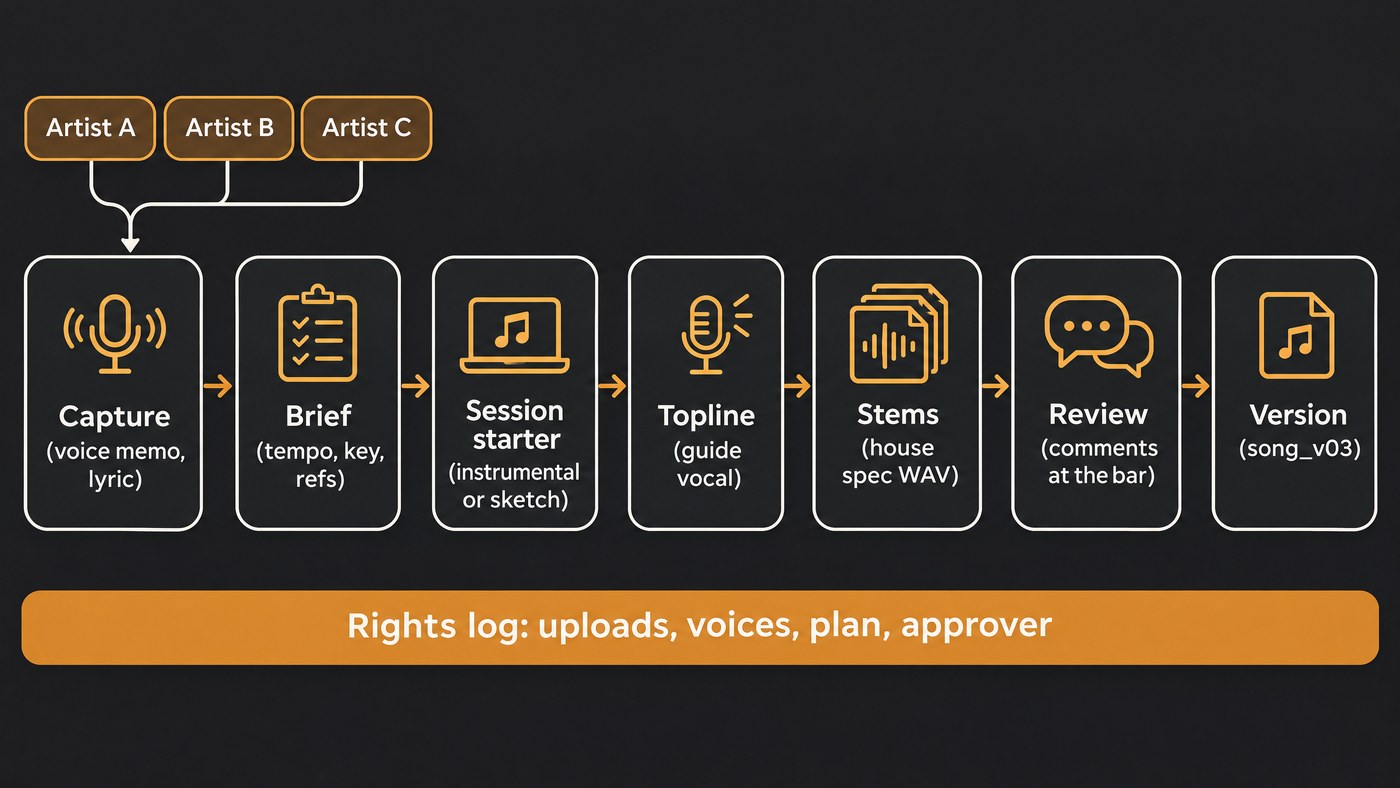
- Capture voice memos and lyrics into one intake folder per artist, named artist_song_date.
- Brief each song on one page: tempo, key, references you own or may use, lyric draft and target voice.
- Prepare session starters before the writing day: three to five instrumentals or sketches, keeping the best two.
- Demo the topline from the lyrics and label it "guide vocal" so nobody mistakes it for the artist.
- Export stems at the house spec, named title_part_bpm_key, all starting at bar 1.
- Review in one place, with comments at the bar and the decision written in the thread.
- Version as title_v01, v02 and so on, never overwriting, with one changelog line each.
- Fix one export spec, such as 24-bit WAV at 48 kHz with peaks at or below −1 dBTP. For release masters, see what distribution portals expect.
Where Soundverse fits
Soundverse is an AI music platform that takes you from idea to audience, built for independent artists who release music, and it suits labels that want the demo stages in one place. Sketch with AI Song Generator, add a guide vocal with AI Singing Generator, split stems with Stem Separator, then review in one Collaborative AI Studio project per song. Agent One can turn an attached brief into a set of songs, and Save as workflow reruns the same steps on the next artist's track. AI Studio exports WAV at 44.1, 48 or 96 kHz with optional true-peak normalizing to −1 dBTP, which makes a house spec easy to enforce; WAV and stems need Creator. Our post on AI Studio for teams shows a session. Licensing is set by plan: the Free plan is for personal use, and the Creator plan comes with a royalty-free license.
This walkthrough shows people invited into one AI Studio session building a track together, with every edit and generated stem appearing on everyone's screen.
FAQ
What's the cheapest way for a small label to share demos? BandLab's Studio is free with up to 50 collaborators per project, and Soundverse's Collaborative AI Studio works on the Free plan, where exports are MP3 and for personal use. Pay where it saves time: downloads, WAV stems and commercial terms.
Which tool is best for topline demos? If the melody already exists as MIDI, ACE Studio sings it. If you have lyrics and want a sung demo quickly, Soundverse's AI Song Generator or AI Singing Generator, or Suno, are faster.
Can AI demo tools give producers usable stems? Yes. Soundverse's Stem Separator exports WAV or FLAC, Suno lists stem separation on paid plans, and Logic Pro has Stem Splitter. Udio has downloads disabled for now.
Do we need different tools for music videos? Usually. Video makers have their own seats and terms; our comparison of AI music video makers for small labels covers them.
Sign up for Soundverse free and run your next writers' session demo through one shared project. More guides on the Soundverse blog.
