Which AI Singing Generator Is Best for Demo Tracks?
Which AI singing generator for demo tracks fits your song? Compare Suno, Soundverse, ACE Studio, VOCALOID6 and Kits.ai on melody, voice and edits.
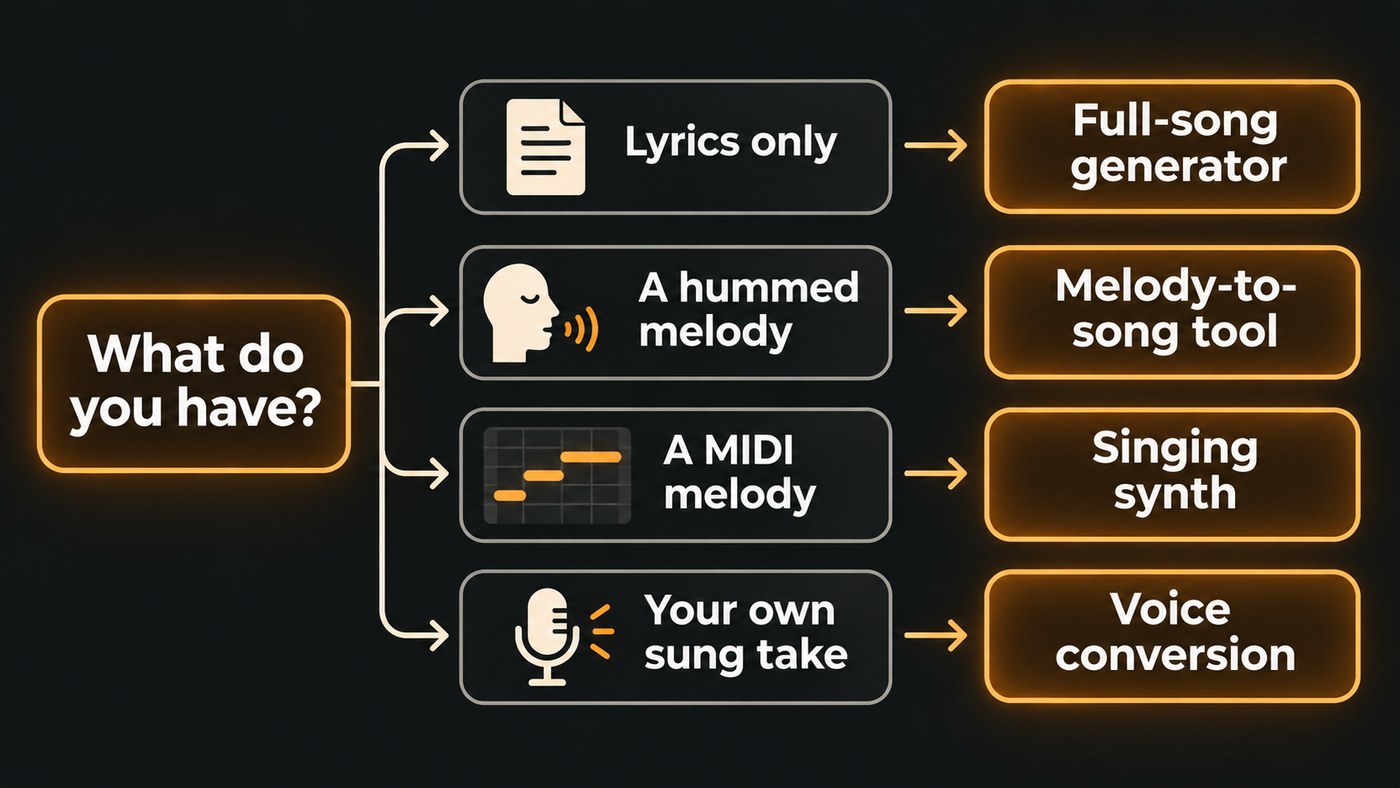
The best AI singing generator for demo tracks depends on what you bring. Lyrics only: Suno or Soundverse's AI Song Generator. A hummed melody: Soundverse's Melody to Song Generator. Exact notes from MIDI: ACE Studio or VOCALOID6. Your own sung take in another voice: Kits.ai. Pick the tool that keeps your melody and words intact.
A demo has one job: let a co-writer, an artist or a producer hear the song as you wrote it. Below is what each tool does well, checked on each tool's own site in November 2026, a simple route if all you have is lyrics, and how to stop the AI from rewriting your song.
What a demo track needs from an AI singer
A pitch demo for another artist, a guide vocal for a session singer and a voice memo you want to hear "finished" ask for slightly different things. Most of the time, a demo needs:
- Your melody. Many AI song tools write their own tune when you give them only lyrics. That's great for exploring and wrong when the melody is what you're pitching.
- Every word, clearly. If the listener can't follow the lyric, the demo fails, however good the voice sounds.
- Your structure. Verse, pre-chorus, chorus and bridge in the order you wrote them.
- The right voice type. A voice in the range and register of the singer you're writing for, without imitating a specific real artist.
- Something you can edit. An a cappella or stems, so you can sit the vocal over your own track or fix one line without regenerating the whole song.
The best AI singing generators for demo tracks
These five cover the common starting points. Plans and features change often, so check each tool's pricing page before you pay.
- Suno: lyrics you want to hear as a full song, fast. Suno's homepage says you can describe a song, including your own lyrics, and get a complete track with vocals and production. Its Voices feature records a few seconds of your voice and sings what you write in it, and Remix can rebuild a song around your own recording. The homepage FAQ lists a free tier of up to 10 songs a day, with commercial rights for paid subscribers. Best for songwriters who care more about hearing the lyric in context than about keeping an exact melody.
- Soundverse: your own melody, or a vocal to place over your track. Melody to Song Generator takes 5 to 60 seconds of a melody you hum, sing or play, plus your lyrics, and builds a full song that follows your tune and sings the words as written. AI Singing Generator sings your lyrics a cappella in a built-in voice (female or male pop, rap, hip-hop, rock, metal, vocal chops or choir) or in a voice like a reference of 30 seconds or more. Best for singer-songwriters who already hear the melody in their head.
- ACE Studio: exact notes from MIDI. ACE Studio's site says you input MIDI and lyrics to generate singing vocals, lists 140+ voices and 8 languages, and adds Vocal to MIDI, which converts a sung vocal into MIDI and lyrics. Best for producers who write toplines in a piano roll and want the guide vocal to hit every programmed note.
- VOCALOID6: detailed vocal direction. Yamaha's VOCALOID6 sings from the melody and lyrics you enter, and its editing tools let you shape accents, vibrato and rhythmic feel. VOCALO CHANGER lets you sing a line in so the voicebank replicates your singing style, and one voicebank can mix Japanese, English and Chinese lyrics. The site lists 20 VOCALOID6 voicebanks as of version 6.9, with Cubase AI bundled in the full version. Best for producers who like shaping every syllable and don't mind a learning curve.
- Kits.ai: you can sing it, just not in the right voice. Kits converts a vocal you upload or record from a mic into a different voice, from its library or a custom voice you create, and its homepage pitches this as a way to demo your voice in any style. Best for a writer whose range sits below the song's key, or who is writing for a different voice type. Soundverse's Voice Swap does a similar job and runs on every plan, Free included.
For a wider comparison of singing generators, see the best AI singing generator platforms for independent artists.
A simple AI singing tool to demo your song lyrics
If you just want a simple AI singing tool to demo your song lyrics, skip MIDI and plugins and use a paste-your-lyrics generator. Here's the route on Soundverse; Suno works in a similar way.
- Tidy the lyric. Mark each part with section tags such as [Verse], [Chorus] and [Bridge], and write repeated lines out in full.
- Open AI Song Generator in Custom mode. Custom sings your lyrics word for word instead of writing new ones. On the Free plan the Lyrics box takes up to 400 characters, so start with a verse and chorus.
- Describe the sound in Style of Music. Genre, feel and voice are enough, for example "stripped-back acoustic pop, warm male vocal, fingerpicked guitar, slow tempo".
- Generate a few takes. Each run comes out differently. Compare the hooks first, because that's what a listener remembers.
- Need only the vocal? Run the lyric through AI Singing Generator for an a cappella take. Each take sings about the first 350 characters, roughly a verse and a chorus, so lead with your strongest lines.
New Soundverse accounts get 1,000 free trial tokens, enough for about 3 full songs on Soundverse v6. Our step-by-step on creating AI vocals for your song demo covers more settings.
How to keep the AI from rewriting your song
The quickest way to lose a song is to let the generator invent the melody and then forget which parts were yours. A few habits help:
- Lead with your melody whenever you have one. Hum it into your phone and trim it to the 5 to 60 seconds a melody-guided tool accepts, or program it as MIDI for ACE Studio or VOCALOID6.
- Write lyrics the way they're sung. Break long lines where you'd breathe, and spell unusual words the way they should sound.
- Ask for a voice type, not a famous voice. "Breathy female alto" tells a generator what you need. A real artist's name invites trouble later.
- Keep your own scratch vocal. Even a rough phone recording shows the melody came from you and gives the eventual singer your phrasing.
- Put the vocal over your own track. Line up the a cappella in your DAW or in Soundverse AI Studio, and record your own harmonies on top.
- Label it. Put "AI guide vocal" in the file name or the email so nobody mistakes it for a final performance.
If you'd rather keep your recorded performance and only change the voice, read about Voice Swap for song demos.
Who owns a demo made with an AI singing generator?
The song you wrote is still yours, but only the parts you wrote. The U.S. Copyright Office's Part 2 report on copyright and AI, released January 29, 2025, concludes that AI outputs can be protected only where a human author has determined sufficient expressive elements, and that prompts alone don't qualify. Register of Copyrights Shira Perlmutter said: "Where that creativity is expressed through the use of AI systems, it continues to enjoy protection."
In practice, if you wrote the lyric and the melody, the AI vocal is a performance of your song. If the generator wrote the melody, that part of the demo may not be yours in the same way. That's one more reason to lead with your own tune when the demo is a pitch.
Voices need the same care. Use your own voice or one you have permission to use. If a demo later becomes a release, platforms are strict about this: Spotify announced on September 25, 2025 that vocal impersonation is allowed in music on Spotify only when the impersonated artist has authorized it.
Where Soundverse fits
Soundverse is an AI music platform that takes you from idea to audience, and for demos it covers the usual starting points. Melody to Song Generator builds a full song on a 5 to 60 second melody you hum, sing or play. It has no genre field and doesn't support every language yet, so your melody and lyrics shape the result. AI Singing Generator gives you an a cappella vocal to place over your own beat. With Train Voice Clone, on Creator and above, one take with at least 15 seconds of singing becomes a reusable voice for AI Song Generator, so demos can be sung in your own voice. Pro and Max start on Soundverse v9. Open any result in AI Studio to record harmonies or add parts.
Licensing is set by plan: the Free plan is for personal use, and the Creator plan comes with a royalty-free license.
This demo shows AI Singing Generator turning lyrics into an a cappella vocal with no instrumental, guided by a vocal reference.
FAQ
Can an AI singing generator follow my exact melody? Yes, if you pick a tool built for it. Melody-guided tools such as Soundverse's Melody to Song Generator follow a melody you hum or play, and ACE Studio and VOCALOID6 sing the notes you program. Generators that take only lyrics write their own tune.
Can I make an AI demo in my own voice? Yes. Suno's Voices, Soundverse's Train Voice Clone and Similar Singing Generator, and Kits.ai's custom voices all work from recordings of your singing. Use only your own voice or one you have the singer's permission to use.
Is it OK to pitch a song with an AI demo vocal? A demo vocal is a guide, not the final performance, so an AI one can do the job. Say clearly that the vocal is AI, avoid voices that imitate real artists, and make sure the lyric and melody are your own work.
Which free AI singing generator is good for demos? Several tools let you start free. Soundverse gives new accounts 1,000 trial tokens, enough for about 3 songs on Soundverse v6, and Suno's homepage lists up to 10 free songs a day. ACE Studio has a free start and VOCALOID6 offers a trial.
Sign up for Soundverse free and hear your next lyric sung. More songwriting guides on the Soundverse blog.
