What Are the Core Technical Differences Between AI-Generated Instrumentals and Traditional MIDI Sequencing?
AI instrumentals vs MIDI for producers: rendered audio vs note events, editing, tempo grids, sound sources, recall, file sizes, mixing and hybrids.
The core difference in AI instrumentals vs MIDI is what the file holds. An AI generator gives you rendered audio: a waveform with every instrument and mix decision already baked in. A MIDI sequence holds note events (pitch, velocity, timing) and makes no sound until a synth or sampler plays it. Almost every other difference follows from that.
If you already make beds from text prompts, our workflow for creating instrumentals with text-to-audio models covers the steps. We checked every source cited below on 19 November 2026.
AI instrumentals vs MIDI: rendered audio or note events
A MIDI file is a list of instructions. The MIDI Association's summary of MIDI 1.0 messages defines a Note On as a status byte plus two data bytes, the key (note) number and the velocity, each seven bits, so both run from 0 to 127. Other messages cover program changes, controllers such as pedals, and a 14-bit pitch bend. None of them carry sound.
MIDI 2.0 raises the resolution, not the idea. The MIDI Association's MIDI 2.0 overview (updated June 2023) says: "With MIDI 2.0 Voice Channel Messages velocity is 16 bit." Controllers and pitch bend move to 32 bits.
An AI-generated instrumental is a stream of sample values, 44,100 per second per channel at CD rate. Many generators work on compressed audio tokens or latents before decoding to a waveform, as our explainer on tokenization and music composition in AI shows. By the time you hear it, notes, instrument sounds, playing and mix are one signal.
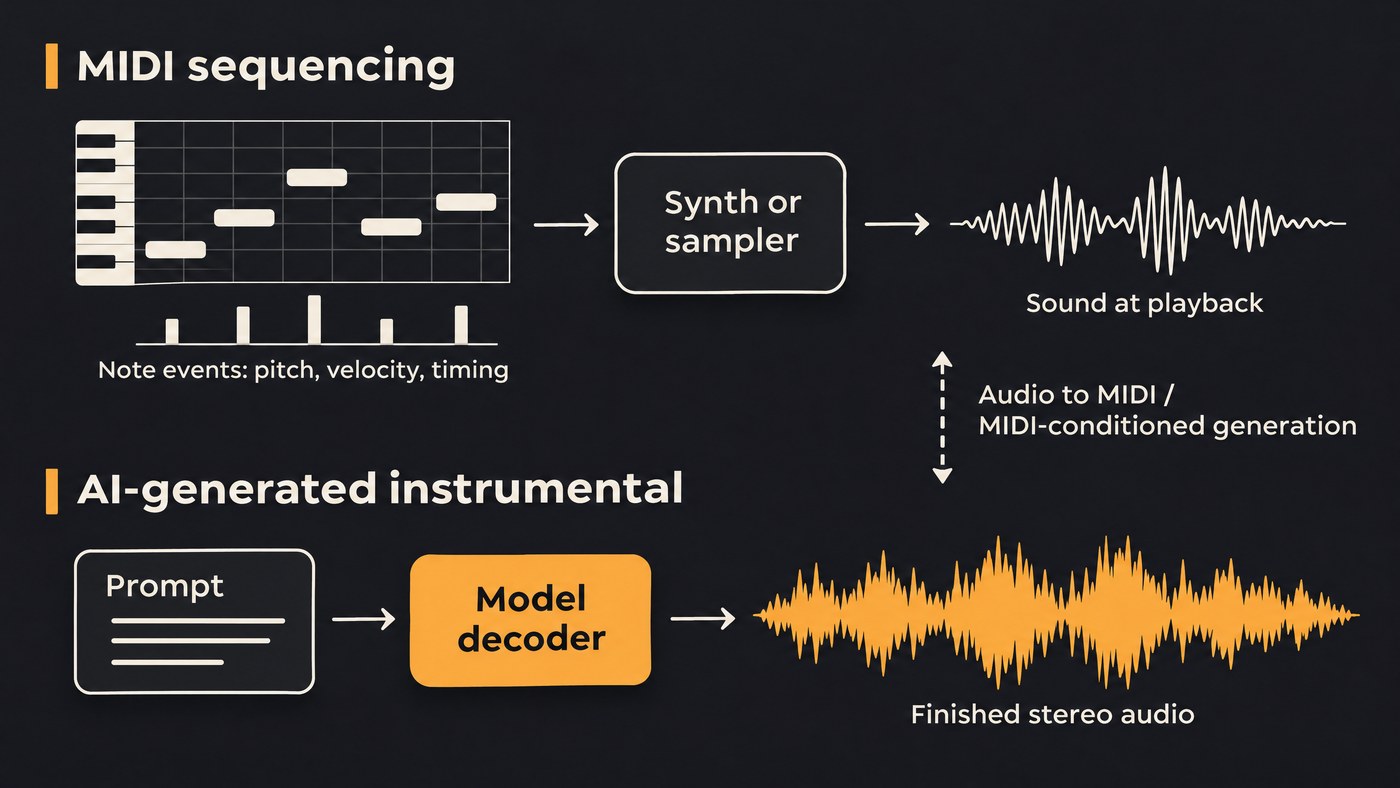
What you can edit afterwards
In a MIDI sequence
Every musical decision stays open until you bounce:
- Notes: move, delete, transpose or lengthen any single note.
- Velocity: reshape hi-hat accents or soften one loud chord.
- Quantize: snap to 1/16 at full strength, or 50 to 70% to keep some feel, then add swing.
- Instrument swap: route the part to another synth or sampler patch; every note comes along.
- Controllers: redraw sustain, mod wheel or filter moves after the take.
In an AI-generated instrumental
You're editing audio, so the tools are coarser:
- Audio edits: cut, loop, crossfade, EQ, time-stretch or pitch-shift the file.
- Stems: split the mix to rebalance drums, bass and the rest. A separator can only pull apart what's already in the mix.
- Inpainting: regenerate one selected section while the rest stays as it was.
- Regeneration: rerun or extend the prompt, knowing you'll get a different take.
The gap shows on small fixes. A wrong note in a MIDI piano part takes seconds to drag. Inside a generated stereo file, it means separating the piano, transcribing or inpainting the bar, or living with it.
Timing and tempo grids
MIDI timing lives on the sequencer's tempo map. Drop the project from 120 to 90 BPM and every note moves with it, with no change to pitch or tone, because the instrument simply plays each note later. Quantizing rewrites the timing data itself. For syncing gear, the MIDI 1.0 summary lists a Timing Clock message sent 24 times per quarter note.
Generated audio has its tempo printed into the waveform. Prompt 92 BPM, let the groove settle a fraction slower, and over a few minutes the bars creep off your DAW grid. Changing tempo means time-stretching; tightening timing means warp markers or slicing. Long generations can also wander in tempo or key.
Before stacking MIDI parts on a generated bed, detect its tempo, set the project to it and line bar 1 up with the first downbeat. Our guide to how AI identifies the key and tempo of audio explains why detectors sometimes report half or double the BPM.
Sound sources: samplers and synths vs a learned decoder
A MIDI part has no sound of its own. A sampler plays recordings mapped across keys and velocity layers; a synth builds tone from oscillators, filters and envelopes. Load the same file on a different patch and you have a different record with identical notes.
In a generator, the instrument is the model's decoder. Timbre, articulation, room and balance come out together, learned from training data, with no patch to open. You steer with words, tags and reference audio, which is coarse for anything that changes bar by bar. In their Music ControlNet paper (November 2023), Shih-Lun Wu, Chris Donahue, Shinji Watanabe and Nicholas J. Bryan write that text control "is primarily suitable for the manipulation of global musical attributes like genre, mood, and tempo, and is less suitable for precise control over time-varying attributes such as the positions of beats in time or the changing dynamics of the music."
Determinism and recall
Play a MIDI file through the same instrument and settings and you hear the same notes every time, apart from known quirks such as round-robin samples or random humanize. A session recalls a year later if the same plugins still load, so print audio of every part in case they don't.
A generator samples. The same prompt twice gives two different takes unless the tool lets you fix a random seed, and a newer model version won't reproduce an old take. Recall for AI audio means archiving the WAV you chose, the prompt, the model version and the date.
File sizes and formats: SMF vs WAV
A Standard MIDI File (.mid) is small and built from chunks. The Library of Congress format description notes that a header chunk identifies the track chunks, and meta-events hold sequence information, text, copyright notices and track names. A note costs three bytes for the Note On and three for the Note Off, plus timing data, so even 4,000 notes at about 8 bytes each is roughly 32 KB.
WAV is a wrapper, usually around uncompressed LPCM audio, according to the Library of Congress's WAVE entry. Its size depends on length and settings, never on how busy the music is:
- 44.1 kHz, 16-bit stereo: 44,100 × 2 bytes × 2 channels = 176,400 bytes a second, about 32 MB for three minutes.
- 48 kHz, 24-bit stereo: 288,000 bytes a second, about 52 MB for three minutes.
That's around a thousand times the MIDI file. MIDI is easy to email and version; audio is what players, distributors and video editors accept.
Mixing implications
A MIDI arrangement mixes like a multitrack session: each part renders dry on its own channel, so you set level, EQ, panning and effects per instrument and can print clean stems at any point.
A generated instrumental usually arrives as one finished stereo mix, often already loud. Treat it as a pre-mixed bed:
- Turn it down first. Leave at least 6 dB of headroom before adding anything.
- Carve space. If a vocal or MIDI lead sits on top, dip the bed 2 to 3 dB around 2 to 4 kHz, ideally with a dynamic EQ keyed from the lead.
- Separate only what clashes. If the generated bass fights your MIDI bass, split out that stem and mute it; every extra split adds a chance of artifacts.
- Check mono after you add parts.
Hybrid workflows: audio-to-MIDI, AI that writes MIDI, MIDI-conditioned generation
Audio-to-MIDI
Transcription turns audio back into note events. The MT3 paper by Josh Gardner and colleagues (ICLR 2022) showed one general-purpose Transformer transcribing several instruments at once across datasets. A clean stem transcribes far better than a dense mix, and you get notes back, not the sound.
This tutorial converts a full song into multi-track MIDI, with each detected instrument on its own track.
AI that writes MIDI
Symbolic models output notes instead of audio. The Anticipatory Music Transformer by John Thickstun, David Hall, Chris Donahue and Percy Liang (TMLR) was trained on the Lakh MIDI dataset and can accompany or fill in a fixed set of notes. You get editable MIDI and still pick the sounds.
MIDI-conditioned generation
Here you supply the notes and a model renders the audio. Curtis Hawthorne and colleagues' 2022 spectrogram diffusion synthesizer generates audio from MIDI sequences with arbitrary combinations of instruments, keeping note-level control. Music ControlNet adds melody, dynamics and rhythm controls to text-to-music. You keep MIDI's timing and get a learned sound.
A hybrid recipe:
- Generate a bed for the vibe and sound palette.
- Detect its tempo, set the grid and align the downbeat.
- Separate the parts you want to own, such as bass and lead, and convert them to MIDI.
- Fix wrong notes, quantize lightly and replay them on your own instruments.
- Mute those generated stems, keep the drums or textures as audio, then mix.
Where Soundverse fits
Soundverse is an AI music platform that takes you from idea to audience. AI Music Generator makes instrumentals from a prompt; Free runs Soundverse v6, Creator adds v7 and v8, and Pro adds Soundverse v9.
Audio to MIDI converts a recording of up to 30 minutes into one .mid file per instrument on your song's tempo grid; its page notes that it captures notes, not tone or effects. Stem Separator's maximum split, on Creator and above, adds a MIDI file for each stem.
In AI Studio, Agent One writes MIDI beats, basslines, chords, pads and leads on their own tracks, which you edit in the piano roll or save with Export as MIDI File. VocalMIDI One, one of the AI Instruments, turns singing, humming or beatboxing into MIDI in real time. MIDI to Song Generator turns a 5 to 60-second .mid melody plus your lyrics into a sung song.
FAQ
Does a MIDI file contain any sound? No. It holds note numbers, velocities, controller moves and timing. What you hear depends on the synth, sampler or player that receives it.
Can I turn an AI-generated instrumental into MIDI? Yes, with audio-to-MIDI transcription. Separate the part first, since a solo stem gives cleaner notes than a full mix. Expect to fix some pitches and re-quantize, then choose new sounds.
Why doesn't my AI instrumental line up with my DAW grid? Its tempo is baked into the audio and may not match your prompt exactly. Detect the tempo, set the project to it and align bar 1 to the first downbeat. If it still drifts, warp the clip.
Is MIDI or AI generation better for producers? Use MIDI for parts you need to control note by note, such as basslines, leads and chords you'll reuse. Use generated audio for beds, textures and fast sketches where the overall sound matters more than single notes. Most finished productions combine both.
Sign up for Soundverse free and turn your next generated bed into MIDI parts you can edit. More production guides on the Soundverse blog.
