What Makes AI-Generated Music Videos Different From Traditional Editing?
AI-generated music videos swap filmed footage for generated shots. See how sync, continuity, revisions and cost differ from traditional editing.
AI-generated music videos differ from traditional editing in where the footage comes from. An editor cuts footage someone filmed. An AI music video generates each shot from prompts, reference images and the song itself, so most creative decisions move from the timeline to the script, the references and the choice of which take to keep.
That one change touches continuity, lip sync, revisions and cost. Here is what it means in practice for an independent musician. For the budget and timeline side, see our overview of AI music video vs traditional music video.
Traditional editing vs AI generation: where the footage comes from
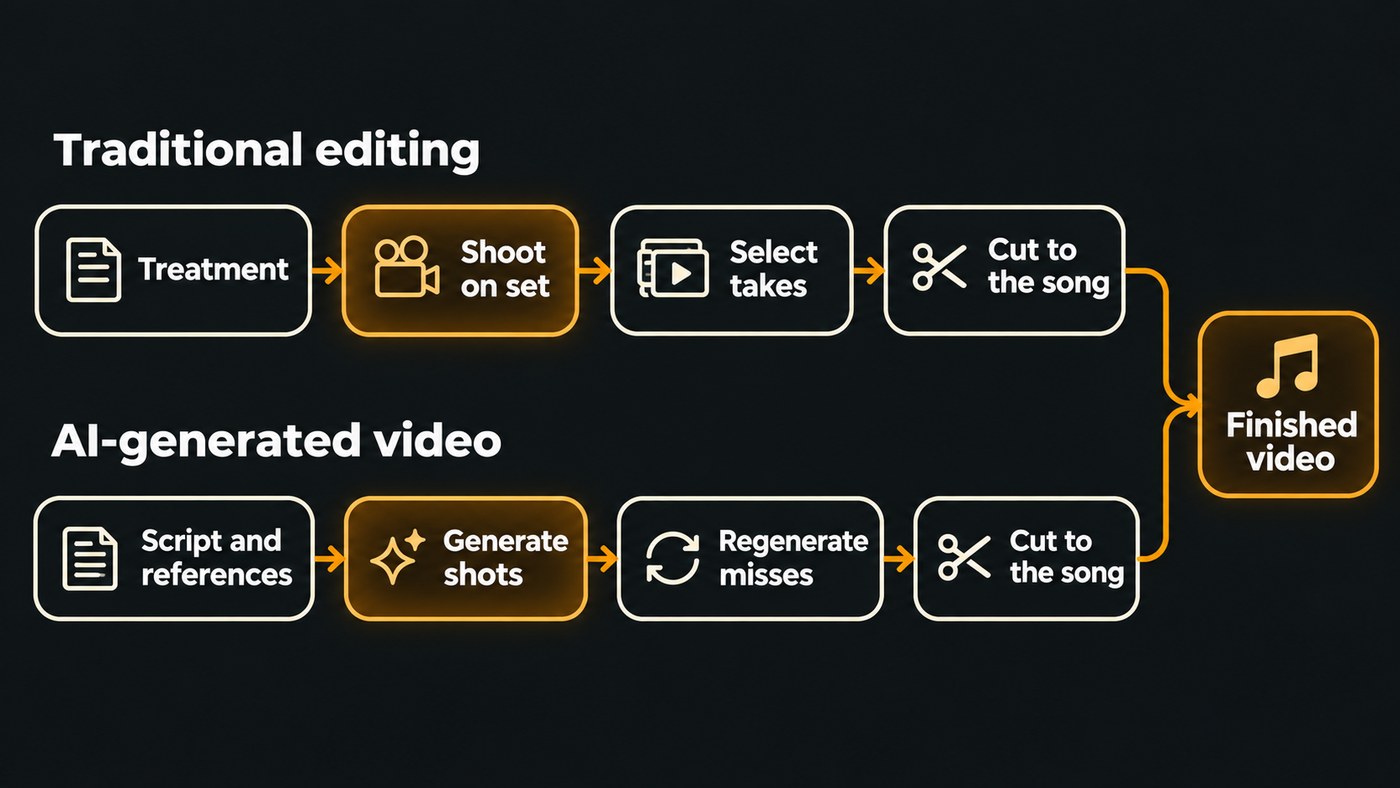
In a traditional music video, editing is the last step of a physical process. You write a treatment, shoot the performance and story scenes on set, usually with the artist singing to playback over many takes, and an editor syncs that footage to the track and cuts the best moments to the song. The editor can only use what the camera caught. A missing shot means going back out to film it.
In an AI-generated music video, nothing exists until you describe it. Each shot comes from a text prompt, a still image or both, so the edit starts before any footage exists: you set the scenes, look and cast in a script, then generate shots to match. A missing or wrong shot gets generated again.
Traditional editing is mostly selection from material you already have. AI generation creates the material first, and then a lighter round of selection and cutting follows.
Six differences you notice on your first AI music video
- Shots arrive in short pieces. AI video models generate clips measured in seconds. Soundverse's AI Video Generator makes one clip of 3 to 30 seconds per run, depending on the model, and Multi-Scene Video Builder plans up to 10 scenes of 4 to 15 seconds each. A full song is assembled from many of these, while a traditional edit can hold one continuous take for a whole verse.
- Continuity is something you have to ask for. On a shoot, the singer looks the same in every take. A generator makes each shot separately, so faces, clothes and locations can drift between scenes. Reference images and pinned first frames are the fix; Soundverse's Multi-Scene Video Builder page names first frames showing the same character as the most reliable way to keep it consistent. Our guide to keeping a consistent visual style in AI music videos goes deeper.
- Lip sync is generated from the vocal. In a filmed performance video, the artist mimes to playback and the editor lines up the takes. With AI, the mouth movement is generated from the audio. A clean vocal stem syncs far better than a full mix, and Soundverse's Lip Sync page notes that its video model blocks realistic human faces, so painterly or anime-style characters are more reliable there.
- Revisions are regenerations. An editor fixes a weak moment by trimming or reordering what exists. In AI generation, the usual fix is a new take: rewrite the prompt, swap the reference and run the shot again. Each run comes out differently, which is both the upside and the main way time gets wasted.
- Cost follows length, not crew. Traditional costs gather around the shoot day: crew, location, gear, then editing hours. AI video is usually priced per second of generated footage, so a longer song costs more to film and a reshoot costs one more generation instead of another day on set. Soundverse's AI Music Video Generator quotes the token cost for your approval before any scene is filmed.
- Resolution has a ceiling. A shoot captures as much resolution as your camera allows. Many video models stop lower: Soundverse's AI Music Video Generator films at up to 1080p, depending on the model, and doesn't film in 4K. That's usually fine for YouTube, Reels and Shorts. For a festival LED wall, plan around it.
What traditional editing still does better
- A real performance. A filmed take of you singing carries how you actually move and breathe on a chorus.
- Frame-level control. An editor can land a cut on a single snare hit. Inside a generated clip, you have far less say over when a movement happens.
- Exact continuity. Same face, same light and same props across a whole video is routine on a shoot and hard work with generation.
- Documentary truth. Tour footage, studio sessions and behind-the-scenes clips matter because they really happened.
AI generation wins where a small budget can't reach: impossible locations, animated or virtual characters, and story worlds that would need a full crew.
How AI-generated music videos and traditional editing work together
Most AI music videos that hold attention still get edited. Here is a hybrid workflow that uses both:
- Write the treatment first. Decide the story, the look and which song sections get which scenes. Mark where each chorus lands so the biggest visual changes hit there.
- Lock your references. Choose the images for your lead character and main location, and reuse them as first frames in every scene they appear in.
- Generate scenes as separate clips. Ask for each scene as its own file, so you can trim and reorder freely.
- Cut the clips to the song on a timeline. Put the cuts on downbeats, let shots breathe in the verses and cut faster in the chorus.
- Mix in real footage where it counts. A phone clip of you in the studio or on stage anchors the video to a real artist.
- Build performance shots line by line. For a lip-synced hook, make one short clip per line from a clean vocal stem and slot each one in.
- Export once per platform. A 16:9 master for YouTube and a 9:16 cut for Shorts and Reels.
Short loops are where generated clips feel most at home. Spotify's Canvas guidelines, checked in November 2026, ask for a 3 to 8 second vertical 9:16 loop, 720 to 1080 pixels tall, as an MP4 or JPG, and advise: "Choose footage without talking, singing, or rapping." A slow camera push across your cover art fits that brief well. For a longer walkthrough of the split between machine and human work, read how to combine AI music, AI video and human editing.
Do you have to label an AI-generated music video?
On YouTube, often yes. YouTube's help page on disclosing GenAI content, checked in November 2026, requires uploaders to disclose AI-generated or altered content that seems realistic. Its list includes realistic scenes that didn't actually occur and music that's the main focus of the video. Clearly non-realistic content, such as its example of someone riding a unicorn through a fantastical world, doesn't need the label.
YouTube's separate guidance on disclosing Gen AI usage for music content classifies a common case as "Partly Gen AI": "An artist produces a song using 100% human-performed audio, but generates the accompanying music video visuals using a text-to-video AI model." You set the disclosure under "AI use" in the Attributes section when you upload in YouTube Studio. YouTube's GenAI disclosure page states that disclosing AI content alone won't limit a video's audience or its eligibility to earn money.
Rights work differently too. A shoot needs release forms from the people on camera. A generated video needs the rights to the song you upload and to every reference image, and you should only show a face you own or have permission to use.
Where Soundverse fits
Soundverse is an AI music platform that takes you from idea to audience, and its video tools start from the song. AI Music Video Generator takes a finished track (MP3, WAV, M4A or FLAC up to 50 MB) or a one-line idea. Agent One writes a script and quotes the cost for your approval, then films the scenes and cuts them to the music. Turn on Lip Sync and the lead sings to camera in time with the vocals.
For scene-by-scene control, Multi-Scene Video Builder plans up to 10 scenes with their own prompts and first and last frames, and can return each scene as its own clip. Put those clips on a video lane in AI Studio, alongside your song and any footage you filmed yourself, and cut them there. Video export goes up to 1080p on Creator and 4K on Pro and Max. The video generation tools need the Creator plan or above.
Licensing is set by plan: the Free plan is for personal use, and the Creator plan comes with a royalty-free license.
This walkthrough shows a song, a character image and a prompt turned into a full music video with planned scenes, a lip-synced performance and cuts to the music.
FAQ
Are AI-generated music videos cheaper than traditional ones? For most independent artists, yes, because there is no crew, location or shoot day. The cost scales with length instead, since AI video is usually priced per second, so check the estimate before you generate.
Do I still need editing skills to make an AI music video? Less than before, but they help. A generator can script, film and cut a full video on its own. Basic timeline skills, such as cutting on the beat and mixing in a real clip, make the result feel like yours.
Can AI make a music video from a song I already released? Yes, as long as you hold the rights to the track. Upload the finished file, describe the look or leave the direction to the AI, and it builds the scenes around the song. On Soundverse, AI Music Video Generator takes MP3, WAV, M4A or FLAC files up to 50 MB.
Can I mix my own footage with AI-generated clips? Yes, and it often makes the strongest video. Put the filmed clips and generated scenes on one timeline, roughly match their colour, and save the real footage for moments where the audience should see you.
Will an AI music video look as good as a filmed one? In some ways it already can, in others not yet. Generated clips are short, often top out below 4K and can drift in small details between shots. For stylized, animated or impossible-to-film visuals, those limits matter much less.
Sign up for Soundverse free and start planning the video for your next single. More music video guides on the Soundverse blog.
