Which AI Voice Generators Offer the Most Natural-Sounding Results for Podcast Intros?
Natural AI voice generators for podcast intros, graded on blind listener votes and vendor docs, with script, cloning, A/B test and mixing tips.
Of the natural AI voice generators we checked, ElevenLabs' Eleven v4 scored highest on Artificial Analysis's blind listening leaderboard on 21 November 2026, followed by Speechify and Google's Gemini TTS, then Murf, Microsoft Azure's HD voices and OpenAI. For a podcast intro, the script, a blind test and the mix under your theme matter as much as the pick.
This guide covers one thing: whether a 15-second spoken intro passes as a person. For directing emotion and emphasis with tags and markup, see our guide to AI voice synthesizers with expressive control for podcasting. Every vendor page below was read on 21 November 2026.
What makes an AI podcast intro sound natural or robotic
Listeners decide within a sentence or two. The tells:
- Prosody. Pitch should rise and fall with meaning, leaning on the word that matters. A robotic read weights every word the same.
- Pacing. Hosts rush familiar phrases and slow down for the show name. One steady rate sounds read, not spoken.
- Breaths. Fifteen seconds without a breath sounds airless; a breath before every sentence sounds pasted in.
- Sentence-final intonation. Statements fall at the end. Watch for a last word that lifts like a question, or every sentence landing on the same low note.
- Mouth noise. Real voices carry tiny clicks. Perfect digital silence between phrases gives a synthetic voice away.
- Over-perfect delivery. Same energy on every line, same gap after every comma. Microsoft says its HD voices add slight variation to each output because human voices vary.
Google's script tips for its Chirp 3: HD voices make the case for small hesitations, saying of ums and uhs: "They add authenticity and make the speech sound less robotic." One in a scripted intro is plenty.
Stock voice or a clone of your own voice?
A stock voice is quick and raises no consent questions, but other shows can use it too. A clone keeps the intro sounding like the host listeners know. Vendors set their own rules:
- ElevenLabs. Its Professional Voice Cloning guide is blunt: "You can only create a Professional Voice Clone of your own voice. Even with their consent, you cannot clone someone else’s voice." A co-host clones and verifies their own voice, then shares it. ElevenLabs recommends at least 30 minutes of audio, ideally 2 to 3 hours, and warns that the clone copies noise and long "uhm"s.
- Descript. Its voice clone help page requires a recorded consent statement in English from the voice's owner, and your delivery while reading it shapes the clone.
- Microsoft Azure. Personal voice needs a verbal consent statement plus a 5 to 90 second prompt, with API access limited to approved customers.
- OpenAI. Custom voices from recordings need a consent recording and are limited to eligible customers.
- Google. Chirp 3: Instant Custom Voice no longer takes access requests; Google points to voice replication in Gemini 3.8 TTS, in Preview.
Record clone audio on the mic and in the room you use for the show. For commercial terms, see our roundup of AI voice cloning services that allow commercial use.
How to write a podcast intro script for text to speech
Write for the ear:
- Keep sentences short, one idea each, roughly 6 to 14 words.
- Write numbers as you say them. "Episode 112" becomes "Episode one-twelve". ElevenLabs' best practices guide shows why: Multilingual v2 reads "$1,000,000" as "one million dollars", while the smaller Flash v2.5 says "one thousand thousand dollars".
- Spell names as they sound. A guest called Siobhan becomes "Shiv-awn", or goes into the tool's pronunciation dictionary once.
- Use punctuation as direction. The same Google page (updated 19 November 2026) treats a period as a longer pause, a comma as a shorter one, an ellipsis as a deliberate pause and a hyphen as a brief break.
- Use contractions, then read the script aloud. If you stumble, the model will too.
Before: Welcome to Episode 112 of The Late Shift, a podcast in which we discuss the music industry with independent musicians.
After: This is The Late Shift. Episode one-twelve. Every week, one artist who put a record out on their own... and how they really did it.
Run a blind A/B listening test before you commit
- Shortlist three or four voices, plus your own phone read as a control.
- Render the final script three times per voice; keep each voice's best take.
- Match loudness, for example to -16 LUFS, or the louder clip wins.
- Lay each over the same 15 seconds of theme, ducked the same way.
- Rename the files A to E and shuffle the order per listener.
- Play them to at least five people who haven't read the script, on a phone speaker and on earbuds. Ask which sounds like a person, and which would keep them listening.
- Tally. If listeners spot every AI take, fix the script before switching vendors.
Artificial Analysis does this at scale: its Speech Arena leaderboard plays two clips of the same text, asks which sounds more natural, and turns votes into Elo scores.
Mixing an AI voice over your theme music
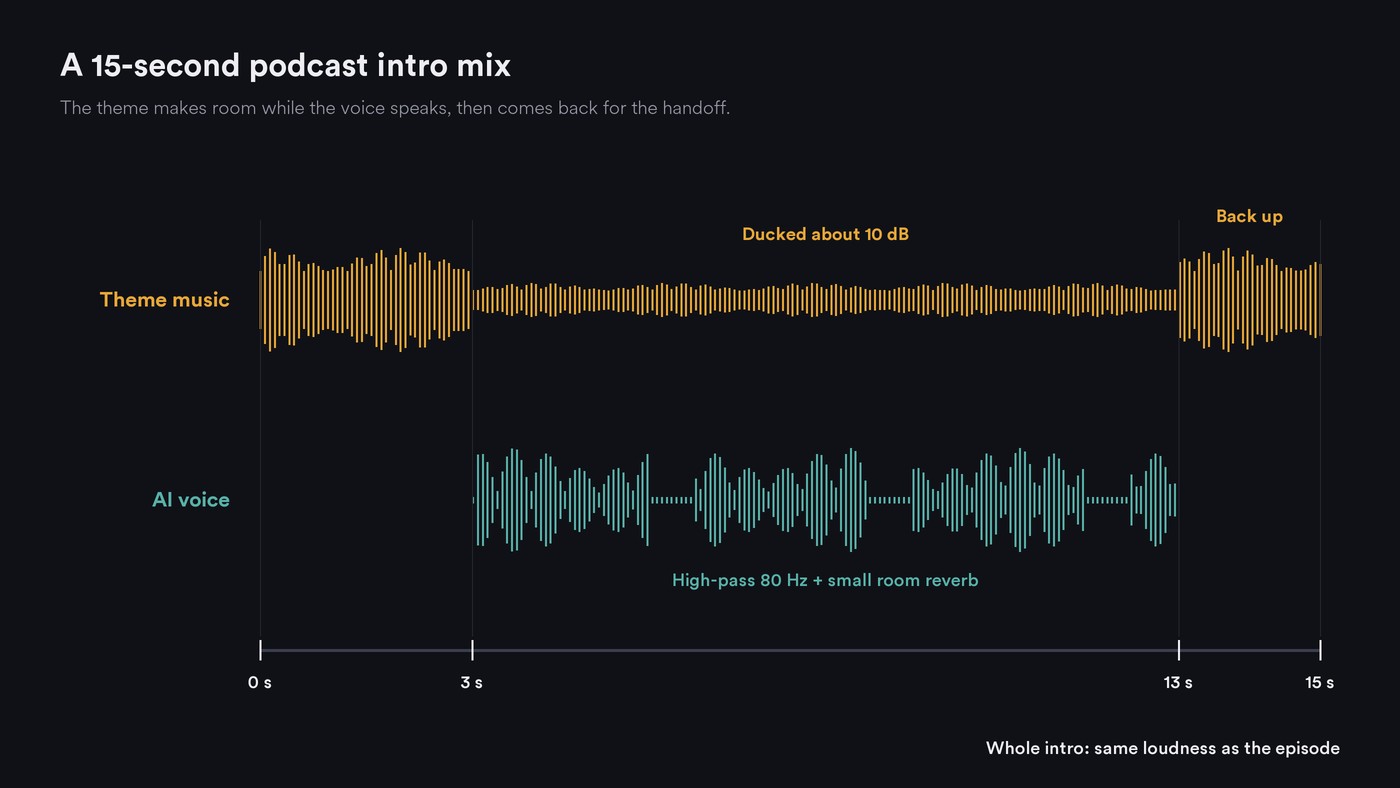
- Duck the music about 10 dB (8 to 12 dB) under the voice, with a sidechain compressor or a drawn volume curve, and bring it back after the last line.
- EQ both. High-pass the voice around 80 to 100 Hz, and cut 2 to 3 dB from the music around 2 to 4 kHz so consonants come through.
- Give the voice a room. Synthetic speech is bone-dry. A short room reverb at a low mix helps, and ElevenLabs can add distance or a room environment at generation.
- Set loudness for the whole intro to the episode's target. Our guide to AI audio editors for podcast post-production lists the published targets.
Need the theme too? See how to create podcast intro music with AI.
Natural AI voice generators for podcast intros, graded
Scores are Elo ratings from Artificial Analysis's leaderboard as read on 21 November 2026, anchored at 1000. It tests general speech, not podcast intros, so shortlist with it and let your blind test decide.
ElevenLabs. Eleven v4 and Eleven v4 Turbo tied first at 1340, and ElevenLabs calls v4 its most emotive model. Outputs vary run to run, so render several takes, and trim any descriptive text it speaks aloud. Best for the most human-sounding stock voice or a clone of your own.
Speechify. Simba 3.5, listed under Speechify, scored 1293. Its AI Voice Generator page lists podcasts as a use, with speed, pitch, pause, pronunciation and emotional-tone controls. Best for quick natural reads.
Google Gemini TTS and Chirp 3: HD. Gemini 3.8 Flash TTS scored 1282 and Chirp 3: HD 1060. Google's Gemini-TTS docs (updated 10 November 2026) list podcast generation among Gemini 2.5 Pro TTS's jobs; Gemini 3.8 Flash TTS is generally available through its Agent Platform API and Agent Studio, not the Cloud Text-to-Speech API. Best for teams on Google Cloud.
Murf. Murf's homepage points to Artificial Analysis for Falcon 2, which scored 1156 that day, with Murf Speech Gen 2 at 986. Podcasts are a listed use, with a pronunciation library and voices made with permission from voice actors who earn royalties. Best for voiceover teams who edit in a studio interface.
Microsoft Azure AI Speech. Azure HD 2.5 scored 1149 and Azure Neural 1032. Microsoft's HD voices page says HD voices can reproduce pauses and filler words in conversational text and recommends Dragon HD Omni for podcasts; on Dragon HD voices, lowering temperature (0 to 1, default 1.0) steadies wandering takes. Best for developers.
OpenAI. TTS-1 HD scored 1109. OpenAI's text to speech guide says tts-1, tts-1-hd and gpt-4o-mini-tts shut down on 6 January 2027, replaced by the Realtime API, and requires telling listeners the voice is AI. Best for existing integrations only.
WellSaid. Not on the leaderboard. The WellSaid Studio page says every voice comes from a consenting, paid professional actor, and lets you direct pacing and emphasis in plain language with a shared pronunciation library. Best for shows that need one approved voice every episode.
Descript. Its help center says AI speech runs on ElevenLabs models, including v3 and v4, so quality tracks those models. Best for patching an intro inside an episode you already edit there.
Where Soundverse fits
Soundverse is an AI music platform that takes you from idea to audience, built for independent artists who release music, and its speech tool lists podcast intros and ad reads among its uses. AI Speech Generator reads up to 3,000 characters per run in one built-in voice, and each voice has a sample labeled for tone and accent across American, British, Australian and Indian English, so you can audition by ear. It doesn't clone voices and isn't on the leaderboard, so include it in your own blind test.
The intro comes together in AI Studio: Generate Dialogue puts the read on a track at the playhead, Generate Instrumental adds a music bed, and volume automation, EQ and Mastering One's loudness targets handle the mix. For two hosts, generate each host's lines in a different voice on separate tracks.
Licensing is set by plan: the Free plan is for personal use, and the Creator plan comes with a royalty-free license.
This walkthrough covers Soundverse's Create tools; the AI Speech Generator part starts at 0:39.
FAQ
Which AI voice sounds the most human for a podcast intro? On Artificial Analysis's blind leaderboard on 21 November 2026, ElevenLabs' Eleven v4 models tied first, ahead of Speechify's Simba 3.5 and Google's Gemini 3.8 Flash TTS. Those are general scores, so play your own script to a few listeners before paying for a plan.
Should I clone my own voice for the intro? If listeners know your voice, a clone keeps the intro consistent with the episode. ElevenLabs allows Professional Voice Clones of your own voice only, and Descript, Azure and OpenAI all require a recorded consent statement.
How long should an AI podcast intro be? Aim for 10 to 20 seconds of speech, roughly 25 to 50 words, over a theme that runs a little longer. Fewer words give the voice fewer chances to slip.
Do I have to tell listeners the voice is AI? OpenAI's usage policies require it for its voices, and other vendors set their own terms. A line in the show notes covers it and keeps your audience's trust.
Sign up for Soundverse free and audition voices for your next intro. More guides on voice and audio on the Soundverse blog.

