Which AI Voice Synthesizers Support Expressive Vocal Control for Podcasting?
AI voice synthesizers graded on expressive control for podcasts: emphasis, pauses, pace, emotion, laughs and multi-speaker dialogue, from each tool's docs.
The AI voice synthesizers with the widest documented expressive control for podcasting are ElevenLabs, with audio tags and multi-speaker dialogue, Google's Gemini-TTS, steered by style prompts and tags, and Microsoft Azure AI Speech, with SSML speaking styles. Descript and WellSaid suit line-by-line direction in an editor; Amazon Polly and Murf give precise but narrower controls.
This is about speech: a host's read, an ad, a two-person segment. For sung vocals, see which AI voice synthesis software offers the best control over vocal expression. Each tool is graded from its own documentation, read on 21 November 2026, and several features are still in Preview.
What expressive vocal control means for a podcast
What a listener hears:
- Emphasis: the one word a sentence hangs on.
- Pauses: a beat before the punchline, room after a question.
- Pace: slower for the key point, quicker for a disclaimer.
- Emotion: warmth, doubt, amusement, without overacting.
- Laughter and breaths: the small sounds that make a host sound present.
- Multi-speaker dialogue: voices that take turns and cut in naturally.
- Pronunciation: guest names, brands, places and acronyms.
Speech has no score, so the model infers pitch and timing from your text. That's the core of the difference between speech synthesis and singing synthesis.
Six ways AI voice synthesizers let you direct a read
- SSML markup. XML tags such as
<break>,<prosody>,<emphasis>and<phoneme>; each vendor supports a different subset. - Provider style tags. Vendor extensions, such as Azure's
<mstts:express-as>speaking styles with an intensity setting. - Audio or emotion tags. Bracketed cues like [laughs] or [whispering] typed into the script.
- Natural-language direction. A separate prompt describing the delivery, such as a tired but amused host.
- Sliders and numbers. Speed, pitch and stability settings.
- Per-line regeneration. Re-render one sentence until it lands and keep the rest.
For how text becomes prosody inside the model, see how AI voice synthesis works.
AI voice synthesizers graded on expressive control
ElevenLabs
ElevenLabs' best practices guide is the most detailed on this list.
- Emotion and nonverbals: on Eleven v4 and v3, bracketed audio tags such as [sighs], [laughs], [whispers], [sarcastic] or [curious] direct the delivery, and an Enhance button can add tags for you. ElevenLabs says tags aren't perfect yet.
- Emphasis, pauses and pace: capitals add emphasis and ellipses add weight. v4 and v3 don't support SSML break tags, though older models accept
<break time="1.5s" />up to 3 seconds. Speed runs from 0.7 to 1.2. - Dialogue: Text to Dialogue lists podcast dialogue as a use case. Each turn gets its own voice and tags, a dash marks an interruption, and Stability and Similarity settings keep voices consistent while emotion comes from the text. The docs suggest generating several takes.
- Pronunciation: IPA between slashes on v4, plus pronunciation dictionaries.
Grade: strongest for nonverbal sounds and two-host dialogue.
Google Gemini-TTS
Google's Gemini-TTS docs (last updated 10 November 2026) steer style, accent, pace, tone and emotion with a natural-language prompt, for one speaker or several.
- Markup tags (Preview): [sigh], [laughing] and [uhm] insert sounds; [sarcasm], [whispering] and [extremely fast] change delivery; [short pause], [medium pause] and [long pause] add about 250 ms, 500 ms and 1,000 ms or more.
- The catch: emotional adjectives such as [curious] or [scared] get spoken aloud as words. Google's advice: "Bracketed tags like [sigh] are best used for injecting a specific, localized action or style modification, not for setting the overall tone." Set the mood in the prompt.
Grade: strongest for directing by description, with tags still in Preview.
Microsoft Azure AI Speech
Azure's SSML voice page covers the deepest markup here.
- Prosody: pitch, rate, volume and pitch contour, plus several voices in one document.
- HD voices: styles such as amused, hesitant, reflective, sarcastic or whispering, written as SSML or as [style] markers, plus laughter, breathing, sighing, coughing, throat clearing and yawning. [Neutral] returns to the default style.
- Neural voices:
express-asstyles with a style degree from 0.01 to 2, and roles, on a subset of voices. - The catch: word-level
<emphasis>works only on three US English neural voices: GuyNeural, DavisNeural and JaneNeural.
Grade: most precise markup, but check what each voice supports.
Amazon Polly
Polly's supported SSML tags list full support for <break>, <sub> and <lang> on every engine, <phoneme> on most, and only partial <prosody>. The expressive ones, <emphasis>, whispering, soft phonation and automatic breaths, work on Standard voices only, not neural, long-form or generative.
Grade: precise timing and pronunciation, little emotion on its most natural voices.
OpenAI text to speech
OpenAI's speech guide lets gpt-4o-mini-tts take a plain-English instructions field that controls accent, emotional range, intonation, impressions, speed, tone and whispering. But tts-1, tts-1-hd and gpt-4o-mini-tts are deprecated and shut down on 6 January 2027; OpenAI points to its Realtime API instead. The same page says: "Our usage policies require you to provide a clear disclosure to end users that the TTS voice they are hearing is AI-generated and not a human voice."
Grade: easy direction in plain English, on an endpoint with an end date.
Descript
Descript's AI speech help runs on ElevenLabs models. On v3 or v4, tone tags go in parentheses: presets like serious, sigh, laugh or long pause, or custom tags up to 150 characters. A tag shapes its paragraph, and a paragraph break resets it. For two hosts, select text, press @ and assign a Speaker. Descript warns that long custom tags may be read aloud and that v3 can shift tone, volume, accent or even speaker identity across paragraphs.
Grade: best for patching AI lines into a recorded episode.
WellSaid
The WellSaid Studio page says you can set pacing, emphasis and emotion on any line, direct in plain language, and save pronunciations to a library used across projects. Its help center blocked our reader, so cue details are unconfirmed.
Grade: line-by-line direction for production teams.
Murf
Murf's API customization docs give its Gen2 voices styles such as promotional, newscast, conversational and inspirational, a [pause 1s] syntax from 0.1 to 5 seconds, speed and pitch from -50 to 50, variations and a pronunciation dictionary. Falcon 2.1 is conversational only. That page documents no laugh or sigh tags.
Grade: dependable numeric controls, few nonverbal sounds.
Worked example: one podcast line, marked up three ways
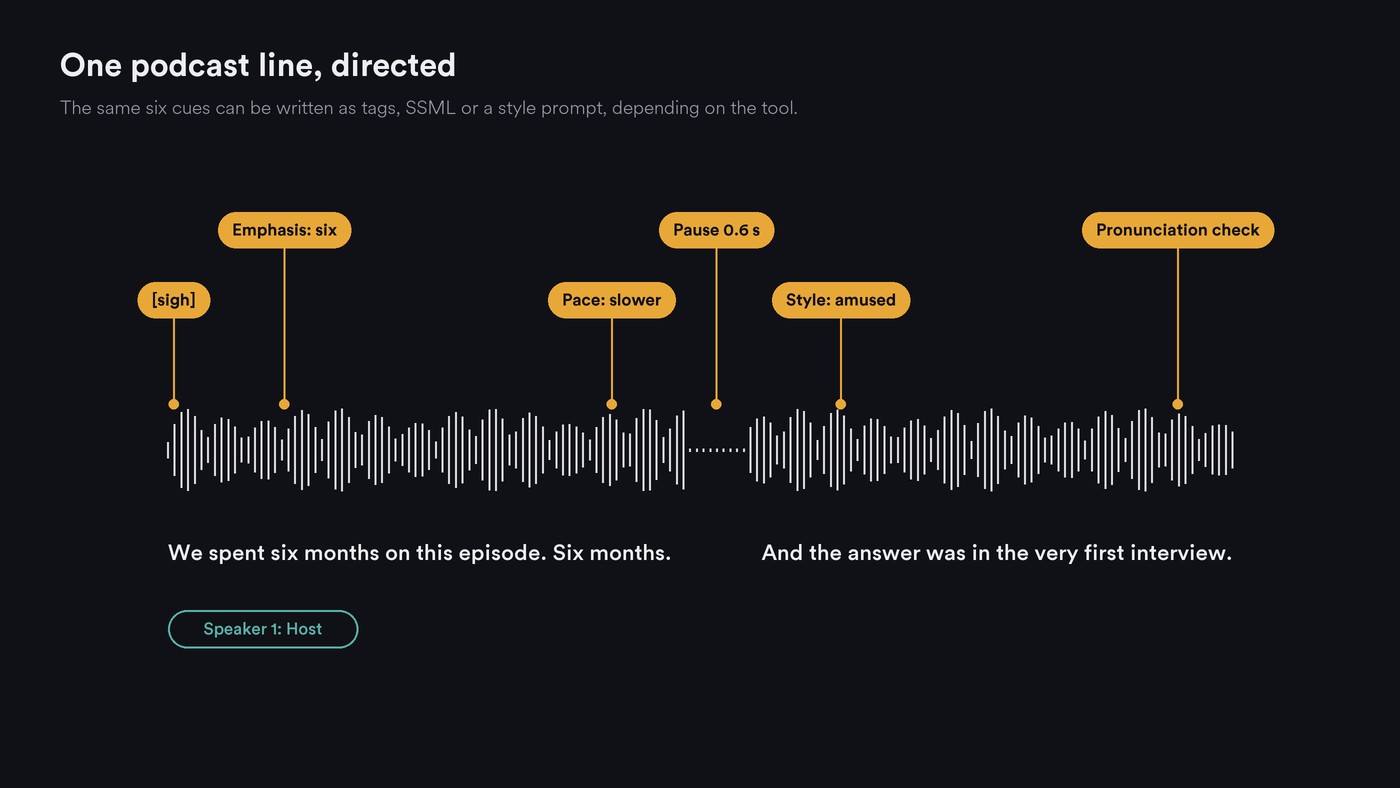
Script: We spent six months on this episode. Six months. And the answer was in the very first interview. The goal: a tired sigh, weight on "six", a beat before the reveal, amused at the end.
ElevenLabs v4, with tags, capitals and an ellipsis:
[sighs] We spent SIX months on this episode... Six months. [laughs] And the answer was in the very first interview.
Azure, inside your usual <speak> element, with an HD voice and two styles:
<voice name="en-us-Ava:DragonHDLatestNeural">
  <mstts:express-as style="reflective">We spent six months on this episode. Six months.</mstts:express-as>
  <break time="600ms"/>
  <mstts:express-as style="amused">And the answer was in the very first interview.</mstts:express-as>
</voice>
Gemini-TTS, with the mood in the prompt and only actions in the text:
Prompt: A podcast host, tired but amused, slowing down before a reveal.
Text: [sigh] We spent six months on this episode. Six months. [medium pause] And the answer was in the very first interview.
Render three takes of each and keep the best. Azure can't stress "six" with <emphasis> on that voice, so the style carries the weight.
A listening test before you publish
- Play the segment at normal speed on earbuds and on a phone speaker.
- Transcribe the render and compare it with the script. Mark skipped or added words and every mispronounced name.
- Listen for tags read aloud, such as "curious" spoken as a word.
- Check that the voice, level and accent hold from the first paragraph to the last.
- Splice the AI line next to your recorded host and listen for jumps in tone or room sound.
- Play it to someone who hasn't seen the script and ask where it sounded off.
- Tell listeners which parts are AI. OpenAI requires it for its voices, and it's good practice for any show.
Where Soundverse fits
Soundverse is an AI music platform that takes you from idea to audience, built for independent artists who release music. For simple spoken segments, its AI Speech Generator turns up to 3,000 characters per run into narration in a built-in voice, each with a sample and labels for tone and accent. Each run speaks in one voice, so for a two-host intro you generate each host's lines separately and place them on separate tracks in AI Studio. The page doesn't list SSML, emotion tags or style sliders: delivery comes from the voice you pick and how you write the line, and you can regenerate a single line when the script changes. Audio Transcription writes out speech with word timestamps for files up to 60 minutes.
Licensing is set by plan: the Free plan is for personal use, and the Creator plan comes with a royalty-free license.
This walkthrough tours every tool in Soundverse's Create section; the AI Speech Generator segment, narration or dialogue in a chosen voice, starts at 0:39.
FAQ
Can AI voices laugh and breathe on a podcast? Yes, on several: ElevenLabs v4 and v3 tags like [laughs] and [sighs], Gemini-TTS's [laughing] and [sigh], and laughter, breathing and sighing on Azure's HD voices. Amazon Polly's automatic breaths work on Standard voices only.
Is SSML still worth learning for podcast voices? For Azure and Amazon Polly, yes: it sets pauses, prosody and pronunciation there. ElevenLabs v4 and v3 don't take SSML break tags, and Gemini-TTS runs on prompts and bracketed tags, so learn the method your tool documents.
Which tool is best for a two-host AI segment? ElevenLabs' Text to Dialogue is built for it; Gemini-TTS, Azure (several voices in one SSML document) and Descript (a Speaker per selection) handle it too. Get written consent before cloning a real co-host; our guide to AI voice cloning services that allow commercial use covers each vendor's terms.
Do I have to tell listeners a voice is AI? OpenAI's usage policies require a clear disclosure for its text-to-speech voices. Other vendors set their own rules; either way, say so in the episode or show notes.
Sign up for Soundverse free and try the AI Speech Generator on your next intro. More guides on voices and audio on the Soundverse blog.

