How Does AI-Assisted Beat Matching Function?
How AI-assisted beat matching works: beat grids, downbeats, phase alignment, time-stretching, key sync and stems, and what DJs still fix by ear.
AI-assisted beat matching works by analyzing each track for its tempo, beats and downbeats, then lining the two beat grids up in phase and time-stretching one track to the other's tempo, often with a key check on top. Neural networks now do much of the listening. Classic signal processing still does most of the stretching.
Steady, programmed tracks are the easy case. Drifting live drums, swing, beatless intros and misplaced downbeats still need a person. Product details below come from each maker's own pages and manuals, and research from the linked papers, all checked on 14 November 2026.
What AI-assisted beat matching does, step by step
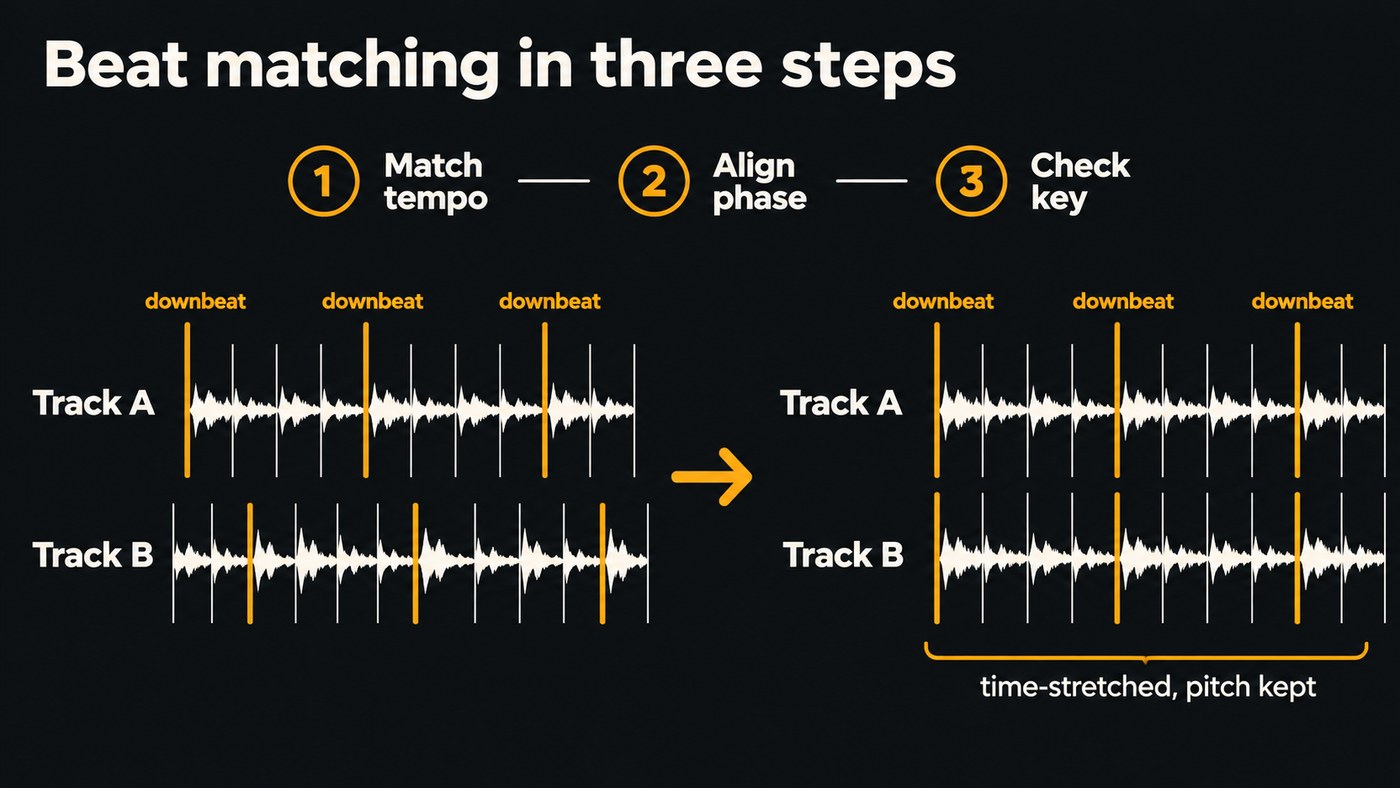
Beat matching means making two tracks play at the same tempo with their beats landing together. Software splits the job into stages:
- Analyze each track's tempo and beat positions, stored as a beat grid.
- Find the downbeats, the first beat of each bar, and the phrases they form.
- Match the tempo by speeding up or slowing down one track.
- Align the phase, so the kicks land together.
- Check the key, and shift one track if the two clash.
- Shape the transition with EQ, filters or stems.
Steps 1, 2, 5 and 6 are listening problems, where machine learning has moved in. Steps 3 and 4 are mostly arithmetic and audio processing.
BPM detection and beat grids
The classic method looks for onsets, sudden jumps in energy such as a kick or a strum, then finds the steady pulse that best explains them and lays an even grid over the track.
Machine learning changed the listening half. A neural network trained on songs with every beat marked outputs, frame by frame, how likely a beat or downbeat is. Many systems then smooth that with a statistical model that assumes a fairly steady tempo and meter.
Beat This!, by Francesco Foscarin, Jan Schlüter and Gerhard Widmer (ISMIR 2024), drops that smoothing step and trains on solo instruments, time signature changes and classical music with big tempo swings. The authors report it beats the previous state of the art on F1 score, and add: "However, it can still fail, especially for difficult and underrepresented genres, and performs worse on continuity metrics".
Grids can be static, with one tempo, or dynamic, with markers wherever the tempo moves. The rekordbox FAQ warns that Normal analysis, which gives static grids, can compromise accuracy on tracks that need Dynamic analysis. Native Instruments says Traktor Pro 4's flexible beatgrids follow each tempo change through a track.
Watch for octave errors: a 174 BPM drum and bass track read as 87, or a 70 BPM beat read as 140. For checking by hand, see our guide to finding the tempo of a song.
Downbeats and phrases: finding the one
If the grid's first beat sits on beat three, sync locks your tracks half a bar apart and the drop lands in the wrong place. The Ableton Live 12 manual says it plainly: "In some cases Auto-Warp guesses the tempo correctly but gets the downbeat wrong." The fix is to drag a Warp Marker onto the real downbeat or use Set 1.1.1 Here.
Dance music tends to move in 8, 16 or 32-bar phrases, and transitions that start on a phrase boundary sound intentional. Analyzers now map that structure. rekordbox 7's overview page describes phrase analysis and AI-based detection of where vocals sit. Algoriddim says djay Pro's Automix AI identifies rhythmic patterns, including the best intro and outro sections of songs.
Phase alignment: same tempo, beats together
Two tracks can share a BPM and still flam, because their beats are offset. That's phase.
Small tempo errors become phase errors. At 124 BPM a beat lasts about 484 milliseconds. Play a second track at 124.1 BPM and each beat arrives about 0.4 milliseconds earlier, so after roughly 50 beats, about 25 seconds, the kicks are around 20 milliseconds apart and the attack starts to blur. That's why sync works in two stages: lock the tempo, then line up the beats.
Time-stretching and its artifacts
To change one track's tempo, you either change the playback speed like a turntable, so pitch moves with it (Ableton's Re-Pitch mode: double the speed, up an octave), or time-stretch with keylock on, so the pitch stays put.
In the tools covered here, stretching is classic signal processing. Ableton describes its Warp Modes as granular techniques that repeat or omit small segments of audio, and Traktor Pro 4 lists Elastique 3 time-stretching. Every method leaves fingerprints. In their 2016 review in Applied Sciences, Jonathan Driedger and Meinard Müller explain that:
- time-domain methods such as WSOLA can cause transient doubling, where one drum hit is heard twice;
- the phase vocoder smears transients and adds phasiness, which listeners describe as reverberant, with less bite;
- stronger methods split harmonic and percussive parts and stretch each in its own way.
Ableton's modes follow that trade-off: Beats preserves transients for drums and dance music, Tones suits vocals and basslines, and Complex and Complex Pro handle full songs at a higher CPU cost.
Keep stretches small. Taking 124 BPM to 128 is about 3%. Taking 90 BPM to 128 is over 40%, and you'll hear it, so use a cut or an echo-out instead.
Key detection and key sync
Beats can line up while two bass lines clash. The classic key detector measures the energy on each of the 12 pitch classes and compares it with templates for every major and minor key. Neural networks now learn that mapping. Filip Korzeniowski and Gerhard Widmer's genre-agnostic key classifier (ISMIR 2018) outperformed the previous state of the art on unseen datasets, and they concluded a model needs the whole piece's harmonic context to judge a short segment's key.
Misses tend to be close relatives, such as a relative major and minor, so check a reading against the bass line. Our guide to detecting a song's key with AI goes deeper. rekordbox 7 lists Key Sync and Key Shift controls for trying two tracks together. Small shifts tend to pass unnoticed; bigger ones change a vocal's character.
Stem separation for transitions
A neural network splits a track into vocals, drums, bass and the rest, so you can mix parts instead of whole songs: drop the outgoing vocal before the next one starts, swap basslines on a downbeat, or keep one track's drums under the other's melody.
rekordbox 7 has STEMS, Traktor Pro 4's separation is powered by iZotope's RX technology, and djay Pro's Neural Mix isolates beats, instruments and vocals in real time. Listen for bleed on dense mixes. Read how AI stem separation works, or compare DAWs with built-in AI stem separation. To prepare stems before a set, Soundverse's Stem Separator gives 2 stems (vocals and backing) or 6 (vocals, drums, bass, guitar, piano and other).
Where machine learning comes in, and where it doesn't
Machine learning does most of the hearing: beats and downbeats, keys, vocal positions, stems and section labels. Classic signal processing does the moving: time-stretching, pitch shifting, EQ, filters and the sync engine's arithmetic. The fixes differ too. Analysis errors are fixed by editing the grid or the tag; artifacts are fixed by stretching less or picking another mode.
What DJs and producers still do by ear
- Variable-tempo tracks. Disco, funk and live rock drift. Use dynamic or flexible grids, add markers by hand, or ride the pitch.
- Live drummers. Ableton's manual points to Phase Nudge for staying aligned with sources that aren't locked to one tempo, such as live musicians, and to Tempo Follower for following external audio.
- Swing. A grid marks beats, not the swung 16ths between them. Quantize a swung loop to a straight grid and the groove dies, so use a partial setting such as Ableton's Quantize Amount.
- Grid fixes. Beatless intros, tempo ramps and breakdowns confuse analyzers.
- Taste. Whether two keys really clash, whether the energy fits, and when not to sync.
A quick grid check before a set:
- Make sure a grid line sits on the first kick, and set the downbeat there if not.
- Check the grid at the middle and the last chorus.
- Compare the BPM with the genre to catch half or double readings.
- Lock the grid once it's right.
Where Soundverse fits
Soundverse is an AI music platform that takes you from idea to audience, built for independent artists who release music. DJ One is its two-deck booth in the browser: press SYNC to match tempo, press it again for phase, and in Pro mode watch the beat zipper turn green when the beats line up. It has keylock, a key menu that shifts a track up to 3 semitones with the tempo unchanged, and Automix, which picks a blend, drop-swap, echo-cut or filter-fade from each pair's key, tempo and energy. Mixing uses no tokens; Analyse sections does. There's no separate headphone cue.
Before a set, Tempo & Key Detector reads a track's BPM and key, such as 96 BPM in A minor, and saves both to your Library. It gives one reading per file, so confirm songs that change tempo by ear. Section Analysis maps intros, verses, choruses and outros with timings, plus tempo, beats and downbeats.
Soundverse's Analyze walkthrough shows Tempo & Key Detector from 0:11 and Section Analysis from 1:49.
FAQ
Do I still need to learn to beatmatch by ear? If you play out, yes. Sync handles steady tracks well, but when a grid is wrong or a drummer drifts, your ears are the backup.
Why does my DJ software show half or double the BPM? Tempo detection can lock onto half or double the real pulse. Halve or double the reading in your grid editor, then check the grid still sits on the kicks.
Can AI beat matching handle live drums and tempo changes? Increasingly. rekordbox's Dynamic analysis and Traktor Pro 4's flexible beatgrids follow tempo changes, and research models such as Beat This! train on music with big tempo swings. Check those tracks by hand anyway, especially intros and breakdowns.
Does time-stretching hurt sound quality? A little, and more the further you stretch. Big changes can smear or double drum hits and wash out vocals, so keep stretches small or change the transition.
Sign up for Soundverse free and open DJ One in your browser. More guides for DJs and producers on the Soundverse blog.
