Can AI Tools Accurately Detect Tempo in Unedited Recordings?
AI tempo detection on raw takes: Accuracy1 and Accuracy2 results, why drift, rubato and count-ins fool trackers, and how to check and fix a BPM.
AI tempo detection is accurate on unedited recordings when the performance keeps a steady pulse with clear attacks, and unreliable when it doesn't. Published tests show modern trackers get a steady track's tempo right most of the time, though often at half or double speed, while rubato, drift, quiet intros and odd meters still cause real misses.
So treat any reading as a first guess to verify. Papers, docs and manuals cited were read on 19 November 2026. For the mechanics of onsets, autocorrelation and key profiles, see how AI identifies the key and tempo of audio files.
How AI tempo detection works, briefly
Every detector does two jobs: find where sounds start, then find the steady pulse that best explains those starts. The tools differ in how much they assume about that pulse.
- Signal processing. librosa's tempo estimator (version 1.0.1 docs) autocorrelates an onset-strength curve over 8-second windows and starts from a 120 BPM guess with a pseudo-log-normal prior, a built-in preference for common tempos.
- Neural beat trackers. madmom runs an ensemble of recurrent networks (RNNBeatProcessor) or temporal convolutional networks (TCNBeatProcessor, from Matthew Davies and Sebastian Böck's 2019 work) that output a beat probability for every frame. A dynamic Bayesian network then decodes the beats, by default between 55 and 215 BPM, with a transition_lambda setting that decides how strongly it prefers a constant tempo.
- Transformer trackers. Beat This! (Francesco Foscarin, Jan Schlüter and Gerhard Widmer, ISMIR 2024) drops the Bayesian step and still reports state-of-the-art beat F1 scores in its authors' tests.
That steadiness assumption matters most for raw takes. It smooths over a flam or a missed hit, and it also smooths over a band that genuinely speeds up.
How accurate is AI tempo detection? What published tests show
Tempo estimators are scored with two numbers that date back to the ISMIR 2004 tempo contest:
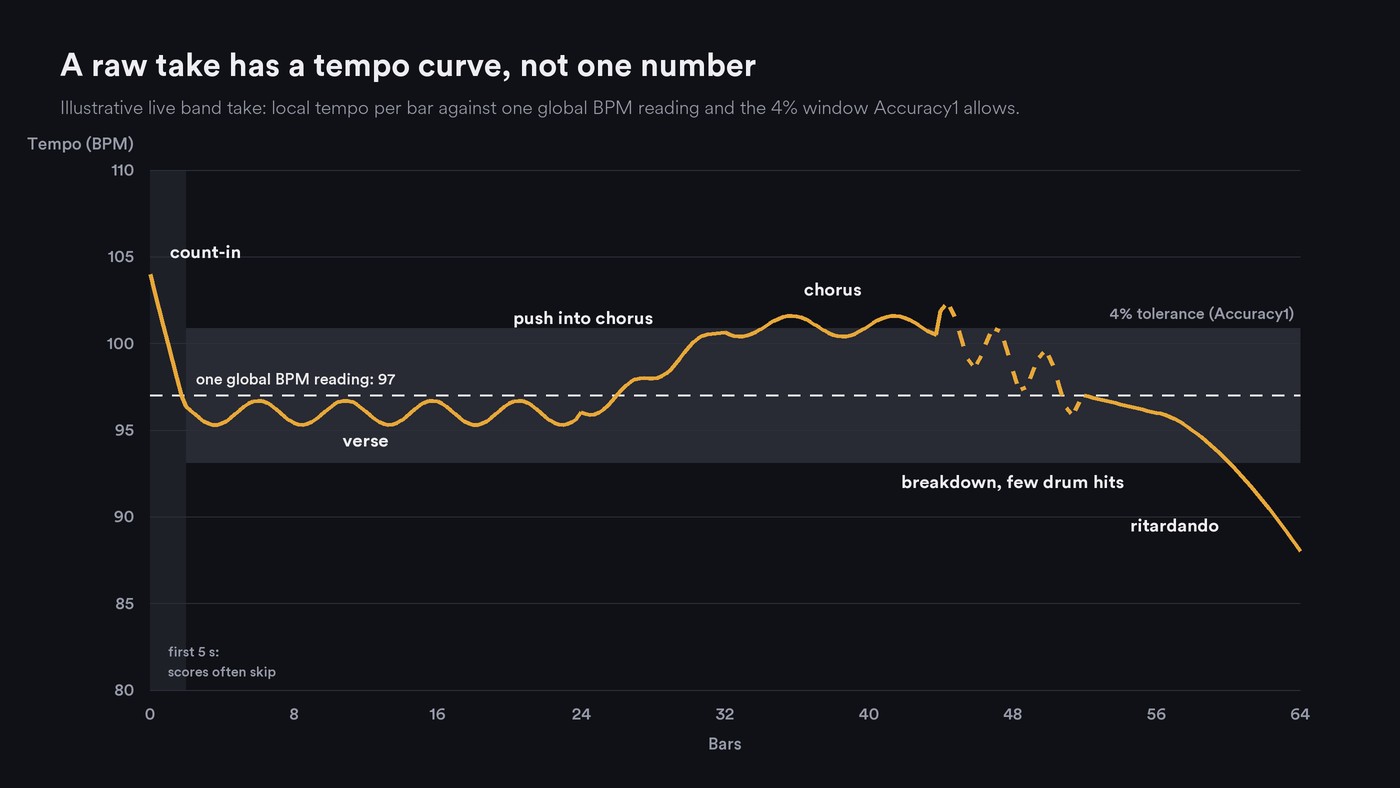
- Accuracy1 counts an estimate as correct if it lands within 4% of the annotated tempo.
- Accuracy2 also accepts octave errors: readings off by a factor of 2, 3, 1/2 or 1/3.
Hendrik Schreiber, Julián Urbano and Meinard Müller's review, Music Tempo Estimation: Are We Done Yet? (TISMIR, August 2020), points out that the 4% tolerance was never derived from a real application. They suggest it is lenient for music made to a click track and strict for Romantic piano pieces.
Sebastian Böck, Matthew Davies and Peter Knees tested their multi-task tempo and beat model (ISMIR 2019) on collections it never saw in training:
- GTZAN, 999 clips across many styles: Accuracy1 0.697, Accuracy2 0.939.
- GiantSteps, dance-music previews from Beatport: 0.697 and 0.958.
- ACM Mirum: 0.757 and 0.977.
Read plainly, about seven in ten clips got the annotated tempo, and most of the rest were right only at half, double or another multiple. The authors write that "it may not be realistic to expect to obtain near perfect performance" on Accuracy1 for music of any makeup, because listeners tap different valid pulses.
Beat tracking, where every beat position is scored, shows the style gap more sharply. Beat This! reports beat F1 scores, which count a beat as a hit within the mir_eval toolkit's default 70-millisecond window, of 97.5 on Ballroom and 96.1 on RWC Pop, against 83.3 on RWC Jazz, 77.1 on RWC Classical and 62.7 on SMC, a set of deliberately hard excerpts.
Two caveats for producers:
- Benchmarks skip the opening. The mir_eval documentation says beats before 5 seconds are typically ignored, a convention the Beat This! authors follow without endorsing it. Published scores say little about count-ins and intros.
- "Correct" isn't grid-ready. At 120 BPM, a reading 3.9% off still passes Accuracy1, yet after 32 bars of 4/4 a click at that tempo sits about 5 beats away from the band. Even a 1% error leaves it about 1.3 beats out.
Why unedited recordings are harder
The clearest evidence on what breaks trackers comes from the SMC dataset. Andre Holzapfel and colleagues built it in 2012 from excerpts that several beat trackers disagreed on, then annotated 217 of them and tagged what made each hard. The most common tag was expressive timing; other tempo tags were slow tempo, gradual tempo change and tempo discontinuity, a sudden change. Their conclusion: "This indicates that any kind of tempo changes cause trouble for beat tracking approaches, and adds the characteristic of having a slow tempo to the list of problematic tempo-related features."
Map that onto a raw take:
- Tempo drift and rubato. A band that pushes into the chorus, or a singer who slows into each line, has no single true BPM. Schreiber and colleagues measured the spread: in SMC, only half the local tempi fall within 4% of a track's average, against 91% or more for GTZAN and Ballroom. When they kept only SMC's steadiest tracks, Accuracy2 rose by 10.0 to 18.4 percentage points across three published estimators.
- Count-ins, silence and talk. A spoken "one, two", a stick count at a different speed, tuning noise or a long silent tail give the tracker onsets that don't belong to the song, in the stretch benchmarks skip.
- Room sound and noise. Reverb, bleed and hiss blur the attacks onset detection relies on. Holzapfel's team listed a lack of transient sounds and quiet accompaniment among the properties that make trackers fail.
- Sparse or percussion-free parts. A solo voice, a held pad or a fingerpicked intro offers few clear onsets, so the tracker guesses or locks onto the wrong level.
- Swing. The quarter-note pulse stays even, but swung eighths add onsets off a straight grid, which can pull a detector toward the off-beats or a triplet-based reading.
- Odd and changing meters. The same study found ternary meter also made trackers fail, and the Beat This! authors note that a single 2/4 bar inside a 4/4 song disrupts the periodicity that downbeat models assume.
How to check a detected tempo
- Tap along for 8 to 16 bars. Ableton Live 12's Tap Tempo button, or any tap tool, gives you a human reading. If you land at half or double the detector's number, choose the pulse that matches the feel. Our guide to finding the tempo of a song covers counting by hand.
- Lay a click or grid from the first downbeat, then listen at the start, the middle and the last section. A steady drift means the BPM is off by a fraction; a click that wanders ahead and behind means the band moved.
- Look at a local tempo curve. librosa returns a tempo per frame when you set aggregate to None, and its own docs show why one number can mislead: on the same 30-second Nutcracker excerpt it reports 143.555 BPM with the default prior, 161.499 BPM with a uniform prior, and a frame-by-frame curve that starts near 89 BPM and ends near 123.
- Check the downbeat as well as the tempo. A grid at the right BPM that starts on beat three puts every bar line in the wrong place.
What to do when the tempo is wrong
- Trim the edges. Cut the count-in, silence and talkback, and analyze from the first real downbeat.
- Analyze the steadiest part. Separate the drums, or pick the track with the clearest attacks, detect on that and apply the grid to the full mix.
- Set a range or a starting guess. In librosa, pass a prior or change start_bpm; in madmom, narrow min_bpm and max_bpm around the tempo you hear. Ableton's Live 12 manual describes tapping the tempo first, then using Warp From Here (Start At …) so Auto-Warp starts from your tapped tempo, and says Warp From Here (Straight) works best for samples with no tempo variations.
- Add hints and markers. Apple's Logic Pro 13 guide says a few downbeat hints at the beginning are often enough for an accurate tempo analysis, and that time signature changes can only be detected with time signature hints. In Ableton, Set 1.1.1 Here pins the first downbeat and Warp Markers pin individual hits.
- Split at tempo changes. Analyze each section on its own instead of averaging them.
- Let the grid follow the band. Logic's Smart Tempo can apply a free-tempo recording's tempo to the project, so the grid bends to the take rather than the take to the grid.
Where Soundverse fits
Soundverse is an AI music platform that takes you from idea to audience, built for independent artists who release music. Tempo & Key Detector reads one BPM and one key for a whole file, from a full mix, a stem or a sample, and measures how confident each reading is. Its page notes that a song that changes tempo gets a single overall reading and that some audio gives a less certain result, so confirm by ear. Section Analysis adds beats and downbeats to its section map, which its page calls a starting map rather than a final edit list. Both run on the Free plan.
For the steadiest-part fix, Stem Separator splits a song into 6 stems, drums included, so you can run the detector on the drums alone. In AI Studio, imported audio is analyzed for tempo and key, Follow tempo fits a clip to the project tempo and keeps its key, and Stretch changes a clip's length from 0.25× to 4×. Agent One can't change the project tempo, so set it yourself.
Soundverse's Analyze walkthrough shows Tempo & Key Detector from 0:11 and Section Analysis from 1:49.
FAQ
Is AI tempo detection accurate enough for a live band recording? For a tight band that held tempo, usually yes, once you rule out a half or double reading. For a take that breathes, a single BPM can only be an average, so use a local tempo curve or a tool that writes a variable tempo map.
What's the difference between Accuracy1 and Accuracy2? Accuracy1 counts a tempo as correct within 4% of the annotation. Accuracy2 also accepts half, double, a third or triple. A big gap between the two means a system finds the pulse but often at the wrong level.
Should I record to a click if I plan to use AI tools? If the song suits it, a click makes every later step easier: grids, loops, stems and video edits line up without fixes. If the feel depends on push and pull, record free and map the tempo afterwards with beat markers or warp markers.
Sign up for Soundverse free and check your next take's tempo. More guides for producers on the Soundverse blog.
