Which AI Voice Synthesis Software Offers the Best Control Over Vocal Expression?
Vocal expression control compared: dynamics, emotion modes, consonants, breath and retakes in Synthesizer V, ACE Studio, VOCALOID7 and AI generators.
For vocal expression control, Synthesizer V Studio 2 Pro gives you the most to work with: loudness curves, per-voice Vocal Modes such as Emotional or Whispery, phoneme strength and AI Retakes. ACE Studio is close behind, with a Dynamic envelope and Rap and Opera styles. VOCALOID7 suits Cubase users, and prompt-based generators trade precision for speed.
Expression here means how a line is delivered, not which notes it hits or whose voice sings it. If you're choosing for that instead, see our guide to a voice synthesis tool for pitch and timbre adjustment. Below, each tool is judged by the controls its own documentation lists, read on 19 November 2026. Dreamtonics blocks automated readers, so the Synthesizer V details come from its user manual as captured on 13 and 15 November 2026, and its Notes Panel page as captured on 1 April 2026.
What vocal expression control actually covers
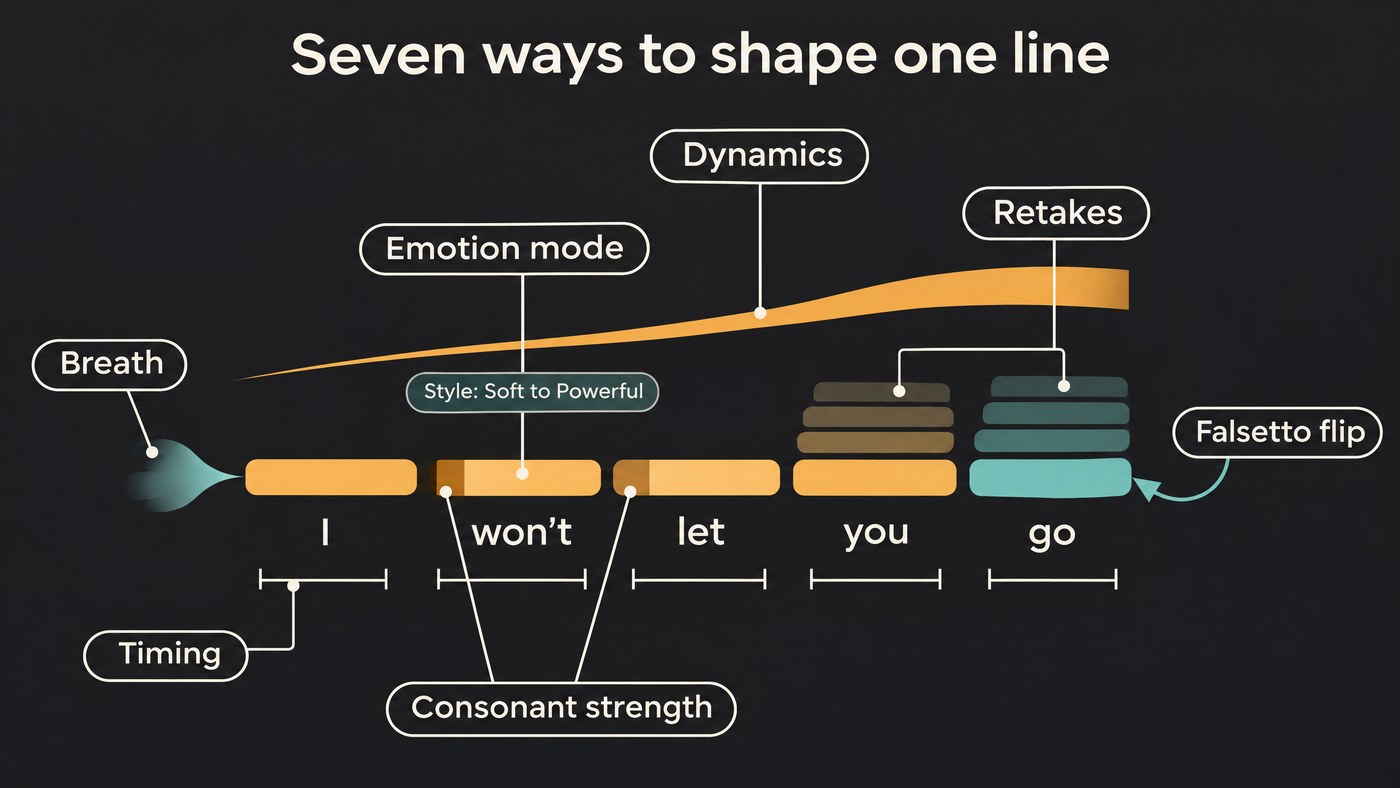
Check any tool against these seven before you buy:
- Dynamics. An intensity curve you can draw, ideally one that changes tone as well as level.
- Emotion and style presets. Named deliveries such as soft or powerful, switchable mid-song.
- Phrasing and timing. Where each syllable lands and how long it lasts.
- Articulation. Consonant length and strength: a word bitten off or sighed.
- Breath, rasp and growl. Air in the tone, hoarseness and the breaths between phrases.
- Register flips. Moving into falsetto or head voice without changing the note.
- Expressive retakes. New performances of one phrase to comp from.
The best AI voice synthesis software for vocal expression control
Synthesizer V Studio 2 Pro (Dreamtonics)
Emotion presets. Vocal Modes differ from voice to voice. The Vocal Modes manual page lists six for Mai 2 (Breathy, Downer, Emotional, Powerful, Rap and Sweet) and six for Liam (Bright, Heavy, Rounded, Whispery, Soft and Hoarse). You can mix several and automate them, so a verse sits in Soft and leans into Powerful for the last chorus. For voice texture, the manual recommends Vocal Modes over the base parameters because they tend to sound more natural.
Dynamics. Loudness is its own parameter for fine level changes. In the Parameter Panel, which you can open up to three times, you draw control points and choose Linear, Cosine or Spline interpolation per parameter, so a crescendo can be a straight ramp or a smooth swell.
Articulation and timing. The Phoneme Timing panel, described on the pronunciation page, lets you drag a phoneme's edges to change its length and drag a line up or down to change its strength. For some consonants, a triangle sets the plosive's timing and strength. The Voice Panel's Consonant Adjustment changes plosives and fricatives across a whole note group. The same page advises joining adjacent notes, not leaving gaps between words, so consonants get time to sound.
Breath, whisper and falsetto. Per the Base Parameters page, Breathiness balances voiced and aspirated sound, and lowering Voicing makes the voice more whisper-like. For a falsetto flip, raise Tone Shift slightly on notes just below the falsetto range and they'll sound like falsetto.
Retakes. AI Retakes, in the Notes Panel, regenerate a selection all at once or only its pitch, its phoneme timing, or its timbre and pronunciation. The Expression Pad also pushes the generated pitch delivery toward one of four characters: Vibrant, Refined, Raw or Rigid.
Best for: producers who want to direct an emotional performance note by note and render on their own machine.
ACE Studio
ACE's Vocal Parameters docs group expression into three tabs for its V2 models.
Dynamics. One Dynamic envelope runs from soft and gentle to powerful and full. Left alone, it stays on Auto and infers dynamics from the melody, lyrics and voice; wherever you draw, it switches to Manual, and a Line tool gives clean crescendos.
Styles. Some singers add a special control as an extra tab. Rap sharpens articulation for rhythmic, aggressive delivery, Opera adds bel canto resonance and vibrato, and Chinese Opera adds that tradition's ornaments. ACE's release notes for version 2.0 list more than 140 voices in 8 languages, with new genres including Country, Rap, Afro and Theatre.
Articulation and breath. The Breath & Phoneme tab places breaths at phrase starts with Add all, or wherever you click, and lets you drag the boundary between phonemes. ACE spells out the effect: a longer consonant gives a stronger, more deliberate attack, and a shorter one smooths the move between notes. Edited phonemes turn blue and stay locked when you change notes or lyrics.
Rasp and power. Under Advanced, Air makes the voice raspier and brighter, and ACE suggests a slight lift on powerful passages. Energy controls power, and the docs stress it isn't simply volume.
Best for: producers who want fast emotional shaping with one curve, plus genre styles on tap.
VOCALOID7 (Yamaha)
Yamaha now sells VOCALOID7; sales of VOCALOID6 stopped at its launch. The VOCALOID7 page puts expression at the voicebank level:
- VOICE TYPE switches delivery inside one voicebank: Normal, Power and Soft on the bundled asa, Normal, Power and Whisper on LUCI, and Native, Ballade and Vivid on AI Megpoid.
- ATTACK, a new parameter, sets how defined the pronunciation sounds. The artist INE, in Yamaha's launch messages, describes it this way: "Simply lowering the line gives the vocals a laid-back, almost languid feel."
- Style presets, more than 100 of them, recall singing styles with their parameter and effect settings in one click.
- Cubase control. EXPRESSION and ATTACK can be adjusted with dedicated controls inside Cubase.
Best for: Cubase users and anyone who already owns VOCALOID voicebanks.
Prompt-and-reference singing generators
Song and a cappella generators have no expression lanes: emotion comes from your words, a reference or a melody you perform. ElevenLabs' music prompting guide lists delivery words that steer its model, such as raw, breathy, aggressive, whispered, belted and deadpan, and explains why vague prompts sound flat: "Any question you leave open, the model answers with the most statistically likely choice — which is to say, the most average one."
Soundverse's AI Song Generator works the same way. In Custom mode you write a Style of Music and add up to five Quick Style pills, on Soundverse v9 for Pro and Max plans.
Best for: fast demos where the feel matters more than any one syllable.
Find me an AI voice generator that handles vocal emotion well
Start with where the emotion will come from:
- You want to draw it. Synthesizer V Studio 2 Pro, with a voice whose Vocal Modes include the moods you need, or ACE Studio's Dynamic curve plus a style tab. Check each voice's modes first.
- You can sing it. Perform the line and change the voice afterwards. Voice conversion keeps your phrasing and timing, which is still the most reliable way to get one exact emotional read.
- You can describe it. Use a prompt generator and describe delivery section by section, for example "close, half-whispered verse; belted, cracking last chorus", instead of one mood for the whole song.
- You can hum it. Melody-led generators build the song around the tune you record.
For why emotion is the hardest part to synthesize, see the common challenges of expressive AI vocals; for breath, see whether AI can replicate breathiness and subtle vocal artifacts.
How to test vocal expression control before you buy
Run the same 16 bars through every trial: Synthesizer V's lasts 14 days and VOCALOID7's 31.
- Write four deliveries into one test: a soft, close verse line, a belted chorus line, a whispered tag and a jump into falsetto.
- Draw a crescendo with dynamics only across one long note. Listen for whether the tone thickens or only the level rises.
- Switch style on one line only, using a Vocal Mode, an ACE style tab or a VOCALOID7 VOICE TYPE, and listen to the join.
- Lengthen the first consonant of a stressed word such as "cut" or "break", and check that it bites rather than smears.
- Make three retakes of one phrase and comp the best syllables, as you would with a session singer.
- Bounce it under the full mix. A delivery that sounds dramatic solo often flattens out behind drums.
Where Soundverse fits
Soundverse is an AI music platform that takes you from idea to audience, built for independent artists who release music. Here, expression comes from a performance or your words, not parameter lanes. Voice Swap changes the voice, not the performance, so the phrasing and timing of the take you sing carry through, and it runs on every plan, Free included. Melody to Song Generator builds a full song that follows 5 to 60 seconds of a tune you hum, sing or play. And with Train Voice Clone, on Creator and up, you can train one clone from a breathy take and another from a belted one, then pick the one each song needs.
Soundverse has no note-level dynamics or phoneme editor. When a line needs that, write it in Synthesizer V or ACE Studio.
This video trains a voice model on clean vocals, then uses it in Voice Swap to re-sing a track while keeping the original performance.
FAQ
Which AI vocal synth has emotion presets? Synthesizer V Studio 2 Pro has Vocal Modes per voice, such as Emotional, Downer and Sweet on Mai 2. ACE Studio adds Rap, Opera or Chinese Opera tabs on singers that support them, and VOCALOID7 has VOICE TYPE options plus more than 100 style presets.
Is a dynamics curve the same as volume? Not always. ACE's Dynamic envelope shapes intensity, and its docs say Energy isn't simply volume. Synthesizer V's Loudness is a level control, so for a belt, pair it with a mode such as Powerful.
Can AI vocals growl or rasp? Rasp, yes: ACE's Air makes a voice raspier, and Liam in Synthesizer V has a Hoarse mode. None of the manuals we read lists a dedicated growl control, so for a real growl, perform it and convert the voice, or record it.
Do I need to sing to get emotional AI vocals? No. You can draw emotion in a vocal synth or describe it in a prompt. Singing the line roughly yourself and converting the voice is still the fastest route to one specific delivery.
Sign up for Soundverse free and hear your own take in a new voice with Voice Swap. More vocal guides on the Soundverse blog.
