AI Video Tools That Support Automated Music Video Creation, Graded by How Much They Automate
Automated music video creation: which AI video tools analyze your song, plan scenes, make shots, cut to the beat and lip-sync, and what stays manual.
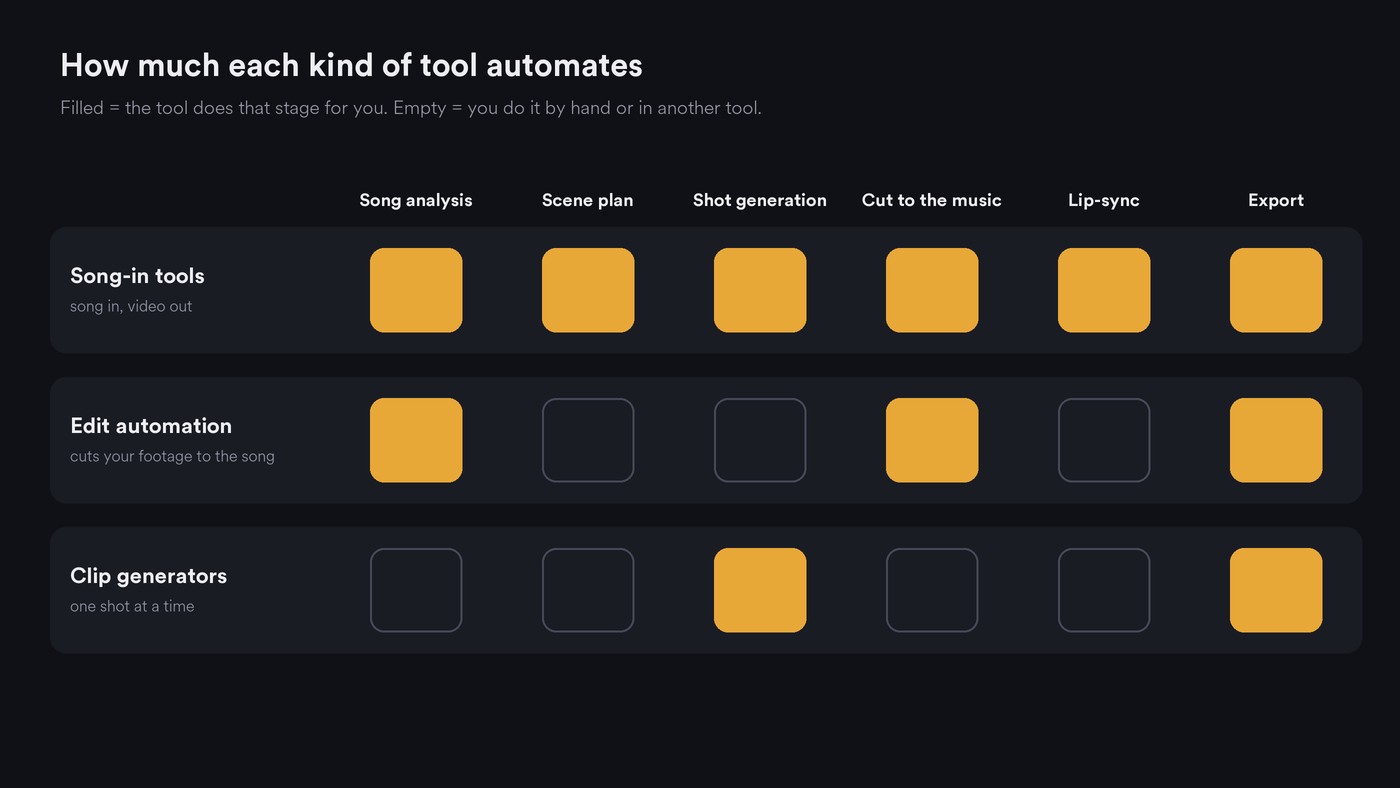
AI video tools that support automated music video creation fall into three levels. Song-in tools (Soundverse AI Music Video Generator, Neural Frames Autopilot, Freebeat, Kaiber and Revid) analyze your track, plan scenes, generate shots and cut them to the music. Rotor Videos and LTX Studio automate parts of the job. Runway and Pika generate shots you cut yourself.
We graded each tool on six stages, using only what each vendor's own pages said when we checked them on 19 November 2026. For prices and who each tool suits, see our roundup of the best AI music video generators. This page answers a narrower question: how much of the work does the software do without you?
What automated music video creation covers: six stages
A tool can automate any of these, and few automate all six:
- Song analysis. Reading tempo, beats, sections and lyrics from your audio.
- Scene planning. Turning the song into a storyboard or script.
- Shot generation. Making the footage, or choosing it from a library.
- Cutting to the music. Cuts on beats, scene changes at section changes.
- Lip-sync. An on-screen singer mouthing your vocal.
- Export. Length limits, aspect ratios, resolution, and whether you can keep editing.
Level 3 tools take a song and handle stages 1 to 4, usually with lip-sync on offer. Level 2 tools automate the edit or the planning but leave the footage or the shot decisions to you. Level 1 tools make strong shots and leave analysis and cutting to you. Our explainer on how AI video engines read rhythm and tempo covers what happens inside stages 1 and 4.
Level 3: song in, finished video out
Soundverse AI Music Video Generator
AI Music Video Generator takes a finished MP3, WAV, M4A or FLAC of up to 50 MB, or a prompt for a new song.
- Automates: Agent One writes a script around the track, films every scene and cuts the video to the music. With Auto-generate direction on, it chooses the characters, setting and camera. Prompt to Music Video makes the song first, then the video.
- Optional: Lip Sync for a lead who sings to camera, and up to nine image references for cast and setting.
- Export: 16:9 or 9:16, up to 1080p, with no 4K. The video opens in AI Studio for further editing.
- By hand: you approve the script and its quoted cost before filming starts, and you need the rights to the song and any images. It needs the Creator plan or above.
Neural Frames Autopilot
Autopilot analyzes your song's lyrics, key and tempo, then generates a visual storyboard of scenes.
- Automates: the storyboard, the scene prompts and a batch render that Neural Frames says takes 10 to 15 minutes. Its audio-reactive system splits a track into 8 stems so effects can follow the drums or the vocal.
- Optional: a Lipsync Pro template and a lyric video mode.
- Export: up to 4K with upscaling; the Autopilot page lists 16:9 among several aspect ratios.
- By hand: you pick the video model, then use the editor to trim clips, add transitions or re-render single scenes. Neural Frames recommends at least its Neural Ninja plan for Autopilot.
Freebeat
Freebeat describes itself as an AI director that plans, shoots and edits a music video automatically.
- Automates: it analyzes BPM, beats and song sections first, then writes storylines and shot plans and syncs visuals to beats, drops and sections. Lyric videos get automatic karaoke-style timing.
- Optional: lip-sync singing, dance videos and consistent characters.
- Export: from about 15 seconds to roughly 6 minutes, at 720p or 1080p, in 16:9, 9:16 or 1:1.
- By hand: refine prompts and regenerate weak shots. Its FAQ points to a Privacy Policy that explains how your content may be used to improve its models and how to opt out, so check that before uploading an unreleased song.
Kaiber Music Video Sequence and Montage
Kaiber's Music Video Sequence analyzes the structure and content of your track and maps settings and actions to it. Montage keeps one subject, setting and style for the whole song.
- Automates: the prompt is optional, and if you leave the aesthetic blank the audio analysis picks a style to suit the genre. Camera movement is automated as well. Lyric Video transcribes your song and builds the words into the scene.
- Also: Beat Sync cuts your own clips to a track, and Auto-Clip first splits long footage into shots.
- Export: 30 seconds or 1 to 4 minutes; 16:9, 9:16, 1:1, 3:4 or 4:3; 540p, 720p or 1080p.
- By hand: lip sync is a separate tool in Kaiber Canvas, and Kaiber asks you to leave camera directions out of the prompt. It suggests a 30-second, low-resolution test before a full render.
Revid
Revid's AI Music Video Generator turns an MP3, WAV or music link into visuals, motion and lyric captions.
- Automates: choose Beats timing for instrumentals or Lyrics timing for vocals, pick stock footage, AI clips or moving AI images, and Revid builds the cut.
- Optional: singer lip-sync, as a separate setting.
- Export: vertical for social clips or widescreen for YouTube.
- By hand: review the captions in the editor and swap scenes that miss a lyric. Revid's own page warns: "A dense mix or an unusual pronunciation can need corrections."
Level 2: automated editing or a song-aware workspace
Rotor Videos
Rotor Videos automates the edit, not the footage. Upload your audio and it recommends clips from its stock library matched to tempo, genre and mood, then sequences them into a finished edit. Its FAQ is plain about it: "AI is the editor; it doesn't create the footage."
- Also: Transcribe & Sync for lyric videos, Spotify Canvas loops, Apple Music Album Motion in 1:1 and 3:4, and Reframe for vertical and square cuts.
- By hand: choosing styles and clips. There are no generated people and no lip-sync.
LTX Studio
LTX Studio's music video workflow starts from your track, uploaded as MP3 or OGG. You set the style and lighting, cast characters, then adjust motion and camera for each shot.
- Automates: scene generation, with a storyboard generator and script-to-video elsewhere in the platform.
- Export: MP4, or XML to keep editing in other software.
- By hand: shot-by-shot fine-tuning. Lip-sync isn't mentioned on its music video page.
Level 1: shot generators with automation inside the clip
Runway
Runway's Gen-4.5 model makes the shots, and Runway Workflows chain generations into node pipelines that run with a single click. Input nodes take images, video and text; song analysis and cutting to the music aren't part of those pages. You edit the shots to your song yourself.
Pika
Pika's Video Studio generates anything from a short clip to a 30-second multi-shot video with sound, guided by image, video or audio references, with controls that depend on the model. That covers a hook or a teaser; a full song means many generations and your own edit.
Platforms that generate music videos automatically using AI
If you just want the list:
- Full song to finished video: Soundverse AI Music Video Generator, Neural Frames Autopilot, Freebeat, Kaiber (Music Video Sequence, Montage and Lyric Video) and Revid.
- Automated edit from stock or your own footage: Rotor Videos and Kaiber Beat Sync.
- Song-aware workspace with shot control: LTX Studio.
- Shots for you to cut: Runway, Pika, and Soundverse Multi-Scene Video Builder for planned sequences.
What you still do by hand
Even the most automated tool leaves you five jobs:
- Rights. Upload only songs, photos and faces you own or have permission to use.
- Direction. Automation picks a look; one line on subject, setting and palette makes it yours.
- Review. Watch with the track and check hands, faces, text in frame, caption spelling and lip-sync on fast lines.
- Versions. Generate the shape you need instead of cropping later. Our guide to AI video file formats covers delivery settings.
- Disclosure. YouTube's help center asks you to mark realistic AI content and AI-generated music under "AI use" when you upload.
How to test a tool's automation in 30 minutes
- Pick a 30- to 60-second excerpt with a clear section change, such as verse into chorus.
- Run it with direction on auto and change nothing.
- Check whether cuts land on beats, whether the scene changes at the chorus, and whether the captions are right.
- Fix one shot. Note whether you can regenerate it alone or must re-render the video.
- Export 9:16 and 16:9 and compare the framing.
- Count your manual steps. That number is the tool's real automation level.
Where Soundverse fits
Soundverse, an AI music platform that takes you from idea to audience, covers more than one level. AI Music Video Generator is the song-in route, with the script and its cost put to you for approval before filming. To plan first, Music Video Storyteller reads your song's sections and lyrics and writes what happens in each one; it films nothing and works on the Free plan.
For a sequence you design shot by shot, Multi-Scene Video Builder films up to 10 scenes of 4 to 15 seconds from your descriptions and first and last frames. You get one stitched video, or separate clips to place on a video lane in AI Studio and cut to the song.
Licensing is set by plan: the Free plan is for personal use, and the Creator plan comes with a royalty-free license.
This walkthrough shows a song, a character image and a prompt becoming a full music video, with planned scenes, a lip-synced performance and cuts to the music.
FAQ
Can AI make a whole music video from my song automatically? Yes. Soundverse AI Music Video Generator, Neural Frames Autopilot, Freebeat, Kaiber's music video workflows and Revid all take an uploaded track and return a full video cut to it. Length caps differ: Kaiber's Music Video Sequence stops at 4 minutes, while Freebeat lists roughly 6.
Which automated music video tools include lip-sync? Soundverse offers Lip Sync inside AI Music Video Generator, Freebeat lists lip-sync singing, and Neural Frames has a Lipsync Pro template. Revid offers it as a separate setting, and Kaiber as a separate tool in Kaiber Canvas.
Can I edit a music video after the AI makes it? In most tools, yes. Neural Frames re-renders single scenes, Revid and Kaiber Beat Sync have editors, Soundverse opens the video in AI Studio, and LTX Studio exports XML for your own editing software.
Sign up for Soundverse free and turn your next single into a music video. More guides on the Soundverse blog.
