How to Create Lyric-Based AI Music Videos
Learn step-by-step how to create lyric-based AI music videos using Soundverse AI Song Generator in 2026.
How to Create Lyric-Based AI Music Videos
In 2026, lyric-driven videos have become one of the most effective ways for artists and content creators to engage audiences across YouTube, TikTok, and Instagram. With AI technology now capable of handling everything from songwriting to video production, the line between musician and digital creator has blurred. Creating lyric-based AI music videos is no longer a complex task reserved for professional studios—it can be done with intuitive AI tools like Soundverse.
Why are lyric-based AI music videos trending in 2026?
Lyrics provide emotional depth and audience connection, making them perfect for short-form content and full-length releases. As social platforms continue to prioritize visual storytelling, musicians are turning to AI video generators to translate their songs into compelling visuals automatically. Lyric music video AI systems synchronize text animations and effects that match each rhythm or voice phrase, creating content that performs exceptionally in engagement metrics.
How AI music video creation empowers independent artists
Independent music production has evolved dramatically since 2024. By 2026, artists can handle writing, production, and video editing all within AI ecosystems. AI music video creation lets artists skip technical barriers—automatic scene generation, lyric synchronization, and creative editing options help them focus on the emotional narrative. This trend also supports multilingual productions, so artists can reach fans globally.
AI video generator platforms now specialize in music video automation. They combine audio analysis with visual rendering, ensuring that each lyric appears with dynamic motion that represents tone and mood. For creators who want to build brand visuals consistent with their sound, these tools save time and enable professional-level output at little cost.
How to make lyric-based AI music videos with Soundverse AI Song Generator

Soundverse provides an end-to-end ecosystem for musicians interested in lyric-based video creation. Its AI Song Generator turns written lyrics or descriptive prompts into completed songs with instrumentals and AI vocals. This step is essential before generating the visual layer because the generated song forms the foundation for the video.
Step 1: Feature Overview

Access the Soundverse AI Song Generator from the main menu. This tool offers two main working modes—Describe Your Song and Custom mode. In Describe Your Song mode, users type short prompts describing the mood, theme, and genre. In Custom mode, users paste full lyrics and adjust genre and instrumental preferences manually.
Step 2: Lyrics Input
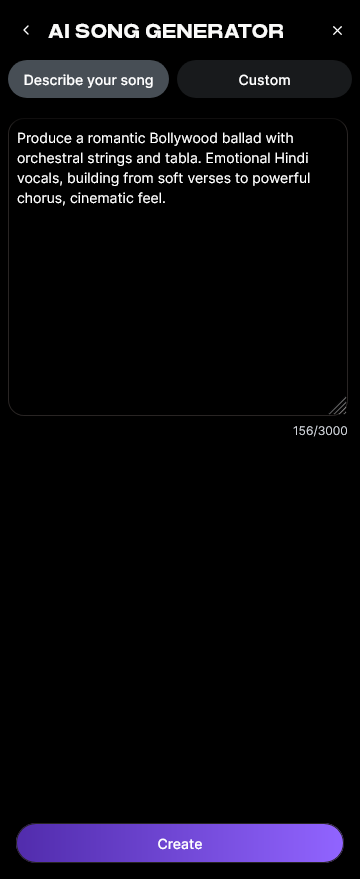
Paste or type your lyrics inside the AI Song Generator interface. You can also use integrated assistance from the AI Lyrics Writer to refine structure, rhyme schemes, or generate additional sections instantly. This feature ensures the lyrics are clear and structured enough for future synchronization when creating lyric videos.
Step 3: Style Selection

Next, choose your preferred music style—Soundverse provides Quick Style options including Pop, Rock, EDM, Jazz, and more. Selecting the right genre helps align both vocal character and instrumental arrangement with your brand.
Step 4: Configuration

You’ll then configure generation parameters, including instrumental arrangement type, mixing preferences, and tempo. You can upload reference audio or voice samples to match certain vocal tones or melodic contours. This step defines how the final AI-produced music will sound and sets the emotional pace for the future video.
Step 5: Generation

Click Generate to process your input. The Soundverse AI Song Generator uses a multi-stage pipeline that handles melody creation, arrangement, vocal synthesis, and mixing sequentially. It does not offer real-time preview—each session operates asynchronously. Once generated, the song will appear in your dashboard for review.
Step 6: Generation Complete

After processing, you’ll receive a fully arranged and mixed AI song with clear vocals and background instrumentation. This output becomes the base soundtrack for your lyric video. You can replay it and check where each lyric line naturally syncs within the rhythm for accurate visual timing later.
Step 7: Export Results

Finally, export your finished AI-generated song in multiple formats, typically WAV or MP3. This step finalizes the audio file, making it ready for import into any AI video generator platform to create dynamic lyric visuals.
How to turn your AI-generated song into a lyric video
Once Soundverse produces your song, upload it to your preferred AI video generator capable of lyric synchronization. Many modern music video automation platforms analyze the audio to align the lyrics automatically. You can customize font animations, color themes, and background videos to reflect the emotional texture of your song.
Here’s a simplified workflow:
- Use Soundverse’s AI Song Generator to produce the base song.
- Prepare a transcript of the lyrics in text format.
- Import both the audio and lyrics into a lyric video AI platform.
- Customize transitions, fonts, and spacing.
- Render and export your final lyric-based AI music video.
For a deeper dive, watch our Soundverse Tutorial Series - 9. How to Make Music or explore the guide on creating Deep House music for genre-based inspiration.
Pro Tips for Creative Video Production with AI
- Match lyrical emotion to visuals: When the lyrics express intimacy or depth, use slow transitions and warm tones; for energetic beats, use fast-paced text effects.
- Experiment with multilingual lyrics: Soundverse supports more than 10 languages, enabling multilingual lyric videos that appeal to diverse audiences.
- Combine AI Singing Generator outputs: For richer vocal effects, generate additional acapella layers using Soundverse’s AI Singing Generator before creating your video.
- Use AI Music Generator for background scoring: Sometimes lyric videos benefit from ambient instrumental intros or outros. You can use the Soundverse AI Music Generator for filler music segments.
- Explore thematic styling: Articles like How to Create Country Music with Soundverse AI or How to Create EDM with Soundverse AI can inspire genre-based customization.
Leveraging Soundverse ecosystem for seamless music and video creation
Soundverse’s suite integrates directly with other tools to make creative video production with AI efficient and cohesive:
- AI Lyrics Writer: Creates instant lyrical drafts based on emotion or genre suggestions. Ideal when building dynamic text visuals.
- AI Singing Generator: Useful for producing high-quality AI vocals that match your written lyrics, even including experimental options like whispering or synthesized effects.
- AI Music Generator: Provides tailored instrumental backing optimized for online video use, social media loops, or cinematic intros.
To further improve workflow, you can use the Soundverse AI Magic Tools article for shortcuts, or review how AI-generated music is transforming the music industry to stay updated with creative trends.
Why use AI music video creation for continuous engagement
By employing AI music video creation technology, artists can sustain a continuous release strategy. Instead of waiting for external video production support, creators can produce lyric animations quickly, publish teasers, or remix content to match seasonal moods or events. This automation allows consistent presence and audience retention. In 2026, automated music content ensures an artist’s catalog remains active across all platforms.
Start Creating Your Own AI Music Videos Today
Bring your lyrics to life with Soundverse’s intuitive AI music video creation tools. Generate custom soundtracks, synchronize visuals, and produce professional-grade videos in minutes.
Related Articles:
- Generate AI Music with Soundverse Text-to-Music: Learn how to turn your text or lyrics into beautiful, AI-generated music tracks instantly.
- Enhancing YouTube Content with Royalty-Free and Copyright-Free Music Using Soundverse AI: Discover how to upgrade your YouTube videos using AI-generated music that’s safe and copyright-free.
- Soundverse Assistant: Your AI Music Co-Producer: Meet the Soundverse Assistant — your smart co-producer for quick and creative AI music generation.
- The Role of AI Music in Film and Television: Explore how AI-generated music is reshaping soundtracks in the entertainment industry.
Here's how to make AI Music with Soundverse
Video Guide

Here’s another long walkthrough of how to use Soundverse AI.
Text Guide
- To know more about AI Magic Tools, check here.
- To know more about Soundverse Assistant, check here.
- To know more about Arrangement Studio, check here.
Soundverse is an AI Assistant that allows content creators and music makers to create original content in a flash using Generative AI.
With the help of Soundverse Assistant and AI Magic Tools, our users get an unfair advantage over other creators to create audio and music content quickly, easily and cheaply.
Soundverse Assistant is your ultimate music companion. You simply speak to the assistant to get your stuff done. The more you speak to it, the more it starts understanding you and your goals.
AI Magic Tools help convert your creative dreams into tangible music and audio. Use AI Magic Tools such as text to music, stem separation, or lyrics generation to realise your content dreams faster.
Soundverse is here to take music production to the next level. We're not just a digital audio workstation (DAW) competing with Ableton or Logic, we're building a completely new paradigm of easy and conversational content creation.
TikTok: https://www.tiktok.com/@soundverse.ai
Twitter: https://twitter.com/soundverse_ai
Instagram: https://www.instagram.com/soundverse.ai
LinkedIn: https://www.linkedin.com/company/soundverseai
Youtube: https://www.youtube.com/@SoundverseAI
Facebook: https://www.facebook.com/profile.php?id=100095674445607
Join Soundverse for Free and make Viral AI Music

We are constantly building more product experiences. Keep checking our Blog to stay updated about them!