Affordable Apps for Quick Vocal Pitch Correction: Free and Paid Picks
Find an affordable vocal pitch correction app: free picks like GarageBand and BandLab, cheap paid ones, and what quick tuning can and can't fix.
If you need an affordable app for quick vocal pitch correction, the best vocal pitch correction app to start with is a free one: GarageBand on a Mac, BandLab's AutoPitch on your phone, or the MAutoPitch and Graillon 3 plugins in a DAW. If a few notes still sound off, Melodyne 5 essential ($99) fixes them one at a time.
We checked every price and plan below on each company's own page on 7 November 2026. Several were running Black Friday sales, so check again before you buy.
What quick pitch correction can and can't fix
Quick correction means automatic tuning. You tell the tool the song's key, and it pulls each sung note toward the nearest note in that key as the audio plays. Apple's GarageBand guide sums up when that works: "This process is especially useful when you record audio regions that have the right 'feel' and timing but aren't perfectly in tune."
It does a good job on:
- Long notes that sag flat or creep sharp at the end of a phrase.
- A take with the right emotion that sits slightly under the note in places.
- Backing vocals and doubles that need to line up with the lead.
It can't fix:
- A wrong note. If you sing well away from the pitch you meant, the tuner pulls you to the nearest note in the scale, which may not be the right one. This is where note-by-note editing earns its price.
- A wrong key setting. Set the key wrong and every correction goes the wrong way. Find the key before you tune.
- Timing, tone and strain. A late entry, a thin or pushed sound, or a cracked note stays as it is.
- Chords and stacked harmonies on one track. Apple's guide says its correction is accurate only on single-note (monophonic) audio. Put each harmony on its own track and tune them one by one.
- A vocal inside a full mix. If your only file is a bounce of voice and guitar together, separate the vocal first.
- Reverb printed on the take. A long tail confuses pitch detection. Tune the dry vocal, then add reverb.
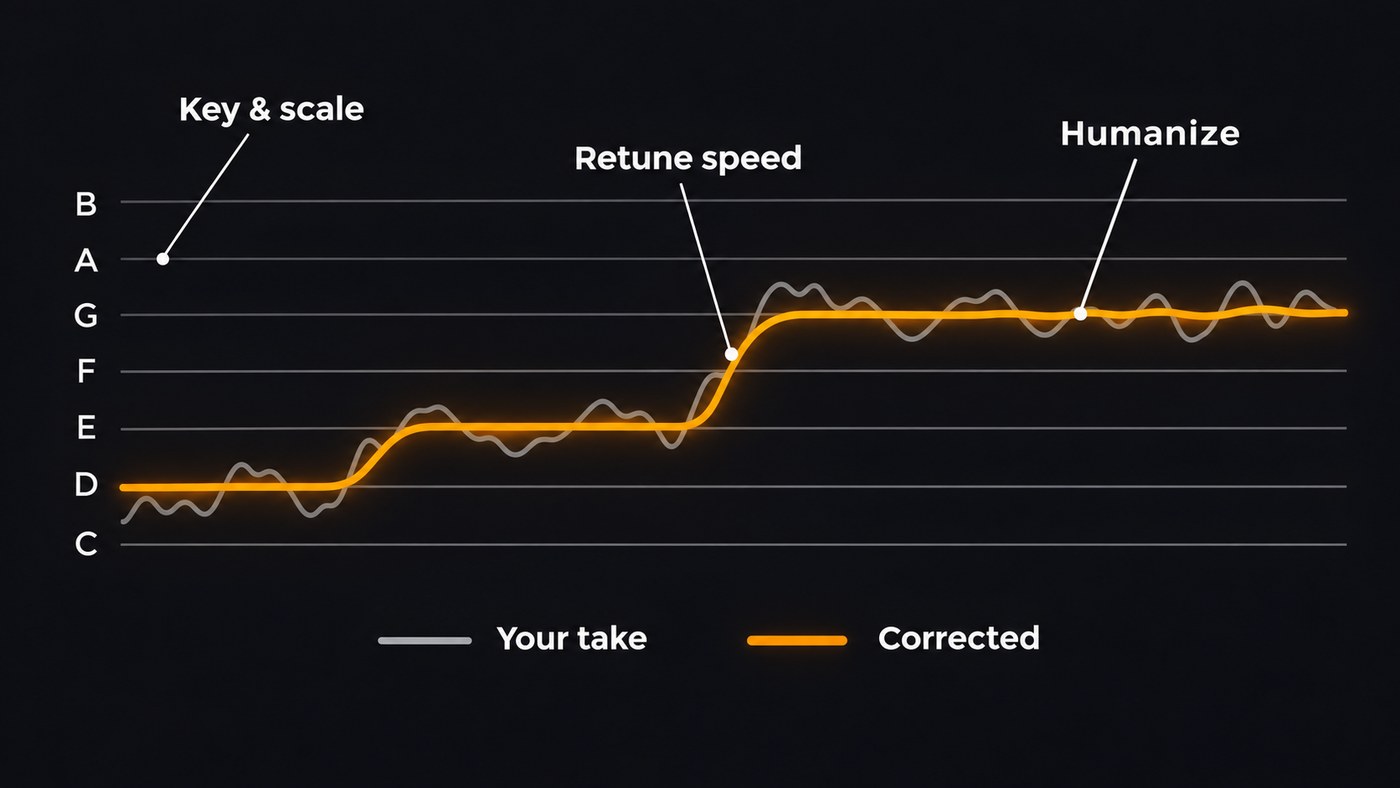
Almost every tuner below shares three controls under slightly different names: the key and scale, a retune speed (slow sounds natural, fast sounds robotic), and a humanize or amount control that leaves long notes and vibrato alone.
Free vocal pitch correction apps
GarageBand (Mac, free). GarageBand is free on the Mac App Store. Select the vocal track, make sure Track is selected in the Audio Editor inspector, and drag the Pitch Correction slider to the right for more correction. Tick Limit to Key to tune only to the notes of your project key; leave it off and notes go to the nearest of all 12. One slider covers the whole track, so this is for light touch-ups. Best for singer-songwriters on a Mac who want a fix in a minute.
BandLab AutoPitch (BandLab app, free with paid extras). BandLab's AutoPitch page lays out three steps: record your vocals in BandLab, apply an AutoPitch effect, then adjust key and intensity. Six effects are free, and a BandLab Membership adds 18 more. Best for singers who record on a phone and want the beat, the vocal and the tuning in one free app.
MAutoPitch (plugin, free). MeldaProduction's MAutoPitch is a free automatic tuner for vocals and other monophonic instruments, included in its MFreeFXBundle. It adds formant shift and stereo widening, which helps on backing vocals. Best for anyone already recording into a DAW.
Graillon 3 Free Edition (plugin, free). Auburn Sounds' Graillon 3 comes as VST, AAX, AU and LV2 for Windows, macOS and Linux. Its pitch correction does both natural and hard-tune sounds, alongside pitch and formant shifting. The Full Edition was $29 on 7 November 2026, marked down from $38.67, and adds pitch-tracking modulation, keyboard tuning and a vocal doubler. Best for Linux users, and for a free tuner with a convincing natural setting.
Voloco (iPhone and Android, free with premium packs). Voloco is a recording app that tunes as you sing. Its free Starter Pack has five effects, covering natural tuning and subtle correction, and more than 65 others come in premium packs. Its beat library detects the key for you. Best for rappers and singers who record over beats on a phone.
Cheap paid options worth the money
Melodyne 5 essential (US$99). Celemony's web shop listed essential at US$99 on 7 November 2026, the cheapest of its four editions. You see every sung note as a shape you can drag to pitch, or run the pitch macro over the whole take and then fix the few notes that landed in the wrong place. Celemony's edition comparison shows essential includes the pitch, timing and leveling macros and works inside your DAW through ARA, but leaves out the polyphonic DNA mode and the detailed pitch drift and modulation tools of the larger editions. There's a free 30-day trial, and an upgrade later costs only the difference in list price. Best for a natural result when you don't mind ten minutes of clicking.
Waves Tune Real-Time ($34.99 on sale). Waves listed it at $34.99 on 7 November 2026, against a list price of $199, and it's also included in the Waves Essential subscription at $14.99 a month. It tunes with very low latency, so you hear the corrected voice in your headphones while you record. Waves puts it plainly: "With Waves Tune Real-Time, what you hear is what you track." Best for singers who perform better when they hear themselves in tune.
Antares AutoTune (one-time or subscription). On Antares' site, AutoTune is the streamlined edition, with fewer controls than AutoTune Pro 11. You can buy it once and keep it (that comes with a free month of AutoTune Unlimited), or get it inside the AutoTune Unlimited subscription, billed monthly or yearly. There's a free trial, and a Black Friday sale was running on 7 November 2026. Best for rap and pop vocals where that classic sound is the point.
How to tune a vocal quickly
- Find the key. Check the chords, ask whoever made the beat, or run the instrumental through a key finder such as Soundverse's Tempo & Key Detector, which reports the key as a note and a scale, such as A minor.
- Start from a dry, solo vocal track. Put the tuner first in the chain, before compression and reverb.
- Set the key and scale. If the tool asks for a vocal range, set that too.
- Start gentle. Use a slow retune speed or a low amount and raise it until the sour notes settle.
- Listen to long notes and slides. If a deliberate slide turns into steps, slow the speed down or bypass the tuner for that phrase.
- Judge it in the mix. Small drift that sounds wrong solo often disappears once the band is playing.
- Bounce the tuned vocal to a new file. Keep the raw take, then fix any leftover wrong notes by hand or record that line again.
The Tempo & Key Detector part of this Analyze walkthrough starts at 0:11 and runs from input to result.
Next comes the mix: our guide to mixing vocals like a pro picks up from here. If hiss or room echo is the problem rather than pitch, start with our roundup of software for cleaning up vocal recordings.
Which vocal pitch correction app should you pick?
- You only record on your phone: BandLab or Voloco.
- You're on a Mac: GarageBand first, then Melodyne 5 essential when one slider isn't enough.
- You use a DAW on Windows or Linux: MAutoPitch or Graillon 3 Free Edition.
- You want to hear tuning while you track: Waves Tune Real-Time or AutoTune.
- A great take has three bad notes: Melodyne 5 essential, because automatic tuning will pull those notes the wrong way.
Where Soundverse fits
Soundverse is an AI music platform that takes you from idea to audience, built for independent artists who release music. It isn't a pitch correction app, and it's worth being clear about the one tuner it has. AI Studio includes VocalTune One, which corrects pitch while you listen, but its exports are dry, so the tuned sound doesn't end up in your file. Use it to preview, and do the final correction in one of the tools above.
Where Soundverse helps is around the tuning. Tempo & Key Detector gives you the key to set in your tuner. Stem Separator pulls the vocal away from the backing with its 2-stem split when your only file is a bounced demo. Once your tuned vocal is printed, AI Studio's EQ One, De-Esser One and Mix One run in your browser on every plan with no tokens. AI Studio doesn't load third-party plugins, so tune first, then import the vocal.
Licensing is set by plan: the Free plan is for personal use, and the Creator plan comes with a royalty-free license.
FAQ
Is there a free app that corrects vocal pitch? Yes. GarageBand on a Mac, BandLab's AutoPitch (six free effects), Voloco's free Starter Pack on iPhone and Android, and the free MAutoPitch and Graillon 3 plugins all tune vocals automatically. They handle small drift well and wrong notes badly.
Can pitch correction make a bad singer sound good? It tidies notes that are close to the target. It can't supply timing, tone or a note you never reached, and notes that are far off get pulled to the wrong pitch. If most of a take is off, practise the part and record it again.
What's the difference between AutoTune-style and Melodyne-style correction? Automatic tuners such as AutoTune, Waves Tune Real-Time, MAutoPitch and GarageBand correct the audio as it plays, using your key and speed settings. Melodyne shows each note so you can move it yourself. It's slower, but it fixes wrong notes.
Can I pitch-correct the vocal in a finished song? Not reliably while the vocal is mixed with instruments, because tuners need single-note audio. Split the vocal out first, tune the vocal stem, then mix it back in. Our guide to free tools for isolating vocals compares the options.
Sign up for Soundverse free and find the key of your next song before you tune it. More vocal and production guides on the Soundverse blog.
