Intuitive Audio Editors That Include Royalty-Free Sound Libraries
Audio editor with royalty-free sound built in: BandLab, GarageBand, FL Studio, Soundtrap, Audition and more, with each sound licence quoted and dated.
The easiest audio editor with royalty-free sound built in is GarageBand on Apple devices, or BandLab on your phone or desktop. If you want an intuitive audio editor that includes royalty-free sound libraries with more depth, try FL Studio with FL Cloud or Soundtrap. Each lets you use the sounds in your own work, not resell them.
Below is each editor's ease of use, platforms, library and licence terms, quoted from the company's own pages and checked on 21 November 2026.
What "royalty-free" means inside an audio editor
Royalty-free means you don't pay per use, per view or per stream for a sound. It doesn't mean the sound is yours, or that it's out of copyright. Our guide to copyright-free vs royalty-free music explains the difference.
Almost every library licence below shares the same core rules:
- Use the sounds inside your own song, podcast, video or game.
- Publish and monetise that finished work.
- Never redistribute the raw sounds as samples, loops or sound effects.
- Increasingly, don't use them to train AI.
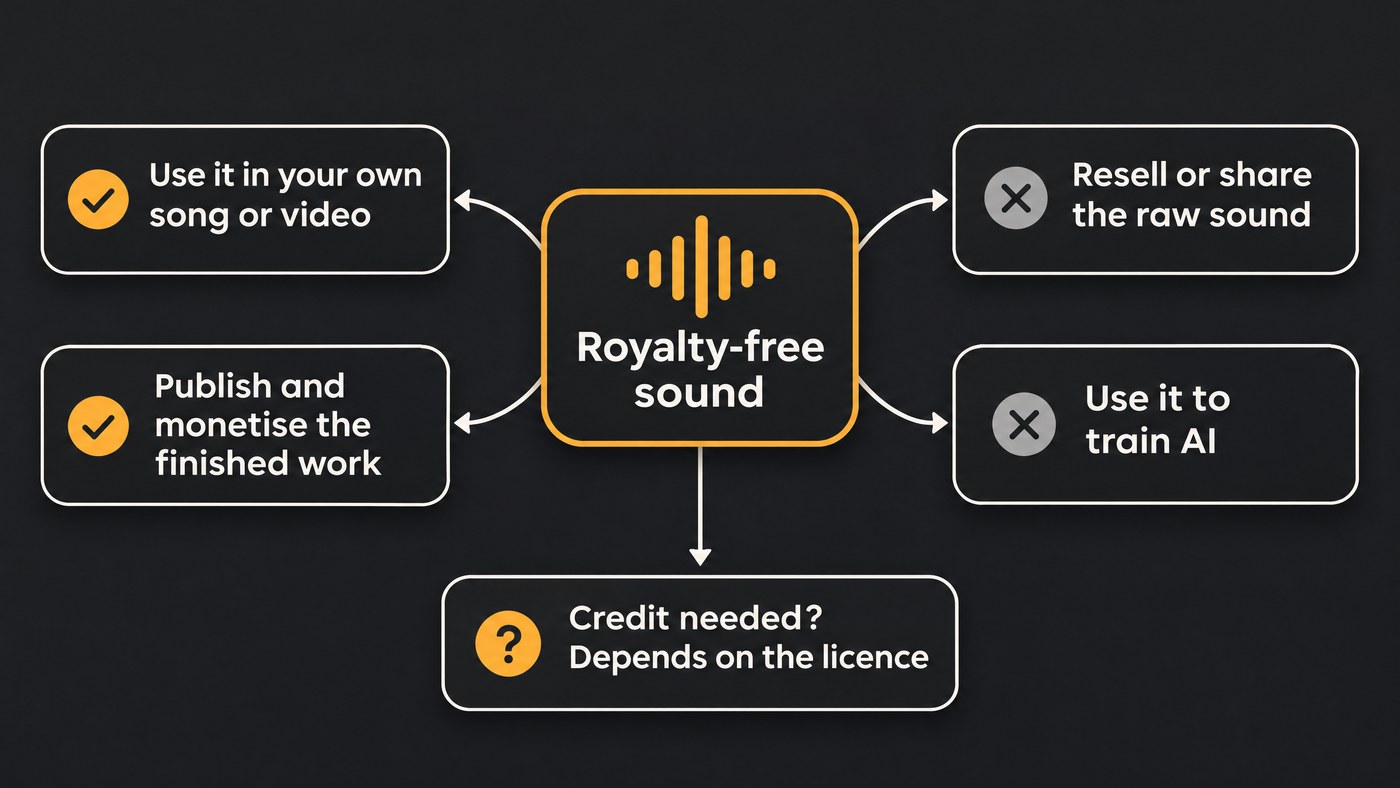
Where they differ is the small print: how much you must change a sound, whether you credit anyone, and where commercial use is allowed.
Audio editors with royalty-free sound libraries
BandLab
- Ease and platform: the gentlest start. BandLab's app installs free on iOS and Android, and you can also browse sounds on your desktop and drag them into Studio.
- Library: BandLab's Sounds page advertises "160,000+ royalty–free loops and one–shots" that you drag into Studio, with full packs to download on Membership.
- Licence: the BandLab Terms of Use, current as of 9 September 2026, grant a worldwide, non-exclusive, royalty-free licence for personal or commercial purposes, "provided that Sounds form part of Users Content as a larger composition as a whole." You can't use, redistribute or resell Sounds as standalone samples, put them in sample packs, or use them to train AI. You also can't credit the artist behind a Sound without their written permission.
GarageBand
- Ease and platform: free on the Mac App Store, and also on iPhone and iPad. Apple's GarageBand page describes "thousands of loops" plus Drummer, with 28 drummers and three percussionists who play along with your song.
- Licence: Apple's support article on GarageBand loops, published 21 August 2023, quotes the licence: you may use the loops "on a royalty-free basis, to create your own original music compositions or audio projects", but individual loops may not be distributed on their own or repackaged as samples, sound effects or music beds. Apple sums it up: "So don't worry, you can make commercial music with GarageBand, you just can't distribute the loops as loops."
Logic Pro
- Ease and platform: a step up from GarageBand in depth and learning curve. Apple lists it at $199.99 as a one-time Mac purchase, or with Apple Creator Studio at $12.99 a month, on Apple silicon Macs with macOS 15.6 or later, and on iPad.
- Library: royalty-free Sound Packs and Producer Packs, with natural-language search across the Sound Library.
- Licence: Apple's Logic Pro support article, published 3 March 2025, quotes the same model as GarageBand: Sample Content is royalty-free for your own soundtracks for film, video and audio projects, and can't be redistributed on a standalone basis or repackaged as samples, music beds, sound effects or sound libraries.
FL Studio with FL Cloud
- Ease and platform: FL Studio runs on Windows and Mac, and its free trial has no time limit, though Image-Line's terms limit trial use to personal projects.
- Library: Image-Line's FL Cloud page lists over two million royalty-free sounds you can audition in your track's tempo and key inside FL Studio, and says: "Every sound you download stays in your library, even if you cancel."
- Licence: the Image-Line terms say you may use the Digital Content "to create your own original musical compositions, provided that additional content is added, and the Digital Content will be significantly transformed." Using unmodified content in isolation needs a separate licence, and a third-party provider's own terms take priority where they apply. This is one of the stricter "change it" rules on this list.
Soundtrap
- Ease and platform: a browser studio that suits beginners and classrooms. You can change a loop's speed, pitch, key and scale on the timeline.
- Library: Soundtrap's loops page lists over 23,000 royalty-free loops, instruments, sound effects and samples, with new Originals packs every two weeks. Full access needs a paid plan.
- Licence: the page says Originals are "100% royalty-free", so you can release songs built with them. Soundtrap's terms (effective 1 July 2023) add that the bundled Demo Projects are for inspiration and education only, and that neither sounds nor demos may be distributed outside Soundtrap on a standalone basis.
Audacity with Freesound
- Ease and platform: free and open source on Windows, macOS and Linux, and simple for cutting, fading and cleaning audio.
- Library: Audacity has no sound library inside the editor. Its site says downloading through MuseHub adds free extras, including "Elements looping sound clips", so check their terms in MuseHub.
- Pairing: Freesound gives each sound one of three Creative Commons licences: CC0, attribution (CC BY) or attribution non-commercial (CC BY-NC). Its FAQ is plain about the middle one: “For "attribution" you should always mention the original creators of the sounds when you use them.” Non-commercial sounds are out for anything you earn from.
Adobe Audition with Adobe's sound effects
- Ease and platform: a professional editor with a steeper curve, listed at US$22.99 a month on the annual plan, billed monthly.
- Library: Adobe's Audition sound effects page offers thousands of royalty-free, uncompressed effects in categories such as Ambience, Animals, Foley, Weather and Transportation.
- Licence: under the Adobe EULA you may use, modify, reproduce and distribute the associated content file, but "you may not distribute the Content File on a standalone basis".
Splice with the DAW you already use
- Ease and platform: as easy as your DAW. Splice's help centre covers a Splice Sounds plugin and its integration with Ableton Live 12.3 and later.
- Licence: the Splice Sounds licensing FAQ, dated 6 September 2024, gives a royalty-free licence for commercial and non-commercial use, needs no credit, and stays valid if you cancel. It also lets you use sounds on their own as effects inside videos, films and games. You can't sublicense them in isolation, put them in sample packs, use the creator's name or likeness, or train AI on them. Splice can generate a certified licence PDF for your distributor.
CapCut and Canva for video-first editing
- CapCut: its Materials License Agreement, last updated 22 January 2026 (US users have a separate US version), lets you use only materials marked "commercial" for limited commercial purposes, such as promotional and advertising materials, and its music library has separate rules. Mix a marked item with an unmarked one and the whole video becomes personal use only.
- Canva: its licence pages returned access errors when we checked on 21 November 2026, so read Canva's Content License Agreement yourself before you use its audio in paid work.
Soundverse AI Studio
- Ease and platform: a browser studio with eight built-in instruments, including Drum Kit One's synthesized drum kits and Sampler One for audio you bring.
- Library: generated sounds instead of a stock library. AI Sound Effects Generator turns a description into a clip from 0.5 to 30 seconds, in chat or straight onto the timeline.
- Licence: Licensing is set by plan: the Free plan is for personal use, and the Creator plan comes with a royalty-free license.
If AI cleanup and separation matter as much as the library, our comparison of free vs paid AI audio editing software covers that side.
How to check a sound licence before you publish
- Read the licence, not the banner. "Royalty-free" on a product page is a summary. The rules live in the terms, EULA or licensing FAQ.
- Check how much you must change it. BandLab wants Sounds inside a larger composition, Image-Line wants significant transformation, and Splice allows isolated effects inside a video or game.
- Check where commercial use applies. CapCut limits it to marked sounds and listed uses.
- Check credit rules both ways. Freesound's CC BY sounds need attribution, while BandLab and Splice forbid naming a sound's creator without permission.
- Keep proof. Save dated copies of licence pages, and Splice's certified licence, in case a release is flagged.
- Mind AI training bans. BandLab and Splice both forbid training AI on their sounds.
For background music rather than single sounds, see our guide to platforms for royalty-free background tracks.
Where Soundverse fits
Soundverse is an AI music platform that takes you from idea to audience, built for artists and producers who release music; its studio also suits video editors and podcasters. In AI Studio you record, play the built-in instruments, generate music, vocals and sound effects onto the timeline, and score a video on its own lane. Instead of searching a stock folder, you describe the sound you need.
If you bring in loops from elsewhere, AI Studio's own FAQ is clear that you need the rights to anything you upload. Copyright Checker can fingerprint a loop or stem from an unknown source against released recordings first. It is a recognition check, not legal clearance.
This walkthrough of Soundverse's Create tools shows AI Sound Effects Generator from 0:50, turning a short description into a sound effect.
FAQ
Can I use GarageBand loops in a monetised YouTube video? Yes. Apple's licence lets you use the loops royalty-free in your own music and audio projects and distribute the result. What you can't do is share or sell the loops on their own.
Does Audacity come with free sound effects? No library ships inside the editor. Downloading Audacity through MuseHub adds free extras, including looping sound clips, under MuseHub's terms. Many editors pair Audacity with Freesound and check each sound's Creative Commons licence.
Do I need to credit royalty-free sounds? It depends on the licence. Freesound's attribution sounds need credit, Splice needs none, and BandLab and Splice forbid naming a sound's creator without permission.
Can I sell a beat made with library loops? Usually, as long as the loops sit inside your own composition. Image-Line also asks for significant transformation, and Splice notes that most distributors want you to disclose licensed third-party material, which its certified licence covers.
Sign up for Soundverse free and make the sound your edit is missing. More guides on the Soundverse blog.

