How to Write Effective Suno AI Prompts (2026 Guide for Creators)
Master Suno AI prompt writing in 2026 and create amazing songs effortlessly.
How to Write Effective Suno AI Prompts
Writing effective Suno AI prompts is both an art and a science — and as we enter 2026, mastering this skill has become essential for musicians, content creators, and AI enthusiasts seeking to create high-quality, emotionally resonant songs with artificial intelligence. With tools like Suno AI transforming how we produce music, prompt writing determines whether the results feel generic or deeply creative.
What is Suno AI Prompt Writing?
Suno AI prompt writing refers to the process of crafting effective input text for the Suno AI platform, which converts written descriptions or lyrics into full songs using AI-generated vocals, instruments, and arrangements. The right prompt guides the AI’s interpretation of tone, genre, emotion, and lyrical structure.

In 2026, prompt writing is no longer limited to vague text descriptions like “make an upbeat pop song.” Skilled creators now blend sensory, emotional, and stylistic cues that help AI systems create compositions closer to human expression.
Why Does Your Suno AI Prompt Matter?
Your prompt acts as the blueprint for the song. When you provide a rich, descriptive input, Suno AI understands not only the genre but also the emotional context. For instance, detailed prompts like “a soulful ballad about sunrise after heartbreak with acoustic guitar and warm female vocals” produce significantly more coherent results than short commands like “create a sad song.”
Detailed prompts influence:
- Genre Output: Whether you want Pop, Jazz, EDM, or Lo-Fi, your phrasing matters.
- Mood and Emotion: Words such as “melancholic,” “energetic,” or “dreamy” alter chord progressions and vocal timbre.
- Instrumentation: Adding cues like “soft piano,” “electric synth,” or “acoustic strumming” helps AI select the right elements.
- Structure: If your prompt mentions “verse and chorus contrast,” AI generators assemble the arrangement accordingly.
Understanding how to guide these elements is the foundation of mastering Suno AI prompt writing.
What Makes a Good Suno AI Prompt in 2026?
Since AI music tools have matured rapidly between 2024 and 2026, effective prompts now follow three essential principles:
- Clarity and Context: The AI thrives on structured input. A clear description like “create a romantic jazz duet” is far better than “romantic song.”
- Specificity: Mention genre, emotion, instruments, vocal style, and even tempo cues such as “slow rhythmic swing at 90 BPM.”
- Creative Emotion Mapping: Modern AI models interpret emotional tone. Describe feelings in relatable human terms, e.g., “nostalgic longing,” “hope after darkness,” or “unrestrained joy.”
You can explore more about modern AI music trends in 2026 by reading this in-depth report.
How to Write Effective Prompts for Suno AI Step-by-Step
Developing powerful Suno AI prompts can be divided into conceptual stages before you even click “Generate.” Each stage adds detail, emotion, and intention.
Step 1: Define the Purpose

Before writing, decide what you want the song for — social media background, YouTube intro, or a personal project. Purpose drives tone. For instance, upbeat prompts fit brand content, while introspective lyrics suit storytelling videos.
Step 2: Choose the Core Theme
Themes anchor emotion. Select one theme such as love, freedom, resilience, or adventure. Add imagery that connects emotionally, like “journey across oceans” if you want cinematic vibes.
Step 3: Add Genre and Instrumentation Details

Explicit genre cues (pop, rock, trap, lo-fi, or classical) shape rhythm and harmony. You can draw inspiration from guides such as How to Create EDM with Soundverse AI or Create Metal Music with AI to understand structural genre patterns.
Instrumentation details enhance realism — words like “soft synth layers” or “acoustic rhythm with hand percussion” give clear direction.
Step 4: Set Vocal Style and Emotion Dynamics

Prompts that include vocal emotion — “gentle female voice,” “raspy tone with emotional intensity” — help generate lifelike performances. Use adjectives that describe mood transitions, such as “starts calmly then builds into passionate melody.” For a tutorial overview of dynamic vocal blending, see Suno AI Music Generator Tutorial: How to use Suno in 2026.
Step 5: Include Structural Notes

If you write lyrics manually, mention structure hints: “intro—verse—chorus—bridge—outro” or “repeat chorus twice with harmonies.” For prompt-only input, brief structure phrases are enough for AI to arrange sections accordingly.
Step 6: Refine and Test Variations

Modern creators iterate prompts to evolve sound. Suno API processing may interpret subtleties differently, so create versions with small changes — swap adjectives, adjust tempo, or modify genre cues.
Common Mistakes in Suno AI Prompt Writing
Despite improvements in AI comprehension, some users still make errors that result in mismatched music. Watch out for:
- Vague Descriptions: “Cool song” or “romantic tune” lacks actionable context for AI.
- Overloaded Prompts: Using too many genres (“pop jazz rock hybrid”) may confuse interpretation.
- Contradictory Emotions: Mixing conflicting tones like “sad but euphoric” causes inconsistent melodies.
- Ignoring Tempo and Energy: Forgetting to include rhythm words like slow, upbeat, or rapid reduces control over pacing.
Avoiding these flaws makes your AI compositions more predictable and professional.
How to make Suno AI Prompt Results Sound More Human
To give music authenticity, blend real-world emotion with sonic detail:
- Use metaphorical phrasing (“echoes of midnight rain”) for lyrical depth.
- Include performance cues (“gentle live feel,” “slight guitar imperfections”) to instruct AI models toward natural sound.
- Reference emotional arcs in the prompt (“builds from loneliness to hope”).
Understanding narrative flow helps create continuity that feels handcrafted rather than algorithmic. Learn how AI fusion enhances creativity in this detailed guide. For practical audio testing illustrations, check our YouTube series: Soundverse Tutorial Series - 9. How to Make Music.
How to make Suno-style AI Music Instantly with Soundverse AI Song Generator

Now that you understand the essentials of Suno AI prompt writing, it’s time to apply those skills inside Soundverse, one of the most comprehensive AI music creation ecosystems available in 2026.
Soundverse AI Song Generator lets you turn lyrics or text descriptions into complete songs with AI-generated vocals and instrumental backing. The system operates through a multi-stage pipeline managing lyrics, melody, arrangement, and mixing — ensuring polished results.
Step 1: Feature Overview
Access the AI Song Generator from the main Soundverse menu. It’s designed for beginners and professionals looking to create full vocal tracks efficiently.
Step 2: Lyrics Input
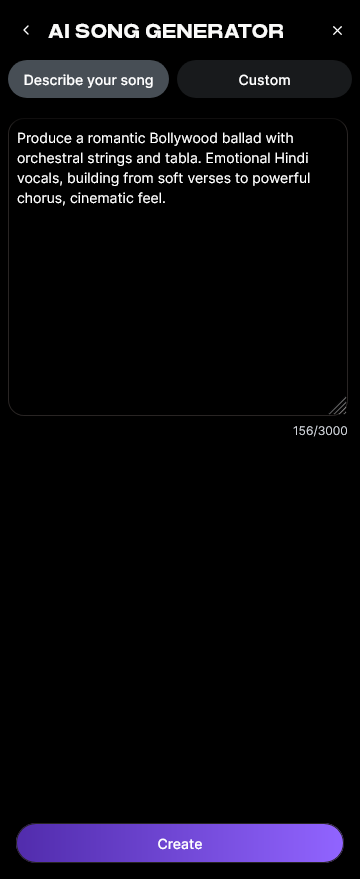
Enter or paste song lyrics directly if you have them. Alternatively, use the “Describe Your Song” mode by typing a detailed prompt similar to those crafted for Suno AI.
Step 3: Style Selection
Choose your preferred genre or vibe: Pop, Rock, EDM, Jazz, Classical, and more. This instantly sets tempo and arrangement style.
Step 4: Configuration
Adjust generation parameters — language (choose from 10+ multilingual options), instrument intensity, and vocal presence.
Step 5: Generation
Click “Generate.” The AI processes lyrics, melody, arrangement, and mixing asynchronously, meaning it creates and refines the track before returning a complete version. There is no real-time audio preview, maintaining professional-grade rendering fidelity.
Step 6: Generation Complete
Once done, your full AI song displays with playback options. Preview the result and decide if you’d like variations in style or vocal tone. For song-building inspiration, watch our Deep House music tutorial from the Soundverse series.
Step 7: Export Results

Download your finished track in multiple audio formats for YouTube, social media, or streaming platforms.
Soundverse also integrates related tools:
- AI Music Generator for instrumental backgrounds.
- AI Lyrics Writer for auto-generating lyrical drafts with defined tone and genre.
Creators leveraging these tools have built entire discographies, social campaigns, and personalized music gifts. For deeper learning, explore Soundverse AI Magic Tools or learn how AI-generated music shapes industry trends.
Start Creating Music Prompts That Inspire AI Magic
Unlock the full potential of your AI music ideas with Soundverse. Craft precision prompts, generate high-quality audio instantly, and elevate your content to professional-grade production.
- 100 Text-to-Music Prompts That Will Help You Create Viral Music: Discover how to use effective AI prompts to craft catchy, trending tracks that resonate with listeners.
- Generate AI Music with Soundverse Text-to-Music: Learn how Soundverse’s text-to-music feature transforms simple prompts into full-length songs automatically.
- Best Suno Alternative — Soundverse AI Free Sign-Up: See why Soundverse is the top alternative to Suno AI for generating professional-quality, custom music.
- Soundverse Assistant — Your AI Music Co-Producer: Meet Soundverse Assistant, the smarter way to co-create music, refine your sound, and expand your creative possibilities.
Here's how to make AI Music with Soundverse
Video Guide

Here’s another long walkthrough of how to use Soundverse AI.
Text Guide
- To know more about AI Magic Tools, check here.
- To know more about Soundverse Assistant, check here.
- To know more about Arrangement Studio, check here.
Soundverse is an AI Assistant that allows content creators and music makers to create original content in a flash using Generative AI. With the help of Soundverse Assistant and AI Magic Tools, our users get an unfair advantage over other creators to create audio and music content quickly, easily and cheaply. Soundverse Assistant is your ultimate music companion. You simply speak to the assistant to get your stuff done. The more you speak to it, the more it starts understanding you and your goals. AI Magic Tools help convert your creative dreams into tangible music and audio. Use AI Magic Tools such as text to music, stem separation, or lyrics generation to realise your content dreams faster. Soundverse is here to take music production to the next level. We're not just a digital audio workstation (DAW) competing with Ableton or Logic, we're building a completely new paradigm of easy and conversational content creation.
TikTok: https://www.tiktok.com/@soundverse.ai
Twitter: https://twitter.com/soundverse_ai
Instagram: https://www.instagram.com/soundverse.ai
LinkedIn: https://www.linkedin.com/company/soundverseai
Youtube: https://www.youtube.com/@SoundverseAI
Facebook: https://www.facebook.com/profile.php?id=100095674445607
Join Soundverse for Free and make Viral AI Music

We are constantly building more product experiences. Keep checking our Blog to stay updated about them!