How to Turn Words Into a Song: A Complete Guide for Songwriters in 2026
Learn how to turn words into a song with creative songwriting tips and AI tools.
How to Turn Words Into a Song
Turning words into a song is one of the most magical processes in music creation. In 2026, with AI-driven creativity and accessible production tools, artists and writers can transform simple text into full musical pieces faster than ever before. Whether you're an aspiring songwriter, a producer looking to create demos, or a poet hoping to turn your verses into melodies, understanding how to turn words into a song is your key to modern music expression.
Why do words matter in songwriting?
Songs begin with words because they convey emotion, storytelling, and connection. Lyrics are the bridge between the listener and the artist's inner world. The challenge lies in transforming written lines or poetry into rhythm and melody—an art that involves both technical skill and creative instinct.

In 2026, songwriting has evolved beyond notebooks and acoustic guitars. Artists blend traditional creation with digital innovation, using tools like AI lyric generators and music composition software to refine and complete their musical ideas. This hybrid approach helps creators focus on storytelling while technology handles arrangement, mixing, and production.
What is the creative songwriting process?
The creative songwriting process usually begins with inspiration. You might start from a phrase, a personal experience, or even a poetic fragment. Here’s how professionals and hobbyists approach songwriting:
- Idea Generation: Capture thoughts, feelings, or imagery that resonate with you. These become the seed of your song.
- Lyric Structuring: Organize your words into verses, a chorus, and a bridge. Tools like the AI Lyrics Writer from Soundverse can help generate well-structured lyrics that match tone and genre.
- Melody Creation: Craft a melody that fits your words, typically using instruments or vocal improvisation. Many creators record humming or piano chords to sketch out ideas.
- Chord Progression: Decide on chords that complement the melody. Common progressions (like I-IV-V) support pop, rock, or R&B songwriting styles.
- Arrangement: Add rhythm and instrument layers to enhance emotion and flow.
- Production: Fine-tune transitions, balance vocals, and add effects to give your song its final sound.

How do you write lyrics effectively?
Writing great lyrics involves honesty, rhythm, and tone. Focus on emotional authenticity and strong imagery rather than complex language. Here are some quick songwriting tips for crafting powerful lyrics:
- Start with a hook: A memorable phrase can become the cornerstone of your song.
- Use sensory language: Describe what you see, feel, and hear to evoke emotion.
- Match syllables to rhythm: Ensure your lines fit smoothly into melody patterns.
- Write conversationally: Listeners prefer lyrics that sound like real speech rather than poetry recitals.
- Experiment with repetition: Repeating a line or phrase strengthens emotional impact.
If you’re turning poetry into music, simplify your text to fit common song structures and ensure rhythmic flow. Poetic writing often needs adaptation to work musically since meter and rhyme must guide the melodic contour.
For deeper insights into genre-specific writing, check out Soundverse’s articles on How to Create Country Music with Soundverse AI and How to Create Rap Music with AI.
You can also watch How to turn Prose into Song Lyrics in 5 Easy Steps! and Turn Lyrics Into Songs INSTANTLY (Watch Me Do It!) for practical demonstrations.
How do melody and words interact?
Melody and lyrics must complement each other. The tone of your music should match your words—sad lyrics demand minor keys, joyful lyrics thrive on major progressions. Rhythm plays an equal role; a melody’s tempo dictates how syllables fall and how emotion unfolds over time.
Modern songwriting often begins with melody-first or lyric-first approaches. In 2026, musicians can also use AI-assisted composition tools to align melody with text automatically. These systems analyze lyrical rhythm and emotional tone to propose suitable melodic patterns.
For a deeper dive, watch our guide on creating Deep House music and how to make music from ideas on the Soundverse YouTube channel.
How can technology help in songwriting?
Technology has revolutionized songwriting by providing digital workstations, AI assistants, and real-time mixing algorithms. Instead of spending hours arranging or recording demos, creators now use AI platforms that understand musical intent and turn plain text into a complete production.
Innovative solutions like Soundverse’s ecosystem of tools make songwriting accessible even to non-musicians. You can:
- Use AI Lyrics Writer to generate lyrics by theme or genre.
- Employ AI Singing Generator to transform your lyrics into professional vocal performances in different languages and styles.
- Try Melody to Song Generator if you have an original tune and need full instrumentation around it.
These AI tools provide fast experimentation without replacing human creativity. They empower artists to test ideas, refine structure, and share professional-quality songs effortlessly.
For comparisons with other music creation platforms, read Best AI Music Generator: Top Picks and Review or explore alternatives like Soundraw Alternative and Mubert Alternatives—Soundverse.
How to make a song from words: step-by-step guide
Ready to bring your words to life? Here’s a structured process to create a full song—from concept to export.
Step 1: Feature Overview

Access the AI Song Generator from the main Soundverse menu. This tool allows you to turn lyrics or text descriptions into complete songs with AI-generated vocals and instrumentals.
Step 2: Lyrics Input
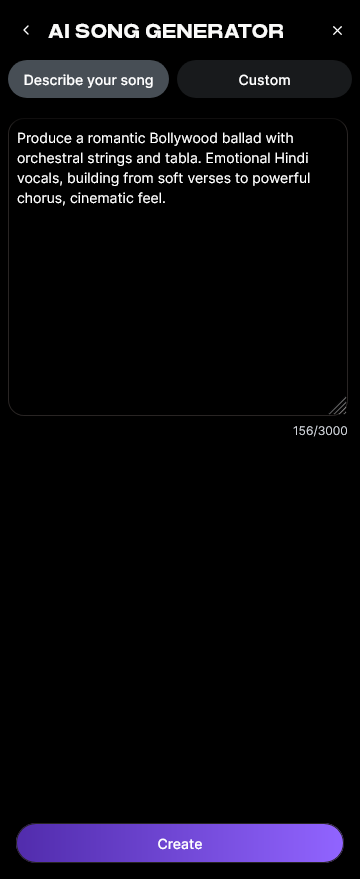
Paste or type your lyrics directly into the input field. You can use custom-written words or generate new ones using the integrated AI Lyrics Writer via the 'Help Me Write' button.
Step 3: Style Selection

Choose your music style—Pop, EDM, Rock, Classical, or others—from the Quick Style Selection menu. This determines the instrument arrangement and rhythm aesthetic for your final song.
Step 4: Configuration

Adjust generation parameters such as vocal tone, tempo, and mood. You can also upload reference audio for melody or singing guidance. The AI uses these references to align your words with a fitting melody and rhythm.
Step 5: Generation

Click “Generate.” The system processes your lyrics through its multi-stage pipeline—handling melody creation, arrangement, and instrumental layering. Within moments, your text becomes a full musical composition.
Step 6: Generation Complete

After processing, the AI displays your finished song. You can preview the structure, listen to vocals, and check balance across sections.
Step 7: Export Results

Download the completed track in multiple formats, ready for sharing on YouTube, Spotify, or social media platforms. It’s ideal for demos, songwriting drafts, or personalized greetings.
You can also learn visually through our Explore tab tutorial on the Soundverse channel.
How to make how to turn words into a song with Soundverse AI Song Generator

Now that you understand how to turn words into a song manually, here’s how Soundverse automates this process with precision and creativity.
The Soundverse AI Song Generator automatically transforms lyrics or textual descriptions into full songs with AI-generated vocals and instrumental backing. Operating through a multi-stage pipeline, it manages lyrics interpretation, melody composition, arrangement, and mixing.
Its key modes include:
- Describe Your Song: Input a text prompt describing mood, genre, and emotion.
- Custom Mode: Paste specific lyrics and customize song settings.
- Reference Audio Support: Upload rough melody or vocal ideas to guide generation.
- Quick Style Selection: Instantly choose target genre (Pop, EDM, Rock, Lo-fi, etc.).
Use cases include songwriting demos, creative prototyping, content creation, and multilingual music production in over ten languages.
Want to explore more AI-powered creativity? You can also read about Soundverse Assistant: Your AI Music Co-Producer and Soundverse AI Magic Tools: Create Content Quickly with AI.
Transform Your Lyrics Into Music Instantly
Bring your written words to life with Soundverse’s AI-powered text-to-music engine. Generate melodies, harmonies, and rhythms that match your lyrical emotion and creative vision in seconds.
Related Articles
- Generate AI Music with Soundverse Text-to-Music: Discover how Soundverse can turn your text prompts into complete musical compositions effortlessly.
- 100 Text-to-Music Prompts That Will Help You Create Viral Music: Get inspired with 100 creative prompts to jumpstart your next AI-powered music project.
- What Are Song Stems and Why Do You Need Them: Learn how stems can help you mix and remix your songs like a pro using AI tools.
- How to Make Good Rap Lyrics: Understand the art of crafting powerful lyrics and transforming them into captivating rap songs.
Here's how to make AI Music with Soundverse
Video Guide

Here’s another long walkthrough of how to use Soundverse AI.
Text Guide
- To know more about AI Magic Tools, check here.
- To know more about Soundverse Assistant, check here.
- To know more about Arrangement Studio, check here.
Soundverse is an AI Assistant that allows content creators and music makers to create original content in a flash using Generative AI.
With the help of Soundverse Assistant and AI Magic Tools, our users get an unfair advantage over other creators to create audio and music content quickly, easily and cheaply.
Soundverse Assistant is your ultimate music companion. You simply speak to the assistant to get your stuff done. The more you speak to it, the more it starts understanding you and your goals.
AI Magic Tools help convert your creative dreams into tangible music and audio. Use AI Magic Tools such as text to music, stem separation, or lyrics generation to realise your content dreams faster.
Soundverse is here to take music production to the next level. We're not just a digital audio workstation (DAW) competing with Ableton or Logic, we're building a completely new paradigm of easy and conversational content creation.
TikTok: https://www.tiktok.com/@soundverse.ai
Twitter: https://twitter.com/soundverse_ai
Instagram: https://www.instagram.com/soundverse.ai
LinkedIn: https://www.linkedin.com/company/soundverseai
Youtube: https://www.youtube.com/@SoundverseAI
Facebook: https://www.facebook.com/profile.php?id=100095674445607
Join Soundverse for Free and make Viral AI Music

We are constantly building more product experiences. Keep checking our Blog to stay updated about them!