How to Turn an AI-Generated Song Into a Full Music Video in 2026
Learn step-by-step how to use AI music video creation tools to transform your AI-generated song into a full visual masterpiece.
How to Turn an AI-Generated Song Into a Full Music Video
Creating music videos has long been one of the most resource-intensive aspects of music production. But in 2026, the era of AI music video creation has arrived — musicians, content creators, and producers can now turn an AI-generated song into a full, visually engaging video using powerful artificial intelligence tools. Whether you’re crafting a new single or producing content for platforms like YouTube, this guide walks you through everything from generating your song to pairing it with stunning AI-generated visuals.
Why turn your AI-generated song into a full music video?
Music videos amplify storytelling. A song alone can evoke emotion, but combined with visuals, it connects with audiences on a deeper level. With the rise of ai music visuals and music video generation tools, creators can now produce cinematic-quality videos without professional film crews or large budgets.
In 2026, musicians use AI creativity tools not only to produce lyrics and melodies but also to generate album art, lyric videos, and animated performances. By combining your AI-generated song with generative video tools, you can create immersive experiences that attract more listeners and boost engagement.
How to make AI music videos with Soundverse AI Song Generator

Soundverse has become one of the leading hubs for artificial intelligence music production, providing end-to-end creation tools for both audio and video content. The AI Song Generator is your core starting point.
Soundverse AI Song Generator Overview
The Soundverse AI Song Generator turns text inputs, lyrics, or descriptions into fully produced songs — complete with AI-generated vocals, melody, arrangement, and instrumental backing. This multi-stage pipeline handles everything from crafting melodies to mixing tracks that are ready for content creation.
Core Capabilities:
- Describe Your Song mode: Enter a text prompt describing your song’s vibe or theme.
- Custom mode: Paste full lyrics and set preferences like vocal type and energy level.
- Reference Audio support: Upload reference songs, vocals, or instrumentals.
- Quick Style Selection: Choose genres such as Pop, EDM, Rock, Jazz, or Lo-Fi.
Primary Use Cases:
- Songwriting demos and vocal prototyping
- YouTube and social content creation
- Multilingual track generation (10+ languages)
- Custom greetings, performances, or gifts
The process is asynchronous — Soundverse processes your request and delivers a final song ready for download and creative use.
Step 1: Access AI Song Generator from the Main Menu

Log into your Soundverse account and locate the AI Song Generator in the main navigation panel. This is your entry point for building a full song using AI-powered composition and vocal synthesis.
Step 2: Enter or Paste Song Lyrics
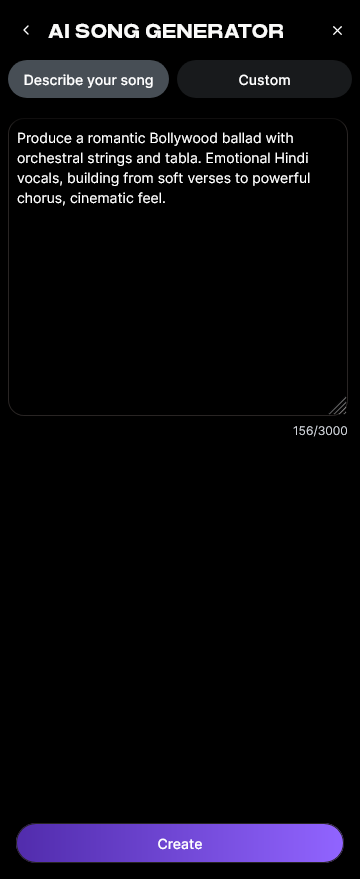
Input your lyrics directly into the interface. You can write original lyrics, adapt public domain texts, or craft story-driven songs. To speed up this step, consider checking out the 100 Text-to-Music Prompts That Will Help You Create Viral Music for inspiration.
Step 3: Choose Music Style and Genre

Pick a style that fits the emotion and rhythm of your video concept—use genres like Electronica, Indie Pop, or Cinematic Ambient to match different moods. Selecting the right tone is crucial because visuals will later follow your song’s tempo, mood, and structure.
Step 4: Set Generation Parameters

In this stage, define parameters such as tempo, instrumentation, and vocal preferences. You can integrate reference audio to fine-tune how you want your track to sound. Think of this as directing an invisible studio band.
Step 5: Generate Song with Vocals and Instruments

Click Generate and let Soundverse handle the heavy lifting. In this asynchronous step, the platform incorporates AI models specialized in melody creation and singing synthesis. You’ll receive a fully mixed file when generation is complete.
Step 6: Review Generation Results

Once the system processes your request, you can listen to your final track. Soundverse offers track section breakdowns such as intro, verse, and chorus through its Section Analysis tool, which is helpful for editing and syncing later visuals. For a deeper dive, watch our Soundverse Tutorial Series - 9. How to Make Music.
Step 7: Export Results

Finally, export your complete audio in your preferred format (e.g., WAV, MP3). The file is now ready to be used as the foundation for your AI-generated music video.
How to pair AI-generated songs with AI music visuals
Once you have your finished song, the next step is creating the visuals. AI music video creation combines sound-driven analysis with generative video tools.
Here’s how to structure the process:
- Select a Video Generator: Tools like Kaiber or Runway let you upload music and choose visual styles that move in sync with your audio.
- Use Motion Syncing: Align beats and lyrical moments with scene changes. Many visual generators automatically detect rhythm and adapt animations to your track’s tempo.
- Generate Visual Frames: Decide on cinematic, animated, or abstract interpretations. For instance, synthwave tracks often work well with neon visuals and fast transitions.
- Edit and Enhance in Post: Import both song and generated footage into a video editor for minor corrections, cuts, and overlays. Add transitions, text lyrics, or your logo.
- Combine with Other Soundverse Tools: Use Extend Music if you need a longer version of your track, or use Section Analysis to match perfect visual transitions.
Pro Tips for AI Music Video Creation in 2026
1. Focus on storytelling
AI music videos are most engaging when visuals follow an emotional arc that complements your lyrics. Think in terms of narrative beats — verse sections might use calmer imagery, while the chorus bursts into color or motion.
2. Match genre to aesthetic
A rock song might require fast-paced edits, whereas ambient tracks may shine with minimal gradients or slow pans. Review visual style trends in 2026 from resources like Music Industry Trends to keep your visuals contemporary.
3. Experiment with multi-tool workflows
Some creators produce songs with Soundverse’s AI Music Generator before layering vocals using the AI Song Generator. For others, mastering tools like those discussed in Soundverse AI Magic Tools: Create Content Quickly with AI can accelerate production speed.
4. Use sound structure analysis
Leverage Section Analysis to label verses and choruses, then merge visual clips to align precisely with each identified section. Learn more through the Soundverse Tutorial Series - 10. Make Deep House Music.
5. Optimize for social media
In 2026, vertical short-form videos dominate platforms like Instagram Reels and TikTok. Generate multiple versions of your video for various dimensions to maximize visibility.
Why AI Music Video Creation Is Changing the Game in 2026
The transformation of ai song to video workflows reflects a broader cultural shift: creativity is no longer bound by expensive recording gear or large teams. Artists can compose, arrange, and visualize their ideas all within AI-assisted environments.
AI-driven visual storytelling also enables accessibility for emerging musicians around the world, giving them professional-level output at a fraction of traditional production costs. This democratization of art echoes the movement explored in How AI-Generated Music Is Transforming the Music Industry.
Turn Your AI Songs Into Stunning Music Videos Today
Transform every AI-generated track into a dynamic visual story with Soundverse’s all-in-one music creation tools. Enhance your creative process and publish compelling videos that captivate your audience.
Start Creating Now
Related Articles:
- How an AI Music Generator Inspires Creative Fusion — Explore how AI tools spark new levels of creativity and blend genres to produce unique soundscapes.
- The Role of AI Music in Film and Television — Discover how AI-generated music is transforming visual media production with budget-friendly, cinematic soundtracks.
- Enhancing YouTube Content with Royalty-Free and Copyright-Free Music Using Soundverse AI — Learn how creators can legally enhance their videos with exclusive AI-generated music that avoids copyright issues.
- Creating a Faceless Valentine’s Day Video Message with Free AI Tools — See how AI tools can easily bring your message to life with visuals and music—no camera needed.
Here's how to make AI Music with Soundverse
Video Guide

Here’s another long walkthrough of how to use Soundverse AI.
Text Guide
- To know more about AI Magic Tools, check here.
- To know more about Soundverse Assistant, check here.
- To know more about Arrangement Studio, check here.
Soundverse is an AI Assistant that allows content creators and music makers to create original content in a flash using Generative AI.
With the help of Soundverse Assistant and AI Magic Tools, our users get an unfair advantage over other creators to create audio and music content quickly, easily and cheaply.
Soundverse Assistant is your ultimate music companion. You simply speak to the assistant to get your stuff done. The more you speak to it, the more it starts understanding you and your goals.
AI Magic Tools help convert your creative dreams into tangible music and audio. Use AI Magic Tools such as text to music, stem separation, or lyrics generation to realise your content dreams faster.
Soundverse is here to take music production to the next level. We're not just a digital audio workstation (DAW) competing with Ableton or Logic, we're building a completely new paradigm of easy and conversational content creation.
TikTok: https://www.tiktok.com/@soundverse.ai
Twitter: https://twitter.com/soundverse_ai
Instagram: https://www.instagram.com/soundverse.ai
LinkedIn: https://www.linkedin.com/company/soundverseai
Youtube: https://www.youtube.com/@SoundverseAI
Facebook: https://www.facebook.com/profile.php?id=100095674445607
Join Soundverse for Free and make Viral AI Music

We are constantly building more product experiences. Keep checking our Blog to stay updated about them!